Which is Better for AI Development: Apple M1 Pro 200gb 14cores or Apple M3 100gb 10cores? Local LLM Token Speed Generation Benchmark

Introduction
Building and running Large Language Models (LLMs) locally on your own device can be a thrilling and empowering experience. Imagine having the power of a cutting-edge AI directly at your fingertips, without the need for cloud services or complicated setups. But which device is best suited for this task? In this comprehensive comparison, we'll dive deep into the performance of two popular Apple chips – the M1 Pro 200gb 14cores and the M3 100gb 10cores – when it comes to running LLMs locally, specifically focusing on Llama 2 7B token speed generation. Buckle up, fellow AI enthusiasts, and get ready for some juicy benchmarks!
Why Local LLM Development Matters
Before we jump into the numbers, let's take a moment to understand why local LLM development is such a hot topic. Traditionally, running LLMs required powerful cloud infrastructure, which wasn't always accessible or affordable for everyone. However, recent advancements in hardware, like the revolutionary Apple M-series chips, have brought the power of LLMs closer to the individual developer. This opens up a world of possibilities, allowing users to:
- Experiment faster: No more waiting for cloud responses! Develop and iterate on your LLM projects with blazing-fast local processing speeds.
- Improve privacy and security: Your data stays on your device, eliminating potential concerns about data privacy and security breaches.
- Unlock offline capabilities: Imagine creating interactive AI experiences that work even without an internet connection – truly exciting possibilities for mobile applications and embedded systems.
Comparison of Apple M1 Pro 200gb 14cores and Apple M3 100gb 10cores
Now, let's get down to brass tacks. We'll compare the performance of the Apple M1 Pro 200gb 14cores and the Apple M3 100gb 10cores based on their token speed generation for Llama 2 7B models, using different quantization levels (F16, Q80, and Q40).
Key Differences
Before we jump into the benchmarks, let's quickly recap the key differences between these two Apple chips:
M1 Pro 200gb 14cores:
- This chip boasts a larger memory bandwidth of 200 GB/s.
- It features 14 cores, offering potentially higher processing power.
M3 100gb 10cores:
- The M3 sacrifices some memory bandwidth with a 100 GB/s rate.
- It has 10 cores compared to the M1 Pro's 14, indicating a lower potential for raw processing power.
Apple M1 Pro Token Speed Generation
Let's start by examining the performance of the Apple M1 Pro 200gb 14cores. We'll showcase token speed generation for Llama 2 7B models, measured in tokens per second (tokens/s), using different quantization levels:
| Model | Processing (tokens/s) | Generation (tokens/s) |
|---|---|---|
| Llama 2 7B Q8_0 | 235.16 | 21.95 |
| Llama 2 7B Q4_0 | 232.55 | 35.52 |
| Llama 2 7B F16 (16 cores) | 302.14 | 12.75 |
Observations:
- Quantization: The results show a clear trade-off between accuracy and speed. Quantization levels like Q40 and Q80 sacrifice some accuracy but significantly boost token speed generation. Interestingly, the M1 Pro demonstrates impressive generation speeds with Q40 (35.52 tokens/s) compared to Q80 (21.95 tokens/s).
- F16 Performance: The M1 Pro with 16 cores achieves a remarkable 302.14 tokens/s for processing, showcasing its strength when handling F16 models. However, the generation speed is still decent, even with the larger memory footprint of F16.
- Impact of Processing: The processing speed on the M1 Pro is noticeably faster compared to the generation speed for all quantization levels.
- No F16 data for 14 cores: Unfortunately, we don't have benchmark numbers for the M1 Pro with 14 cores and the F16 quantization level for Llama 2 7B. This means we can't directly compare the 14-core performance for all quantization levels.
Apple M3 Token Speed Generation
Now, let's turn our attention to the Apple M3 100gb 10cores. We'll be comparing the token speed generation for Llama 2 7B models with different quantization levels:
| Model | Processing (tokens/s) | Generation (tokens/s) |
|---|---|---|
| Llama 2 7B Q8_0 | 187.52 | 12.27 |
| Llama 2 7B Q4_0 | 186.75 | 21.34 |
Observations:
- M3 Performance: The M3 displays consistent performance across different quantization levels, demonstrating a good balance between speed and accuracy.
- Slower Processing: The M3 exhibits slower processing speeds compared to the M1 Pro (particularly for Q80 and Q40), likely due to the lower number of cores and reduced memory bandwidth.
- Generation Performance: Interestingly, the M3 demonstrates slightly faster token generation speeds for Q80 and Q40 compared to the M1 Pro with 14 cores.
Performance Analysis: Apple M1 Pro vs. M3
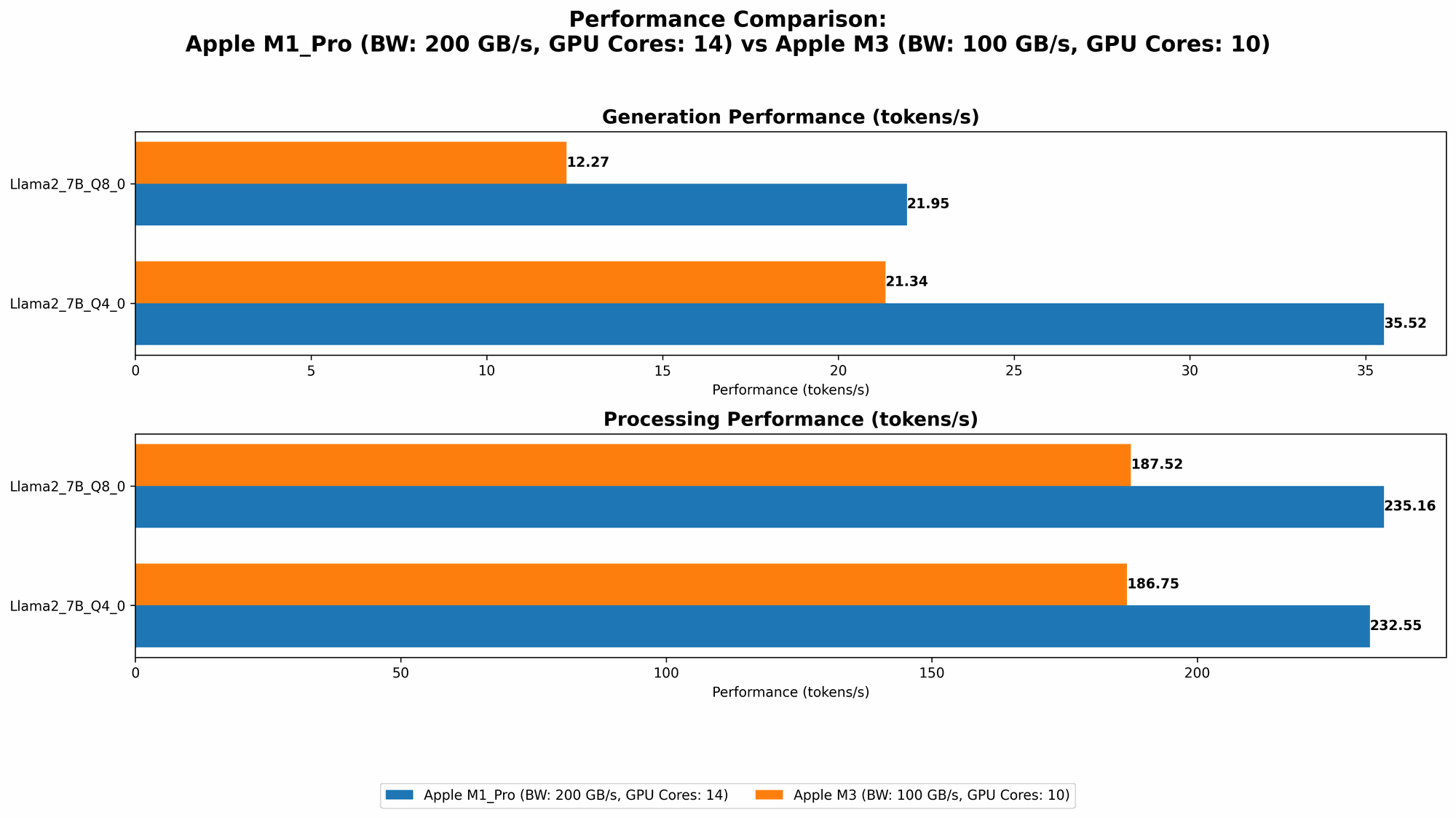
Now that we've reviewed the individual benchmarks, let's dive into a head-to-head comparison between the Apple M1 Pro 200gb 14cores and the Apple M3 100gb 10cores.
Strengths and Weaknesses
Apple M1 Pro 200gb 14cores:
Strengths:
- High processing speed: The M1 Pro excels at processing, particularly with F16 models, due to its larger memory bandwidth and greater number of cores.
- Flexibility: The M1 Pro offers a wider range of quantization options (F16, Q80, and Q40), providing more flexibility for different use cases.
- Power: The M1 Pro can handle more demanding tasks like training LLMs, though not as efficiently as GPUs.
Weaknesses:
- Token generation speed: While the M1 Pro's generation speed is decent, it lags behind the M3 for some quantization levels, especially Q8_0.
- Cost: M1 Pro-equipped machines tend to be more expensive than those with M3 chips.
Apple M3 100gb 10cores:
Strengths:
- Token generation speed: The M3 shines in token generation speed, especially with Q80 and Q40, outperforming the M1 Pro with 14 cores.
- Efficiency: This chip effectively balances performance and power consumption, making it suitable for applications where battery life is a concern.
- Affordability: M3-powered devices generally offer more value for the price compared to M1 Pro machines.
Weaknesses:
- Limited processing power: The M3's performance is noticeably lower than the M1 Pro when it comes to processing, particularly with F16 models.
- Fewer quantization options: Currently, less data is available for the M3, limiting our ability to compare its performance with various quantization levels.
Practical Recommendations
Choosing between the Apple M1 Pro and the Apple M3 largely depends on your specific needs and use cases. Here's a breakdown to help you make the right decision:
- Token generation is king: If you're primarily focused on generating text from an LLM, especially using Q80 or Q40, the M3 100gb 10cores might be the perfect choice. It delivers impressive speeds at a more affordable price point.
- Processing power is paramount: For tasks that involve a significant amount of processing, such as training LLMs or working with F16 models, the M1 Pro 200gb 14cores is the better option. Though it's more expensive, its processing power shines in these scenarios.
- Budget matters: If price is a concern, the M3 offers exceptional value for money, delivering competitive performance without breaking the bank.
Analogy: Imagine you're building a car. The M1 Pro is like a powerful V8 engine – it's great for high-speed racing and handling heavy loads, but it consumes more fuel. The M3 is like a turbocharged 4-cylinder engine – it's efficient, quick, and gets great gas mileage, but it lacks the raw power of the V8.
Implications for the Future of Local LLM Development
The impressive performance of both the M1 Pro and M3 chips highlights the exciting possibilities of local LLM development. As hardware continues to improve and become more accessible, we can expect even faster speeds, lower power consumption, and more flexibility in the future.
- Democratization of AI: Lower hardware costs can make AI development more attainable for individuals and smaller teams, fostering innovation and widespread adoption.
- Edge computing advancements: Local LLMs unlock exciting opportunities for edge computing, allowing for AI deployments in environments with limited connectivity or strict latency requirements.
- Mobile AI applications: The potential for powerful LLMs running smoothly on mobile devices opens up a world of new possibilities for user-friendly AI experiences, from personalized assistants to interactive games.
FAQ
Q: What is quantization?
A: Quantization is a technique used to reduce the size of LLM models by converting their weights (the numerical values that represent the model's knowledge) from 32-bit floating-point numbers to smaller, more compact representations like 8-bit or 4-bit integers. This significantly reduces the memory footprint of the model, allowing it to run on devices with limited RAM, like smartphones or smaller computers.
Q: Are there other devices capable of running LLMs locally?
*A: * Absolutely! While Apple M-series chips are making waves, other devices, including some laptops powered by AMD Ryzen processors and even specialized AI accelerators like Google's Tensor Processing Units (TPUs), can handle LLMs.
Q: What are the limitations of local LLM development?
A: While local LLM development is exciting, it comes with its limitations:
- Model size: Running larger LLMs (e.g., Llama 2 13B or GPT-3) may require high-end devices with substantial RAM and processing power.
- Training complexity: Training LLMs locally can be time-consuming and computationally intensive, often requiring specialized hardware like GPUs for optimal performance.
- Data availability: Local LLMs rely on having the model data readily available on the device, which might be a challenge in some scenarios.
Q: What are the future trends in local LLM development?
A: We're likely to see significant advancements in:
- Hardware optimization: Devices specifically designed for running LLMs will emerge, leading to even faster speeds and increased energy efficiency.
- Software advancements: Optimized software libraries and frameworks will make it easier to run and deploy LLMs on local devices.
- Model compression techniques: Further innovations in quantization and other model compression techniques will allow for running larger LLMs on smaller, more affordable devices.
Keywords
Apple M1 Pro, Apple M3, LLM, local LLM, token speed, Llama 2 7B, quantization, F16, Q80, Q40, AI development, performance comparison, hardware benchmarks, edge computing, mobile AI, AI acceleration