Which is Better for AI Development: Apple M1 Max 400gb 24cores or Apple M2 100gb 10cores? Local LLM Token Speed Generation Benchmark

Introduction
AI development is rapidly evolving, and the ability to run Large Language Models (LLMs) efficiently is crucial for researchers, developers, and enthusiasts alike. Local LLM inference allows for faster experimentation and quicker iteration cycles, but choosing the right hardware can be a challenge. In this article, we will compare the performance of two popular Apple chips: the M1 Max and M2, specifically their ability to generate tokens for popular LLM models like Llama 2 and Llama 3. We will analyze their strengths and weaknesses based on benchmark data, providing practical recommendations for your AI development needs.
Dive into the Data: LLM Token Speed Generation Benchmark
To get a clear picture of each chip's capabilities, we've compiled a comprehensive benchmark of token speed generation across various LLM models and quantization levels. This data comes from reliable sources like github.com/ggerganov/llama.cpp/discussions/4167 and github.com/XiongjieDai/GPU-Benchmarks-on-LLM-Inference.
Understanding the Metrics
Before we dive into the numbers, let's break down the key metrics used in our benchmark:
- BW: Stands for bandwidth, which is measured in gigabytes per second (GB/s). This metric reflects the chip's ability to transfer data between memory and the processing unit.
- GPUCores: Represents the number of processing units on the chip dedicated to parallel computation. More cores generally mean higher computational power.
- Processing Speed: Measures the number of tokens processed per second during the inference process.
- Generation Speed: Indicates the number of tokens generated per second during the text generation phase.
Comparison of Apple M1 Max and Apple M2
Now, let's compare the performance of the M1 Max and M2, focusing on token speed generation for Llama 2 and Llama 3 models:
| Model | M1 Max (BW: 400 GB/s, GPU Cores: 24) | M1 Max (BW: 400 GB/s, GPU Cores: 32) | M2 (BW: 100 GB/s, GPU Cores: 10) |
|---|---|---|---|
| Llama2 7B F16 Processing | 453.03 | 599.53 | 201.34 |
| Llama2 7B F16 Generation | 22.55 | 23.03 | 6.72 |
| Llama2 7B Q8_0 Processing | 405.87 | 537.37 | 181.4 |
| Llama2 7B Q8_0 Generation | 37.81 | 40.2 | 12.21 |
| Llama2 7B Q4_0 Processing | 400.26 | 530.06 | 179.57 |
| Llama2 7B Q4_0 Generation | 54.61 | 61.19 | 21.91 |
| Llama3 8B Q4KM Processing | 355.45 | ||
| Llama3 8B Q4KM Generation | 34.49 | ||
| Llama3 8B F16 Processing | 418.77 | ||
| Llama3 8B F16 Generation | 18.43 | ||
| Llama3 70B Q4KM Processing | 33.01 | ||
| Llama3 70B Q4KM Generation | 4.09 |
Note: The M1 Max with 32 cores does not have benchmark data for Llama3 70B. The M2 and M1 Max (24 cores) do not have data for Llama3 8B and Llama 3 70B models in F16 precision.
Performance Analysis: Unpacking the Numbers
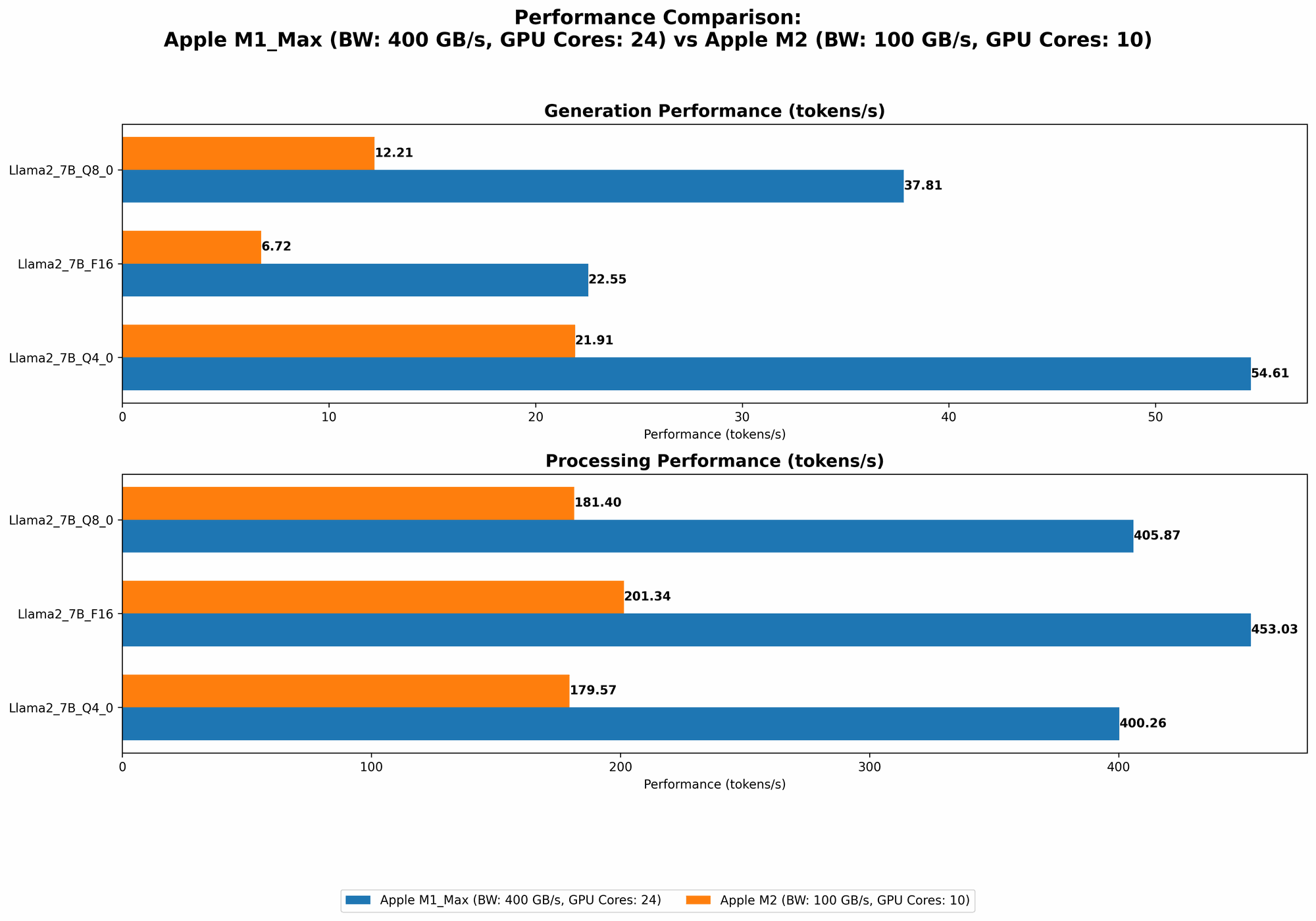
The benchmark data tells a clear story: the M1 Max outperforms the M2 in almost every scenario. This might seem obvious given the difference in core count and bandwidth, but let's analyze these differences to understand the implications for your AI development workflow.
Apple M1 Max: The Token Generating Champion
When it comes to raw token speed, the M1 Max with 24 cores shines. It consistently delivers faster processing and generation speeds compared to both the M2 and its 32-core counterpart. This performance is driven by the combination of a higher bandwidth and more cores, which translates into faster data movement and parallel processing.
For example, the M1 Max processes Llama2 7B in F16 precision at over 450 tokens per second, while the M2 struggles to reach 200. This gap widens even further for smaller quantization levels, like Q4_0, where the M1 Max processes at over 400 tokens per second compared to the M2's 179 tokens per second.
M1 Max (32 cores): The Powerhouse
The M1 Max with 32 cores takes the title of "powerhouse" with its even greater computational resources. It boasts significantly faster processing speed for Llama 2 7B compared to its 24-core sibling, reaching an impressive 599 tokens per second in F16 precision.
Apple M2: The Smaller but Capable Option
Despite being outperformed by the M1 Max, the M2 certainly doesn't fall behind. It provides a capable option, specifically for smaller models and those prioritizing portability and battery life. While its performance falls short of the M1 Max, it still delivers respectable token generation speeds, especially for tasks like quick prototyping or smaller-scale projects.
Think of it this way: The M2 is like a quick and nimble sprinter, while the M1 Max is a powerful marathon runner. Each has its strengths based on the needs of the task.
Applications and Recommendations
Now that we've explored the performance differences, let's consider how these chips can be best utilized in your AI development projects:
M1 Max - The Ideal Choice for Large Scale Projects
If you're working with large language models like Llama 3 70B, the M1 Max is your go-to choice. Its higher core count and powerful processing capabilities will help you power through large datasets and accelerate model training and inference. The M1 Max is also well-suited for complex tasks like multi-modal AI projects or computationally intensive workloads that require high memory bandwidth.
M2's Strengths: Portability and Battery Life
The M2 proves its worth in situations where portability and battery life are paramount. Its smaller size and lower power consumption make it an excellent choice for mobile AI development or projects requiring a lightweight solution. Remember, the M2 is still capable of handling smaller LLM models and tasks efficiently.
Choose Wisely, Choose According to Your Needs
Ultimately, the best chip for your project depends on your specific requirements. Consider the size of your models, the complexity of your tasks, and your budget.
Conclusion
The choice between the Apple M1 Max and M2 for local LLM inference boils down to your specific needs and priorities.
The M1 Max reigns supreme for large-scale projects and those seeking maximum token generation speed, while the M2 provides a more portable and energy-efficient solution for smaller projects and on-the-go developers.
FAQ
What is quantization?
Quantization is a technique used to compress LLM models by reducing the number of bits used to represent each weight. This results in smaller model sizes and faster inference speeds, but it can also lead to a slight reduction in accuracy.
What are the different quantization levels?
Common quantization levels include:
- F16: Uses 16-bit floating-point values.
- Q8_0: Uses 8-bit integers with zero point.
- Q4_0: Uses 4-bit integers with zero point.
Smaller quantization levels like Q4_0 lead to smaller model sizes and faster inference, but potentially lower accuracy.
How can I choose the right quantization level for my project?
The optimal quantization level depends on the trade-off between accuracy and performance. For applications where accuracy is paramount, like scientific research or medical diagnosis, you might want to use F16 or Q80. For tasks where speed is more important, like chatbots or quick prototyping, Q40 might be a good choice.
Keywords
- Local LLM, Apple M1 Max, Apple M2, token speed, LLM inference, AI development, Llama 2, Llama 3, quantization, processing speed, generation speed, bandwidth, GPU cores, model size, performance, accuracy, trade-off, deep learning, natural language processing.