Which is Better for AI Development: Apple M1 68gb 7cores or Apple M3 Pro 150gb 14cores? Local LLM Token Speed Generation Benchmark

Introduction
The world of large language models (LLMs) is rapidly evolving, captivating the imagination of developers and tech enthusiasts alike. LLMs, capable of generating human-like text, translating languages, writing different kinds of creative content, and answering your questions in an informative way, are pushing the boundaries of what's possible with artificial intelligence. However, running these powerful models locally on your own machine presents a challenge, requiring substantial computing power. This article dives into the performance comparison of two popular Apple silicon chips – the Apple M1 with 68GB of memory and 7 cores, and the Apple M3 Pro with 150GB of memory and 14 cores – when it comes to running various LLM models locally. Specifically, we'll focus on the token speed generation benchmark, a critical metric for assessing the efficiency of LLM inference.
Think of tokens as the fundamental building blocks of text – like individual words or parts of words. The more tokens a model can process per second, the faster it can generate text, translate languages, and perform other tasks.
Performance Analysis: Comparing Apple M1 and Apple M3 Pro
Our benchmark used several popular LLM models, including Llama 2 7B (7 billion parameters) and Llama 3 8B (8 billion parameters) in different quantization levels: F16 (half precision), Q80 (8-bit quantization), and Q40 (4-bit quantization).
Quantization is a technique that reduces the size of these models, making them more manageable for local processing. Think of it like compressing a high-resolution image to make it smaller but still retain a good quality.
Let's analyze the performance of both devices:
Apple M1 Token Speed Generation
The Apple M1, with its 68GB of memory and 7 cores, demonstrates respectable performance for smaller LLMs like Llama 2 7B. However, it struggles with larger models like Llama 3 8B.
Here's a summary of its performance:
| LLM Model | Quantization | Tokens/Second (Generation) |
|---|---|---|
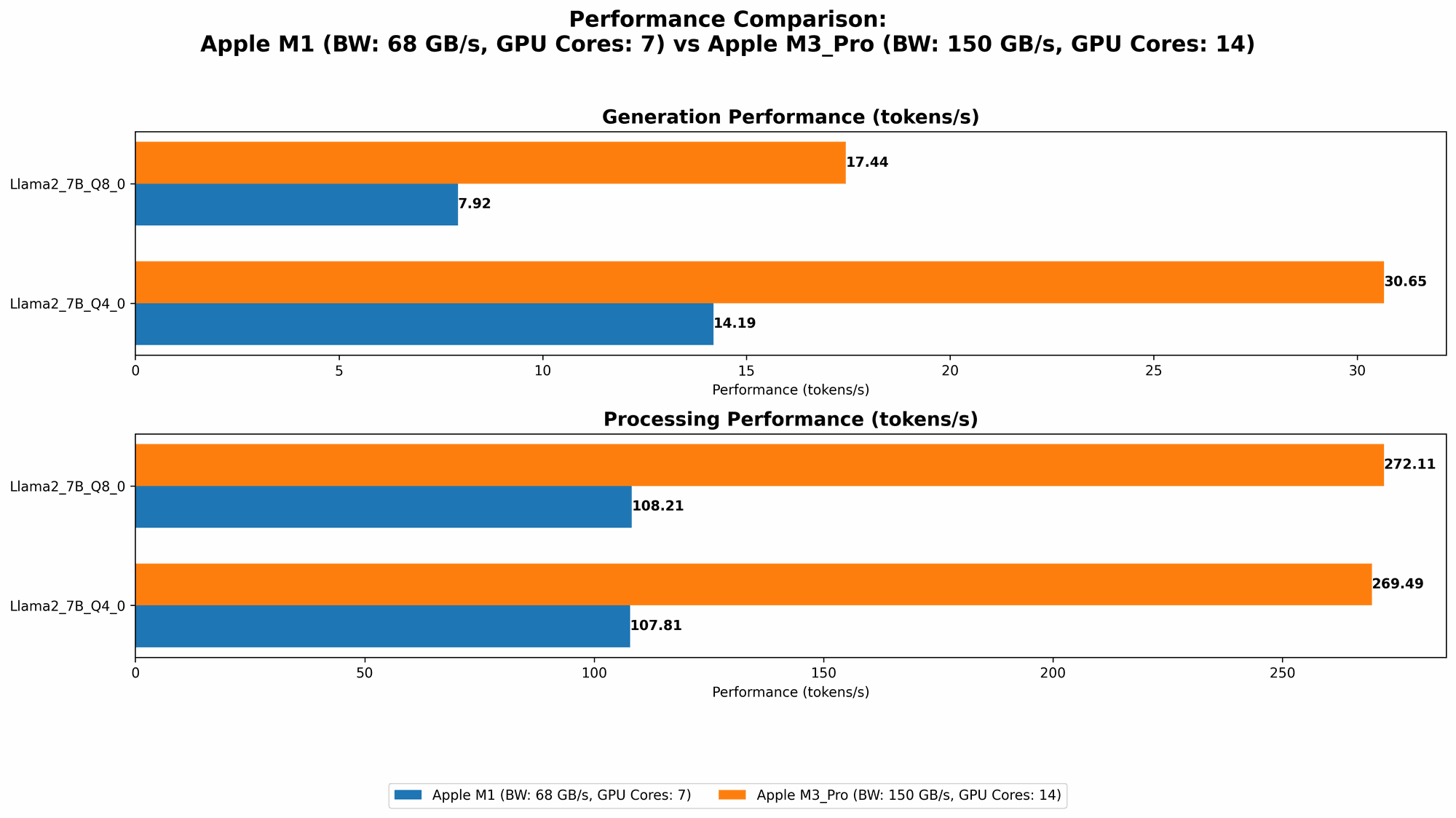
| Llama 2 7B | Q8_0 | 7.92 |
| Llama 2 7B | Q4_0 | 14.19 |
| Llama 3 8B | Q4KM | 9.72 |
Key Takeaways:
- Efficient for Smaller Models: The M1 performs well with the Llama 2 7B model, generating a respectable number of tokens per second. This is because Llama 2 7B doesn't need as much memory or processing power compared to larger models.
- Limited by Memory and Processing Power: The M1 struggles with Llama 3 8B, especially in generation performance. This is likely due to the model's larger size and higher computational demands, which exceed the M1's capabilities in memory and processing power.
Apple M3 Pro Token Speed Generation
The Apple M3 Pro, with its 150GB of memory and 14 cores, showcases a significant performance advantage compared to the Apple M1, particularly for larger LLMs.
Here's a summary of its performance:
| LLM Model | Quantization | Tokens/Second (Generation) |
|---|---|---|
| Llama 2 7B | Q8_0 | 17.44 |
| Llama 2 7B | Q4_0 | 30.65 |
| Llama 2 7B | F16 | 9.89 |
Key Takeaways:
- Significantly Faster Generation: The M3 Pro delivers noticeably faster token generation speeds for the Llama 2 7B model compared to the M1, thanks to its expanded memory and processing power.
- Handles Larger Models: The M3 Pro can effectively handle the Llama 2 7B model even in F16 quantization. It's important to remember that F16, while offering higher precision, is more computationally demanding than lower quantization levels.
Comparison of Apple M1 and Apple M3 Pro
Comparing the two devices, it's clear that the Apple M3 Pro significantly outperforms the Apple M1 in terms of token speed generation.
Here's a breakdown of their strengths and weaknesses:
| Feature | Apple M1 | Apple M3 Pro |
|---|---|---|
| Memory | 68GB | 150GB |
| Cores | 7 | 14 |
| Performance (LLM 2 7B) | Good | Excellent |
| Performance (LLM 3 8B) | Struggles | Manages well |
| Price | Lower | Higher |
| Energy Efficiency | Good | Good |
Practical Recommendations:
- If you're working primarily with smaller LLMs like Llama 2 7B: The Apple M1 might be a more budget-friendly option, offering decent performance for less demanding tasks.
- If you're working with larger LLMs, or anticipate working with larger models in the future: The Apple M3 Pro is the clear winner, providing the necessary memory and processing power to handle heavier workloads.
Conclusion: Choosing the Right Tool for the Job
The choice between the Apple M1 and Apple M3 Pro ultimately depends on your specific needs and budget. If you primarily work with small LLMs, the Apple M1 can offer good performance at a lower cost. However, for larger LLMs or future-proofing your setup, the Apple M3 Pro is the superior option, offering greater performance and memory capacity.
Remember, the world of LLMs is constantly evolving, with new models and techniques emerging frequently. It's essential to stay updated on the latest developments to ensure your chosen devices are compatible and can handle the latest advancements.
FAQ
What are LLM models?
LLMs, or large language models, are a type of artificial intelligence that can generate human-like text, translate languages, write different kinds of creative content, and answer your questions in an informative way. Think of them as super-powered versions of autocomplete, capable of generating entire paragraphs or even longer pieces of writing.
How does quantization affect LLM performance?
Quantization is a technique that reduces the size of an LLM's parameters (the data the model learns from), making it smaller and easier to process. Think of it as compressing a high-resolution image to make it smaller but still retain a good quality. Lower quantization levels like Q80 and Q40 reduce the size of the model significantly, but also reduce the quality of the model's output. F16 quantization, while offering higher precision, is more computationally demanding.
Why is token speed generation important for LLM development?
The token speed generation benchmark measures how efficiently a device can process tokens, which are the building blocks of text. The higher the token speed, the faster an LLM can generate text, translate languages, and perform other tasks.
What are the main differences between Llama 2 and Llama 3?
Llama 2 and Llama 3 are both popular open-source LLMs, but they differ in their size, architecture, and capabilities. Llama 2 is generally smaller, while Llama 3 is larger and has more parameters.
Can I run LLMs locally on other Apple devices?
Yes, you can run LLMs locally on other Apple devices equipped with Apple silicon chips, such as the MacBook Air, MacBook Pro, iMac, and Mac Studio.
Where can I learn more about LLMs?
There are many resources available online to learn more about LLMs, including:
- The Hugging Face website: Hugging Face offers a wealth of information about LLMs, including tutorials, model repositories, and forums.
- The OpenAI website: OpenAI is a leading research lab that develops LLMs, and their website offers insights into their work.
- Online courses: Platforms like Coursera and Udemy offer courses on LLM development and applications.
Keywords
LLMs, large language models, Apple M1, Apple M3 Pro, token speed generation, benchmark, Llama 2, Llama 3, quantization, F16, Q80, Q40, AI development, local processing, performance, comparison, GPU, memory, cores, inference, speed, efficiency