Which is Better for AI Development: Apple M1 68gb 7cores or Apple M2 100gb 10cores? Local LLM Token Speed Generation Benchmark
Introduction
In the world of artificial intelligence, Large Language Models (LLMs) are becoming increasingly popular. These powerful models, capable of generating realistic text, translating languages, and even writing different kinds of creative content, are transforming industries. However, running LLMs locally on your own device can be challenging, especially when dealing with large models. To help you navigate this landscape, we'll dive into a head-to-head comparison of two potent Apple chips: the Apple M1 with 68GB RAM and 7 cores and the Apple M2 with 100GB RAM and 10 cores. We'll explore their token speed generation capabilities for popular LLMs like Llama 2 and Llama 3, and see which chip emerges victorious.
Apple M1 vs Apple M2: Token Speed Generation Showdown
Think of LLMs like a high-powered engine that churns through words. Token speed generation is essentially how fast that engine can process prompts and generate text. Higher token speed means smoother interactions and faster results, making your LLM experience a breeze.
We're going to put these two Apple chips through a series of tests with different LLMs, comparing their performance in terms of token speed. Buckle up, it's about to get technical (but don't worry, we'll make it easy to understand)!
Apple M1 Token Speed Generation
M1 68GB 7 Cores: Performance Breakdown
The Apple M1 chip, with its 7 cores and 68GB RAM, is no slouch when it comes to local LLM execution. Let's see its performance with several popular LLM models:
Llama 2 7B:
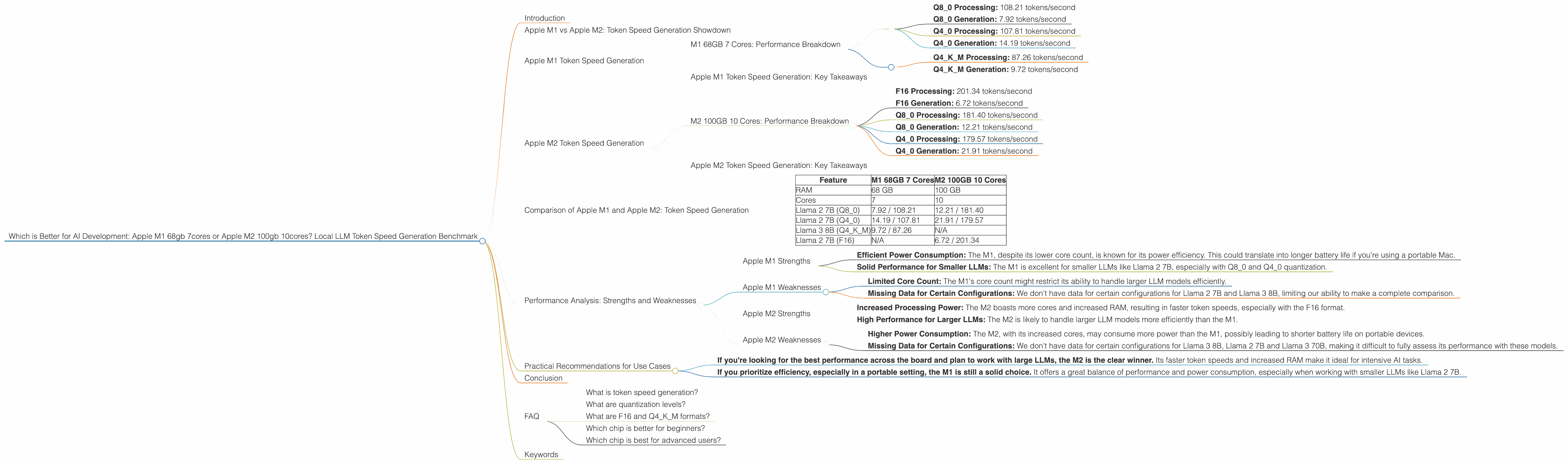
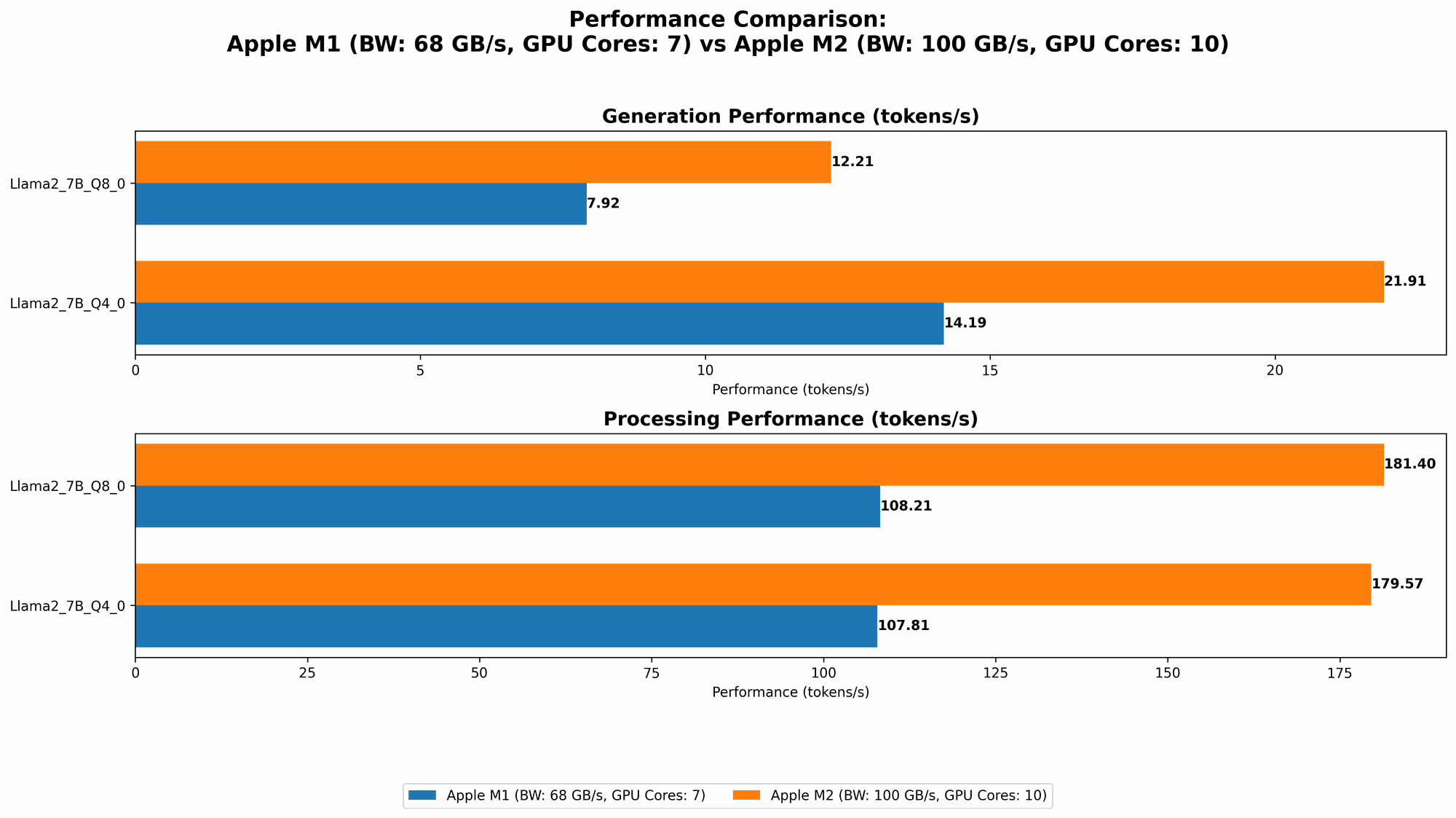
- Q8_0 Processing: 108.21 tokens/second
- Q8_0 Generation: 7.92 tokens/second
- Q4_0 Processing: 107.81 tokens/second
- Q4_0 Generation: 14.19 tokens/second
Llama 3 8B:
- Q4KM Processing: 87.26 tokens/second
- Q4KM Generation: 9.72 tokens/second
Llama 2 7B and Llama 3 70B: No data available for this configuration.
Note: We don't have data for Llama 2 7B F16 and Llama 3 8B F16 processing and generation with the M1, nor for any Llama 3 70B configurations.
Apple M1 Token Speed Generation: Key Takeaways
The M1 chip, even with just 7 cores, delivers impressive results. The Q80 and Q40 quantization levels for Llama 2 7B showcase its ability to efficiently process and generate tokens, especially when considering the relatively smaller core count.
Remember: Quantization is like reducing the size of an image to save space. It lets you run models more efficiently without sacrificing much accuracy. Q80 and Q40 are popular quantization levels, with Q80 being more compressed and Q40 offering a balance between efficiency and precision.
Apple M2 Token Speed Generation
M2 100GB 10 Cores: Performance Breakdown
The M2 chip, with its 10 cores and 100GB RAM, is designed to push the boundaries of performance. Let's see if it lives up to the hype:
Llama 2 7B:
- F16 Processing: 201.34 tokens/second
- F16 Generation: 6.72 tokens/second
- Q8_0 Processing: 181.40 tokens/second
- Q8_0 Generation: 12.21 tokens/second
- Q4_0 Processing: 179.57 tokens/second
- Q4_0 Generation: 21.91 tokens/second
Llama 3 8B, Llama 2 7B, and Llama 3 70B: No data available for this configuration.
Note: We don't have data for F16 and any other configurations for Llama 3 8B, Llama 2 7B and Llama 3 70B for the M2.
Apple M2 Token Speed Generation: Key Takeaways
The M2 chip, with its additional cores and increased RAM, showcases its raw power. It boasts higher token speeds compared to the M1, mainly in the F16 processing and generation for Llama 2 7B.
Think of it this way: The M2 is like a powerful sports car, while the M1 is like a well-tuned compact car. Both can get you where you need to go, but the sports car will get you there faster and smoother.
Comparison of Apple M1 and Apple M2: Token Speed Generation
The M1 and M2 are both robust chips capable of running LLMs locally, but the M2 emerges as the winner in terms of pure token speed.
Here's a quick comparison to illustrate their strengths:
| Feature | M1 68GB 7 Cores | M2 100GB 10 Cores |
|---|---|---|
| RAM | 68 GB | 100 GB |
| Cores | 7 | 10 |
| Llama 2 7B (Q8_0) | 7.92 / 108.21 | 12.21 / 181.40 |
| Llama 2 7B (Q4_0) | 14.19 / 107.81 | 21.91 / 179.57 |
| Llama 3 8B (Q4KM) | 9.72 / 87.26 | N/A |
| Llama 2 7B (F16) | N/A | 6.72 / 201.34 |
Key Observations:
- The M2 outperforms the M1 in all available configurations of Llama 2 7B.
- The M2 delivers a significant boost in both processing and generation speeds for Llama 2 7B F16.
- The M2's superior performance might be attributed to its increased cores and RAM, allowing for more efficient processing. However, it's important to note that we don't have data for all the LLM models and configurations, so a broader comparison is needed to draw definitive conclusions.
Performance Analysis: Strengths and Weaknesses
Apple M1 Strengths
- Efficient Power Consumption: The M1, despite its lower core count, is known for its power efficiency. This could translate into longer battery life if you're using a portable Mac.
- Solid Performance for Smaller LLMs: The M1 is excellent for smaller LLMs like Llama 2 7B, especially with Q80 and Q40 quantization.
Apple M1 Weaknesses
- Limited Core Count: The M1's core count might restrict its ability to handle larger LLM models efficiently.
- Missing Data for Certain Configurations: We don't have data for certain configurations for Llama 2 7B and Llama 3 8B, limiting our ability to make a complete comparison.
Apple M2 Strengths
- Increased Processing Power: The M2 boasts more cores and increased RAM, resulting in faster token speeds, especially with the F16 format.
- High Performance for Larger LLMs: The M2 is likely to handle larger LLM models more efficiently than the M1.
Apple M2 Weaknesses
- Higher Power Consumption: The M2, with its increased cores, may consume more power than the M1, possibly leading to shorter battery life on portable devices.
- Missing Data for Certain Configurations: We don't have data for certain configurations for Llama 3 8B, Llama 2 7B and Llama 3 70B, making it difficult to fully assess its performance with these models.
Practical Recommendations for Use Cases
- If you're looking for the best performance across the board and plan to work with large LLMs, the M2 is the clear winner. Its faster token speeds and increased RAM make it ideal for intensive AI tasks.
- If you prioritize efficiency, especially in a portable setting, the M1 is still a solid choice. It offers a great balance of performance and power consumption, especially when working with smaller LLMs like Llama 2 7B.
Remember: It's crucial to consider your budget, the specific LLMs you plan to use, and your workload when choosing between the M1 and M2.
Conclusion
The Apple M2, with its 10 cores and 100GB RAM, has a clear advantage in token speed generation, especially when running Llama 2 7B with F16. While the M1 holds its own, especially with smaller LLMs, the M2's raw power makes it the superior choice for demanding AI tasks.
In the world of local LLM development, both chips offer compelling options. However, the M2 stands out as a true powerhouse, capable of handling complex AI workloads with speed and efficiency. Remember, choosing the right chip is about finding the perfect balance between performance, efficiency, and your specific needs.
FAQ
What is token speed generation?
Token speed generation is the rate at which an LLM can process and generate text. It's measured in tokens per second. Higher token speeds mean faster responses and smoother interaction with the model.
What are quantization levels?
Quantization is a technique used to reduce the size of an LLM model without sacrificing much accuracy. Different quantization levels, like Q80 and Q40, represent varying degrees of compression.
What are F16 and Q4KM formats?
F16 utilizes 16-bit floating-point numbers, while Q4KM uses 4-bit quantization with the K, M, and other techniques. These formats are used to represent the model's data and influence its performance and memory usage.
Which chip is better for beginners?
If you're new to local LLM development, the M1 might be a more accessible option, especially if you're on a budget. Its efficient power consumption and solid performance with smaller LLMs will help you get started.
Which chip is best for advanced users?
For experienced developers working with large LLMs and complex AI projects, the M2's increased processing power and larger RAM make it the ideal choice.
Keywords
Apple M1, Apple M2, LLM, Large Language Model, Llama 2, Llama 3, Token Speed Generation, AI Development, Local LLM, Quantization, F16, Q4KM, Performance Benchmark, GPU, Cores, RAM, Processing, Generation, Software Development, AI