What's the Best Cooling Solution for NVIDIA RTX 6000 Ada 48GB During AI Workloads?

Introduction
The NVIDIA RTX 6000 Ada 48GB is a beast of a graphics card designed for professionals and AI enthusiasts. Its massive 48GB of GDDR6 memory and powerful Ada Lovelace architecture make it ideal for workloads requiring heavy processing power, including running large language models (LLMs) locally. But there's a catch: the RTX 6000 Ada can get hot, really hot! And excessive heat can lead to performance throttling and even damage to your expensive hardware. That's why having a proper cooling solution is crucial.
So, how can you keep your RTX 6000 Ada cool during AI workloads and maximize its performance? Let's dive into the details, explore various cooling options, and discuss their effectiveness based on real-world data from running LLMs.
Understanding LLM Workloads and GPU Performance
LLMs, like Llama 3, are computationally demanding. They need powerful GPUs like the RTX 6000 Ada to decipher the complexities of text, translate languages, or write creative stories. For example, imagine training an LLM to write code – it's like building a complex machine learning model that can understand and manipulate code.
The RTX 6000 Ada's performance is directly affected by temperature. Think of it like a marathon runner – when they get too hot, they slow down. So, maintaining a cool GPU temperature is critical to squeezing every ounce of performance from your NVIDIA card.
The RTX 6000 Ada 48GB's Heat Problem and Ways to Keep it Cool
The RTX 6000 Ada is a powerhouse, but it does generate a significant amount of heat when running LLMs. To combat this, let's explore effective cooling solutions and their impact on LLM performance.
1. Understanding the Data: How NVIDIA RTX 6000 Ada 48GB Performs with Different LLMs
Before diving into cooling solutions, we need to peek at the performance of the RTX 6000 Ada with different LLMs. This will help us understand which cooling solutions are most crucial for specific LLM scenarios.
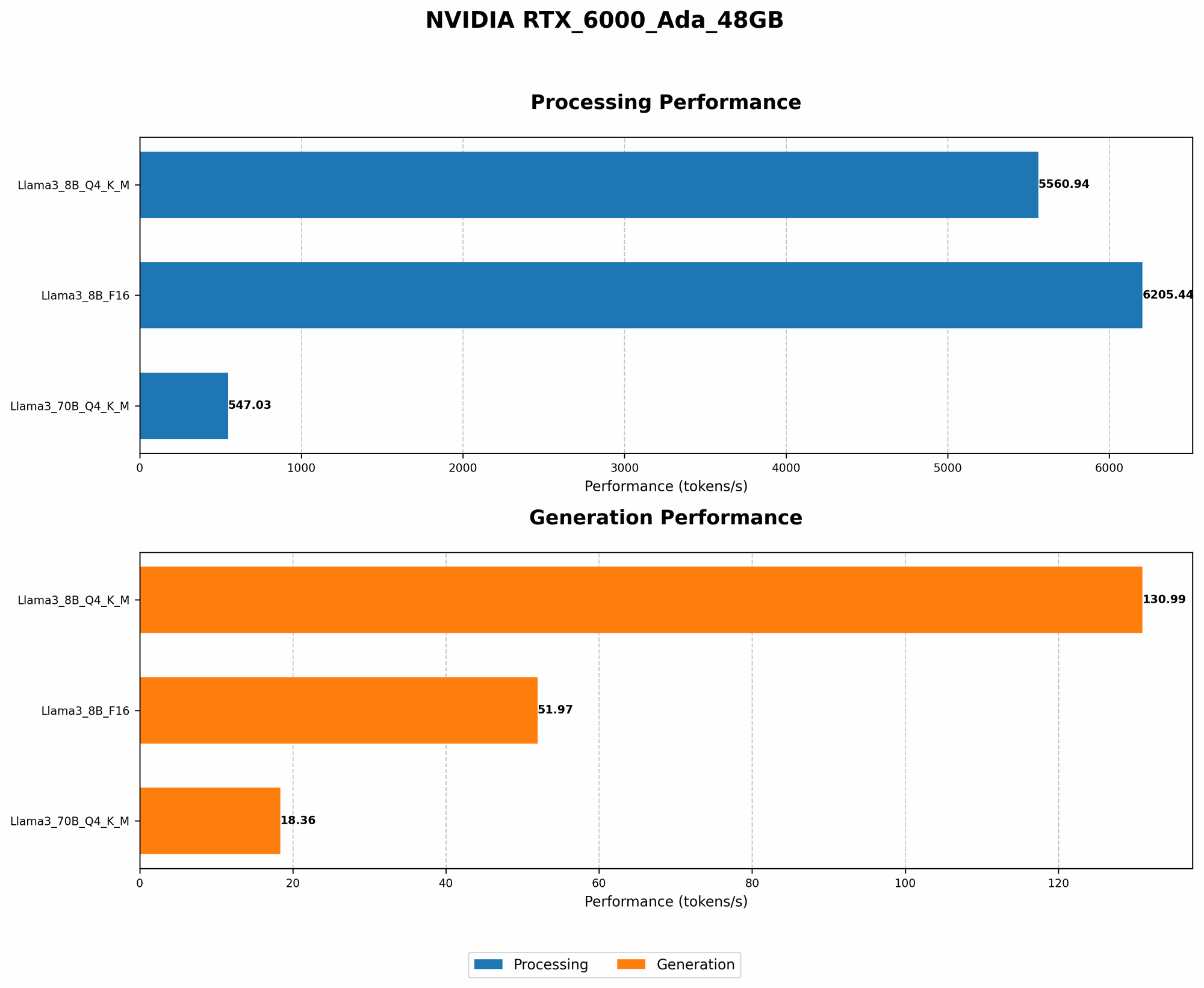
Here's a table summarizing the performance of the RTX 6000 Ada 48GB with two popular LLMs – Llama 3 8B and Llama 3 70B. We'll look at model generation and processing speeds measured in tokens per second.
| Model | Quantization | Generation (Tokens/Second) | Processing (Tokens/Second) |
|---|---|---|---|
| Llama 3 8B | Q4KM | 130.99 | 5560.94 |
| Llama 3 8B | F16 | 51.97 | 6205.44 |
| Llama 3 70B | Q4KM | 18.36 | 547.03 |
| Llama 3 70B | F16 | N/A | N/A |
Note: The data for Llama 3 70B with F16 quantization was not available.
Let's break down what these numbers tell us:
- Quantization Impact: Quantization is a technique used to reduce the size of LLM models, making them more efficient for processing. Q4KM (4-bit quantization with Kernel and Matrix) and F16 (16-bit floating point) are common quantization methods. As you can see, the RTX 6000 Ada can process Llama 3 8B models significantly faster when using Q4KM quantization compared to F16. The same pattern applies to Llama 3 70B (where data is available).
- Model Size Matters: The larger the model, the slower the token generation and processing speeds. This makes sense, as the larger models have more parameters to compute.
Key Takeaway: The RTX 6000 Ada is a powerful machine, but even with its muscle, it can struggle to keep up when dealing with larger LLMs like Llama 3 70B. This highlights the importance of efficient cooling to maximize processing power and avoid performance throttling.
2. The Power of Proper Airflow: Keeping Your "Beast" Breathless
The most effective cooling strategy for your RTX 6000 Ada relies on maximizing airflow. Think of it like providing your GPU with a continuous fresh supply of air – the more air it gets, the cooler it stays. Here's what you can do:
- Open Your Case: Make sure your PC case is properly ventilated. Remove any unnecessary dust filters or panels that might impede airflow.
- Case Fan Configuration: Ensure you have enough case fans and that they are positioned to create a strong air current flowing through your case. Optimize fan placement to direct airflow directly towards your RTX 6000 Ada.
- Fan Curves: Don't rely on default fan curves. Adjust your fan curves to ramp up fan speed as your GPU temperature increases. Aim for a balance between quiet operation and effective cooling.
Practical Examples:
- Imagine your PC case is like a kitchen – you want to use a powerful exhaust fan to remove hot air and a fan to circulate fresh air, just like a ventilation system.
- Adjusting your fan curves is like turning up the fan speed when cooking something hot – the more you cook, the faster you need to remove the heat.
3. Cooling Solutions for the RTX 6000 Ada: Beyond Stock
If you're pushing your RTX 6000 Ada to its limits with powerful LLMs, you might need more than the stock cooler to keep temperatures under control. Let's explore some popular aftermarket cooling options:
- Air Coolers: Air coolers are a budget-friendly option and offer great value for money. They work by drawing air over a heatsink using a fan to dissipate heat away from the GPU.
- Liquid Coolers (AIO): All-in-one liquid coolers are a more advanced option. They use a closed-loop system with a water pump, radiator, and fan to transfer heat away from the GPU. AIO coolers offer better heat dissipation than air coolers.
- Custom Loop Cooling: Custom loop water cooling uses a loop of water, pumps, radiators, and fans to transfer heat away from the GPU. This is the most advanced and expensive cooling option, but it offers the best performance and flexibility.
Choosing the Right Cooling Solution for Your Needs:
- Budget: Air coolers are the most affordable option, while custom loops are the priciest.
- Noise: Air coolers can be louder than AIO coolers, especially at higher fan speeds.
- Performance: Custom loop cooling offers the best performance, followed by AIO coolers, and then air coolers.
3.1 Air Cooler: NVIDIA RTX 6000 Ada 48GB
The RTX 6000 Ada 48GB comes with a stock air cooler, but for optimal thermal performance, consider a high-end aftermarket air cooler. Here are recommendations:
- Cooler Master MasterAir MA620P: This popular air cooler offers excellent cooling performance and is compatible with the RTX 6000 Ada. It has a large heatsink and a powerful fan to keep your GPU cool.
- Noctua NH-D15: Known for its quiet operation and exceptional cooling performance, the NH-D15 is a top pick for those looking to reduce noise while maximizing cooling.
3.2 AIO: NVIDIA RTX 6000 Ada 48GB
AIO coolers offer a nice balance between performance and noise. Here are some well-regarded options:
- Corsair H150i Elite Capellix: This AIO cooler features a large 360mm radiator and three powerful fans, providing exceptional cooling capabilities.
- NZXT Kraken Z73: The Kraken Z73 is another excellent choice, featuring a 280mm radiator and a stunning RGB LED display.
3.3 Custom Loop Cooling: NVIDIA RTX 6000 Ada 48GB
Custom loop cooling is the ultimate solution for those who want the best cooling performance possible. However, it's far more complex to install and requires a significant investment. If you're considering custom loop cooling, research and understand the process before going forward.
FAQ: Keeping it Cool with NVIDIA RTX 6000 Ada 48GB and LLMs
What are the signs of overheating in my NVIDIA RTX 6000 Ada?
If your RTX 6000 Ada is overheating, you may notice signs such as:
- Performance Throttling: If you experience a sudden drop in performance when running LLMs, it's a sign that your GPU is throttling to prevent damage.
- Excessive Noise: Increased fan noise is a clear indicator that your GPU is getting hot.
- High GPU Temperature: Monitor your GPU temperature using software like NVIDIA GeForce Experience or MSI Afterburner. If your GPU temperature exceeds 85°C consistently, you need to improve cooling.
What is quantization and how does it impact performance?
Quantization is a technique used to reduce the size of LLM models by reducing the precision of their weights. Imagine you have a bunch of numbers with many decimal places, but you only need a few – quantization helps you keep the most important digits and discard the rest.
This makes LLMs more efficient, allowing them to run faster and use less memory. As shown in the table, using Q4KM with Llama 3 8B leads to much faster results, compared to F16. However, some model performance might be lost due to reduced precision.
What are the best practices for preventing GPU overheating?
- Monitor GPU Temperature: Keep an eye on your GPU temperature using monitoring software.
- Clean Your PC: Dust can build up inside your PC case, blocking airflow and hampering cooling.
- Proper Airflow: Make sure your PC case has adequate ventilation and that your fans are working effectively.
- Use a High-Quality Cooling Solution: Choose an air cooler, AIO cooler, or custom loop cooling solution that meets your needs.
Does running LLMs on my RTX 6000 Ada shorten its lifespan?
Overheating can definitely damage your GPU and shorten its lifespan. But if you keep your GPU cool and monitor its temperature, it's less likely to suffer unexpected issues.
Keywords
NVIDIA RTX 6000 Ada 48GB, LLM Cooling, AI Workloads, GPU Temperature, Overheating, Performance Throttling, Air Cooler, AIO Cooler, Custom Loop Cooling, LLMs, Llama 3, Quantization, Tokens/Second, Token Generation, Token Processing, Airflow, Fan Curves, GPU Performance,