What's the Best Cooling Solution for NVIDIA RTX 5000 Ada 32GB During AI Workloads?
Introduction
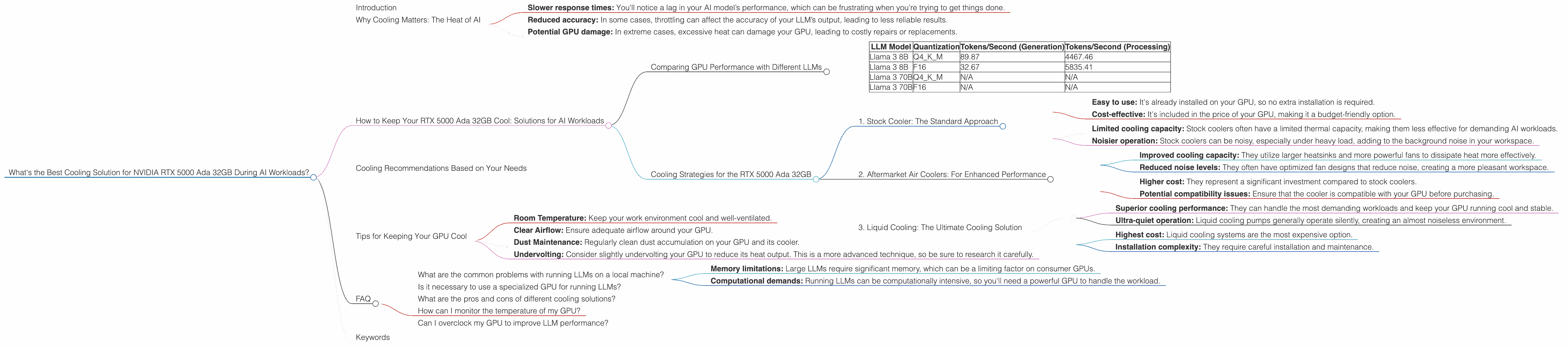
For those of you diving headfirst into the captivating world of local LLM models, you've probably already encountered the "thermal throttling" monster. It's like a grumpy dragon guarding the gate to efficient AI performance, ready to snatch away your precious compute power if your GPU gets too hot.
This article focuses on a specific GPU, the NVIDIA RTX 5000 Ada 32GB, a popular choice for running large language models (LLMs). We'll delve into the performance of this GPU under different AI workloads and explore various cooling solutions to keep it cool and running like a well-oiled machine. We'll be focusing on the Llama family of models, as they're commonly used examples for local inference.
Why Cooling Matters: The Heat of AI
Think of your GPU as a powerful engine – it burns through energy to generate the complex calculations needed to run an LLM. This energy expenditure creates heat, and if it gets too hot, your GPU might start to slow down to prevent damage, a process called thermal throttling.
Thermal throttling can significantly hamper your model's performance, leading to:
- Slower response times: You'll notice a lag in your AI model’s performance, which can be frustrating when you're trying to get things done.
- Reduced accuracy: In some cases, throttling can affect the accuracy of your LLM’s output, leading to less reliable results.
- Potential GPU damage: In extreme cases, excessive heat can damage your GPU, leading to costly repairs or replacements.
How to Keep Your RTX 5000 Ada 32GB Cool: Solutions for AI Workloads
Comparing GPU Performance with Different LLMs
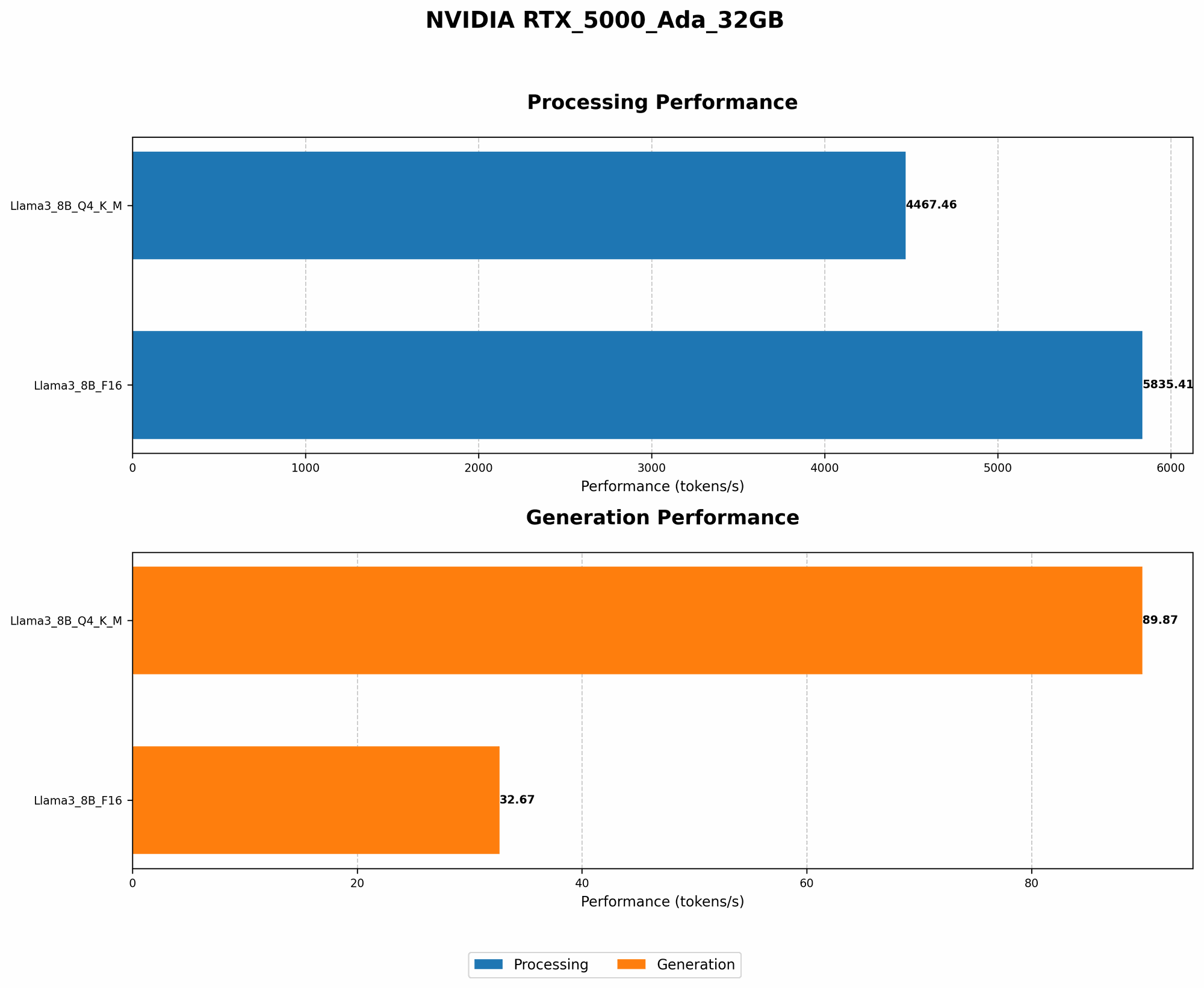
Let's dive into the performance metrics of the NVIDIA RTX 5000 Ada 32GB, specifically for the Llama 3 family of models. We'll look at two different quantization strategies:
- Q4KM: This strategy uses 4-bit quantization for the weights and activations, which significantly reduces memory usage and improves performance.
- F16: This strategy uses half-precision floating-point numbers (16-bit) which is a good balance between memory usage and accuracy.
Important Note: We lack data for the Llama 3 70B model, which is a significant size difference compared to the 8B model. This means we cannot compare their performance or provide recommendations based on those benchmarks.
| LLM Model | Quantization | Tokens/Second (Generation) | Tokens/Second (Processing) |
|---|---|---|---|
| Llama 3 8B | Q4KM | 89.87 | 4467.46 |
| Llama 3 8B | F16 | 32.67 | 5835.41 |
| Llama 3 70B | Q4KM | N/A | N/A |
| Llama 3 70B | F16 | N/A | N/A |
Key Observances:
- Quantization Impact: As expected, the Q4KM quantization, with its reduced memory footprint, significantly improves token generation speed.
- Processing vs. Generation: The RTX 5000 Ada 32GB shows a much faster processing speed compared to generation. This is likely due to the processing task being more memory-intensive, and the GPU can leverage its massive bandwidth to handle it more efficiently.
What does this mean for cooling?
Given the RTX 5000 Ada 32GB's ability to handle substantial workloads, ensuring proper cooling becomes even more critical, especially for processing tasks.
Cooling Strategies for the RTX 5000 Ada 32GB
1. Stock Cooler: The Standard Approach
Most GPUs come equipped with a stock cooler, which is usually sufficient for moderate workloads. However, when it comes to AI tasks that push your GPU to its limits, the stock cooler might fall short.
Benefits:
- Easy to use: It's already installed on your GPU, so no extra installation is required.
- Cost-effective: It's included in the price of your GPU, making it a budget-friendly option.
Drawbacks:
- Limited cooling capacity: Stock coolers often have a limited thermal capacity, making them less effective for demanding AI workloads.
- Noisier operation: Stock coolers can be noisy, especially under heavy load, adding to the background noise in your workspace.
2. Aftermarket Air Coolers: For Enhanced Performance
Aftermarket air coolers offer an upgrade over stock coolers, typically achieving higher cooling performance and quieter operation.
Benefits:
- Improved cooling capacity: They utilize larger heatsinks and more powerful fans to dissipate heat more effectively.
- Reduced noise levels: They often have optimized fan designs that reduce noise, creating a more pleasant workspace.
Drawbacks:
- Higher cost: They represent a significant investment compared to stock coolers.
- Potential compatibility issues: Ensure that the cooler is compatible with your GPU before purchasing.
3. Liquid Cooling: The Ultimate Cooling Solution
Liquid cooling systems offer the most advanced cooling solution, maintaining GPU temperatures significantly lower than air-based systems.
Benefits:
- Superior cooling performance: They can handle the most demanding workloads and keep your GPU running cool and stable.
- Ultra-quiet operation: Liquid cooling pumps generally operate silently, creating an almost noiseless environment.
Drawbacks:
- Highest cost: Liquid cooling systems are the most expensive option.
- Installation complexity: They require careful installation and maintenance.
Cooling Recommendations Based on Your Needs
Casual User: If you're only occasionally using your GPU for AI tasks, the stock cooler might be sufficient.
Frequent User: For regular AI workloads, an aftermarket air cooler can provide noticeable improvement in cooling and reduce noise levels.
Power User: If you're a power user and need the best possible cooling performance, a custom liquid cooling system is the way to go.
Tips for Keeping Your GPU Cool
- Room Temperature: Keep your work environment cool and well-ventilated.
- Clear Airflow: Ensure adequate airflow around your GPU.
- Dust Maintenance: Regularly clean dust accumulation on your GPU and its cooler.
- Undervolting: Consider slightly undervolting your GPU to reduce its heat output. This is a more advanced technique, so be sure to research it carefully.
FAQ
What are the common problems with running LLMs on a local machine?
The most common problem is thermal throttling, which can lead to decreased performance and even damage your GPU. Other challenges include:
- Memory limitations: Large LLMs require significant memory, which can be a limiting factor on consumer GPUs.
- Computational demands: Running LLMs can be computationally intensive, so you'll need a powerful GPU to handle the workload.
Is it necessary to use a specialized GPU for running LLMs?
While you can run smaller LLMs on a regular gaming GPU, it's recommended to use specialized GPUs like the NVIDIA RTX 5000 Ada 32GB for larger models. These GPUs are designed with greater memory capacity and computational power, which are crucial for handling the heavy lifting required for LLMs.
What are the pros and cons of different cooling solutions?
We've discussed the advantages and disadvantages of stock, aftermarket air, and liquid cooling solutions earlier in the article. Ultimately, the best option for you will depend on your budget, desired performance, and noise tolerance.
How can I monitor the temperature of my GPU?
You can use various tools, including GPU monitoring software like "GPU-Z" or the "NVIDIA Control Panel," to monitor your GPU temperature.
Can I overclock my GPU to improve LLM performance?
While overclocking can potentially increase performance, it also generates more heat, which can lead to thermal throttling. It's a delicate balance, and you'll need to closely monitor temperatures while experimenting with overclocking.
Keywords
NVIDIA RTX 5000 Ada 32GB, LLM cooling, AI workloads, Llama model, thermal throttling, GPU overheating, aftermarket cooler, liquid cooling, stock cooler, performance optimization, token generation, token processing, quantization, Q4KM, F16.