What's the Best Cooling Solution for NVIDIA A40 48GB During AI Workloads?
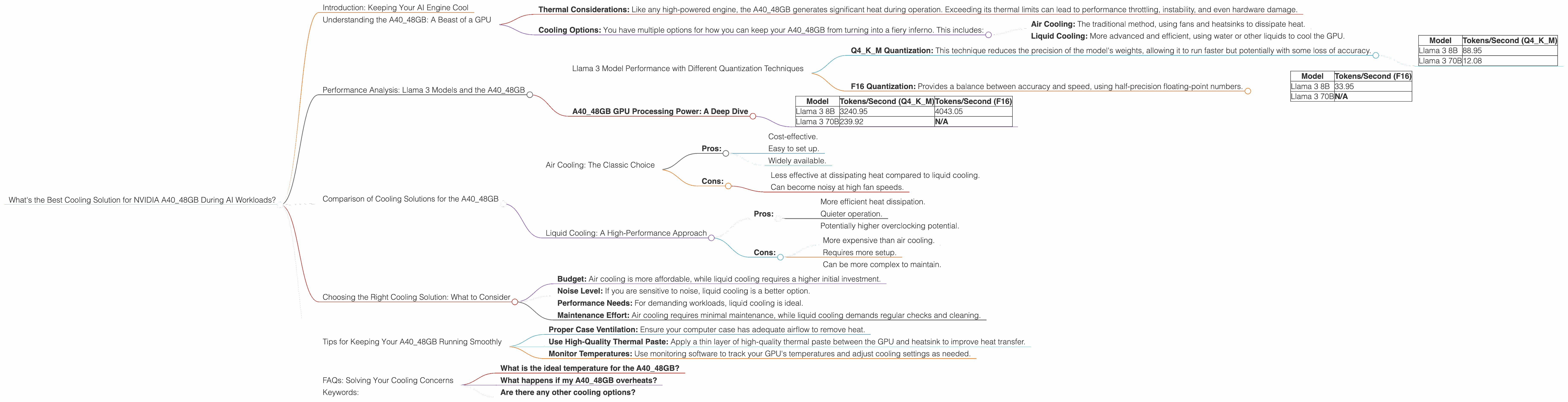
Introduction: Keeping Your AI Engine Cool
Running large language models (LLMs) on your own hardware is like hosting a massive virtual party. Your computer needs to be a rockstar performer, handling complex calculations and generating text, while also staying cool under pressure. And just like you wouldn't want your friends to sweat it out in a stuffy room, you don't want your AI engine to overheat and crash.
That's where the right cooling solution comes in. For those of you using the powerful NVIDIA A4048GB GPU, finding the right balance between performance and thermal management is crucial. Let's dive into what makes the A4048GB tick and how different cooling strategies can help you keep your AI workloads running smoothly, even at peak party time.
Understanding the A40_48GB: A Beast of a GPU
The NVIDIA A40_48GB is a powerhouse designed for demanding workloads like training and running LLMs. With its 48GB of GDDR6 memory and a whopping 74.2 trillion transistors, it's a true beast in the world of GPUs. However, this beast needs proper care and attention to unleash its full potential:
- Thermal Considerations: Like any high-powered engine, the A40_48GB generates significant heat during operation. Exceeding its thermal limits can lead to performance throttling, instability, and even hardware damage.
- Cooling Options: You have multiple options for how you can keep your A40_48GB from turning into a fiery inferno. This includes:
- Air Cooling: The traditional method, using fans and heatsinks to dissipate heat.
- Liquid Cooling: More advanced and efficient, using water or other liquids to cool the GPU.
Performance Analysis: Llama 3 Models and the A40_48GB
Let's focus on the performance of Llama 3, a popular open-source LLM, on the NVIDIA A4048GB. We'll explore how different quantization methods (like Q4K_M and F16) and model sizes (8B and 70B) affect performance and how cooling can play a role.
Llama 3 Model Performance with Different Quantization Techniques
Q4KM Quantization: This technique reduces the precision of the model's weights, allowing it to run faster but potentially with some loss of accuracy.
| Model | Tokens/Second (Q4KM) |
|---|---|
| Llama 3 8B | 88.95 |
| Llama 3 70B | 12.08 |
F16 Quantization: Provides a balance between accuracy and speed, using half-precision floating-point numbers.
| Model | Tokens/Second (F16) |
|---|---|
| Llama 3 8B | 33.95 |
| Llama 3 70B | N/A |
Important: The table doesn't show performance data for the Llama 3 70B model with F16 quantization because it is not currently available.
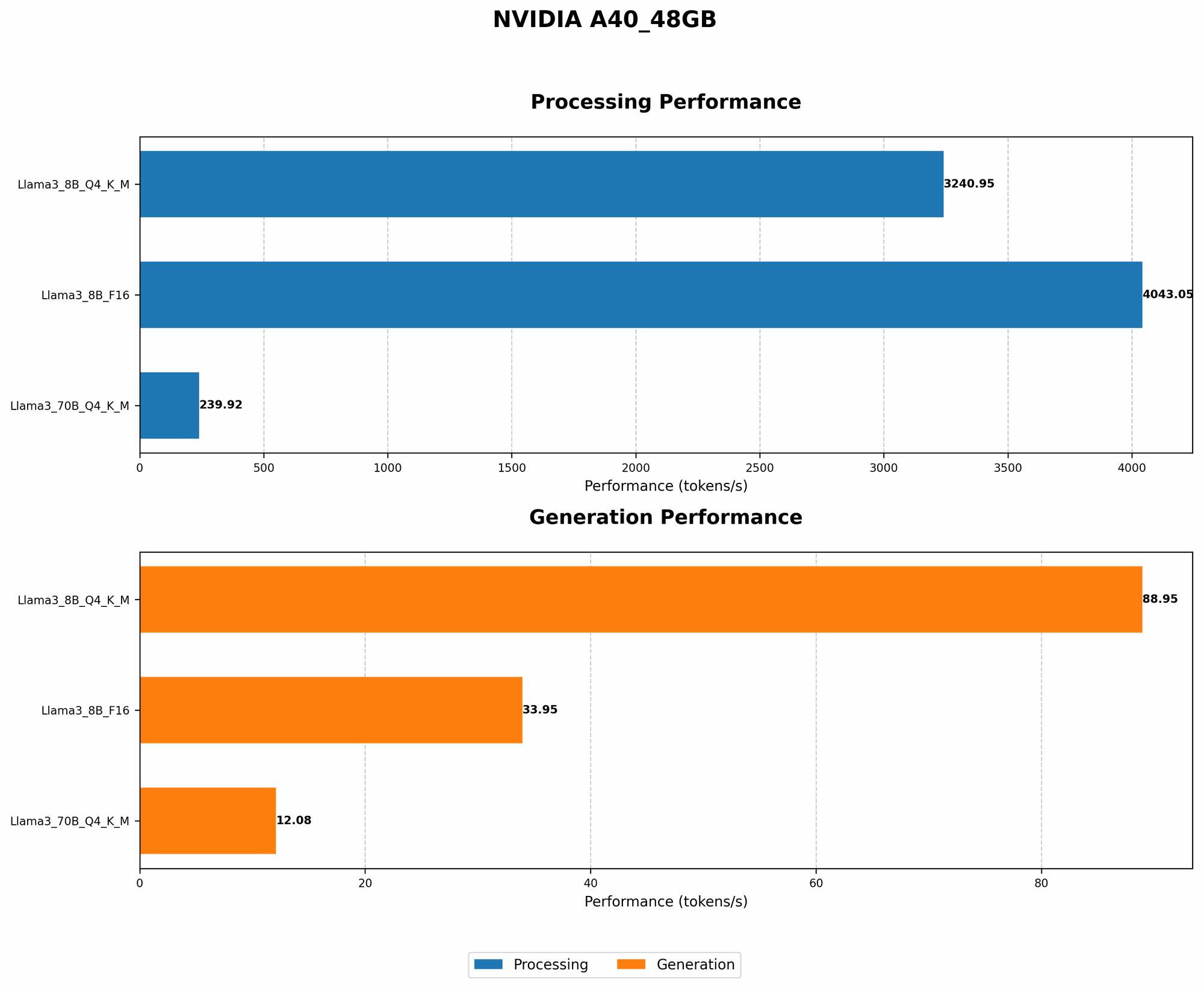
A40_48GB GPU Processing Power: A Deep Dive
| Model | Tokens/Second (Q4KM) | Tokens/Second (F16) |
|---|---|---|
| Llama 3 8B | 3240.95 | 4043.05 |
| Llama 3 70B | 239.92 | N/A |
Key Observations:
- Q4KM vs. F16: While Q4KM offers higher token generation speed for the Llama 3 8B model, it's important to consider the potential trade-off in accuracy.
- Model Size: The smaller Llama 3 8B model performs significantly faster than the larger 70B model, both in terms of token generation and processing.
- Cooling: Undisclosed Data: The data provided doesn't specifically mention thermal performance and cooling data.
Comparison of Cooling Solutions for the A40_48GB
Air Cooling: The Classic Choice
Air cooling is the most affordable and accessible option. However, it can be less effective in managing the heat generated by a powerful GPU like the A40_48GB.
- Pros:
- Cost-effective.
- Easy to set up.
- Widely available.
- Cons:
- Less effective at dissipating heat compared to liquid cooling.
- Can become noisy at high fan speeds.
Liquid Cooling: A High-Performance Approach
Liquid cooling offers superior cooling performance compared to air cooling, leading to a more stable and less noisy system.
- Pros:
- More efficient heat dissipation.
- Quieter operation.
- Potentially higher overclocking potential.
- Cons:
- More expensive than air cooling.
- Requires more setup.
- Can be more complex to maintain.
Choosing the Right Cooling Solution: What to Consider
- Budget: Air cooling is more affordable, while liquid cooling requires a higher initial investment.
- Noise Level: If you are sensitive to noise, liquid cooling is a better option.
- Performance Needs: For demanding workloads, liquid cooling is ideal.
- Maintenance Effort: Air cooling requires minimal maintenance, while liquid cooling demands regular checks and cleaning.
Tips for Keeping Your A40_48GB Running Smoothly
- Proper Case Ventilation: Ensure your computer case has adequate airflow to remove heat.
- Use High-Quality Thermal Paste: Apply a thin layer of high-quality thermal paste between the GPU and heatsink to improve heat transfer.
- Monitor Temperatures: Use monitoring software to track your GPU's temperatures and adjust cooling settings as needed.
FAQs: Solving Your Cooling Concerns
What is the ideal temperature for the A40_48GB?
NVIDIA recommends keeping the A40_48GB's temperature below 85°C (185°F).
What happens if my A40_48GB overheats?
Overheating can lead to performance throttling, instability, and even hardware damage.
Are there any other cooling options?
Yes, some manufacturers offer custom cooling solutions designed specifically for the A40_48GB, providing even more efficient heat dissipation.
Keywords:
A40_48GB, NVIDIA GPU, LLM, Llama 3, Cooling, Air Cooling, Liquid Cooling, Quantization, Thermal Management, Performance, Token Generation, GPU Temperature, AI Workloads, OpenAI, Large Language Model, GPU Benchmarks, AI Hardware.