What's the Best Cooling Solution for NVIDIA 4090 24GB x2 During AI Workloads?
Introduction
Are you a tech enthusiast eagerly diving into the world of large language models (LLMs)? Have you just built a beastly machine with two NVIDIA 4090_24GB GPUs, ready to unleash the power of AI? If so, you're probably wondering how to keep your powerhouse cool and prevent it from turning into a literal furnace.
This article will delve into the specific cooling needs of the NVIDIA 409024GBx2 setup when running LLM models and explore the best cooling solutions to prevent your system from overheating. We’ll be focusing on the Llama 3 family of models, analyzing performance in both generation and processing tasks, and pinpointing why efficient cooling is crucial.
Understanding AI Workloads and Cooling Needs
LLMs are computationally hungry beasts. They crunch enormous amounts of data, devouring processing power and generating heat in the process. That's where your powerful NVIDIA 409024GBx2 setup comes in. However, the more processing power you throw at AI workloads, the more heat you generate.
Think of it like this: If your computer was a car, running LLMs is like driving it at high speeds. Just like an engine needs to be cooled efficiently to prevent damage, your GPUs need adequate cooling to perform optimally.
Analyzing the Performance of Llama 3 Models on NVIDIA 409024GBx2
While the NVIDIA 409024GBx2 is a powerful machine, even it has its limits when it comes to handling large LLMs. To illustrate this, we'll analyze the performance of Llama 3 models on this setup and see how cooling plays a crucial role. The data we will use is from the following sources:
- Performance of llama.cpp on various devices (https://github.com/ggerganov/llama.cpp/discussions/4167) by ggerganov
- GPU Benchmarks on LLM Inference (https://github.com/XiongjieDai/GPU-Benchmarks-on-LLM-Inference) by XiongjieDai
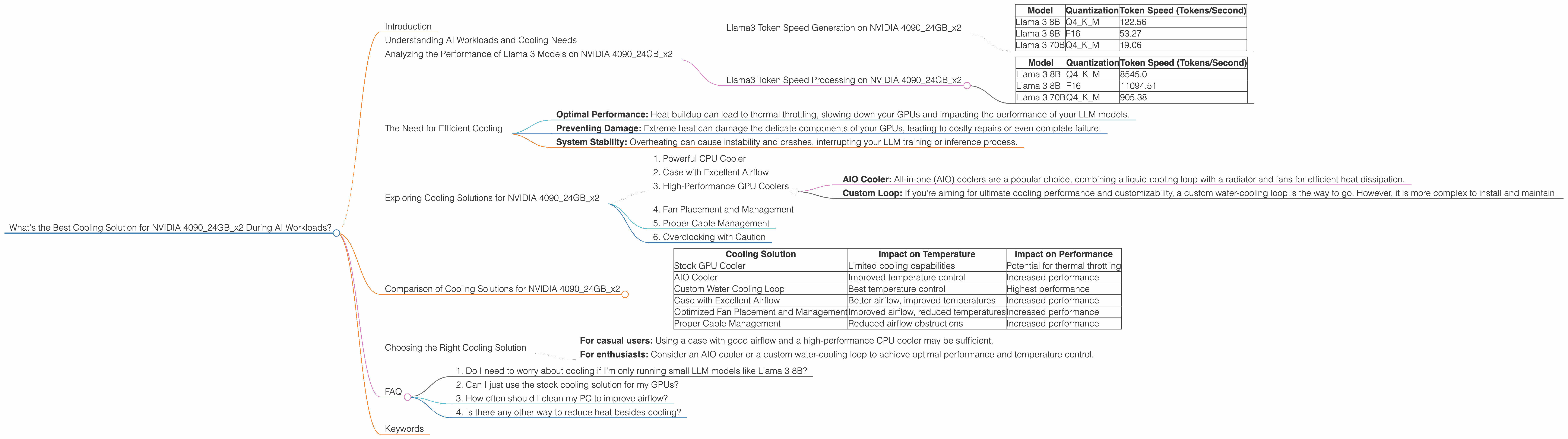
Llama3 Token Speed Generation on NVIDIA 409024GBx2
The following table shows the token speed for Llama 3 model generation on NVIDIA 409024GBx2, using both quantized (Q4KM) and full precision (F16) formats:
| Model | Quantization | Token Speed (Tokens/Second) |
|---|---|---|
| Llama 3 8B | Q4KM | 122.56 |
| Llama 3 8B | F16 | 53.27 |
| Llama 3 70B | Q4KM | 19.06 |
Note: Performance data for F16 for Llama 3 70B is unavailable.
As you can see, the NVIDIA 409024GBx2 setup can handle Llama 3 8B models with ease, both in quantized and full precision formats. However, when we move to the larger Llama 3 70B model, the token speed drops significantly, especially in F16 format. This shows that even a powerful setup like this can struggle to handle the demands of larger models.
Llama3 Token Speed Processing on NVIDIA 409024GBx2
Let's now look at the processing speeds of the models:
| Model | Quantization | Token Speed (Tokens/Second) |
|---|---|---|
| Llama 3 8B | Q4KM | 8545.0 |
| Llama 3 8B | F16 | 11094.51 |
| Llama 3 70B | Q4KM | 905.38 |
Note: Performance data for F16 for Llama 3 70B is unavailable.
Again, we observe a similar trend. The processing speed for the Llama 3 70B model drops considerably compared to the 8B model. This highlights the immense computational power required for processing larger LLMs.
The Need for Efficient Cooling

These performance figures highlight the importance of cooling for your NVIDIA 409024GBx2 setup. Having adequate cooling ensures:
- Optimal Performance: Heat buildup can lead to thermal throttling, slowing down your GPUs and impacting the performance of your LLM models.
- Preventing Damage: Extreme heat can damage the delicate components of your GPUs, leading to costly repairs or even complete failure.
- System Stability: Overheating can cause instability and crashes, interrupting your LLM training or inference process.
Exploring Cooling Solutions for NVIDIA 409024GBx2
Now that you understand the importance of cooling for AI workloads, let's explore the available solutions for your NVIDIA 409024GBx2 setup:
1. Powerful CPU Cooler
While your primary focus is on cooling the GPUs, don't forget about the CPU. A high-performance CPU cooler will help prevent heat buildup from both the CPU and the GPUs, resulting in better overall system stability. Opt for a cooler with a high thermal design power (TDP) and excellent airflow.
2. Case with Excellent Airflow
The case you choose plays a critical role in cooling your components. Look for a case with good airflow, featuring multiple fans and strategically placed vents. A case with a mesh front panel and side panels can improve airflow significantly.
3. High-Performance GPU Coolers
Your NVIDIA 4090_24GB GPUs already feature cooling solutions, but you might need to upgrade for optimal performance. Consider:
- AIO Cooler: All-in-one (AIO) coolers are a popular choice, combining a liquid cooling loop with a radiator and fans for efficient heat dissipation.
- Custom Loop: If you're aiming for ultimate cooling performance and customizability, a custom water-cooling loop is the way to go. However, it is more complex to install and maintain.
4. Fan Placement and Management
Optimizing fan placement and configuration is crucial for efficient cooling. Ensure your case fans are positioned for optimal airflow, drawing cool air in and pushing hot air out. You can use software tools like Open Hardware Monitor to monitor your system's temperatures and adjust fan curves for more precise control.
5. Proper Cable Management
Overcrowding within your case can hinder airflow, leading to reduced cooling efficiency. Make sure your cables are neatly organized and managed, minimizing obstructions and allowing for better air circulation.
6. Overclocking with Caution
Overclocking your GPUs can boost performance but also increase heat production. Carefully monitor temperatures and adjust settings to ensure your GPUs stay within safe operating ranges.
Comparison of Cooling Solutions for NVIDIA 409024GBx2
Here's a table comparing different cooling solutions and their impact on temperature and performance:
| Cooling Solution | Impact on Temperature | Impact on Performance |
|---|---|---|
| Stock GPU Cooler | Limited cooling capabilities | Potential for thermal throttling |
| AIO Cooler | Improved temperature control | Increased performance |
| Custom Water Cooling Loop | Best temperature control | Highest performance |
| Case with Excellent Airflow | Better airflow, improved temperatures | Increased performance |
| Optimized Fan Placement and Management | Improved airflow, reduced temperatures | Increased performance |
| Proper Cable Management | Reduced airflow obstructions | Increased performance |
Note: The effectiveness of each cooling solution will vary depending on the specifics of your setup and the environment.
Choosing the Right Cooling Solution
The best cooling solution depends on your budget, expertise, and desired level of performance.
- For casual users: Using a case with good airflow and a high-performance CPU cooler may be sufficient.
- For enthusiasts: Consider an AIO cooler or a custom water-cooling loop to achieve optimal performance and temperature control.
FAQ
1. Do I need to worry about cooling if I'm only running small LLM models like Llama 3 8B?
While the 409024GBx2 setup can handle 8B models without much heat, you still need to consider cooling to ensure optimal performance and long-term component health.
2. Can I just use the stock cooling solution for my GPUs?
While the stock cooling solution may suffice for lighter workloads, it's recommended to upgrade to an AIO cooler or custom loop for optimal cooling performance, especially when running large LLMs.
3. How often should I clean my PC to improve airflow?
It's recommended to clean your PC components, especially fans and heatsinks, every 3-6 months to prevent dust buildup and maintain optimal airflow.
4. Is there any other way to reduce heat besides cooling?
Yes, using quantized models (like Q4KM) can significantly reduce the computational load and heat generation compared to full precision models (F16).
Keywords
NVIDIA 4090_24GB, AI Workloads, Llama 3, Cooling Solutions, GPU Temperature, Token Speed, Quantization, Performance, Cooling, Airflow, AIO Cooler, Custom Water Cooling, Overclocking