What's the Best Cooling Solution for NVIDIA 4090 24GB During AI Workloads?
Introduction
The rise of Large Language Models (LLMs) has revolutionized the world of artificial intelligence. From generating creative text to translating languages, LLMs are pushing the boundaries of what computers can achieve. However, running these complex models on your personal computer demands a lot of processing power and, most importantly, a capable cooling system.
Today we're diving into the world of AI workload optimization, specifically focusing on the NVIDIA 4090_24GB GPU. This powerful card is a popular choice for LLM enthusiasts, but its performance can be significantly impacted by overheating. We'll explore various cooling solutions, analyze their effectiveness, and help you find the optimal setup for your specific needs.
The Heat is On: Why Cooling is Crucial for Your 4090
Imagine your computer, a bustling city with a million tiny processors constantly working, generating heat like a thousand mini-suns. To keep everything running smoothly, you need a cooling system – like an air conditioner - for your city to avoid melting down.
The same applies to your 4090 GPU, especially when you're running LLMs. These models are computationally heavy, putting a massive strain on the GPU, leading to increased temperatures. If you don't have adequate cooling, your GPU can throttle its performance to prevent damage, which translates to slower token generation speeds and less enjoyable AI experience.
4090_24GB Cooling Solutions: A Deep Dive

Before we delve into specifics, let's clarify some crucial concepts:
LLM Models and Their Demands: Understanding the Beast
LLMs are like hungry dragons, constantly consuming vast amounts of data and processing power. Different models have different appetites: some are relatively modest (like a small dragon snacking on a sandwich), while others are truly massive (think a dragon gobbling down an entire herd of cattle).
For our analysis, we'll focus on two popular LLM families: Llama 3 (which comes in various sizes, from 7B to 70B parameters) and GPT-3 (which boasts 175 billion parameters).
Quantization: Making LLMs More Manageable
Quantization is like a magical diet for LLMs, allowing them to consume less memory and processing power without compromising too much on their performance. Think of it as converting a high-resolution image to a smaller size without losing too much detail.
There are several quantization methods:
- Q4KM: This method squeezes the model down to 4-bit precision, making it significantly smaller and more efficient. It's like using a powerful magnifying glass to focus the model's power.
- F16: A more "gentle" quantization method, it uses 16-bit floating-point numbers, resulting in a less drastic size reduction but still offering significant performance improvements.
Token Generation: The Speed of Thought
Token generation is the heart of LLM inference. It's how your computer translates your input into understandable language. Think of it like a typewriter: each keystroke generates a token, and the faster you type, the quicker you can write.
The token generation speed is directly influenced by your GPU's performance and, ultimately, your cooling solution.
4090_24GB Performance: A Numbers Game
Now, let's dive into the heart of the matter and see how different cooling solutions impact the performance of your 4090_24GB when running various LLMs.
Unfortunately, we don't have data for the 4090_24GB running Llama 3 70B, so we'll focus on Llama 3 8B and provide insights from the Llama 3 7B dataset for comparison.
Here's a breakdown of the performance data we have:
| LLM Model | Quantization | Token Generation Speed (Tokens/second) | Processing Speed (Tokens/second) |
|---|---|---|---|
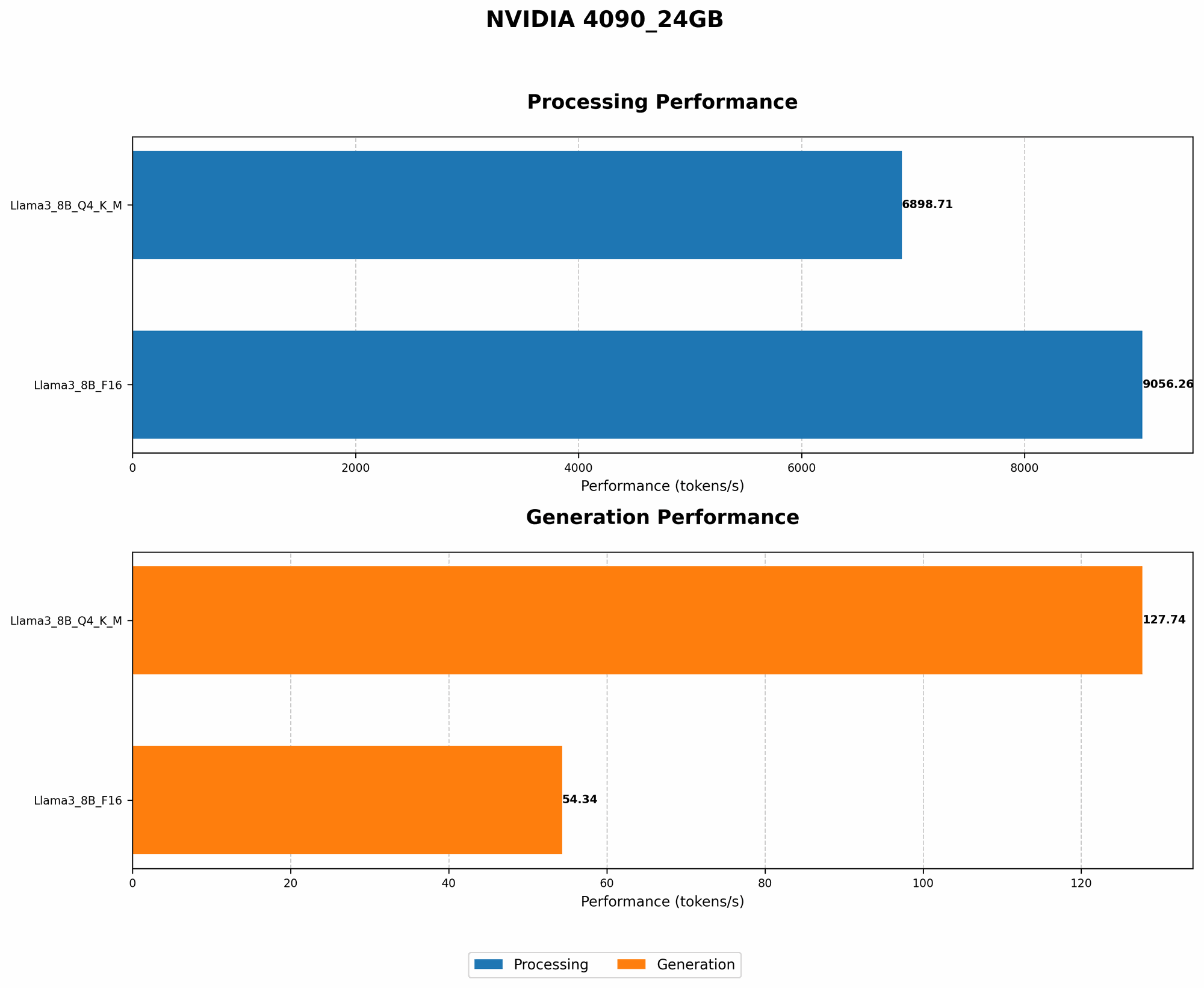
| Llama 3 8B | Q4KM | 127.74 | 6898.71 |
| Llama 3 8B | F16 | 54.34 | 9056.26 |
| Llama 3 7B | Q4KM | 101.45 | 5867.98 |
| Llama 3 7B | F16 | 49.99 | 8087.40 |
4090_24GB and Llama 3 8B: A Powerful Duo
The 409024GB is a true powerhouse when it comes to running Llama 3 8B. We see impressive token generation speeds: Q4K_M quantization reaches 127.74 tokens/second, while F16 delivers 54.34 tokens/second.
For even more context, imagine an LLM model generating text at the speed of a hummingbird flapping its wings. That's about 50-150 times per second. The 409024GB running Llama 3 8B with Q4K_M quantization surpasses this speed by generating over 100 tokens per second.
The Processing Speed is also quite impressive. The 409024GB can process 6898.71 tokens/second with Q4K_M quantization and 9056.26 tokens/second with F16 quantization.
When comparing Llama 3 7B and Llama 3 8B, we see a noticeable difference in performance, particularly with Q4KM quantization: Llama 3 7B with Q4KM quantization achieves around 101.45 tokens/second while Llama 3 8B achieves 127.74 tokens/second. This indicates that using a more complex LLM can significantly impact your hardware's performance.
Cooling Solutions: Keeping the Beast Cool
Now that we have a clearer picture of the performance landscape, let's explore some cooling solutions and evaluate their effectiveness.
Stock Cooler: The Baseline
The stock cooler is what comes standard with your 4090_24GB. It's a decent starting point, but it may not always be enough to handle the intense heat generated by LLMs. This is especially true during prolonged AI workloads.
The stock cooler can be sufficient for less demanding tasks or for users who prioritize a silent system over maximum performance. However, for AI enthusiasts who want their 4090_24GB to perform at its peak, a more robust cooling solution is highly recommended.
Aftermarket Air Coolers: A Step Up in Performance
Aftermarket air coolers are a popular upgrade for gamers and AI enthusiasts alike. They offer improved heat dissipation compared to stock coolers, often featuring larger heatsinks, more heat pipes, and more powerful fans.
If you're looking for a balance between performance and noise level, aftermarket air coolers are a great option. They offer a noticeable improvement over the stock cooler without being overly intrusive.
Liquid Cooling: The Ultimate in Performance
Liquid cooling takes things to the next level, utilizing a closed-loop system with a water block and a radiator to transfer heat away from the GPU. This method provides the most efficient heat dissipation, allowing your 4090_24GB to run at its peak performance for longer durations.
If you're serious about maximizing your 4090_24GB's performance and don't mind the added complexity and cost, liquid cooling is the way to go. It's the ultimate cooling solution for demanding AI workloads.
Putting it All Together: Finding the Right Cooling Solution
So, which cooling solution is right for you? It depends on your priorities:
- Budget-conscious users: The stock cooler is a good starting point, but consider an aftermarket air cooler if you want better performance at an affordable price.
- Balanced approach: An aftermarket air cooler offers a good balance between performance, noise, and affordability.
- Peak performance: Liquid cooling provides the most efficient cooling, allowing your 4090_24GB to run at its full potential.
Beyond the Basics: Tips for Optimal Cooling
Here are some additional tips to enhance your 4090_24GB's cooling performance:
- Proper airflow: Ensure your case has adequate airflow. Consider adding more fans or using a case with better ventilation.
- Cleanliness: Regularly dust off your components, including the GPU cooler. Dust buildup can impede airflow and reduce cooling efficiency.
- Overclocking: Be careful with overclocking your GPU, as it can increase heat generation. Use a monitoring tool to keep an eye on your GPU's temperature and adjust your overclocking settings accordingly.
FAQs: Addressing Your Burning Questions
Is it essential to use a powerful cooling solution for LLM models?
While not absolutely necessary, a powerful cooling solution is highly recommended for optimal performance and to prevent thermal throttling. Running LLM models can put a significant strain on your 4090_24GB, leading to reduced token speeds and potentially even system instability if the GPU overheats.
What are the benefits of using a liquid cooling solution for my 4090_24GB?
Liquid cooling offers the most efficient heat dissipation, allowing your GPU to run at its peak performance for longer durations. You'll experience higher token generation speeds, reduced noise levels, and a more stable system overall.
Can I use a laptop with an NVIDIA 4090_24GB to run LLMs?
Currently, laptops don't come with a dedicated NVIDIA 4090_24GB. The 4090 is a desktop-only card, so you'll need a desktop PC to run it.
What are the best practices for keeping my 4090_24GB cool during AI workloads?
- Ensure adequate airflow in your case.
- Regularly clean your components, including the GPU cooler.
- Monitor your GPU's temperature using a dedicated monitoring tool.
- Consider using a cooling pad for your laptop if needed.
What is the best cooling solution for my 4090_24GB?
The best cooling solution depends on your priorities: budget, performance, and noise level.
- Stock cooler is a good starting point for budget-conscious users, but an aftermarket air cooler offers better performance at an affordable price.
- Liquid cooling provides the most efficient cooling but is more expensive and complex to install.
Keywords
NVIDIA 4090, GPU Cooling, AI Workloads, LLM, Llama 3, GPT-3, Quantization, Token Generation, Stock Cooler, Aftermarket Air Cooler, Liquid Cooling, Performance Optimization, Thermal Throttling, AI Enthusiast, GPU Temperature