What's the Best Cooling Solution for NVIDIA 4070 Ti 12GB During AI Workloads?
Introduction
Running large language models (LLMs) locally can unlock a whole new world of AI possibilities – from generating creative content to building personalized chatbots. But these powerful models can also put your hardware through its paces, especially your graphics card. The NVIDIA 4070 Ti 12GB is a popular choice for AI work, but it's crucial to ensure it stays cool under intense workloads, preventing throttling and potentially damaging the hardware. In this article, we’ll explore the 4070 Ti 12GB’s performance in AI workloads, discuss the importance of cooling, and delve into the best cooling solutions to keep your GPU running smoothly and efficiently.
Understanding the Challenge: Why Cooling Matters for AI Workloads
AI workloads demand considerable processing power, pushing your GPU to its limits. As the GPU works tirelessly to generate text, translate languages, or answer your questions, it generates heat, which can negatively affect its performance.
Imagine your GPU like a powerful car engine – it performs best at the optimal temperature. If it overheats, it starts to slow down, just like your car engine would if it got too hot. This is called throttling, where the GPU automatically reduces its clock speed to prevent damage. Throttling can lead to slower performance, inconsistent results, and even instability.
In the context of AI, poor cooling can mean slower text generation, longer inference times, and a frustratingly inconsistent user experience.
Cooling Solutions for the NVIDIA 4070 Ti 12GB: A Deep Dive
The 4070 Ti 12GB is a capable GPU designed for demanding tasks, but its performance directly depends on maintaining optimal temperatures. Let's explore the best cooling solutions to keep your GPU running cool and efficient during intense AI workloads.
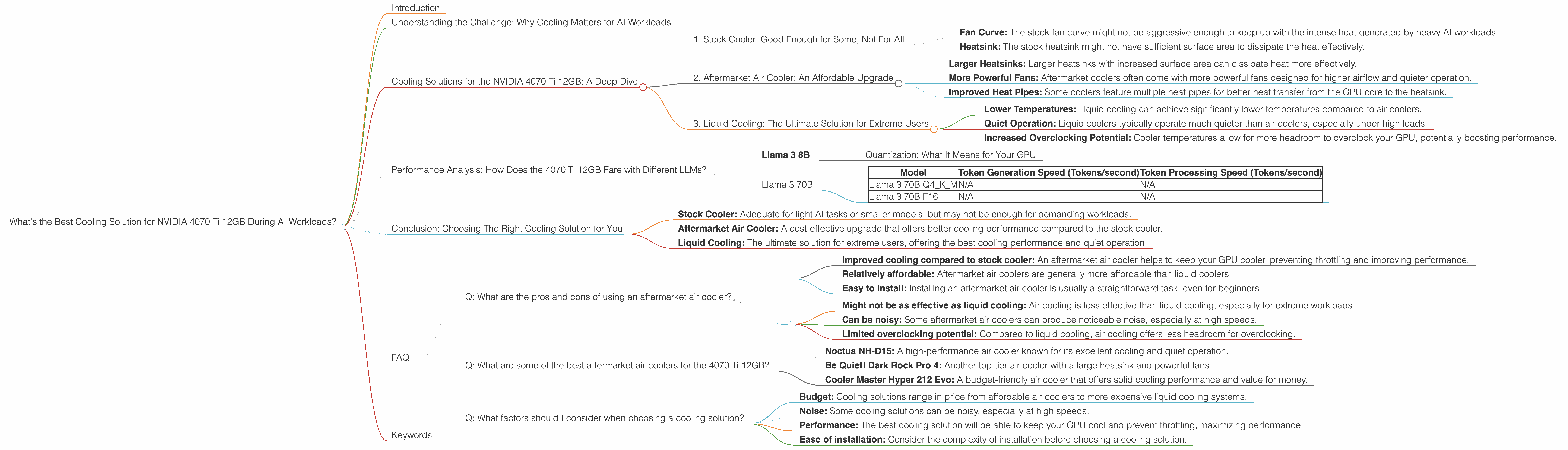
1. Stock Cooler: Good Enough for Some, Not For All
The NVIDIA 4070 Ti 12GB comes with a decent stock cooler, often adequate for many gaming scenarios. However, for AI tasks, especially with larger models, the stock cooler might not be enough. Consider these factors:
- Fan Curve: The stock fan curve might not be aggressive enough to keep up with the intense heat generated by heavy AI workloads.
- Heatsink: The stock heatsink might not have sufficient surface area to dissipate the heat effectively.
While a stock cooler might be sufficient for light AI tasks or smaller models, you might need to consider an upgrade for more demanding AI tasks.
2. Aftermarket Air Cooler: An Affordable Upgrade
Aftermarket air coolers offer a significant upgrade over the stock cooler. They offer a range of features like:
- Larger Heatsinks: Larger heatsinks with increased surface area can dissipate heat more effectively.
- More Powerful Fans: Aftermarket coolers often come with more powerful fans designed for higher airflow and quieter operation.
- Improved Heat Pipes: Some coolers feature multiple heat pipes for better heat transfer from the GPU core to the heatsink.
*If you're looking for a cost-effective upgrade to improve cooling performance, an aftermarket air cooler is a great option. *
3. Liquid Cooling: The Ultimate Solution for Extreme Users
For those seeking the ultimate cooling solution and willing to invest more, liquid cooling is the way to go. Unlike air coolers, liquid coolers use a closed-loop system with a radiator, pump, and coolant to transfer heat away from the GPU.
- Lower Temperatures: Liquid cooling can achieve significantly lower temperatures compared to air coolers.
- Quiet Operation: Liquid coolers typically operate much quieter than air coolers, especially under high loads.
- Increased Overclocking Potential: Cooler temperatures allow for more headroom to overclock your GPU, potentially boosting performance.
However, liquid cooling is a more complex solution that requires careful installation and maintenance.
Performance Analysis: How Does the 4070 Ti 12GB Fare with Different LLMs?
Let's dive into the performance data and see how the 4070 Ti 12GB performs with popular LLM models. We'll focus on the token generation and processing speeds, key metrics that directly impact the user experience.
Llama 3 8B
| Model | Token Generation Speed (Tokens/second) | Token Processing Speed (Tokens/second) |
|---|---|---|
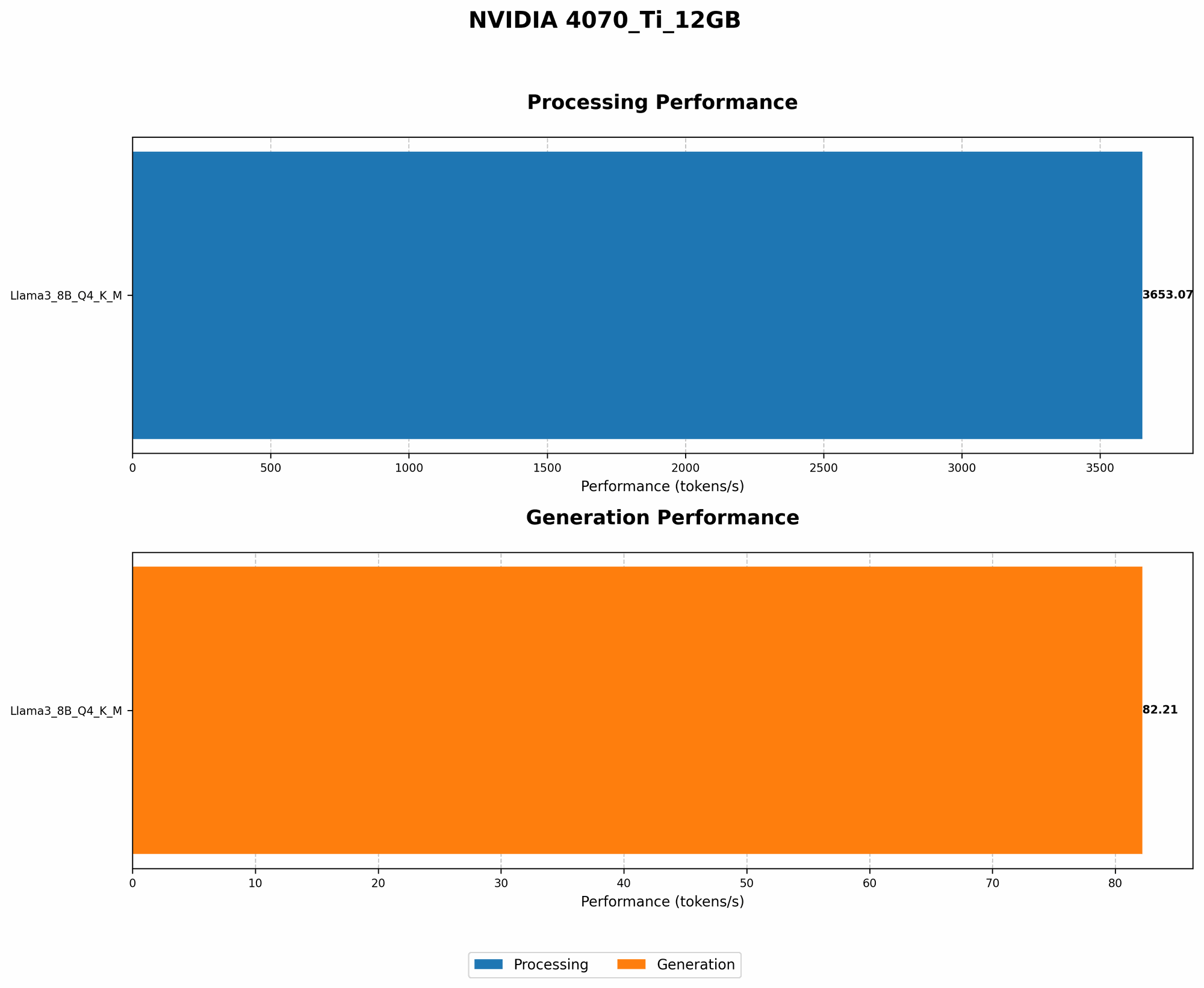
| Llama 3 8B Q4KM | 82.21 | 3653.07 |
| Llama 3 8B F16 | N/A | N/A |
The 4070 Ti 12GB demonstrates solid performance with the Llama 3 8B model, especially when running in quantized (Q4KM) format.
Quantization: What It Means for Your GPU
Quantization is a technique used to reduce the size of LLM models and make them run more efficiently on your GPU. It essentially converts the model's weights (the parameters that determine its behavior) into a smaller, compressed representation. This can significantly improve performance and reduce memory usage.
Think of it like compressing an image or video file – you lose some information, but the file size becomes much smaller, allowing it to load and process faster.
Llama 3 70B
| Model | Token Generation Speed (Tokens/second) | Token Processing Speed (Tokens/second) |
|---|---|---|
| Llama 3 70B Q4KM | N/A | N/A |
| Llama 3 70B F16 | N/A | N/A |
Unfortunately, we don't have any data on the 4070 Ti 12GB's performance with the much larger Llama 3 70B model.
This means that the 4070 Ti 12GB might not be powerful enough to handle the 70B model smoothly without experiencing significant performance degradation.
Conclusion: Choosing The Right Cooling Solution for You
The 4070 Ti 12GB is a capable GPU that can deliver impressive performance with smaller LLMs, but for larger models, you'll need a robust cooling solution.
- Stock Cooler: Adequate for light AI tasks or smaller models, but may not be enough for demanding workloads.
- Aftermarket Air Cooler: A cost-effective upgrade that offers better cooling performance compared to the stock cooler.
- Liquid Cooling: The ultimate solution for extreme users, offering the best cooling performance and quiet operation.
Ultimately, the best cooling solution for you depends on your specific needs and budget. For smaller models like Llama 3 8B, an aftermarket air cooler might be sufficient. However, if you plan to run larger models or push your GPU to its limits, consider investing in liquid cooling for optimal performance and longevity.
FAQ
Q: What are the pros and cons of using an aftermarket air cooler?
Pros: * Improved cooling compared to stock cooler: An aftermarket air cooler helps to keep your GPU cooler, preventing throttling and improving performance. * Relatively affordable: Aftermarket air coolers are generally more affordable than liquid coolers. * Easy to install: Installing an aftermarket air cooler is usually a straightforward task, even for beginners.
Cons: * Might not be as effective as liquid cooling: Air cooling is less effective than liquid cooling, especially for extreme workloads. * Can be noisy: Some aftermarket air coolers can produce noticeable noise, especially at high speeds. * Limited overclocking potential: Compared to liquid cooling, air cooling offers less headroom for overclocking.
Q: What are some of the best aftermarket air coolers for the 4070 Ti 12GB?
There are many great aftermarket air coolers on the market for the 4070 Ti 12GB. Some popular options include:
- Noctua NH-D15: A high-performance air cooler known for its excellent cooling and quiet operation.
- Be Quiet! Dark Rock Pro 4: Another top-tier air cooler with a large heatsink and powerful fans.
- Cooler Master Hyper 212 Evo: A budget-friendly air cooler that offers solid cooling performance and value for money.
Q: What factors should I consider when choosing a cooling solution?
- Budget: Cooling solutions range in price from affordable air coolers to more expensive liquid cooling systems.
- Noise: Some cooling solutions can be noisy, especially at high speeds.
- Performance: The best cooling solution will be able to keep your GPU cool and prevent throttling, maximizing performance.
- Ease of installation: Consider the complexity of installation before choosing a cooling solution.
Keywords
NVIDIA 4070 Ti 12GB, LLM, Cooling, GPU, AI, AI Workloads, Stock Cooler, Aftermarket Air Cooler, Liquid Cooling, Llama 3, Llama 3 8B, Llama 3 70B, Token Generation Speed, Token Processing Speed, Quantization, GPU Temperature, Throttling, Performance Optimization.