What's the Best Cooling Solution for NVIDIA 3080 10GB During AI Workloads?
Introduction
Running large language models (LLMs) locally can be a powerful and rewarding experience. You get the speed and control of your own hardware, plus the thrill of seeing your computer chug along with the immense computational power required to bring these models to life. But along with this comes a potential pitfall: the heat!
These advanced AI models can really push your hardware to the limit, raising temperatures to levels that could damage your precious hardware, especially your graphics card. So, what's the best way to keep your NVIDIA 3080 10GB cool and running smoothly during those intense LLM sessions? Let's dive into it!
The Importance of Cooling for Your NVIDIA 3080 10GB
Think of your 3080 as a high-performance athlete. Just like a marathon runner needs to stay hydrated, your GPU needs proper cooling to maintain peak performance. Excessive heat can lead to:
- Throttling: Your GPU will automatically slow down to avoid overheating. This translates to slower token speeds, frustrating pauses during generation, and a less enjoyable LLM experience.
- Reduced lifespan: Sustained heat can damage your GPU's components, shortening its overall lifespan. This is like pushing your car hard but never giving it a break – eventually, it'll break down!
- Unstable performance: The fluctuating temperatures can cause erratic behavior, leading to crashes, glitches, and unpredictable results. You wouldn't want your LLM mid-conversation to suddenly start babbling nonsense, would you?
Understanding GPU Temperatures and Performance
Before we delve into cooling solutions, let's understand the basics of GPU temperatures and how they impact performance. Think of your GPU as a tiny city bustling with activity – the more complex the task, the more energy it consumes and the hotter it gets.
- GPU Core temperature: This measures the temperature of the primary processing unit within your GPU. For the NVIDIA 3080 10GB, the ideal operating range is generally between 65°C and 85°C. Exceeding 85°C can cause throttling.
- Memory temperature: This indicates the temperature of the GPU's memory modules. While not as critical as core temperature, excessive memory heat can lead to performance issues. Aim for below 90°C.
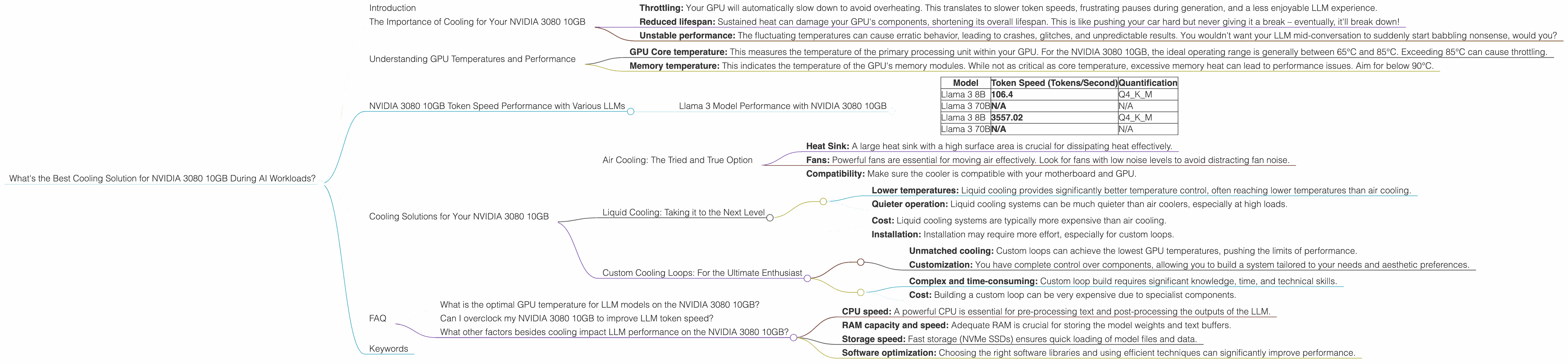
NVIDIA 3080 10GB Token Speed Performance with Various LLMs
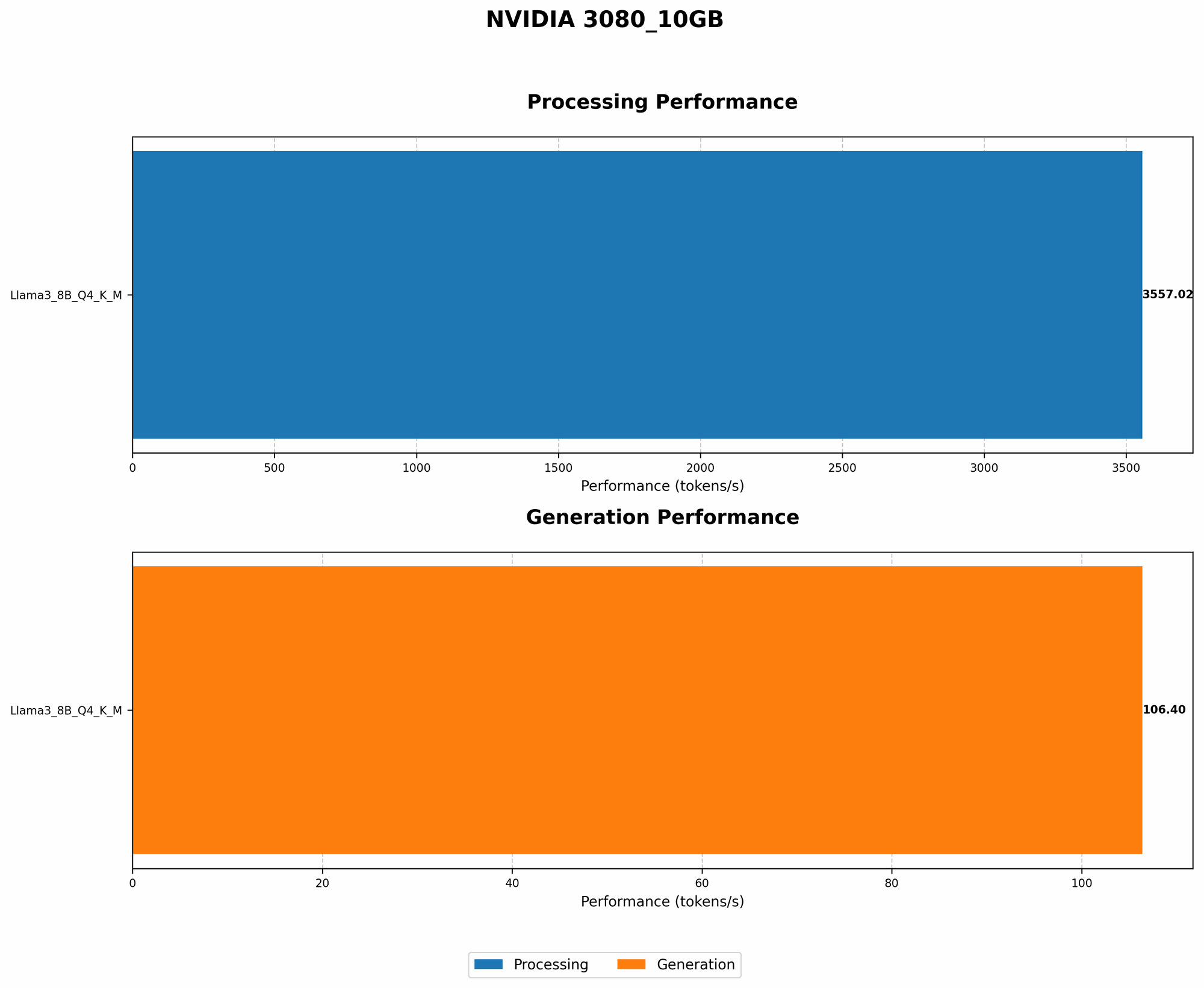
Now, let's look at how the NVIDIA 3080 10GB performs with some popular LLMs, focusing on token speed, a key measure of inference performance. While the dataset mentions both F16 and Q4 quantization methods, it only contains data for Q4 for the Llama 3 models.
Llama 3 Model Performance with NVIDIA 3080 10GB
| Model | Token Speed (Tokens/Second) | Quantification |
|---|---|---|
| Llama 3 8B | 106.4 | Q4KM |
| Llama 3 70B | N/A | N/A |
| Llama 3 8B | 3557.02 | Q4KM |
| Llama 3 70B | N/A | N/A |
- Llama 3 8B: Achieves impressive token speed, capable of generating 106.4 tokens per second for the Generation task. This indicates the ability to quickly process text and generate responses. The Processing task results in 3557.02 tokens/second, highlighting the GPU's strength in handling large amounts of data.
- Llama 3 70B: Unfortunately, there isn't available data for Llama 3 70B on the NVIDIA 3080 10GB, making a direct comparison difficult. However, this gap points to the increasing resource demands of larger LLMs, underscoring the importance of a well-cooled system.
Cooling Solutions for Your NVIDIA 3080 10GB
Now that we've seen how crucial cooling is, let's explore the best options for your NVIDIA 3080 10GB:
Air Cooling: The Tried and True Option
Air cooling is the most common and often the most budget-friendly approach. It involves using fans to circulate air around the GPU, carrying away heat.
Here's what to look for in an air cooler:
- Heat Sink: A large heat sink with a high surface area is crucial for dissipating heat effectively.
- Fans: Powerful fans are essential for moving air effectively. Look for fans with low noise levels to avoid distracting fan noise.
- Compatibility: Make sure the cooler is compatible with your motherboard and GPU.
Liquid Cooling: Taking it to the Next Level
Liquid cooling uses a closed loop system with a water pump to circulate coolant, transferring heat away from the GPU.
Advantages of Liquid Cooling:
- Lower temperatures: Liquid cooling provides significantly better temperature control, often reaching lower temperatures than air cooling.
- Quieter operation: Liquid cooling systems can be much quieter than air coolers, especially at high loads.
Considerations for Liquid Cooling:
- Cost: Liquid cooling systems are typically more expensive than air cooling.
- Installation: Installation may require more effort, especially for custom loops.
Custom Cooling Loops: For the Ultimate Enthusiast
For those chasing the highest performance and the most extreme cooling, custom water loops provide unparalleled customization and cooling potential. These systems involve building your own cooling circuits using specialized components.
Pros of Custom Loops:
- Unmatched cooling: Custom loops can achieve the lowest GPU temperatures, pushing the limits of performance.
- Customization: You have complete control over components, allowing you to build a system tailored to your needs and aesthetic preferences.
Cons of Custom Loops:
- Complex and time-consuming: Custom loop build requires significant knowledge, time, and technical skills.
- Cost: Building a custom loop can be very expensive due to specialist components.
FAQ
What is the optimal GPU temperature for LLM models on the NVIDIA 3080 10GB?
Generally, aim for a GPU core temperature below 85°C and a memory temperature below 90°C. Exceeding these limits can lead to throttling, reduced lifespan, and unstable performance.
Can I overclock my NVIDIA 3080 10GB to improve LLM token speed?
Overclocking can potentially increase performance, but it also increases heat generation. Be cautious when overclocking and ensure adequate cooling to prevent overheating.
What other factors besides cooling impact LLM performance on the NVIDIA 3080 10GB?
- CPU speed: A powerful CPU is essential for pre-processing text and post-processing the outputs of the LLM.
- RAM capacity and speed: Adequate RAM is crucial for storing the model weights and text buffers.
- Storage speed: Fast storage (NVMe SSDs) ensures quick loading of model files and data.
- Software optimization: Choosing the right software libraries and using efficient techniques can significantly improve performance.
Keywords
NVIDIA 3080, 10GB, LLM, AI models, cooling, GPU, temperature, token speed, air cooling, liquid cooling, custom loop, Llama 3, 8B, 70B, quantization, F16, Q4, performance, optimization