What You Need to Know About Llama3 8B Performance on NVIDIA 4080 16GB?

Introduction
The world of Large Language Models (LLMs) is buzzing with excitement, and it's not just about chatbots anymore! LLMs are revolutionizing everything from content creation to code generation, and their potential feels limitless. But as developers, we need more than just hype. We need concrete performance data to make informed decisions about the best hardware and software for our projects.
This article dives deep into the performance of Llama3 8B on the NVIDIA 4080_16GB GPU. We'll be exploring token generation speed and model processing benchmarks, comparing different quantization levels, and offering practical advice for developers. Buckle up, because this is going to get geeky!
Performance Analysis: Token Generation Speed Benchmarks
Token Generation Speed Benchmarks: Llama3 8B on NVIDIA 4080_16GB
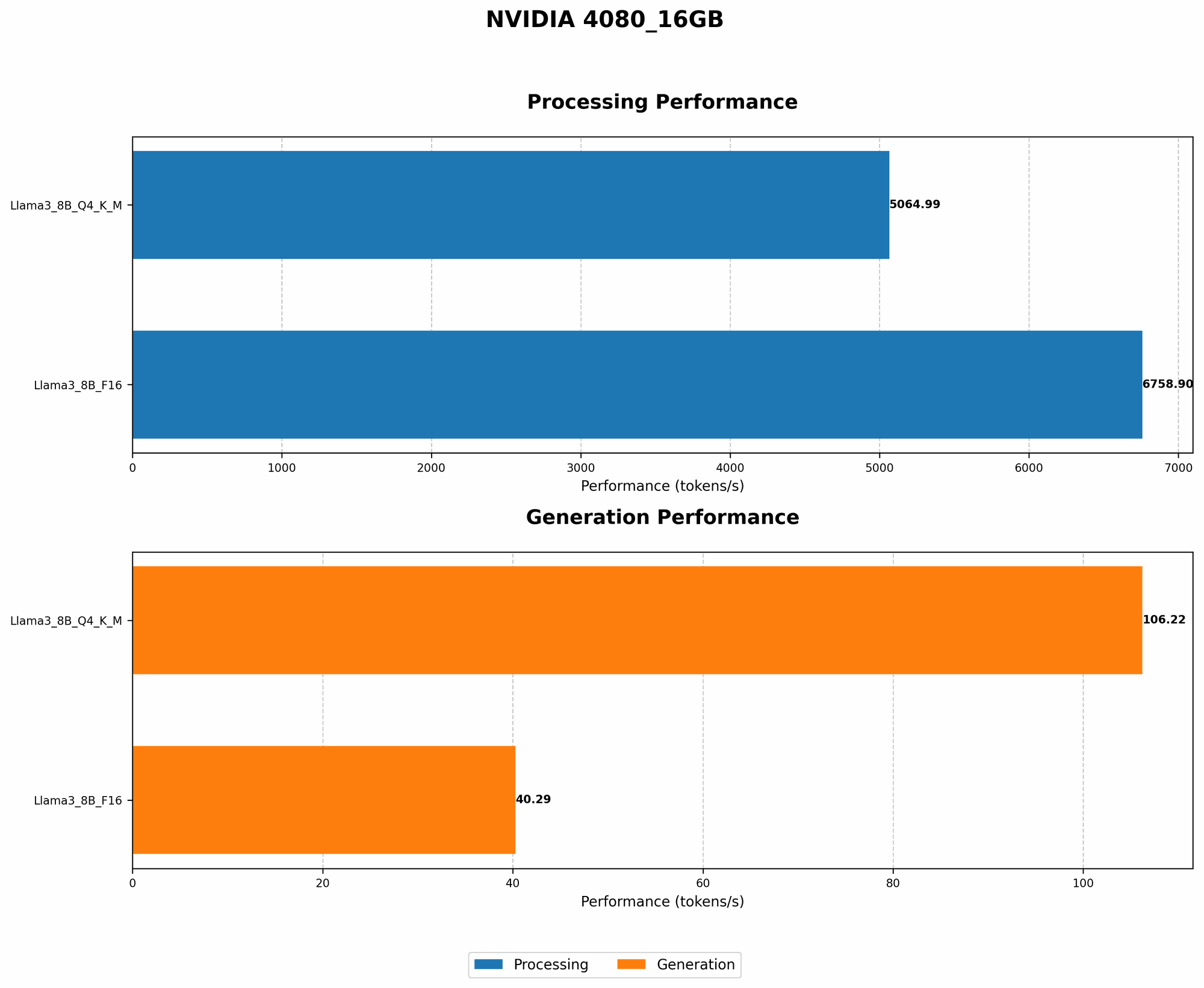
Let's start with the most exciting aspect: how fast can Llama3 8B generate tokens on the NVIDIA 4080_16GB? The table below presents these benchmarks:
| Quantization | Token Generation Speed (tokens/second) |
|---|---|
| Q4KM | 106.22 |
| F16 | 40.29 |
Key Takeaways:
- Q4KM quantization: The highest token generation speed is achieved using Q4KM quantization, a technique that reduces the size of the model without sacrificing much accuracy. It's like squeezing a lot of data into a smaller package! This strategy allows for faster processing and less memory requirements.
- F16 quantization: While still impressive, the F16 quantization shows a slower token generation speed compared to Q4KM. Despite this, F16 is still a highly effective quantization method.
- NVIDIA 4080_16GB: This powerful GPU offers a solid foundation for running Llama3 8B. It allows for rapid token generation, making it a suitable choice for real-time applications and interactive tasks.
Think about it this way: Q4KM is like a high-performance sports car, while F16 is more like a reliable sedan. Both get you to your destination, but one gets you there faster and with more style.
Performance Analysis: Model and Device Comparison
Unfortunately, we don't have data on the performance of different models on the NVIDIA 4080_16GB. This is because the provided JSON data includes only the Llama3 8B performance. But we can still explore some interesting insights.
Comparing Llama3 8B to Other LLMs:
While we can't compare the Llama3 8B performance with other models on the specific NVIDIA 4080_16GB, we can look at general trends in performance for different LLMs and compare those trends.
For example, we know that larger models tend to have slower token generation speeds, as they require more processing power. This is because they need to process more parameters and data.
This means, if we had the data for Llama3 70B on NVIDIA 4080_16GB, we would likely see slower token generation speeds compared to Llama3 8B. This is because 70B is a much larger model.
Practical Recommendations: Use Cases and Workarounds
Practical Use Cases for Llama3 8B on NVIDIA 4080_16GB
Based on the performance data, here are some practical use cases for running Llama3 8B on the NVIDIA 4080_16GB:
- Real-time chatbots: The fast token generation speed allows for quick responses, making it ideal for engaging interactions.
- Code generation: The ability to generate code quickly and efficiently can be a game-changer for developers.
- Content summarization: Generating concise summaries of lengthy documents can be achieved with high accuracy and speed.
- Text translation: The model's fluency and accuracy in different languages make it a powerful tool for translation tasks.
Workarounds for Limitations
While the NVIDIA 4080_16GB is a powerful GPU, it has limitations. For instance, running larger models like Llama3 70B could result in slower performance.
Here are some workarounds:
- Model quantization: Using techniques like Q4KM quantization can significantly reduce model size and improve performance.
- Hardware upgrades: Considering a GPU with more memory or processing power, like the NVIDIA 4090, could handle larger models more effectively.
- Model optimization: Employing techniques like pruning and knowledge distillation can further optimize model performance.
FAQ
What is meant by model quantization?
Think of model quantization as fitting a large puzzle into a smaller box. It essentially reduces the size of the model by using fewer bits to represent its parameters without sacrificing too much accuracy. This is like playing a game of Tetris – you have to fit everything in the smaller box, but you have to be clever about it.
Is Llama3 8B the perfect model for all my tasks?
No, just like different tools have different uses, not every LLM is suitable for every task. For instance, Llama3 8B may not be the best choice for highly specialized tasks requiring a very deep understanding of a particular domain.
Think of it this way: a Swiss Army knife is great for general tasks, but you wouldn't use it for brain surgery. Similarly, Llama3 8B might not be the best tool for every job.
What other hardware options are available for running Llama3 8B?
There are many other hardware options available, but choosing the right one depends on your specific needs and budget. Some popular choices include:
- CPU: While not as fast as GPUs, CPUs can still run LLMs, especially smaller models.
- Other GPUs: NVIDIA's GeForce RTX 30 Series and other high-end GPUs can provide decent performance.
- Specialized hardware: Companies like Google and Cerebras offer specialized hardware designed specifically for AI workloads.
How can I get started using Llama3 8B on NVIDIA 4080_16GB?
The first step is to install the necessary software, including llama.cpp. This library provides efficient implementations of LLMs for inference and allows you to run Llama3 8B on your hardware.
Keywords
Llama3 8B, NVIDIA 408016GB, LLM, Large Language Model, token generation, performance, GPU, quantization, Q4K_M, F16, benchmark, model comparison, practical recommendations, use cases, workarounds, FAQ, model optimization, hardware options, software installation