What You Need to Know About Llama3 8B Performance on NVIDIA 3080 10GB?

Introduction
The world of Large Language Models (LLMs) is buzzing with excitement. These powerful AI models can generate text, translate languages, write different kinds of creative content, and answer your questions in an informative way. But running LLMs, especially the bigger ones, can be a resource-intensive task.
For developers and enthusiasts interested in exploring LLMs locally, choosing the right hardware is crucial. This article dives deep into the performance of the Llama3 8B model on the popular NVIDIA 3080_10GB GPU. We'll explore how this combination performs, analyzing the token generation capabilities, exploring model and device comparisons, and providing practical recommendations for use cases. So, grab your coffee, put on your geekiest hat, and let's dive into the world of LLMs!
Performance Analysis: Token Generation Speed Benchmarks
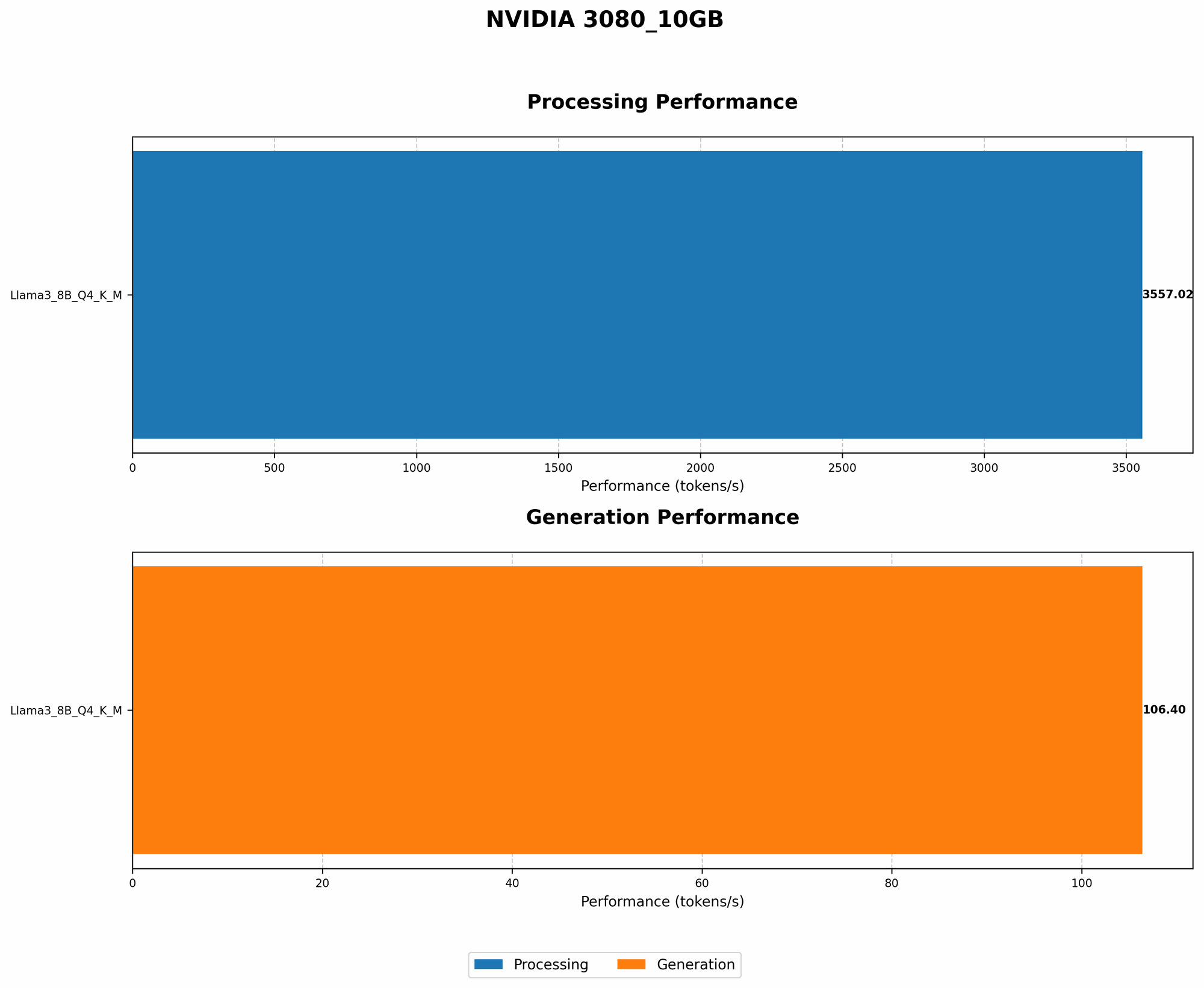
The speed at which a model generates tokens – the building blocks of text – is a critical aspect of performance. Let's examine how the Llama3 8B model generates tokens on the NVIDIA 3080_10GB.
Token Generation Speed Benchmarks: NVIDIA 3080_10GB and Llama3 8B
| Model | Quantization | Generation Speed (Tokens/Second) |
|---|---|---|
| Llama3 8B | Q4KM | 106.4 |
| Llama3 8B | F16 | N/A |
Key Takeaways:
- Llama3 8B with Q4KM Quantization: Achieves a respectable 106.4 tokens per second on the NVIDIA 3080_10GB. This is a good performance for a model of its size.
- Llama3 8B with F16 Quantization: Unfortunately, there's no data available for the Llama3 8B model with F16 quantization on this specific GPU. This is because the F16 quantization might not be supported by this specific hardware/software combination.
Simplified Explanation:
Think of token generation speed like typing speed. The higher the tokens per second, the faster the model can "type" and generate text.
What's Quantization?: It's like compressing a file, making it smaller to fit on a device with limited memory. Q4KM and F16 are different quantization methods. Q4KM is highly compressed, using 4 bits per number. F16 uses 16 bits, offering slightly better precision.
Performance Analysis: Model and Device Comparison
Now, let's see how the Llama3 8B model on the NVIDIA 3080_10GB compares to other potential combinations.
Model and Device Comparison: Llama3 8B on NVIDIA 3080_10GB
Unfortunately, there's no data available for other Llama models (70B) or other quantization types on this specific NVIDIA 3080_10GB GPU. This might be because these configurations haven't been tested, or the hardware limitations might not allow for those configurations.
Practical Recommendations: Use Cases and Workarounds
So, how can you leverage the capabilities of the Llama3 8B model on the NVIDIA 3080_10GB effectively? Here are some use cases and workarounds:
Use Case: Text Generation and Text Completion
- Ideal Scenario: The NVIDIA 308010GB with Q4K_M quantization offers you a good balance of performance and efficiency for tasks like generating creative text content, writing emails, or completing sentences.
- Limitations: If you need F16 quantization for more precision, you might need a different GPU or explore other optimization strategies.
Use Case: Chatbots and Conversational AI
- Ideal Scenario: The Llama3 8B model on the NVIDIA 3080_10GB can handle basic chatbot interactions, especially if you can optimize your prompt engineering to keep responses concise.
- Limitations: For more complex and lengthy conversations, you may need a larger model or a more powerful GPU.
Use Case: Code Generation
- Ideal Scenario: You can use the Llama3 8B model to generate code snippets, especially in languages that are less complex.
- Limitations: For more complex code generation, the 8B model might not be ideal. You may need a more powerful GPU or explore larger language models.
Workarounds: Optimization and Hardware
- Software Optimization: Experiment with different llama.cpp settings or use techniques like prompt engineering to optimize performance. For example, try using a different batch size or adjusting the number of layers used during inference.
- Hardware Upgrade: Consider upgrading to a GPU with more memory, like the NVIDIA 3090, to accommodate larger models or different quantization levels.
Remember:
- The performance of your model depends on various factors—your code, the specific task, and the way you use your hardware.
- Optimizing your code and choosing the right hardware combination is key for optimal performance.
FAQ
Q: What is the biggest LLM that I can run on my NVIDIA 308010GB GPU? * A: Unfortunately, there's no definitive answer because it depends on the LLM, its quantization, and your specific hardware configuration. Generally, you can run smaller models with lower quantization levels on a 308010GB. However, running larger models or more complex quantization levels might require an upgrade.
Q: Is the NVIDIA 3080_10GB a good choice for running LLMs? * A: It can be a good choice for smaller to medium-sized LLMs and basic use cases. For larger models or more demanding tasks, you might need a more powerful GPU.
Q: What other GPUs can I use for running LLMs? * A: There are numerous choices, each with varying capabilities. Popular options include the newer RTX 40 series, NVIDIA A100, and the AMD Radeon RX 7900 series.
Q: Should I run my LLM on CPU or GPU? * A: GPUs offer better performance for LLM inference, generally resulting in faster token generation speeds.
Q: Where can I get more information about running LLMs on the NVIDIA 3080_10GB GPU? * A: The llama.cpp GitHub repository (https://github.com/ggerganov/llama.cpp) and the GPU Benchmarks on LLM Inference repository (https://github.com/XiongjieDai/GPU-Benchmarks-on-LLM-Inference) are great resources.
Keywords
Llama3 8B, NVIDIA 308010GB, LLM, GPU, token generation speed, quantization, Q4K_M, F16, text generation, text completion, chatbot, conversational AI, code generation, performance, optimization, hardware, AI, deep learning, machine learning, model, device, comparison, use cases, workarounds, recommendations, benchmarks, inference, training, developer, geek, AI enthusiast