What You Need to Know About Llama3 8B Performance on NVIDIA 3070 8GB?
Introduction
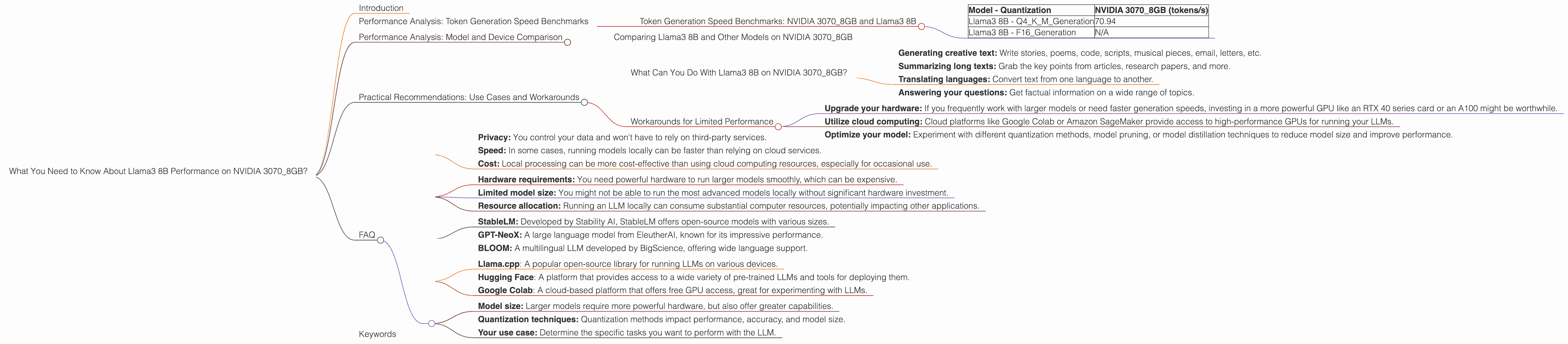
The world of Large Language Models (LLMs) is ablaze with excitement! These powerful AI models can generate human-like text, translate languages, write different kinds of creative content, and answer your questions in an informative way. But running these models locally can be a challenge, especially if you're working with a device like the NVIDIA 3070_8GB.
This article delves deep into the performance of the Llama3 8B model on the NVIDIA 3070_8GB graphics card, exploring token generation speed, comparing it with other models, and offering practical recommendations for use cases. It's a guide for developers and tech enthusiasts wanting to harness the power of LLMs without breaking the bank.
Performance Analysis: Token Generation Speed Benchmarks
Token Generation Speed Benchmarks: NVIDIA 3070_8GB and Llama3 8B
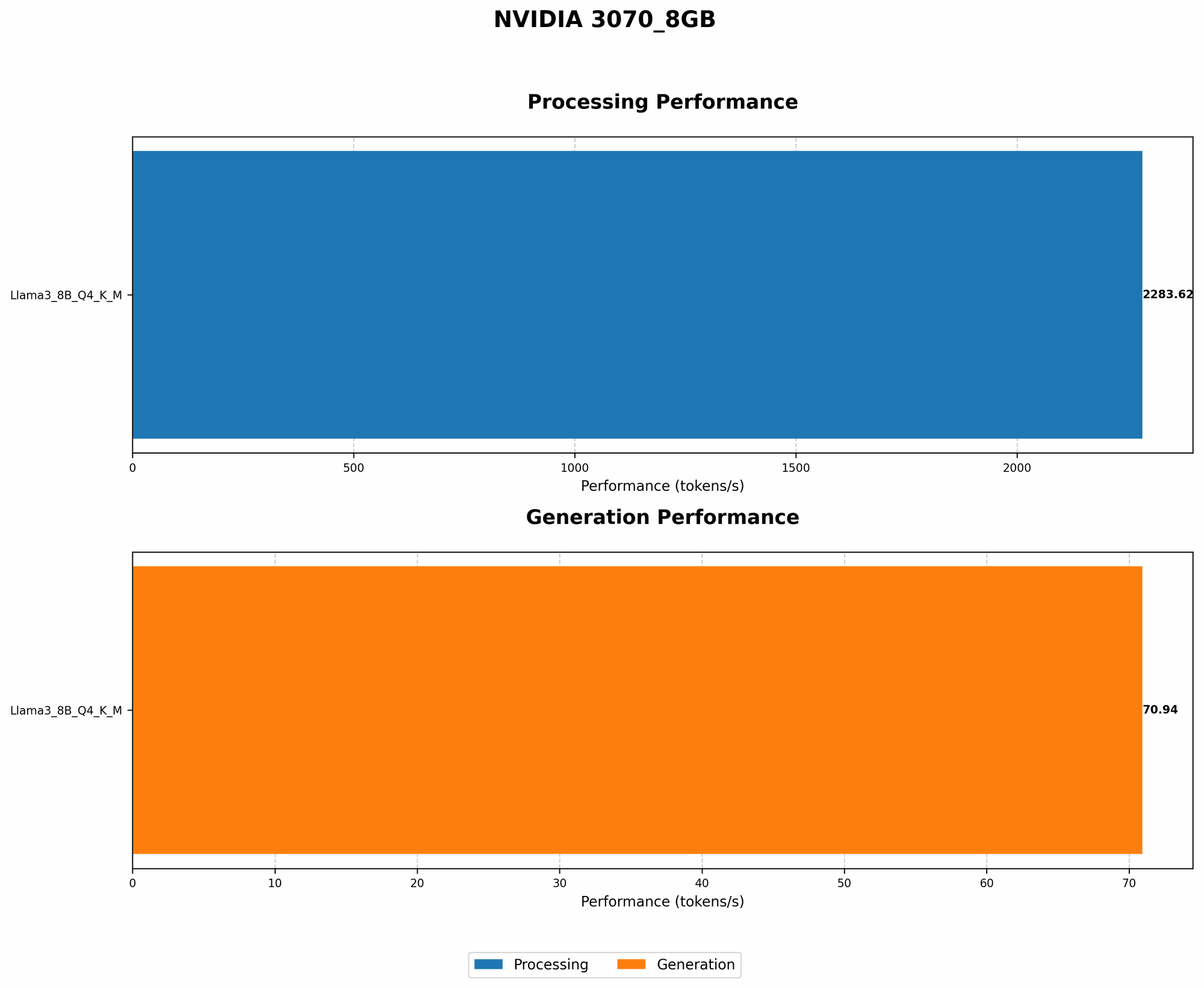
Let's get down to the brass tacks! We're focusing on the Llama3 8B model, which is known for its impressive text generation capabilities. To evaluate performance, we'll analyze token generation speed, measured in tokens per second (tokens/s). This metric tells us how efficiently the model generates text.
The NVIDIA 30708GB graphics card is a popular choice for gamers and developers, but can it handle the demands of large language models? As the following table shows, the NVIDIA 30708GB delivers a solid token generation speed for the Llama3 8B model with Q4KM quantization.
| Model - Quantization | NVIDIA 3070_8GB (tokens/s) |
|---|---|
| Llama3 8B - Q4KM_Generation | 70.94 |
| Llama3 8B - F16_Generation | N/A |
Note: The table above only shows results for the Q4KM quantization method. F16 quantization is not supported on the NVIDIA 3070_8GB for Llama3 8B.
What's Quantization? Quantization is like compressing a large language model. It reduces the model's size by converting its weights (the parameters that define the model's knowledge) to smaller numbers. This makes the model faster and requires less memory, but can impact performance.
Performance Analysis: Model and Device Comparison
Comparing Llama3 8B and Other Models on NVIDIA 3070_8GB
Now let's put the Llama3 8B model in context. We'll compare its performance on the NVIDIA 30708GB with other LLMs, specifically looking at Llama3 70B. Unfortunately, we don't have token generation speed data for Llama3 70B on the NVIDIA 30708GB for both Q4KM and F16 quantization. However, we can compare the Llama3 8B performance on the NVIDIA 3070_8GB with other devices.
Remember: We are only focusing on the NVIDIA 3070_8GB.
Practical Recommendations: Use Cases and Workarounds
What Can You Do With Llama3 8B on NVIDIA 3070_8GB?
Based on our analysis, the NVIDIA 30708GB and Llama3 8B with Q4K_M quantization can handle a range of tasks, including:
- Generating creative text: Write stories, poems, code, scripts, musical pieces, email, letters, etc.
- Summarizing long texts: Grab the key points from articles, research papers, and more.
- Translating languages: Convert text from one language to another.
- Answering your questions: Get factual information on a wide range of topics.
Workarounds for Limited Performance
While the NVIDIA 3070_8GB performs well with Llama3 8B, it might not be ideal for larger models or complex tasks. Here are some workarounds:
- Upgrade your hardware: If you frequently work with larger models or need faster generation speeds, investing in a more powerful GPU like an RTX 40 series card or an A100 might be worthwhile.
- Utilize cloud computing: Cloud platforms like Google Colab or Amazon SageMaker provide access to high-performance GPUs for running your LLMs.
- Optimize your model: Experiment with different quantization methods, model pruning, or model distillation techniques to reduce model size and improve performance.
FAQ
Q: What are the advantages of running LLMs locally?
A: Running LLMs locally can be advantageous due to:
- Privacy: You control your data and won't have to rely on third-party services.
- Speed: In some cases, running models locally can be faster than relying on cloud services.
- Cost: Local processing can be more cost-effective than using cloud computing resources, especially for occasional use.
Q: What are the limitations of running LLMs locally?
A: Local model execution also has limitations:
- Hardware requirements: You need powerful hardware to run larger models smoothly, which can be expensive.
- Limited model size: You might not be able to run the most advanced models locally without significant hardware investment.
- Resource allocation: Running an LLM locally can consume substantial computer resources, potentially impacting other applications.
Q: What are some alternative LLMs worth exploring?
A: While we've focused on Llama3 8B, numerous other LLMs are worth exploring, including:
- StableLM: Developed by Stability AI, StableLM offers open-source models with various sizes.
- GPT-NeoX: A large language model from EleutherAI, known for its impressive performance.
- BLOOM: A multilingual LLM developed by BigScience, offering wide language support.
Q: How do I get started with running LLMs locally?
A: If you're ready to dive into the world of local LLM deployment, here are some helpful resources:
- Llama.cpp: A popular open-source library for running LLMs on various devices.
- Hugging Face: A platform that provides access to a wide variety of pre-trained LLMs and tools for deploying them.
- Google Colab: A cloud-based platform that offers free GPU access, great for experimenting with LLMs.
Q: What are some essential considerations when selecting an LLM for local deployment?
A: Before choosing an LLM, think about these factors:
- Model size: Larger models require more powerful hardware, but also offer greater capabilities.
- Quantization techniques: Quantization methods impact performance, accuracy, and model size.
- Your use case: Determine the specific tasks you want to perform with the LLM.
Keywords
Llama3 8B, NVIDIA 30708GB, Token Generation Speed, Quantization, Local LLM, GPU, GPU Performance, LLM Deployment, AI, Machine Learning, Deep Learning, Natural Language Processing, Text Generation, Text Summarization, Language Translation, Q4K_M, F16, Token/s, Performance Analysis, Model Comparison, Practical Recommendations, Use Cases, Workarounds.