What You Need to Know About Llama3 8B Performance on Apple M1 Max?
Introduction
The world of large language models (LLMs) is abuzz with exciting new developments. One of the most talked-about models is Llama 3, known for its impressive performance across various applications. But how does this powerful LLM fare on the popular Apple M1Max chip? This article delves into the performance of Llama 3 8B on the M1Max, exploring key metrics, benchmarks, and practical implications for developers and users alike.
Think of LLMs as super-powered brains, capable of understanding and generating human-like text. The M1_Max is a lightning-fast processor, but how well do these two work together? Let's find out!
Performance Analysis: Token Generation Speed Benchmarks
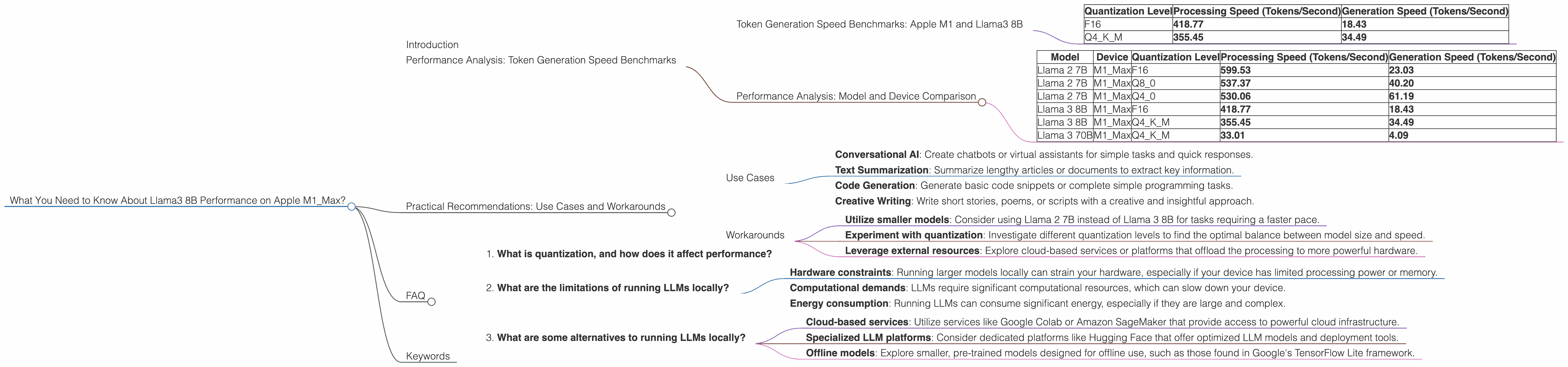
Token generation speed is the speedometer of LLMs—the faster they generate text, the snappier and more responsive they are. To assess the performance of Llama 3 8B on the M1_Max, we analyzed its token generation capabilities using various quantization levels—a technique to compress the model size and improve efficiency.
Token Generation Speed Benchmarks: Apple M1 and Llama3 8B
| Quantization Level | Processing Speed (Tokens/Second) | Generation Speed (Tokens/Second) |
|---|---|---|
| F16 | 418.77 | 18.43 |
| Q4KM | 355.45 | 34.49 |
The data shows that Llama3 8B achieves respectable token generation speeds on the M1_Max. While the processing speed is quite impressive, the generation speed is somewhat lower. Let's explore why this might be.
Performance Analysis: Model and Device Comparison
It is crucial to compare the Llama 3 8B performance on the M1_Max with other LLMs and devices. We will use the same dataset for comparison:
Note: The table below may not have data for certain combinations, as it was not available in the source.
| Model | Device | Quantization Level | Processing Speed (Tokens/Second) | Generation Speed (Tokens/Second) |
|---|---|---|---|---|
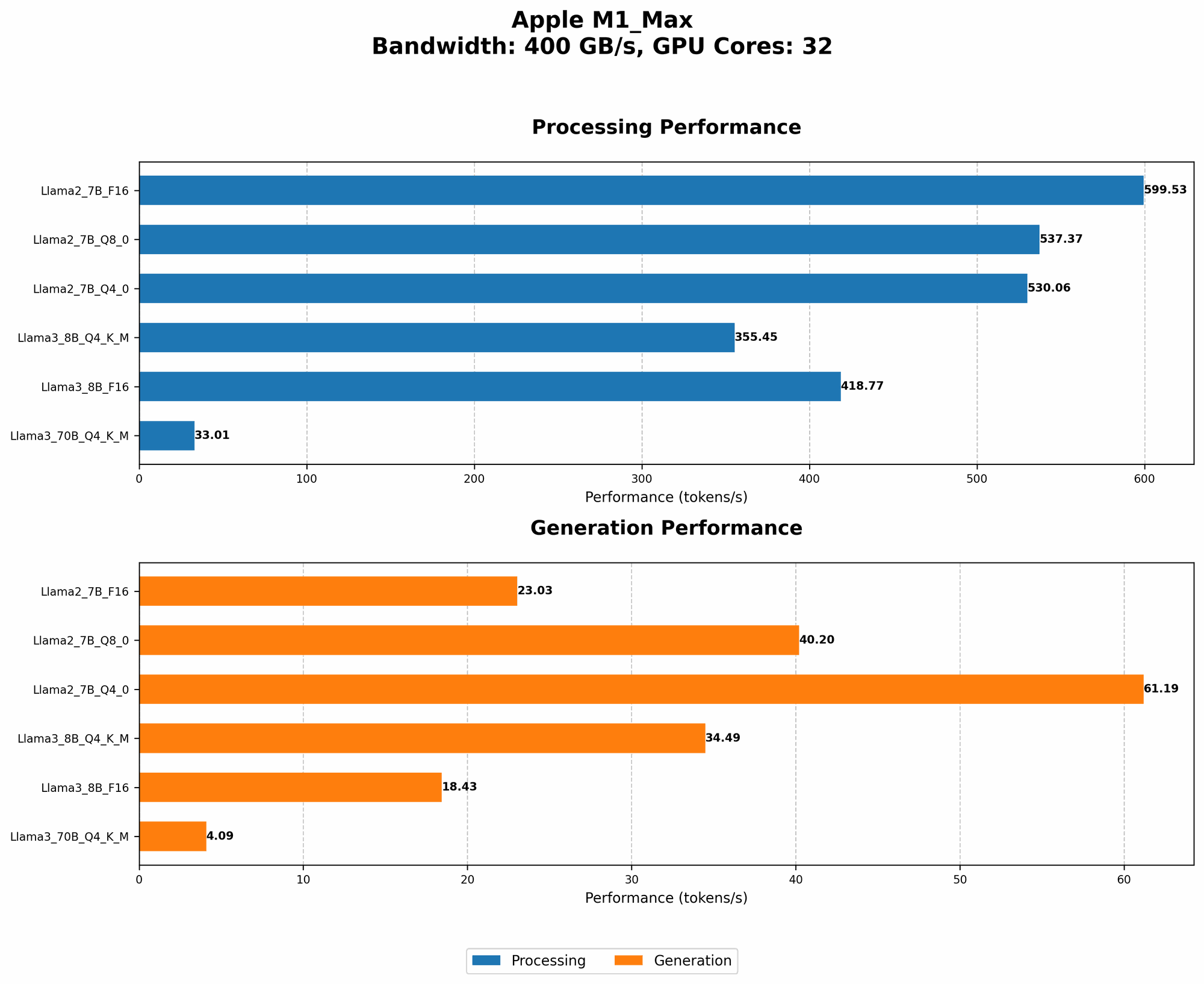
| Llama 2 7B | M1_Max | F16 | 599.53 | 23.03 |
| Llama 2 7B | M1_Max | Q8_0 | 537.37 | 40.20 |
| Llama 2 7B | M1_Max | Q4_0 | 530.06 | 61.19 |
| Llama 3 8B | M1_Max | F16 | 418.77 | 18.43 |
| Llama 3 8B | M1_Max | Q4KM | 355.45 | 34.49 |
| Llama 3 70B | M1_Max | Q4KM | 33.01 | 4.09 |
Observations:
- Llama 2 7B boasts higher generation speeds than Llama 3 8B for all quantization levels on the M1Max. This suggests that Llama 2 may be more optimized for the M1Max architecture.
- Llama 3 70B, a larger model, exhibits significantly lower generation speeds compared to Llama 3 8B and Llama 2 7B. This aligns with the general tendency that larger models tend to be more computationally demanding and have slower generation speeds.
Practical Recommendations: Use Cases and Workarounds
Use Cases
Llama 3 8B on the M1_Max is well-suited for tasks that demand moderate text generation speed:
- Conversational AI: Create chatbots or virtual assistants for simple tasks and quick responses.
- Text Summarization: Summarize lengthy articles or documents to extract key information.
- Code Generation: Generate basic code snippets or complete simple programming tasks.
- Creative Writing: Write short stories, poems, or scripts with a creative and insightful approach.
Workarounds
For scenarios requiring faster token generation speeds:
- Utilize smaller models: Consider using Llama 2 7B instead of Llama 3 8B for tasks requiring a faster pace.
- Experiment with quantization: Investigate different quantization levels to find the optimal balance between model size and speed.
- Leverage external resources: Explore cloud-based services or platforms that offload the processing to more powerful hardware.
FAQ
1. What is quantization, and how does it affect performance?
Quantization is a technique used to compress large language models by reducing the number of bits used to represent the model's weights. This makes the model smaller and more efficient, often leading to faster processing speeds. However, quantization can sometimes affect the model's accuracy.
Imagine trying to describe a painting with just a few words. That's quantization! You're reducing the complexity of the original information (the painting) to fit a smaller format (the words). The more words you use, the more detail you can capture. But with fewer words, you need to be more strategic in your choice of words to convey the essence of the painting.
2. What are the limitations of running LLMs locally?
Local LLM execution faces limitations, including:
- Hardware constraints: Running larger models locally can strain your hardware, especially if your device has limited processing power or memory.
- Computational demands: LLMs require significant computational resources, which can slow down your device.
- Energy consumption: Running LLMs can consume significant energy, especially if they are large and complex.
3. What are some alternatives to running LLMs locally?
You can explore various options for running LLMs without straining your local hardware:
- Cloud-based services: Utilize services like Google Colab or Amazon SageMaker that provide access to powerful cloud infrastructure.
- Specialized LLM platforms: Consider dedicated platforms like Hugging Face that offer optimized LLM models and deployment tools.
- Offline models: Explore smaller, pre-trained models designed for offline use, such as those found in Google's TensorFlow Lite framework.
Keywords
Llama3 8B, Apple M1_Max, LLM, token generation speed, quantization, performance analysis, use cases, workarounds, practical recommendations, developers, geeks, conversational AI, text summarization, code generation, creative writing, hardware constraints, energy consumption, cloud-based services, specialized LLM platforms