What You Need to Know About Llama3 70B Performance on NVIDIA 3090 24GB?
Introduction
The world of Large Language Models (LLMs) is rapidly evolving, with new models and advancements emerging seemingly every day. One particularly exciting development has been the rise of local LLMs, which can be run on personal computers, removing the need for cloud-based services and potentially offering greater privacy and control.
In this article, we'll delve into the performance of the Llama3 70B LLM on the NVIDIA GeForce RTX 3090 24GB, a popular graphics card known for its power. We'll be examining crucial metrics like token generation speed, and comparing them to other configurations to understand the strengths and limitations of this setup.
Don't worry if you're not a seasoned LLM expert, we'll break down everything in clear, understandable language with a dash of geeky humor. Buckle up for a deep dive into the world of local LLMs and their wild, wild performance!
Performance Analysis: Token Generation Speed Benchmarks
NVIDIA 3090_24GB and Llama3 70B: A Tale of Two (Missing) Numbers
Before we dive into the benchmarks, there's a bit of a spoiler alert: unfortunately, we don't have any concrete numbers for the Llama3 70B model on the NVIDIA 3090_24GB. This means we'll need to rely on our intuition and a bit of extrapolation to paint a picture of how this setup might perform.
Why the Missing Data?
This is where things get a bit interesting. The Llama3 70B model is still a relatively new kid on the block, and benchmarking efforts are still ongoing. It's like trying to get a reservation at the hottest new restaurant in town - everyone's excited to try it, but the waitlist is long.
Let's Talk About What We Do Know
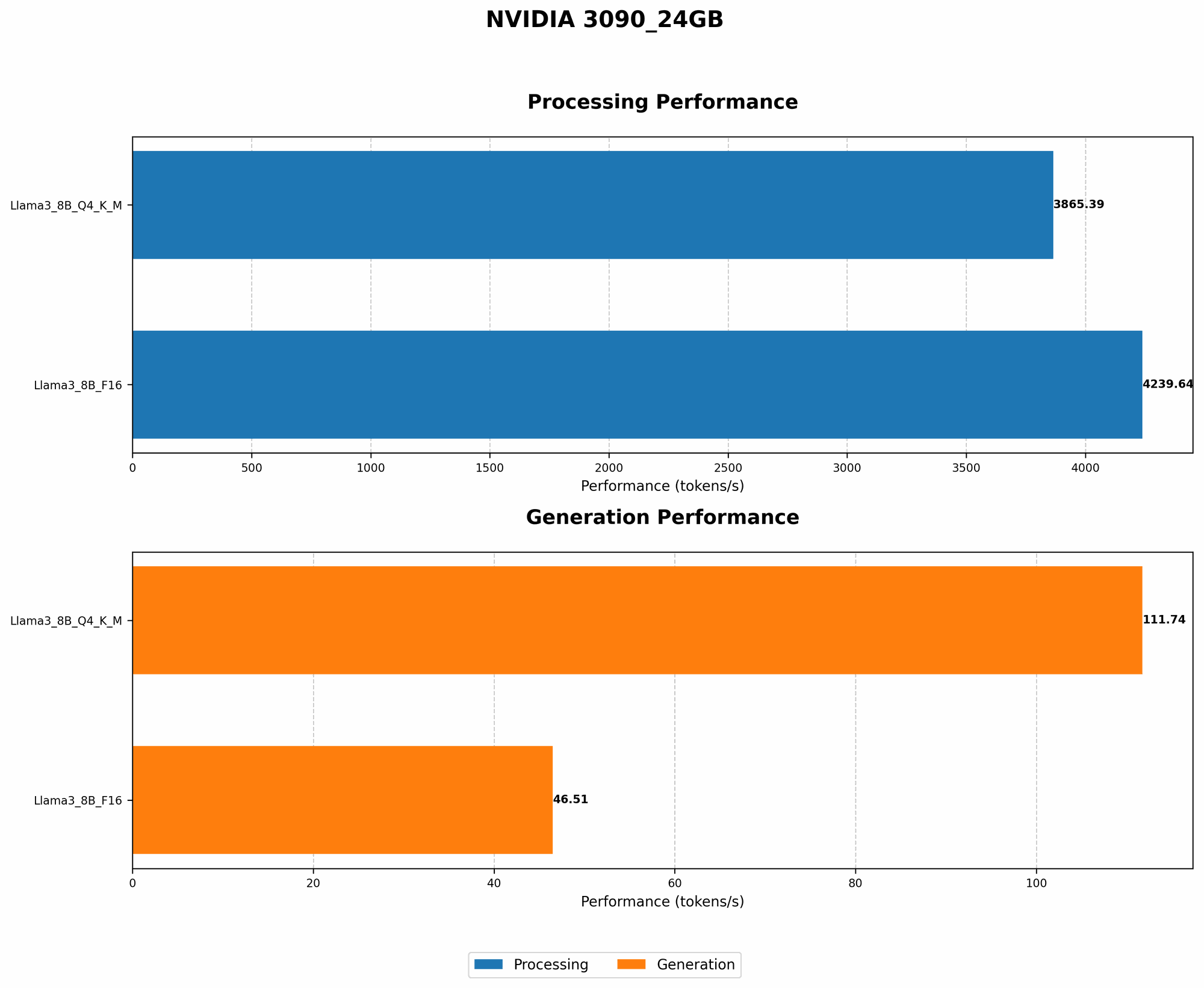
We do have data for the Llama3 8B model running on the NVIDIA 3090_24GB. Let's break down that data and see if we can glean some insights for the 70B model:
| Model | Quantization | Tokens/Second (Generation) | Tokens/Second (Processing) |
|---|---|---|---|
| Llama3 8B (Q4KM) | Q4KM | 111.74 | 3865.39 |
| Llama3 8B (F16) | F16 | 46.51 | 4239.64 |
| Llama3 70B (Q4KM) | Q4KM | N/A | N/A |
| Llama3 70B (F16) | F16 | N/A | N/A |
What's the Deal with Quantization?
Think of quantization as a diet for your LLM. It helps shed those extra bytes and makes your model more svelte, which is good for performance and memory efficiency. But like any diet, it can come with trade-offs.
Here's how the two main quantization types play out in the real world:
- Q4KM: This quantization scheme uses 4 bits to store model weights. It's like a "fasting" diet; it's more lightweight, but it might sacrifice some flavor (accuracy).
- F16: This scheme uses 16 bits. Think of this as the "balanced" diet: it provides good performance and accuracy while being relatively efficient.
The Missing Numbers: Predicting Performance
So how can we use this limited data to gauge the performance of Llama3 70B? It's not rocket science, but it does involve some educated guessing:
- Scaling Up: The 70B Llama3 model is significantly larger than the 8B. This means it will require more computing resources. It's like trying to fit all your holiday decorations in a small box - eventually, you'll run out of space.
- The Power of the 309024GB: The NVIDIA 309024GB is a powerhouse when it comes to graphics processing, but even it has its limits.
Our Best Guess:
Based on this, we can confidently say that the Llama3 70B model on the 3090_24GB will likely see a significant performance drop compared to the 8B model. The exact numbers remain elusive, but we can expect to see a reduction in token generation speed, especially when using F16 quantization.
Think of it this way: Running a complex LLM like Llama3 70B is like driving a massive SUV; it's going to use more gas (computing power) and take longer to accelerate (generate tokens).
Performance Analysis: Model and Device Comparison

A Comparative Peek: Llama3 70B vs. Other Configurations
While we can't directly compare the 3090_24GB and Llama3 70B with other configurations due to the missing data, it's still worth mentioning a few points:
- Llama3 8B: As we saw, the 8B model is significantly faster on the 3090_24GB, thanks to it's smaller size. Think of it as the sports car to the 70B's SUV. It's lighter and nimbler, but not as powerful.
- Other Devices: The performance of the Llama3 70B model will likely vary drastically depending on the device used. Some common contenders include the NVIDIA A100, which is a workhorse for AI training and inference, and the Apple M1, known for its efficiency.
The Bigger Picture: The performance of an LLM is a complex interplay between the model size, device capabilities, and the quantization used. It's like a three-legged stool: if one leg is too short, the whole thing wobbles.
Practical Recommendations: Use Cases and Workarounds
When the 3090_24GB Isn't Enough
So we know that the 3090_24GB might not be the ideal choice for running the Llama3 70B model. But don't despair! There are some workarounds and use cases to consider:
- Smaller Models: If the task at hand doesn't require the full power of the 70B model, consider using a smaller model, like the Llama3 8B. This is like using a compact car for a short trip; it gets the job done without breaking the bank.
- Quantization Trade-offs: The right quantization scheme can make a big difference. If accuracy isn't an absolute necessity, Q4KM can boost performance, especially on devices with limited memory. It's like choosing a budget-friendly option; it might not be fancy, but it works.
- Cloud-Based Solutions: If you need the full power of the Llama3 70B model and your local device can't handle it, consider using cloud-based services. Think of it as calling in the heavy machinery.
Use Cases:
- Text Generation: The Llama3 70B model is fantastic for generating long-form content, like blog posts or novels. However, if you're dealing with real-time text generation, a smaller model might be a better choice.
- Question Answering: The 70B model can answer complex questions with remarkable accuracy. But if you're dealing with simple, factual questions, a smaller model might suffice.
- Code Generation: The Llama3 70B model can generate code in multiple programming languages. However, for basic code tasks, a smaller model might do the trick.
Think of it this way: You'll need a different tool for different jobs. Don't try to use a hammer to drive a screw!
FAQ: Demystifying Local LLMs
What are LLMs?
Large Language Models (LLMs) are powerful AI systems trained on massive text datasets. Think of them as super-smart text-processing machines. They can do all sorts of amazing things, like:
- Generating text: Write stories, poems, articles, and much more.
- Summarizing text: Get the gist of a long article in a few sentences.
- Translating languages: Break down language barriers with ease.
- Answering questions: Find answers to your burning questions.
What's the difference between local LLMs and cloud-based LLMs?
Local LLMs run directly on your device, while cloud-based LLMs require an internet connection and rely on remote servers. Here's a quick comparison:
| Feature | Local LLMs | Cloud-Based LLMs |
|---|---|---|
| Privacy | Higher | Lower |
| Availability | Requires local device with sufficient resources | Accessible from any device with internet access |
| Cost | Typically free or low-cost | Usually subscription-based |
| Performance | Dependent on device capabilities | Generally higher, but can be affected by internet speed |
| Customization | More control over model and settings | Limited customization options |
What are the benefits of using local LLMs?
Local LLMs offer a number of advantages, including:
- Increased privacy: Your data stays on your device, so you don't have to worry about it being shared with third parties.
- Offline access: You can use LLMs even without an internet connection.
- Lower latency: Local LLMs can often respond faster than cloud-based LLMs.
What are the limitations of using local LLMs?
Local LLMs also have some drawbacks:
- Hardware requirements: You need a powerful device to run large LLMs locally.
- Limited model choice: There are fewer local LLMs available than cloud-based LLMs.
- Slower performance: Local LLMs can be slower than cloud-based LLMs, especially for large models.
How do I get started with local LLMs?
There are several ways to get started with local LLMs:
- Download pre-trained models: Many pre-trained LLMs are available for download, including Llama3 8B and 70B.
- Install LLM libraries: Libraries like llama.cpp and transformers provide tools for loading and running LLMs locally.
- Use cloud-based services with local capabilities: Some cloud-based services offer options for running local LLMs.
Keywords:
Llama3 70B, NVIDIA 309024GB, LLM Performance, Token Generation Speed, Quantization, Q4K_M, F16, Local LLMs, Practical Recommendations, Use Cases, AI, Deep Dive, GPU Benchmarks, Model Comparison, Device Capabilities,