What You Need to Know About Llama2 7B Performance on Apple M2?

Introduction
The world of large language models (LLMs) is exploding, and with it, the demand for powerful hardware to run these complex models locally. Apple's M2 chip, known for its impressive performance, has become a popular choice for developers exploring the potential of LLMs. In this article, we'll dive deep into the performance of the Llama2 7B model on the Apple M2 chip. We'll unpack the token generation speed benchmarks, compare the model and device combination to other configurations, and provide practical recommendations for use cases.
Imagine having a powerful AI assistant on your laptop, able to generate creative text, translate languages, or answer your questions with natural language. This is the promise of local LLMs, and understanding how they perform on different devices is crucial for unlocking this potential.
Performance Analysis: Token Generation Speed Benchmarks: Apple M1 and Llama2 7B
Quantization: Compressing Models for Performance
Before we dive into the numbers, let's clarify a crucial concept – quantization. Think of it as a clever way to make the LLM model smaller and faster by making it use fewer bits to represent numbers. This can significantly boost performance, especially on devices with limited memory like your trusty laptop.
Imagine a room filled with boxes. Each box represents a number in the LLM model. If we use 16 bits (like in F16), it's like having a box with 16 compartments. If we use 8 bits (like in Q8_0), we're using smaller boxes with 8 compartments. Smaller boxes mean less storage and faster processing, but we might lose some precision.
Token Generation Speed Benchmarks: Apple M1 and Llama2 7B
Token generation speed is a critical measure of LLM performance. It tells us how quickly the model can process and generate new text, which directly impacts the responsiveness and smoothness of your AI assistant.
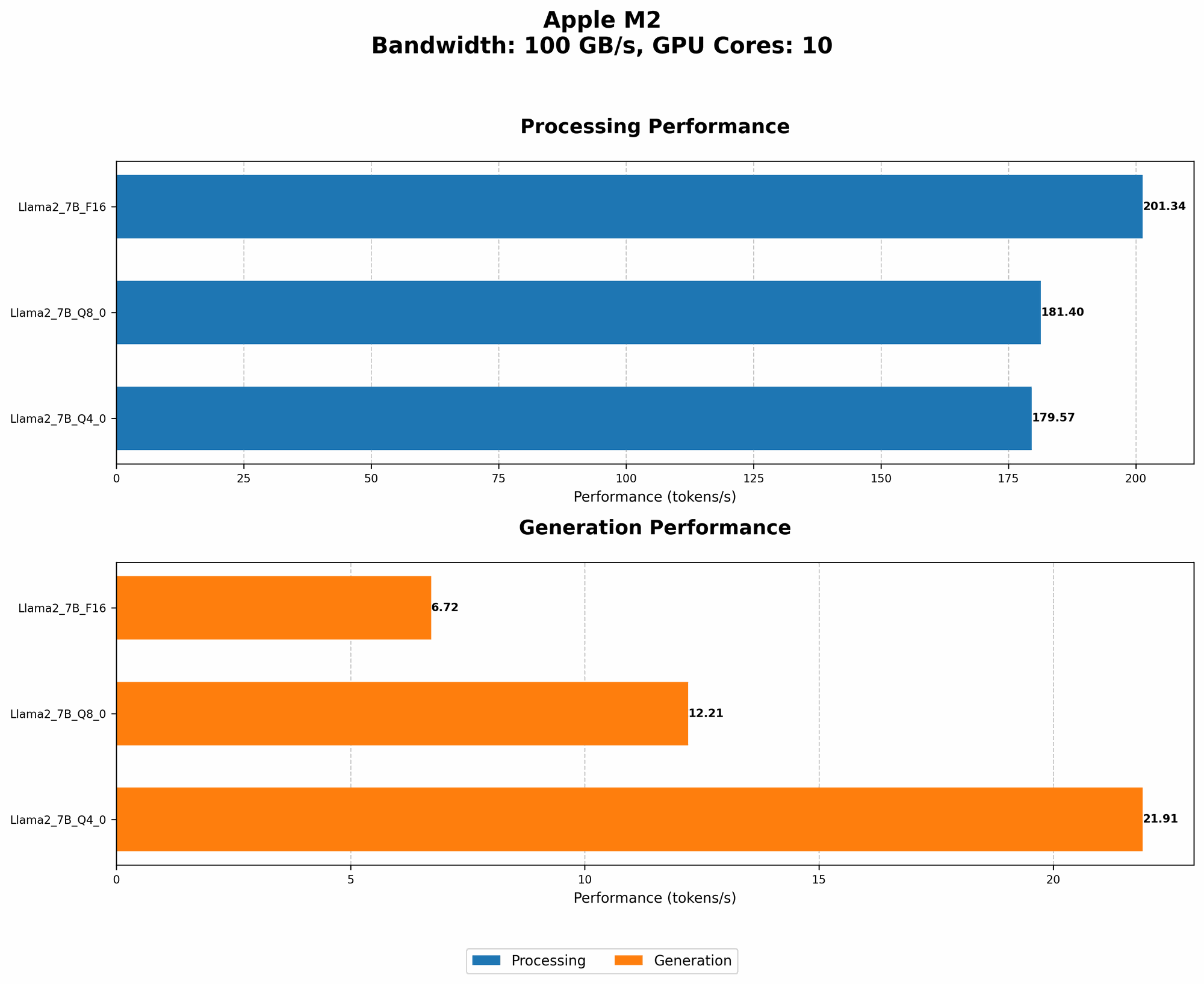
Here's a breakdown of the token generation speed benchmarks for the Llama2 7B model on the Apple M2 chip, using different quantization levels:
| Quantization | Processing (tokens/second) | Generation (tokens/second) |
|---|---|---|
| F16 | 201.34 | 6.72 |
| Q8_0 | 181.40 | 12.21 |
| Q4_0 | 179.57 | 21.91 |
Key Observations:
- F16: While the F16 quantization offers the fastest processing speed, the generation speed is significantly lower compared to other quantization levels.
- Q80 & Q40: Both Q80 and Q40 show faster generation speeds despite slightly slower processing speeds compared to F16.
Real-world implications:
If you're building a conversational AI assistant, the Q80 or Q40 quantization levels might be more desirable, as they offer a better balance between processing and generation speed, leading to a smoother user experience.
Think of it this way:
Imagine writing a story. You need to understand what you've already written (processing) and then write the next sentence (generation). F16 is like a super-fast typist, but it's slow at understanding the story's context. Q80 and Q40 are more balanced, they type quickly and understand the story's flow.
Performance Analysis: Model and Device Comparison
While the Apple M2 offers impressive performance, comparing it to other hardware configurations gives us a better understanding of how it stands in the LLM performance landscape.
Unfortunately, we don't have data for other devices or LLM models for comparison.
This highlights the need for more comprehensive benchmarks of LLM performance on various devices. It's crucial to have a clear understanding of how different models and devices perform to make informed decisions about which configuration best suits your needs.
Practical Recommendations: Use Cases and Workarounds
Finding the Right Balance: Quantization and Use Cases
Choosing the right quantization level is crucial for getting the best performance for your specific application. Here's a quick breakdown of potential use cases:
- F16: Perfect for tasks that require fast processing speed, like summarizing large amounts of text or generating creative content in a single burst.
- Q80/Q40: More suitable for interactive applications or tasks where responsiveness and smoothness are crucial, like conversational AI's or real-time translation.
Workarounds for Performance Bottlenecks
Sometimes, even the M2 can struggle with the computational demands of LLMs. Here are some workarounds to tackle performance bottlenecks:
- Lower the model size: Experiment with smaller versions of the Llama2 model (like Llama2 13B) to see if it fits your performance and memory constraints.
- Reduce model complexity: Look for techniques like knowledge distillation, which can help create smaller, faster models without sacrificing too much accuracy.
- Optimize for specific tasks: Fine-tuning the model for a particular task can often boost performance and efficiency.
FAQ
What is an LLM?
LLMs, or large language models, are a specific type of AI model trained on vast amounts of text data. They can understand and generate human-like text, making them suitable for tasks like writing, translation, and question answering.
Why are LLMs getting so much attention?
LLMs have made significant breakthroughs in natural language processing, bringing us closer to AI systems that can truly understand and interact with us in a human-like way. Their potential applications are vast, ranging from personalized education to innovative creative tools.
How can I run LLMs locally?
There are various tools and libraries available for running LLMs locally, including llama.cpp, which supports the Llama2 model. These tools allow you to explore the capabilities of LLMs on your own hardware, without relying on cloud services.
Keywords:
Llama2, LLM, Apple M2, performance, benchmarks, token generation speed, quantization, F16, Q80, Q40, GPUCores, BW, AI, conversational AI, natural language processing, local models, hardware, tokenization.