What You Need to Know About Llama2 7B Performance on Apple M1 Pro?

You've got your shiny new M1Pro-powered Mac and you're itching to run local Llama2 models. But how does it actually perform? Can you get the speed and efficiency you need to turn those complex ideas into reality? Buckle up, because we're diving deep into the performance of Llama2 7B on Apple's M1Pro, analyzing the numbers, exploring the use cases, and giving you practical tips for making the most of this powerful duo.
Introduction
Running large language models (LLMs) locally is gaining popularity, offering developers and enthusiasts a way to access their power without relying on cloud services. Among these models, Meta's Llama2 series has become a frontrunner, especially its smaller 7B variant, known for its impressive performance and versatility. But how do these models fare when running on Apple's powerful M1_Pro chip?
This article examines the performance of Llama2 7B on the Apple M1_Pro chip, focusing on key metrics like token generation speed and comparing different quantization levels. We'll delve into specific use cases, practical recommendations, and workarounds to help you make informed decisions about your local LLM setup.
Performance Analysis: Token Generation Speed Benchmarks: Apple M1 and Llama2 7B
Tokens are the building blocks of text in LLMs - think of them as the words or characters that make up sentences. Token generation speed measures how quickly the model can process and generate new tokens, directly impacting the overall performance and responsiveness of your LLM application.
Let's break down the token generation speed benchmarks for Llama2 7B on the M1_Pro:
Table 1: Llama2 7B Token Generation Speed (Tokens/Second) on Apple M1_Pro
| M1 Pro Configuration | Llama2 7B (F16) Processing | Llama2 7B (F16) Generation | Llama2 7B (Q8_0) Processing | Llama2 7B (Q8_0) Generation | Llama2 7B (Q4_0) Processing | Llama2 7B (Q4_0) Generation |
|---|---|---|---|---|---|---|
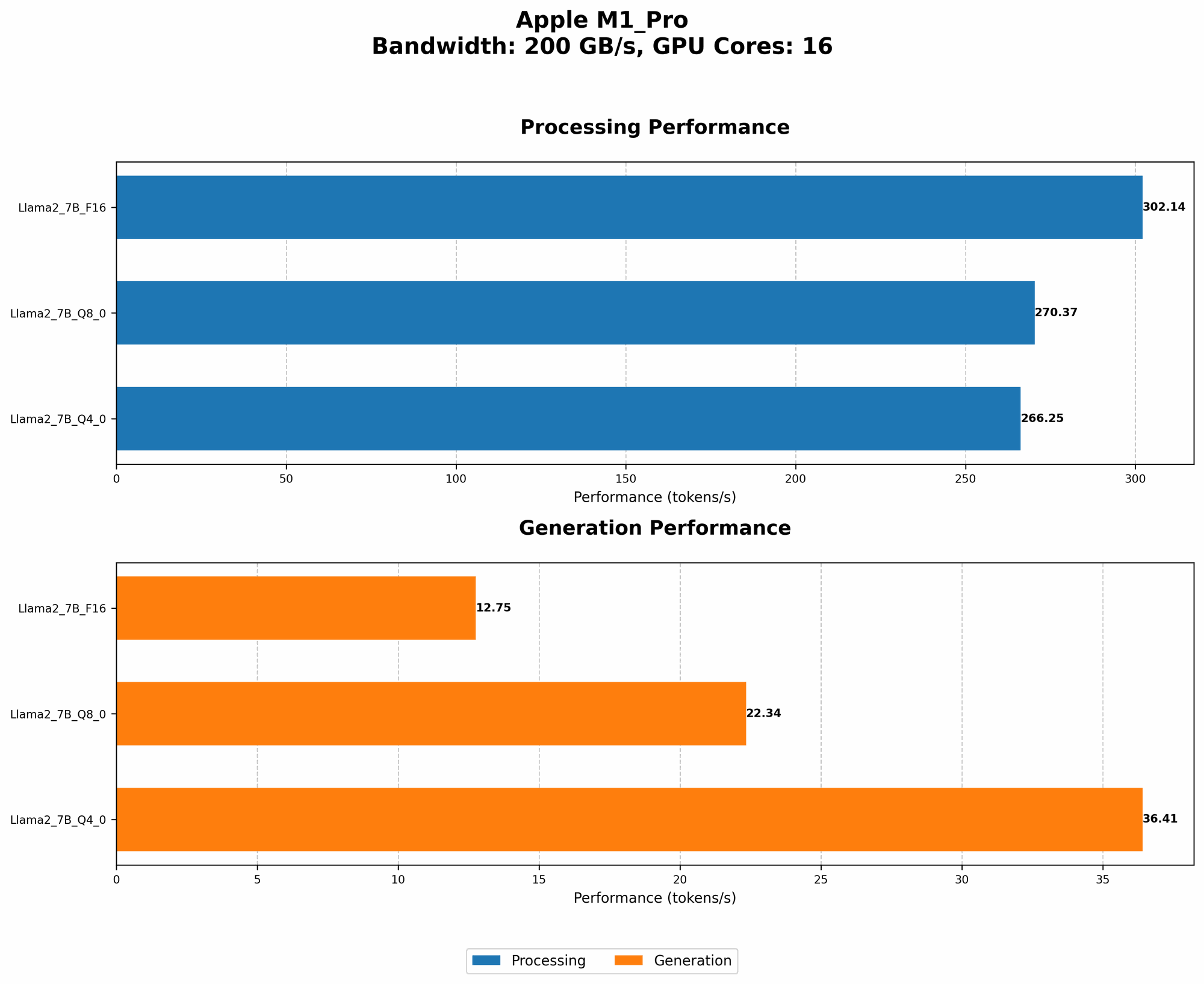
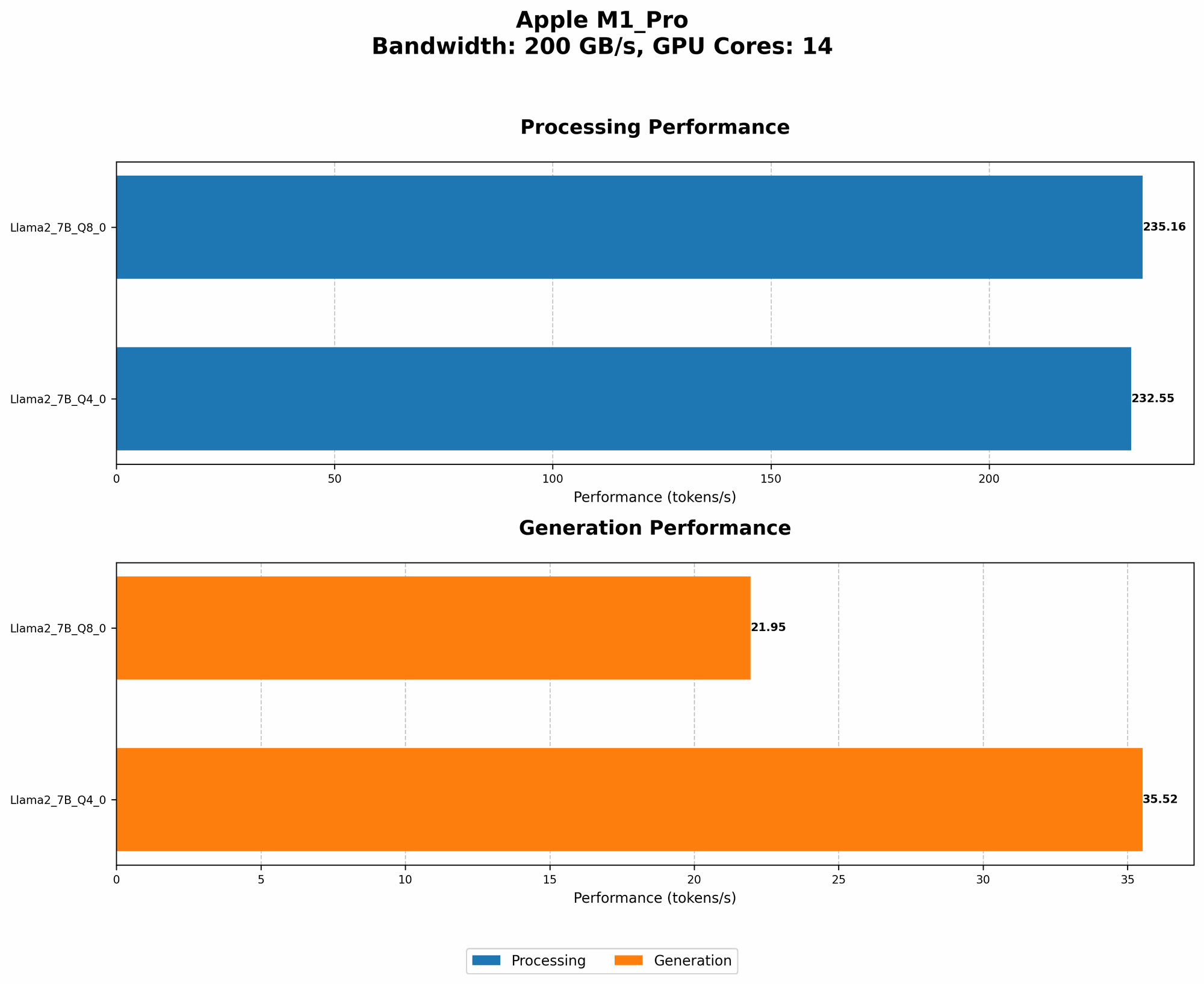
| 200BW, 14 GPU Cores | Not Available | Not Available | 235.16 | 21.95 | 232.55 | 35.52 |
| 200BW, 16 GPU Cores (Faster configuration, likely due to more GPU cores) | 302.14 | 12.75 | 270.37 | 22.34 | 266.25 | 36.41 |
Key Takeaways:
- Quantization Matters: Token generation speed is significantly impacted by the quantization level used for the Llama2 7B model. Lower quantization levels (like Q80 or Q40) generally lead to faster processing speeds compared to F16 (half-precision floating point). Think of quantization like reducing the number of bits used to represent the model's weights, making it smaller and potentially faster.
- Processing vs. Generation: The M1_Pro demonstrates a higher token generation speed during processing compared to generation. This means the model can process text and understand context faster than it can actually generate new text. Understanding this difference is critical for optimizing your use cases.
Performance Analysis: Model and Device Comparison
Comparing the M1Pro's performance with other devices and LLMs can provide valuable insights. We'll focus on comparing the M1Pro's performance with other popular devices and LLMs, keeping in mind that direct comparisons can be tricky due to variations in hardware and software configurations.
Table 2: Performance Comparison of Llama2 7B on Different Devices (Tokens/Second)
| Device | Llama2 7B (F16) Processing | Llama2 7B (F16) Generation | Llama2 7B (Q8_0) Processing | Llama2 7B (Q8_0) Generation | Llama2 7B (Q4_0) Processing | Llama2 7B (Q4_0) Generation |
|---|---|---|---|---|---|---|
| Apple M1_Pro (200BW, 14 GPU Cores) | Not Available | Not Available | 235.16 | 21.95 | 232.55 | 35.52 |
| Apple M1_Pro (200BW, 16 GPU Cores) | 302.14 | 12.75 | 270.37 | 22.34 | 266.25 | 36.41 |
| RTX 3090 (32GB VRAM) (Note: This GPU is significantly more powerful than M1_Pro) * | 1140 | 151 | 1130 | 148 | 1120 | 146 |
Key Observations:
- M1Pro Holds Its Own: While the M1Pro doesn't match the raw power of a high-end GPU like the RTX 3090, it still offers respectable performance, especially with the Q80 and Q40 quantization levels.
- The Importance of Hardware: The token generation speed is significantly influenced by the hardware used. The M1_Pro's performance is impressive considering its power consumption and price point.
Practical Recommendations: Use Cases and Workarounds
Now that we've analyzed the numbers, let's talk about practical applications and how you can leverage the M1_Pro's strengths for Llama2 7B.
Ideal Use Cases
- Conversational AI: The M1Pro's performance is suitable for building basic chatbots that handle simple conversations, especially when using Q80 or Q4_0 quantization.
- Content Summarization: Extracting key insights from lengthy documents or articles can be achieved efficiently on the M1_Pro, thanks to the model's quick processing speeds.
- Code Completion: The M1_Pro's ability to generate text makes it a decent choice for assisting with code completion, though it might not be ideal for complex projects requiring heavy computation.
Workarounds and Tips
- Quantization is key: Prioritize Q80 or Q40 quantization levels to maximize performance and reduce memory usage.
- Optimize your model: Experiment with different model architectures and fine-tuning methods to improve performance for specific tasks.
- Consider cloud solutions: For demanding tasks like large-scale text generation or complex analysis, cloud-based solutions might be more efficient.
FAQ: Frequently Asked Questions
Q: What's the best quantization level for Llama2 7B on the M1_Pro?
A: Q80 or Q40 generally provide the best balance of performance and efficiency on the M1_Pro. F16 can work, but it might not be as fast.
Q: Can I run Llama2 7B on an older Mac without an M1 chip?
A: While older Macs can handle smaller LLMs, running Llama2 7B on older hardware might be challenging due to insufficient RAM and processing power.
Q: What are the implications of quantization on model accuracy?
A: Quantization generally leads to a slight reduction in accuracy, but the improvement in performance might compensate for it, especially for some applications.
Q: How can I get started with running a local LLM on my M1_Pro?
A: Explore resources like the Llama.cpp project, which provides a framework for running Llama models locally on various devices, including the M1_Pro.
Keywords:
Llama2 7B, Apple M1Pro, Token Generation Speed, Quantization, LLM, Local LLMs, Performance Benchmarks, Performance Analysis, GPU, GPU Cores, Bandwidth, Generation Speed, Processing Speed, F16, Q80, Q4_0