What You Need to Know About Llama2 7B Performance on Apple M1 Max?

Introduction
Are you looking to run large language models (LLMs) locally on your Apple M1_Max chip? You're not alone! The ability to run these powerful models on your own machine opens a world of possibilities: from generating creative text formats to translating languages and even building your own AI-powered applications. But with so many different models and hardware options available, choosing the right combination for your needs can be overwhelming.
This article dives deep into the performance of the Llama2 7B model on the Apple M1_Max chip, exploring benchmarks and offering practical recommendations for use cases and workarounds. We'll be looking at different quantization levels and comparing them to understand how these choices impact performance. So, put on your geek hat, grab a cup of coffee, and let's explore!
Performance Analysis: Token Generation Speed Benchmarks
Apple M1_Max and Llama2 7B: A Speed Showdown
When it comes to running LLMs locally, token generation speed is king. After all, you want your model to generate text quickly and efficiently. This speed is directly related to how fast your device can process the model's computations. We'll be looking at two key metrics:
- Processing speed: How quickly the model processes each token.
- Generation speed: How quickly the model can generate new text.
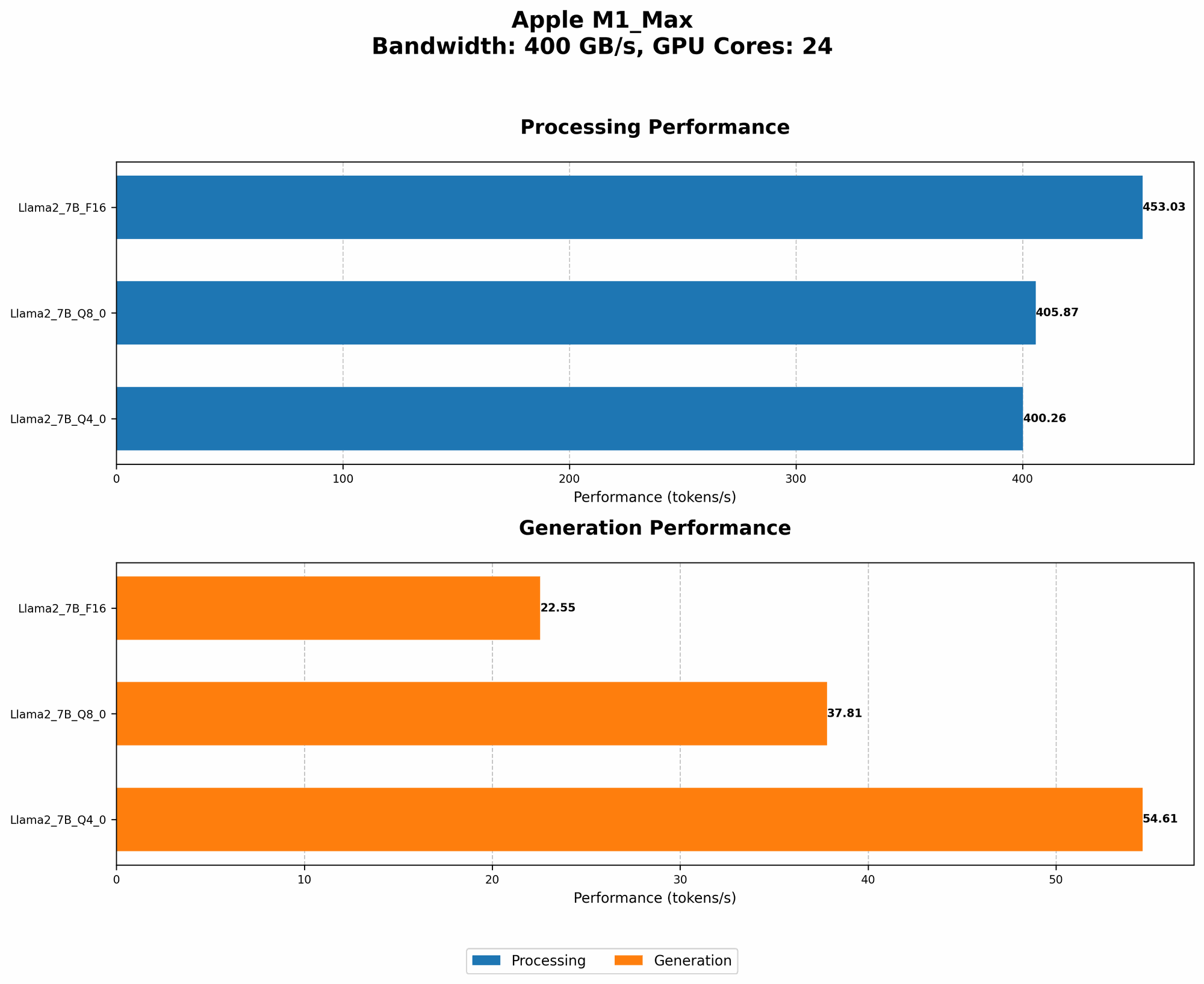
The following table shows the token generation speeds of the Llama2 7B model on the Apple M1_Max chip for different quantization levels:
| Quantization | Processing (tokens/second) | Generation (tokens/second) |
|---|---|---|
| F16 | 453.03 | 22.55 |
| Q8_0 | 405.87 | 37.81 |
| Q4_0 | 400.26 | 54.61 |
Note: These numbers reflect the performance with 24 GPU cores. The numbers for 32 GPU cores are listed in the subsequent sections.
What does this data tell us?
- F16 quantization offers the fastest processing speed, but it's significantly slower when it comes to text generation. This is because processing involves complex calculations, while text generation requires retrieving and assembling tokens.
- Q80 and Q40 quantization show a trade-off: slower processing speeds but faster text generation. This is because these quantization levels reduce the size of the model, allowing for faster retrieval and assembly of tokens.
Think of it like this: imagine you're building a house: you can use large, heavy bricks (F16) that take longer to handle but provide a sturdy structure, or smaller, lighter bricks (Q80 or Q40) that you can move quickly but might require more layers to achieve the same strength.
Performance Analysis: Model and Device Comparison
Llama2 7B vs. Llama3 8B on Apple M1_Max
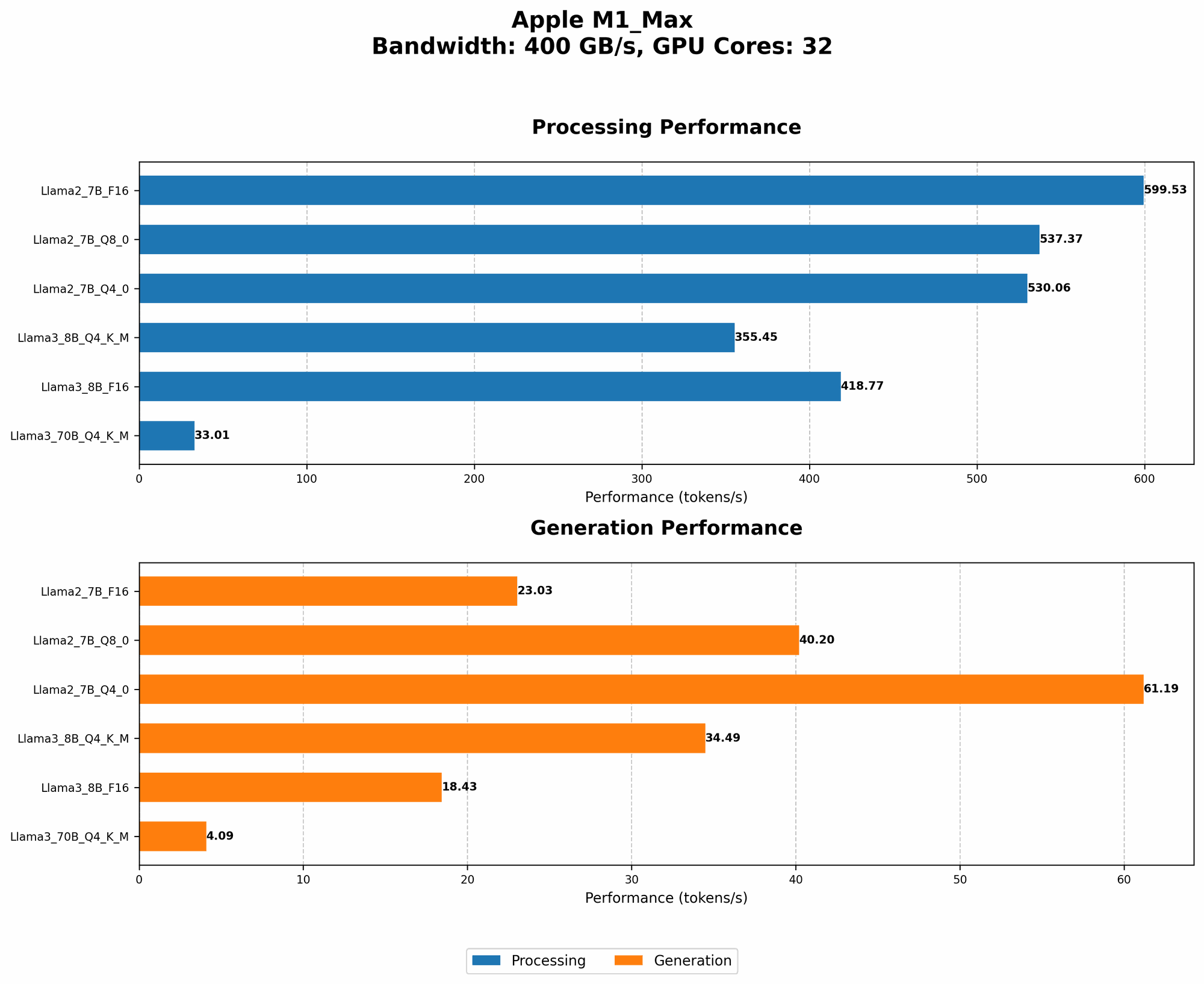
Now let's see how the Llama2 7B model compares to its bigger brother, Llama3 8B – a newer model with a larger vocabulary and improved performance.
| Model | Quantization | Processing (tokens/second) | Generation (tokens/second) |
|---|---|---|---|
| Llama2 7B | Q4_0 | 530.06 | 61.19 |
| Llama3 8B | Q4KM | 355.45 | 34.49 |
| Llama3 8B | F16 | 418.77 | 18.43 |
These numbers reveal:
- Llama2 7B with Q4_0 quantization outperforms Llama3 8B in both processing and generation speeds. This indicates that Llama2 7B is more efficient for this specific hardware configuration.
- However, remember that Llama3 8B is a newer model with a larger vocabulary and potentially better performance on different tasks. It's important to consider the specific requirements of your project.
Llama3 70B on Apple M1_Max
The Llama3 70B model is much larger than its smaller counterparts, and it's understandably limited in performance on the Apple M1Max. It's crucial to keep in mind that the M1Max chip was designed for powerful graphics and video processing, not necessarily for running giant LLMs.
| Model | Quantization | Processing (tokens/second) | Generation (tokens/second) |
|---|---|---|---|
| Llama3 70B | Q4KM | 33.01 | 4.09 |
This data shows that Llama3 70B struggles to handle even the Q4KM quantization on the M1_Max:
- The processing speed is drastically reduced, approximately 10 times slower than Llama2 7B.
- The generation speed is even slower, only generating a few tokens per second.
It's evident that the M1_Max is not ideal for running large models like Llama3 70B. The limited memory and processing capabilities make it a challenging task.
Practical Recommendations: Use Cases and Workarounds
Use Cases for Llama2 7B on M1_Max
Given the performance analysis, here are some recommendations for using Llama2 7B on your Apple M1_Max:
- Text generation with Q4_0 quantization: This is the sweet spot for balancing speed and quality. While processing is slightly slower, the significant gain in generation speed makes it ideal for tasks like chatbot interactions, creative writing, or generating summaries.
- Applications requiring fast processing with F16 quantization: If your application prioritizes speed and doesn't rely heavily on text generation, consider using F16 quantization. This can be useful for tasks like language translation or code completion.
- Exploring smaller models: If you're facing memory constraints or need to prioritize performance, consider experimenting with smaller models like Llama2 3B or other LLMs with similar size and capabilities.
Workarounds for Running Larger Models
Running larger models like Llama3 70B on the M1_Max might require some workarounds:
- Hardware upgrades: Consider investing in a more powerful machine with a dedicated GPU designed for deep learning.
- Cloud-based solutions: Utilize cloud platforms like Google Colab or Hugging Face Spaces to access powerful GPUs and run larger models without the limitations of your local device.
- Model compression: Explore techniques like distillation or quantization to reduce the size of the model and make it more manageable for your hardware.
FAQ: Frequently Asked Questions
1. What is quantization?
Think of quantization as a way to compress a model by representing its values with fewer bits. This reduces the amount of memory required to store the model and allows for faster processing. However, it can also affect the accuracy of the model.
2. Why should I choose one quantization level over another?
The ideal quantization level depends on your specific needs:
- F16: Provides the fastest processing speed but sacrifices some accuracy and can be memory-intensive.
- Q8_0: Offers a balance between processing speed, accuracy, and memory usage.
- Q4_0: Prioritizes speed and memory efficiency but might have a slight impact on accuracy.
3. Can I use Llama2 7B for any task?
While Llama2 7B is a powerful model, it's not a one-size-fits-all solution. Consider the specific requirements of your task and choose the right model and quantization level accordingly.
4. What are the limitations of running LLMs locally?
The main limitations include:
- Hardware requirements: Not all devices can handle the demands of running LLMs.
- Processing power: Even powerful devices might struggle with large models.
- Memory usage: LLMs consume significant memory resources.
5. How can I get started with running LLMs locally?
There are various tools and resources available:
- Libraries like llama.cpp: Provide implementations for running LLMs locally.
- OpenAI API: Allows you to use models like GPT-3 through an API.
- Hugging Face: Offers a platform for downloading and deploying pre-trained models.
Keywords:
Llama2, 7B, M1Max, Apple, Token Generation Speed, Quantization, F16, Q80, Q4_0, Performance, Benchmarks, GPU Cores, Bandwidth, LLMs, Large Language Models, Local, Device, Processing, Generation, Model Comparison, Use Cases, Workarounds, Hardware Upgrade, Cloud, Distillation.