Should I Use Llama3 70B or Llama2 7B on Apple M2 Ultra? Benchmark Analysis

Introduction: The Quest for the Perfect LLM on Your Apple M2 Ultra
You've got an Apple M2 Ultra, a beast of a chip, and you're itching to unleash the power of large language models (LLMs) right on your machine. But which one should you choose – the impressive Llama3 70B or the more modest Llama2 7B?
This article will dive into the performance of these two popular LLMs on the Apple M2 Ultra, analyzing their strengths and weaknesses to help you make the right choice for your use cases. We'll be crunching the numbers from real-world benchmarks, comparing their token speed, and examining how they perform on different tasks. So buckle up, and let's embark on this exciting journey into the world of on-device LLMs!
Comparing Llama2 7B and Llama3 70B: A Token Speed Showdown
Performance Analysis on Apple M2 Ultra
The Apple M2 Ultra boasts incredible processing power, making it a powerful platform for running large language models. To compare the performance of Llama2 7B and Llama3 70B on this device, we'll focus on two key metrics: token speed for both text processing and text generation.
Token Speed: The Key to Smooth LLM Performance
Think of tokens as the building blocks of language, like words or parts of words. The higher the token speed, the faster your LLM can process and generate text. A higher token speed translates to faster responses, smoother interaction, and a more enjoyable user experience.
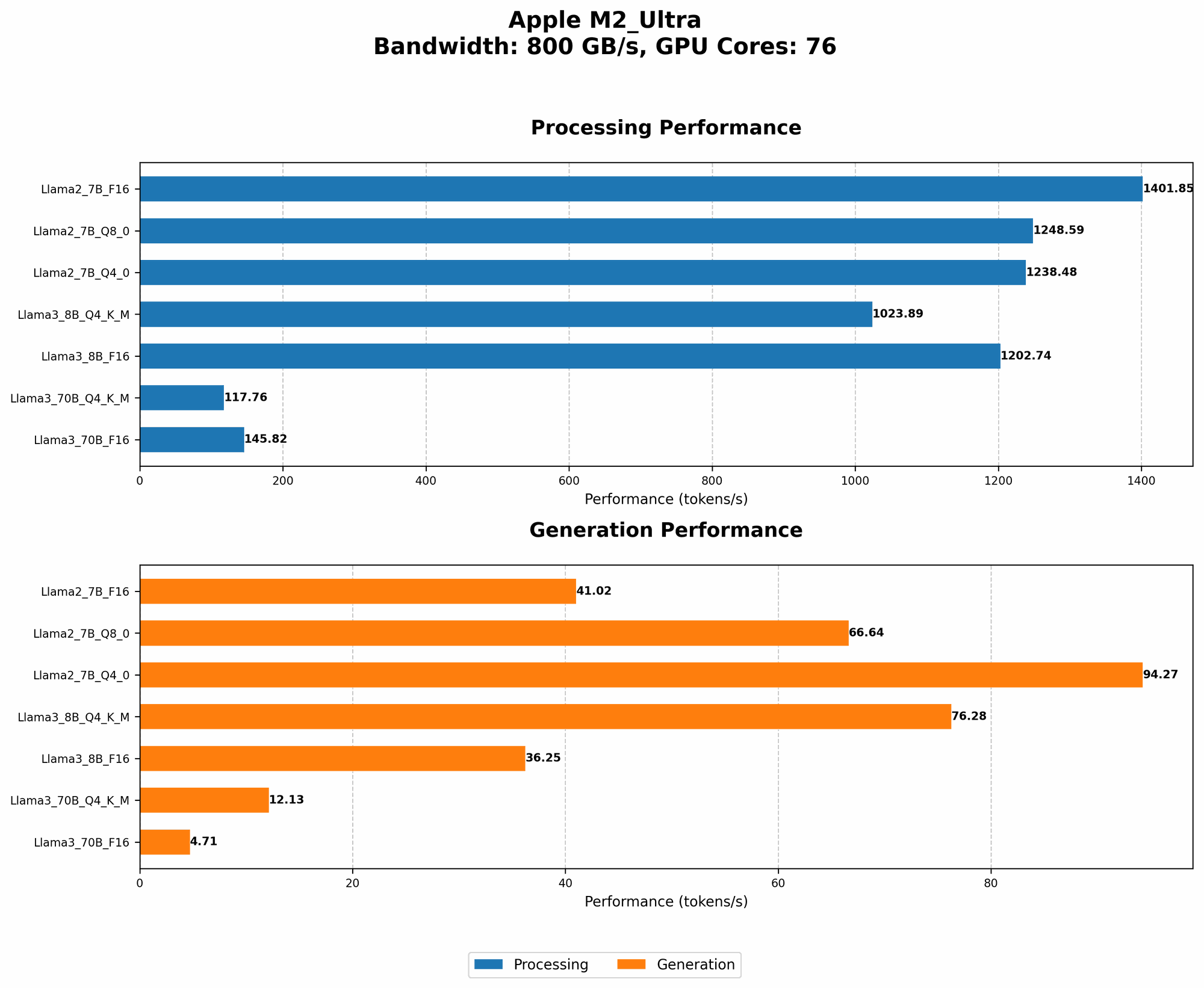
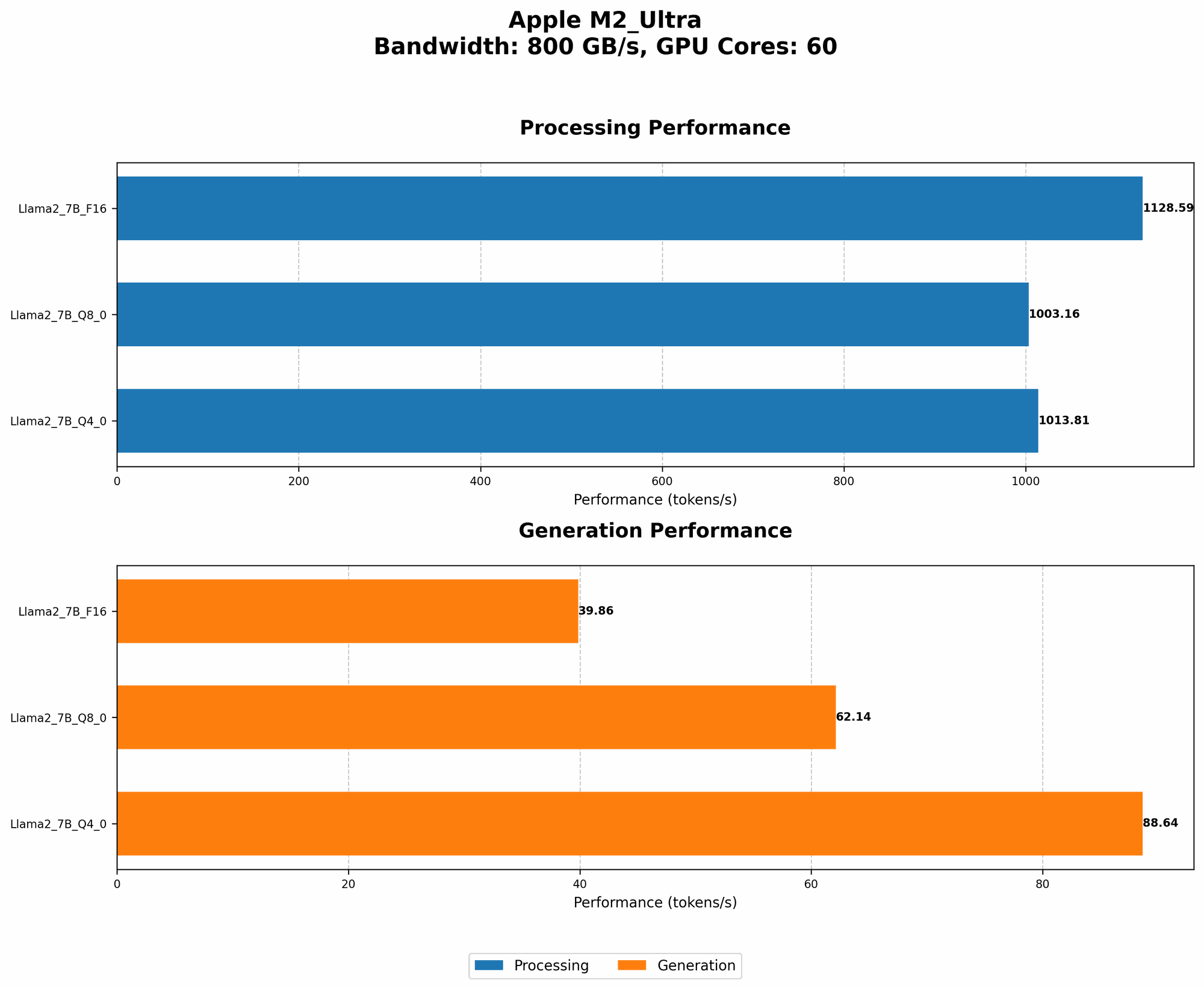
Table 1: Token Speed Comparison on M2 Ultra (tokens/second)
| Model | Token Speed (Processing) | Token Speed (Generation) |
|---|---|---|
| Llama2 7B (F16) | 1128.59 | 39.86 |
| Llama2 7B (Q8_0) | 1003.16 | 62.14 |
| Llama2 7B (Q4_0) | 1013.81 | 88.64 |
| Llama3 8B (F16) | 1202.74 | 36.25 |
| Llama3 8B (Q4KM) | 1023.89 | 76.28 |
| Llama3 70B (F16) | 145.82 | 4.71 |
| Llama3 70B (Q4KM) | 117.76 | 12.13 |
Note: The table only displays data for models tested on M2 Ultra. Unfortunately, there is no data available for Llama3 70B Q8 or Llama3 70B Q4.
Key Findings:
- Llama2 7B reigns supreme in terms of token speed, especially in processing. Llama2 7B's significantly higher token speed across various quantization levels (F16, Q80, Q40) compared to Llama3 70B shows that it processes text much faster.
- Llama2 7B shines in text generation: The Llama2 7B model consistently outperforms Llama3 70B in token speed for generation, suggesting that it generates text more efficiently. The difference in token speed between Llama2 7B and Llama3 70B for generation is even more significant than during processing.
- Quantization impacts performance: The choice of quantization (F16, Q80, Q40) significantly affects token speed. For Llama2 7B, using F16 provides the fastest processing speed but slightly slower generation than the Q80 or Q40 versions.
- Llama3 70B's limitations: Despite its larger size, Llama3 70B struggles in both processing and generation speed compared to Llama2 7B.
Explanation:
- Quantization: Quantization is like using a lower-resolution camera - it takes up less space but sacrifices a bit of detail. In LLM terms, it means reducing the size of the model by using fewer bits to represent the numbers (F16, Q80, Q40), which can impact performance.
- Model Size: A larger model like Llama3 70B often requires more processing power and memory, potentially leading to slower performance.
Practical Implications:
- Choose Llama2 7B for faster response times and smooth user experiences: If you need a model that processes text quickly and generates responses efficiently, Llama2 7B is your go-to choice.
- Llama3 70B is a better option for complex tasks needing more context: Although Llama3 70B is slower, its larger size might be advantageous for tasks requiring deeper understanding and greater context, such as writing longer, more complex text.
Apple M2 Ultra: A Powerful Platform for LLMs
Apple M2 Ultra's Strengths and Weaknesses
The Apple M2 Ultra is a powerhouse, packed with 76 GPU cores. Its incredible processing power and high bandwidth make it a dream come true for running LLMs locally. But every tool has its quirks!
Advantages:
- High Bandwidth: The M2 Ultra boasts impressive bandwidth, allowing for fast data transfer between the CPU and GPU. This is crucial for LLMs' complex calculations. Think of it as a highway for data, ensuring things move smoothly!
- Specialized Architecture: The M2 Ultra is designed for high-performance computing, making it well-suited for the demanding computations required by large language models. It's like having a team of engineers working tirelessly on building a powerful language engine.
Limitations:
- Model Size: While the M2 Ultra excels in processing power, it still has limitations in handling extremely large models on-device. If you're aiming for the biggest and most complex LLMs, you might need to explore cloud-based solutions.
Examples:
- Bandwidth's impact: Consider a video game. The M2 Ultra's high bandwidth ensures that the graphics data from the GPU flows smoothly to the screen, resulting in a super-smooth gaming experience. Similarly, high bandwidth in LLMs means faster processing and generation.
- Model size limitation: Think of a bookshelf. The M2 Ultra is like a bookshelf with a limited capacity. Small books (LLMs) fit effortlessly, but giant encyclopedias (very large LLMs) might be too bulky.
FAQ: Addressing Common Questions
Frequently Asked Questions about LLMs and Devices
Here are some common questions about LLMs and devices:
Q1: What is the best device for running LLMs locally? A: The best device depends on your specific needs. For smaller models like Llama2 7B, you can get good performance on high-end laptops or desktops with powerful GPUs. For larger models like Llama3 70B, you might need a dedicated workstation or a powerful cloud server.
Q2: How do I choose the right LLM for my needs? A: Consider the size of your model, the tasks you want to perform, and the performance you expect. Smaller models are generally more efficient and faster but might have less capability. Larger models require more resources but can handle more complex tasks. You can find more information and benchmarks for different LLMs online.
Q3: What is quantization and how does it affect performance? A: Quantization is a technique that reduces the size of an LLM model by using fewer bits to represent the numbers. This can make the model smaller and faster but might slightly reduce its accuracy. The best choice depends on the trade-off between performance and accuracy.
Q4: What are the advantages of running LLMs on-device? A: Running LLMs on-device offers several benefits:
- Privacy: Your data stays on your device, enhancing privacy.
- Offline access: You can use the model without an internet connection.
- Faster response times: Local processing eliminates network latency.
Q5: What are the challenges of running LLMs on-device? A:
- Resource limitations: Limited memory and processing power can restrict the size of models you can run.
- Model updates: Keeping your model updated can be challenging.
Keywords
LLM, Llama2, Llama3, Apple M2 Ultra, token speed, processing, generation, quantization, F16, Q80, Q40, performance, benchmark, on-device, local, inference, GPU, bandwidth, model size, privacy, offline, faster response times, resource limitations, model updates.