Setting Up the Ultimate AI Workstation with NVIDIA RTX 4000 Ada 20GB: A Complete Guide
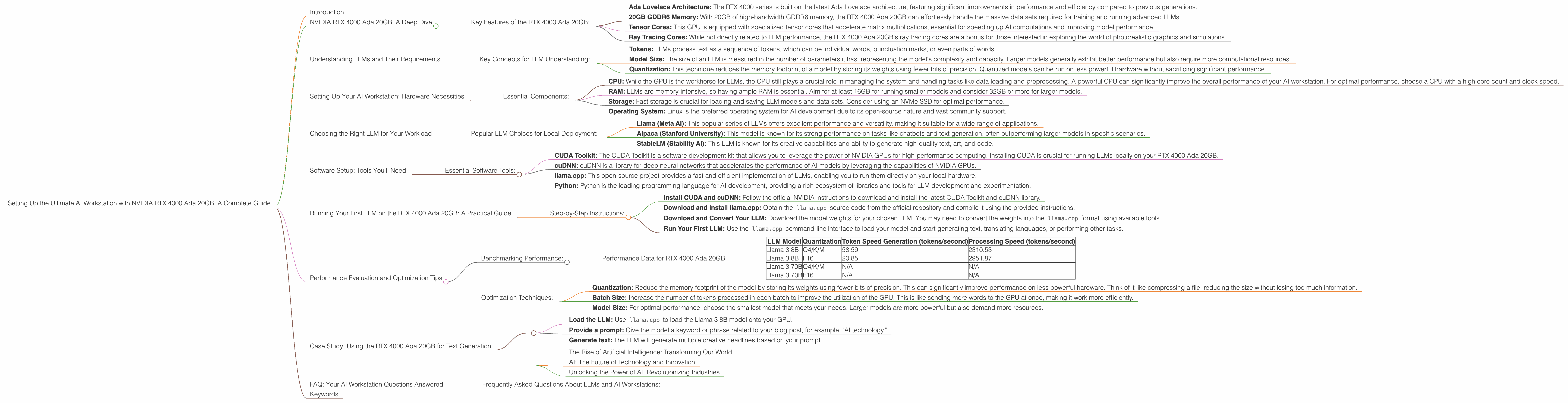
Introduction
Welcome to the exciting world of local Large Language Models (LLMs)! In this guide, we'll dive deep into setting up the ultimate AI workstation powered by the mighty NVIDIA RTX 4000 Ada 20GB. This GPU is a powerhouse for running LLMs locally, offering unparalleled performance and giving you the freedom to explore the capabilities of AI without relying on cloud services.
Imagine generating creative text, translating languages in real-time, or even building your own custom AI assistant, all without the limitations of online APIs or latency issues. This guide will equip you with the knowledge and tools to achieve this with the NVIDIA RTX 4000 Ada 20GB, so grab your coffee, get comfortable, and let's embark on this journey together!
NVIDIA RTX 4000 Ada 20GB: A Deep Dive


The NVIDIA RTX 4000 Ada 20GB is the most powerful GPU in the RTX 4000 series, designed for professional applications like 3D rendering, video editing, and, most importantly for us - running demanding AI models like LLMs. Its powerful architecture, abundant memory, and impressive performance make it the ideal choice for unleashing the potential of your AI projects.
Key Features of the RTX 4000 Ada 20GB:
- Ada Lovelace Architecture: The RTX 4000 series is built on the latest Ada Lovelace architecture, featuring significant improvements in performance and efficiency compared to previous generations.
- 20GB GDDR6 Memory: With 20GB of high-bandwidth GDDR6 memory, the RTX 4000 Ada 20GB can effortlessly handle the massive data sets required for training and running advanced LLMs.
- Tensor Cores: This GPU is equipped with specialized tensor cores that accelerate matrix multiplications, essential for speeding up AI computations and improving model performance.
- Ray Tracing Cores: While not directly related to LLM performance, the RTX 4000 Ada 20GB's ray tracing cores are a bonus for those interested in exploring the world of photorealistic graphics and simulations.
Understanding LLMs and Their Requirements
LLMs are revolutionizing the way we interact with computers. They are advanced artificial intelligence models trained on massive amounts of text data, enabling them to understand, generate, and translate human language with remarkable accuracy and fluency. These models are the brains behind popular AI applications like ChatGPT and Bard, and they are rapidly evolving and expanding their capabilities.
Key Concepts for LLM Understanding:
- Tokens: LLMs process text as a sequence of tokens, which can be individual words, punctuation marks, or even parts of words.
- Model Size: The size of an LLM is measured in the number of parameters it has, representing the model's complexity and capacity. Larger models generally exhibit better performance but also require more computational resources.
- Quantization: This technique reduces the memory footprint of a model by storing its weights using fewer bits of precision. Quantized models can be run on less powerful hardware without sacrificing significant performance.
Setting Up Your AI Workstation: Hardware Necessities
Now that we have a grasp of the key components, let's dive into the hardware requirements for setting up your LLM-powered workstation.
Essential Components:
- CPU: While the GPU is the workhorse for LLMs, the CPU still plays a crucial role in managing the system and handling tasks like data loading and preprocessing. A powerful CPU can significantly improve the overall performance of your AI workstation. For optimal performance, choose a CPU with a high core count and clock speed.
- RAM: LLMs are memory-intensive, so having ample RAM is essential. Aim for at least 16GB for running smaller models and consider 32GB or more for larger models.
- Storage: Fast storage is crucial for loading and saving LLM models and data sets. Consider using an NVMe SSD for optimal performance.
- Operating System: Linux is the preferred operating system for AI development due to its open-source nature and vast community support.
Choosing the Right LLM for Your Workload
Now that you have the hardware in place, let's choose the right LLM for your specific needs. There are numerous open-source LLMs available, each with different strengths and weaknesses.
Popular LLM Choices for Local Deployment:
- Llama (Meta AI): This popular series of LLMs offers excellent performance and versatility, making it suitable for a wide range of applications.
- Alpaca (Stanford University): This model is known for its strong performance on tasks like chatbots and text generation, often outperforming larger models in specific scenarios.
- StableLM (Stability AI): This LLM is known for its creative capabilities and ability to generate high-quality text, art, and code.
Software Setup: Tools You'll Need
With the hardware and LLM chosen, let's set up the software environment for running your model.
Essential Software Tools:
- CUDA Toolkit: The CUDA Toolkit is a software development kit that allows you to leverage the power of NVIDIA GPUs for high-performance computing. Installing CUDA is crucial for running LLMs locally on your RTX 4000 Ada 20GB.
- cuDNN: cuDNN is a library for deep neural networks that accelerates the performance of AI models by leveraging the capabilities of NVIDIA GPUs.
- llama.cpp: This open-source project provides a fast and efficient implementation of LLMs, enabling you to run them directly on your local hardware.
- Python: Python is the leading programming language for AI development, providing a rich ecosystem of libraries and tools for LLM development and experimentation.
Running Your First LLM on the RTX 4000 Ada 20GB: A Practical Guide
Let's delve into the practical steps of running your first LLM on the RTX 4000 Ada 20GB. This guide will use the popular llama.cpp framework as an example.
Step-by-Step Instructions:
- Install CUDA and cuDNN: Follow the official NVIDIA instructions to download and install the latest CUDA Toolkit and cuDNN library.
- Download and Install llama.cpp: Obtain the
llama.cppsource code from the official repository and compile it using the provided instructions. - Download and Convert Your LLM: Download the model weights for your chosen LLM. You may need to convert the weights into the
llama.cppformat using available tools. - Run Your First LLM: Use the
llama.cppcommand-line interface to load your model and start generating text, translating languages, or performing other tasks.
Performance Evaluation and Optimization Tips
Now that your AI workstation is set up and running, let's analyze its performance and explore ways to optimize it.
Benchmarking Performance:
- Token Speed Generation: This metric measures the speed at which the model generates tokens (words or parts of words). Higher token speeds indicate faster model processing.
- Processing Speed: This metric measures the overall throughput of the model, reflecting how many words or phrases it can process per second.
Performance Data for RTX 4000 Ada 20GB:
| LLM Model | Quantization | Token Speed Generation (tokens/second) | Processing Speed (tokens/second) |
|---|---|---|---|
| Llama 3 8B | Q4/K/M | 58.59 | 2310.53 |
| Llama 3 8B | F16 | 20.85 | 2951.87 |
| Llama 3 70B | Q4/K/M | N/A | N/A |
| Llama 3 70B | F16 | N/A | N/A |
Notes:
- The results are based on publicly available benchmarks.
- The provided data only includes results for Llama 3 models for now.
- The "Q4/K/M" column refers to the "quantization" method (4-bit, K and M refer to specific methods) and "F16" refers to 16-bit floating-point precision.
Optimization Techniques:
- Quantization: Reduce the memory footprint of the model by storing its weights using fewer bits of precision. This can significantly improve performance on less powerful hardware. Think of it like compressing a file, reducing the size without losing too much information.
- Batch Size: Increase the number of tokens processed in each batch to improve the utilization of the GPU. This is like sending more words to the GPU at once, making it work more efficiently.
- Model Size: For optimal performance, choose the smallest model that meets your needs. Larger models are more powerful but also demand more resources.
Case Study: Using the RTX 4000 Ada 20GB for Text Generation
Let's explore a real-world example of using the RTX 4000 Ada 20GB for text generation. Imagine you're writing a blog post and need a creative headline. You can use an LLM like Llama 3 8B to generate several options.
How to use the RTX 4000 Ada 20GB for text generation:
- Load the LLM: Use
llama.cppto load the Llama 3 8B model onto your GPU. - Provide a prompt: Give the model a keyword or phrase related to your blog post, for example, "AI technology."
- Generate text: The LLM will generate multiple creative headlines based on your prompt.
Example:
Prompt: "AI technology"
Generated Headlines:
- The Rise of Artificial Intelligence: Transforming Our World
- AI: The Future of Technology and Innovation
- Unlocking the Power of AI: Revolutionizing Industries
FAQ: Your AI Workstation Questions Answered
Frequently Asked Questions About LLMs and AI Workstations:
Q1: What is the difference between a CPU and a GPU for LLMs?
A: CPUs are designed for general-purpose tasks like processing data, while GPUs are specialized for parallel computations, ideal for handling the massive matrix multiplications required by LLMs.
Q2: How much RAM do I need for an AI workstation?
A: You'll need at least 16GB for smaller models and 32GB or more for larger models.
Q3: What are the benefits of running LLMs locally?
A: Running LLMs locally gives you greater control, privacy, and lower latency compared to cloud-based solutions.
Q4: How do I choose the right LLM?
A: Consider the use case, model size, performance, and availability of pre-trained weights.
Q5: What are some limitations of running LLMs locally?
A: Local models may not be as up-to-date as cloud-based models and may require more technical expertise to manage.
Keywords
LLM, Large Language Model, NVIDIA RTX 4000 Ada 20GB, AI workstation, CUDA, token speed, processing speed, Llama 3, quantization, text generation, chatbots, Alpaca, StableLM, GPU performance, AI development, local deployment, performance optimization, hardware requirements, software setup, llama.cpp, open-source AI, GPU benchmarks, AI technology, AI tools, AI resources, AI trends, AI future.