Setting Up the Ultimate AI Workstation with NVIDIA L40S 48GB: A Complete Guide
Introduction
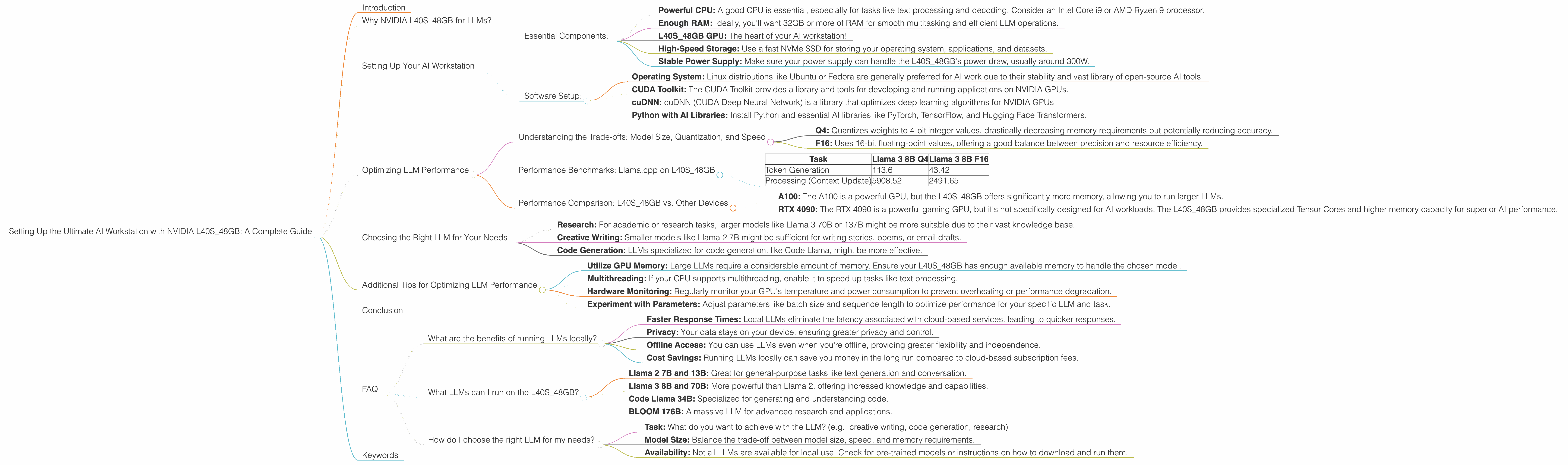
Welcome to the exciting world of local Large Language Models (LLMs)! Imagine having a super-powered AI assistant running right on your computer, ready to answer your questions, generate creative content, and even help you write code. This is the power of LLMs, and with the right setup, you can unlock this potential without relying on cloud-based services.
This guide focuses on building the ultimate AI workstation with the NVIDIA L40S_48GB GPU, a beastly card designed for heavy-duty AI tasks. We'll explore how to set it up, optimize performance for various LLM models, and help you understand the trade-offs between speed, accuracy, and memory.
Why NVIDIA L40S_48GB for LLMs?
The NVIDIA L40S48GB is a high-end GPU specifically designed for AI workloads. It boasts a massive 48GB of HBM3e memory, allowing you to run larger and more complex LLM models locally with ease. The L40S48GB is also packed with Tensor Cores, specialized processors optimized for matrix multiplication, which is the core of LLM operations.
Think of it this way: to power a large LLM, you need a lot of memory to store the model and a fast processor to crunch through its complex calculations. The L40S_48GB excels in both areas, making it the perfect choice for an AI workstation.
Setting Up Your AI Workstation
Essential Components:
- Powerful CPU: A good CPU is essential, especially for tasks like text processing and decoding. Consider an Intel Core i9 or AMD Ryzen 9 processor.
- Enough RAM: Ideally, you'll want 32GB or more of RAM for smooth multitasking and efficient LLM operations.
- L40S_48GB GPU: The heart of your AI workstation!
- High-Speed Storage: Use a fast NVMe SSD for storing your operating system, applications, and datasets.
- Stable Power Supply: Make sure your power supply can handle the L40S_48GB's power draw, usually around 300W.
Software Setup:
- Operating System: Linux distributions like Ubuntu or Fedora are generally preferred for AI work due to their stability and vast library of open-source AI tools.
- CUDA Toolkit: The CUDA Toolkit provides a library and tools for developing and running applications on NVIDIA GPUs.
- cuDNN: cuDNN (CUDA Deep Neural Network) is a library that optimizes deep learning algorithms for NVIDIA GPUs.
- Python with AI Libraries: Install Python and essential AI libraries like PyTorch, TensorFlow, and Hugging Face Transformers.
Optimizing LLM Performance
Understanding the Trade-offs: Model Size, Quantization, and Speed
Model Size: Larger LLMs (like 70B or 137B parameters) offer more knowledge and flexibility, but they also demand more memory and processing power. Smaller models (like 7B or 8B) are faster and more resource-efficient, but they might not be as complex or knowledgeable.
Quantization: Quantization is a technique that reduces the size of a model by representing its weights using fewer bits. This can significantly reduce memory usage and accelerate performance while maintaining reasonable accuracy.
There are different levels of quantization, like Q4 and F16:
- Q4: Quantizes weights to 4-bit integer values, drastically decreasing memory requirements but potentially reducing accuracy.
- F16: Uses 16-bit floating-point values, offering a good balance between precision and resource efficiency.
Speed: The speed at which your LLM generates tokens (words or characters) is crucial for interactive experiences. Faster token generation means smoother responses and a more responsive AI assistant.
Performance Benchmarks: Llama.cpp on L40S_48GB
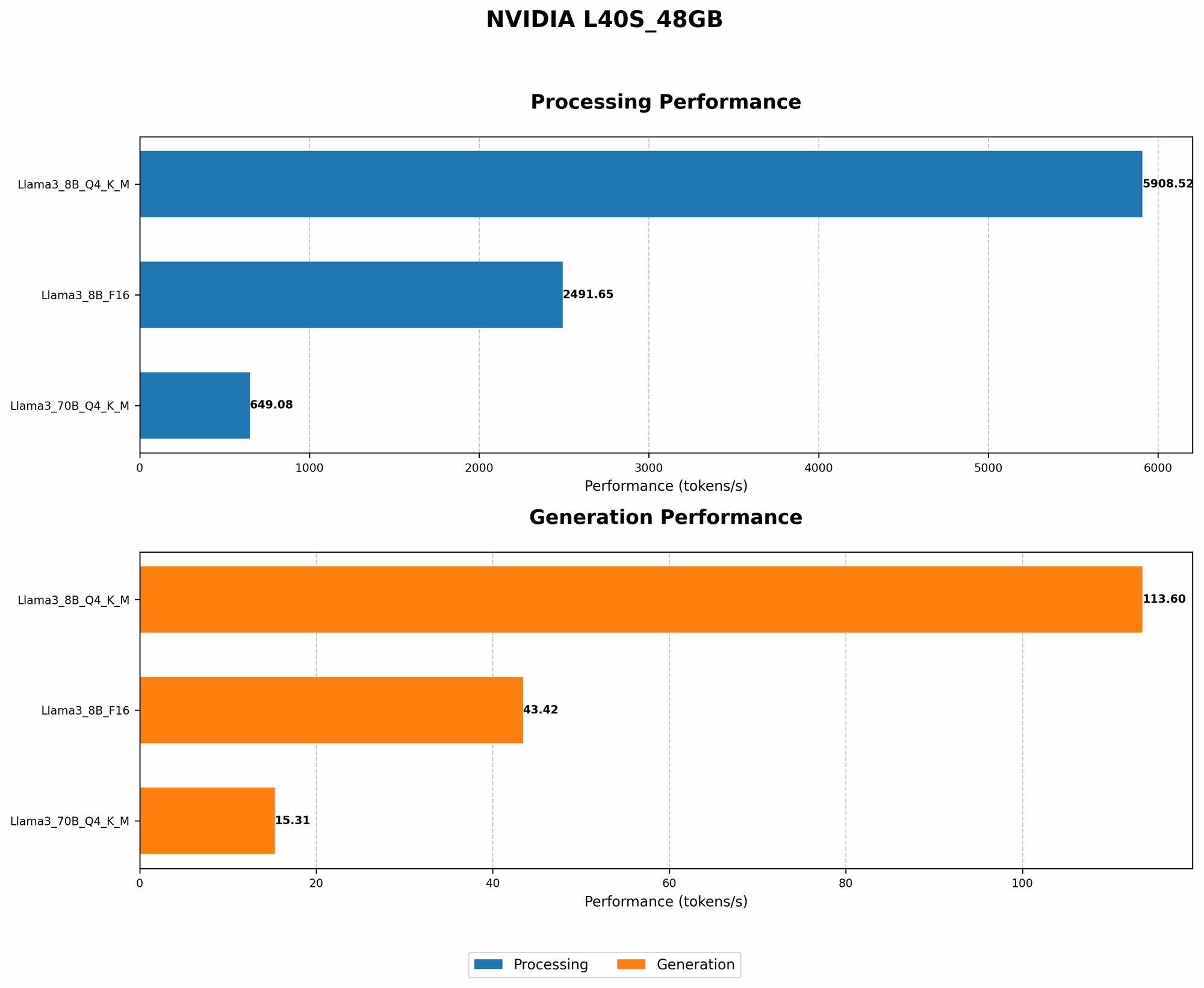
Let's take a look at how the L40S_48GB performs in benchmark tests using the popular Llama.cpp LLM library:
- Model: Llama 3 8B (7.8 Billion parameters)
- Quantization: Q4 and F16
- Metric: Tokens/second (higher numbers are better)
| Task | Llama 3 8B Q4 | Llama 3 8B F16 |
|---|---|---|
| Token Generation | 113.6 | 43.42 |
| Processing (Context Update) | 5908.52 | 2491.65 |
Analysis:
- Q4: The L40S_48GB achieves phenomenal speeds with Q4 quantization, generating over 113 tokens per second.
- F16: While F16 quantization offers slightly improved accuracy, it sacrifices some speed compared to Q4.
It's important to note that the "Llama 3 70B" model results are not available for this specific combination of device and model. This indicates that the L40S_48GB might require more memory to run these models efficiently.
Performance Comparison: L40S_48GB vs. Other Devices
Comparing the L40S_48GB to other popular AI GPUs:
- A100: The A100 is a powerful GPU, but the L40S_48GB offers significantly more memory, allowing you to run larger LLMs.
- RTX 4090: The RTX 4090 is a powerful gaming GPU, but it's not specifically designed for AI workloads. The L40S_48GB provides specialized Tensor Cores and higher memory capacity for superior AI performance.
Conclusion:
Based on these benchmarks, the NVIDIA L40S_48GB is a clear winner for local LLM users. It provides blazing-fast speeds, especially with Q4 quantization, enabling you to run even large LLMs on your personal workstation.
Choosing the Right LLM for Your Needs
The "best" LLM depends on your specific requirements:
- Research: For academic or research tasks, larger models like Llama 3 70B or 137B might be more suitable due to their vast knowledge base.
- Creative Writing: Smaller models like Llama 2 7B might be sufficient for writing stories, poems, or email drafts.
- Code Generation: LLMs specialized for code generation, like Code Llama, might be more effective.
Additional Tips for Optimizing LLM Performance
- Utilize GPU Memory: Large LLMs require a considerable amount of memory. Ensure your L40S_48GB has enough available memory to handle the chosen model.
- Multithreading: If your CPU supports multithreading, enable it to speed up tasks like text processing.
- Hardware Monitoring: Regularly monitor your GPU's temperature and power consumption to prevent overheating or performance degradation.
- Experiment with Parameters: Adjust parameters like batch size and sequence length to optimize performance for your specific LLM and task.
Conclusion
The NVIDIA L40S_48GB is an excellent choice for building an AI workstation that can handle even the most demanding LLMs locally. By understanding the trade-offs between model size, quantization, and speed, you can optimize your setup for optimal performance.
Remember, the world of LLMs is constantly evolving. Stay updated on the latest models and advancements to unlock even greater possibilities with your AI workstation.
FAQ
What are the benefits of running LLMs locally?
- Faster Response Times: Local LLMs eliminate the latency associated with cloud-based services, leading to quicker responses.
- Privacy: Your data stays on your device, ensuring greater privacy and control.
- Offline Access: You can use LLMs even when you're offline, providing greater flexibility and independence.
- Cost Savings: Running LLMs locally can save you money in the long run compared to cloud-based subscription fees.
What LLMs can I run on the L40S_48GB?
The L40S_48GB can handle a wide range of LLMs, including:
- Llama 2 7B and 13B: Great for general-purpose tasks like text generation and conversation.
- Llama 3 8B and 70B: More powerful than Llama 2, offering increased knowledge and capabilities.
- Code Llama 34B: Specialized for generating and understanding code.
- BLOOM 176B: A massive LLM for advanced research and applications.
However, the specific models you can run will depend on your available memory and the chosen quantization level.
How do I choose the right LLM for my needs?
Consider:
- Task: What do you want to achieve with the LLM? (e.g., creative writing, code generation, research)
- Model Size: Balance the trade-off between model size, speed, and memory requirements.
- Availability: Not all LLMs are available for local use. Check for pre-trained models or instructions on how to download and run them.
Keywords
LLMs, Large Language Models, NVIDIA L40S_48GB, AI Workstation, Token Generation, Quantization, Llama.cpp, GPU, HBM3e Memory, Tensor Cores, CUDA, cuDNN, PyTorch, TensorFlow, Transformers, Model Size, F16, Q4, Benchmark, Performance, Comparison, Local LLMs, Offline Access, Privacy, Cost Savings, Research, Creative Writing, Code Generation.