Setting Up the Ultimate AI Workstation with NVIDIA A40 48GB: A Complete Guide
Introduction
Craving the power to run massive language models (LLMs) locally? Tired of waiting for responses from cloud-based AI systems? This guide will help you build the ultimate AI workstation with NVIDIA A40_48GB, a powerhouse GPU designed to tame even the most demanding LLMs. We'll explore the intricacies of LLM performance on this beastly hardware, delve into the benefits of quantization, and provide practical tips for setting up your own AI playground.
What is an NVIDIA A40_48GB GPU and why is it the king of LLMs?
The NVIDIA A40_48GB is like the Ferrari of GPUs, built for speed and luxury. With its gargantuan 48GB of HBM2e memory and a massive number of CUDA cores, it crushes any task you throw at it, especially AI workloads. Imagine a GPU so powerful, it can handle the complex computations of LLMs with ease, churning out text generations at warp speed, like a digital poet on a caffeine rush.
Understanding the Impact of Quantization
Quantization is like a weight-loss program for your LLM, slimming it down without sacrificing its intelligence. It reduces the size of the model by representing its parameters with fewer bits. Think of it as using a smaller storage box for your AI, but still packing the same punch.
This optimization technique is crucial for local LLM inference, as smaller models consume less memory and compute power on your GPU.
Comparing Model Sizes and Quantization on A40_48GB
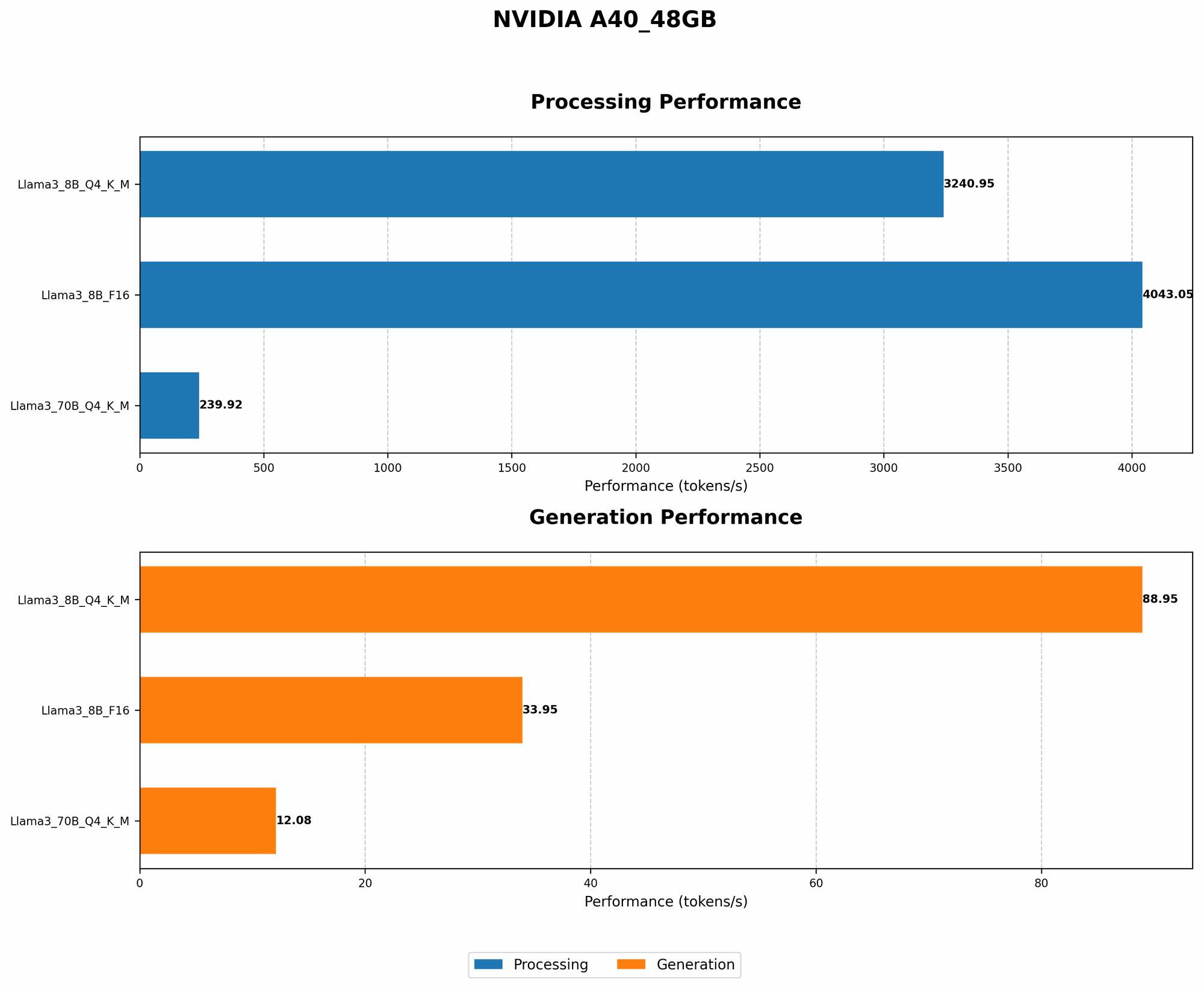
Let's dive into the world of LLMs and see how they perform on the A40_48GB powerhouse. We'll be looking at a popular LLM, Llama, in various sizes and see how quantization affects its speed.
Llama 8B Performance on A40_48GB
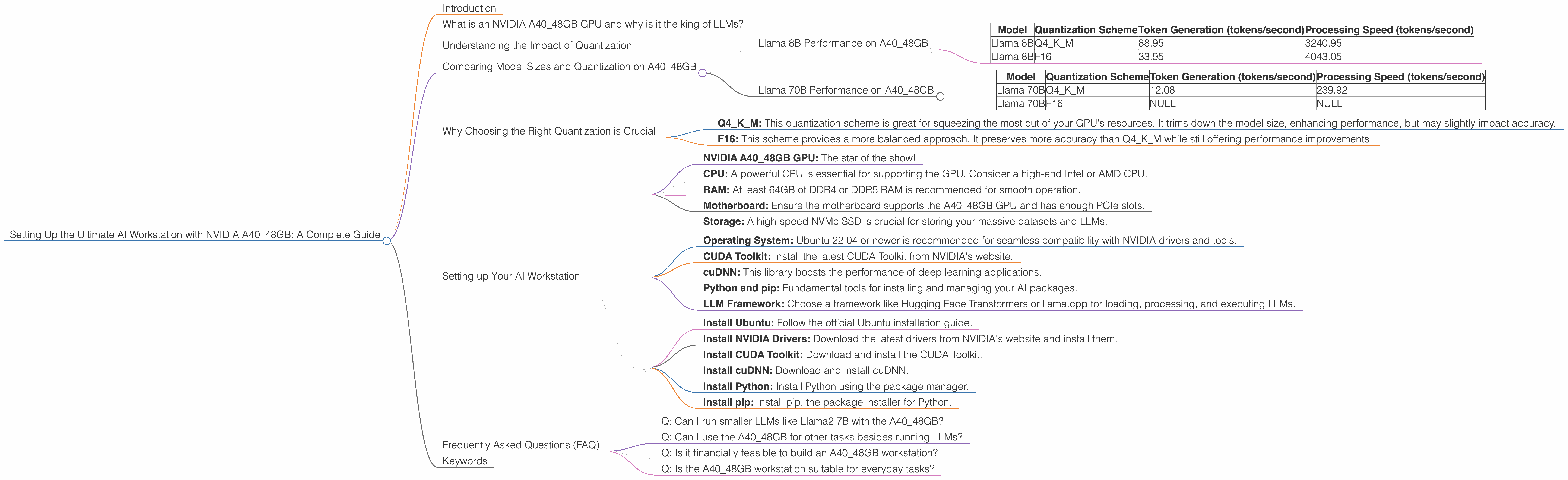
| Model | Quantization Scheme | Token Generation (tokens/second) | Processing Speed (tokens/second) |
|---|---|---|---|
| Llama 8B | Q4KM | 88.95 | 3240.95 |
| Llama 8B | F16 | 33.95 | 4043.05 |
The A4048GB handles the Llama 8B model effortlessly, capable of generating text at speeds well over 80 tokens per second when using Q4K_M quantization. This means generating a 1000-word response (around 3000 tokens) could take as little as 33 seconds!
With F16 quantization, the performance drops, but it's still much faster than other GPUs. The processing speed is also impressive, showcasing the GPU's ability to digest text inputs quickly.
Llama 70B Performance on A40_48GB
| Model | Quantization Scheme | Token Generation (tokens/second) | Processing Speed (tokens/second) |
|---|---|---|---|
| Llama 70B | Q4KM | 12.08 | 239.92 |
| Llama 70B | F16 | NULL | NULL |
With the larger Llama 70B, the A40_48GB still performs admirably, but the speeds are significantly lower than with the 8B variant. This is to be expected as the larger model requires more processing power. Interestingly, F16 quantization data for the Llama 70B model is unavailable for this particular GPU.
Why Choosing the Right Quantization is Crucial
Choosing the right quantization scheme for your LLM is like picking the right gear for your bike. It's essential for optimizing performance:
- Q4KM: This quantization scheme is great for squeezing the most out of your GPU's resources. It trims down the model size, enhancing performance, but may slightly impact accuracy.
- F16: This scheme provides a more balanced approach. It preserves more accuracy than Q4KM while still offering performance improvements.
Choosing the optimal quantization level depends on your specific needs. If accuracy is paramount, F16 is a better choice. However, if you need blazing-fast performance, Q4KM might be the better option.
Setting up Your AI Workstation
Here's a breakdown of how to set up your own AI workstation with the A40_48GB, leveraging the power of this GPU:
1. Hardware:
- NVIDIA A40_48GB GPU: The star of the show!
- CPU: A powerful CPU is essential for supporting the GPU. Consider a high-end Intel or AMD CPU.
- RAM: At least 64GB of DDR4 or DDR5 RAM is recommended for smooth operation.
- Motherboard: Ensure the motherboard supports the A40_48GB GPU and has enough PCIe slots.
- Storage: A high-speed NVMe SSD is crucial for storing your massive datasets and LLMs.
2. Software:
- Operating System: Ubuntu 22.04 or newer is recommended for seamless compatibility with NVIDIA drivers and tools.
- CUDA Toolkit: Install the latest CUDA Toolkit from NVIDIA's website.
- cuDNN: This library boosts the performance of deep learning applications.
- Python and pip: Fundamental tools for installing and managing your AI packages.
- LLM Framework: Choose a framework like Hugging Face Transformers or llama.cpp for loading, processing, and executing LLMs.
3. Installation Guide:
- Install Ubuntu: Follow the official Ubuntu installation guide.
- Install NVIDIA Drivers: Download the latest drivers from NVIDIA's website and install them.
- Install CUDA Toolkit: Download and install the CUDA Toolkit.
- Install cuDNN: Download and install cuDNN.
- Install Python: Install Python using the package manager.
- Install pip: Install pip, the package installer for Python.
4. Setting up the LLM Framework:
Refer to the official documentation of your chosen framework for installation instructions and example code. For instance, for Hugging Face Transformers, follow their guide to download and load your models.
5. Benchmarking and Optimizing:
Test your LLM's performance using benchmark datasets and fine-tune your configuration for optimal results. Experiment with different quantization levels to find the sweet spot between speed and accuracy.
Frequently Asked Questions (FAQ)
Q: Can I run smaller LLMs like Llama2 7B with the A40_48GB?
Absolutely! Smaller models like Llama2 7B will run extremely fast on this GPU. You'll experience a noticeable performance boost compared to other GPUs. However, it’s crucial to note that these smaller models are not the focus of this article.
Q: Can I use the A40_48GB for other tasks besides running LLMs?
Definitely! The A40_48GB is a beastly GPU for all kinds of computing. It's a fantastic choice for data science, machine learning, scientific simulation, and even gaming. It's like having a supercomputer at your fingertips!
Q: Is it financially feasible to build an A40_48GB workstation?
The A40_48GB is not cheap. It's a significant investment. However, if you're serious about running large LLMs locally, it can be a worthwhile investment for developers, researchers, and enthusiasts.
Q: Is the A40_48GB workstation suitable for everyday tasks?
While it's capable of handling everything from gaming to video editing, the A40_48GB is overkill for typical everyday computer tasks. There are more cost-effective options available for day-to-day use.
Keywords
NVIDIA A4048GB, LLM, AI workstation, GPU, Llama 8B, Llama 70B, quantization, Q4K_M, F16, token generation, processing speed, benchmarking, Hugging Face Transformers, llama.cpp