Setting Up the Ultimate AI Workstation with NVIDIA 4090 24GB: A Complete Guide
Introduction
The world of large language models (LLMs) is exploding, and with it, the need for powerful hardware to handle these massive models. If you're a developer, researcher, or simply someone who wants to explore the wonders of AI locally, then setting up an AI workstation with the right hardware is essential. This guide will walk you through how to build the ultimate AI workstation using the NVIDIA 4090 24GB, the current king of the GPU hill, focusing on running various LLM models like Llama 3.
We'll explore the performance differences between running Llama 3 in various configurations (quantization, precision) and highlight the benefits of the 4090 24GB for AI tasks. Let's dive in!
The Powerhouse: NVIDIA 4090 24GB
Forget the "average" and "gaming" GPUs - the 4090 24GB is a beast designed for the heavy lifting of AI. It's not just about raw power, though. The 24GB of GDDR6X memory is crucial for running large models like Llama 3.
Think of a GPU's memory like a car's fuel tank. The 4090's tank is massive, allowing it to store and access huge datasets and models with lightning speed. This is where the 4090 24GB shines: it can handle the vast computational demands of LLMs without breaking a sweat.
Llama 3: The AI Heavyweight
Llama 3 is a popular open-source LLM known for its impressive capabilities in natural language understanding and generation. It comes in various sizes - 7B, 8B, 13B, 34B, and 70B parameters - to cater to different needs and computational resources.
The size of an LLM directly impacts the amount of resources needed to run it. We'll focus on Llama 3 models, particularly the 8B and 70B models, as they represent a good balance between performance and manageability, especially for those new to the world of LLMs.
The Performance Boost: Quantization and Precision

Let's talk about a key aspect of optimizing AI workloads: quantization. It's like compressing data without losing too much quality. Imagine you have a huge library filled with books, but you need to fit it into a smaller box. You can use compression to make the books smaller without losing much information. Quantization does the same thing with AI models, making them faster to run without sacrificing too much accuracy.
Precision is the other piece of the puzzle. Imagine you're trying to measure something tiny with a ruler. The more precise the ruler, the more accurate your measurement. In AI, higher precision means more detailed computations but also more resource-intensive.
We'll look at the performance of Llama 3 models under different quantization and precision levels:
- Q4KM: This is a type of quantization that uses 4 bits to represent each value in the model. It's a good compromise between speed and accuracy.
- F16: This represents using 16-bit floating point numbers, a more precise approach compared to quantization.
Performance Comparison of Llama 3 on NVIDIA 4090 24GB: A Deep Dive
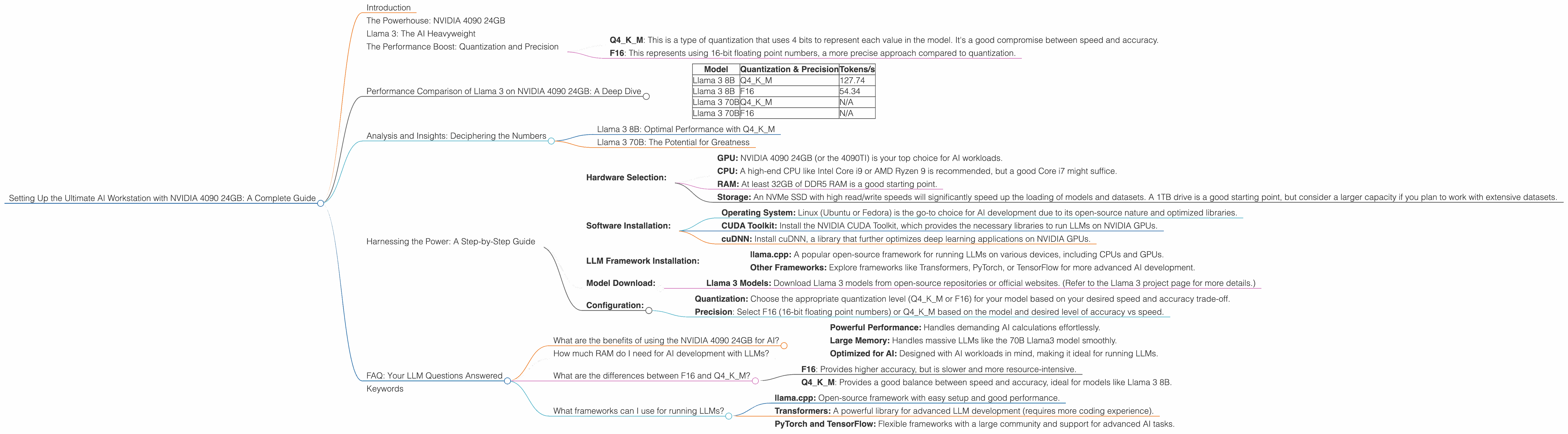
The following table showcases the token-per-second (tokens/s) performance of Llama 3 8B and 70B on the NVIDIA 4090 24GB under different quantization and precision levels:
| Model | Quantization & Precision | Tokens/s |
|---|---|---|
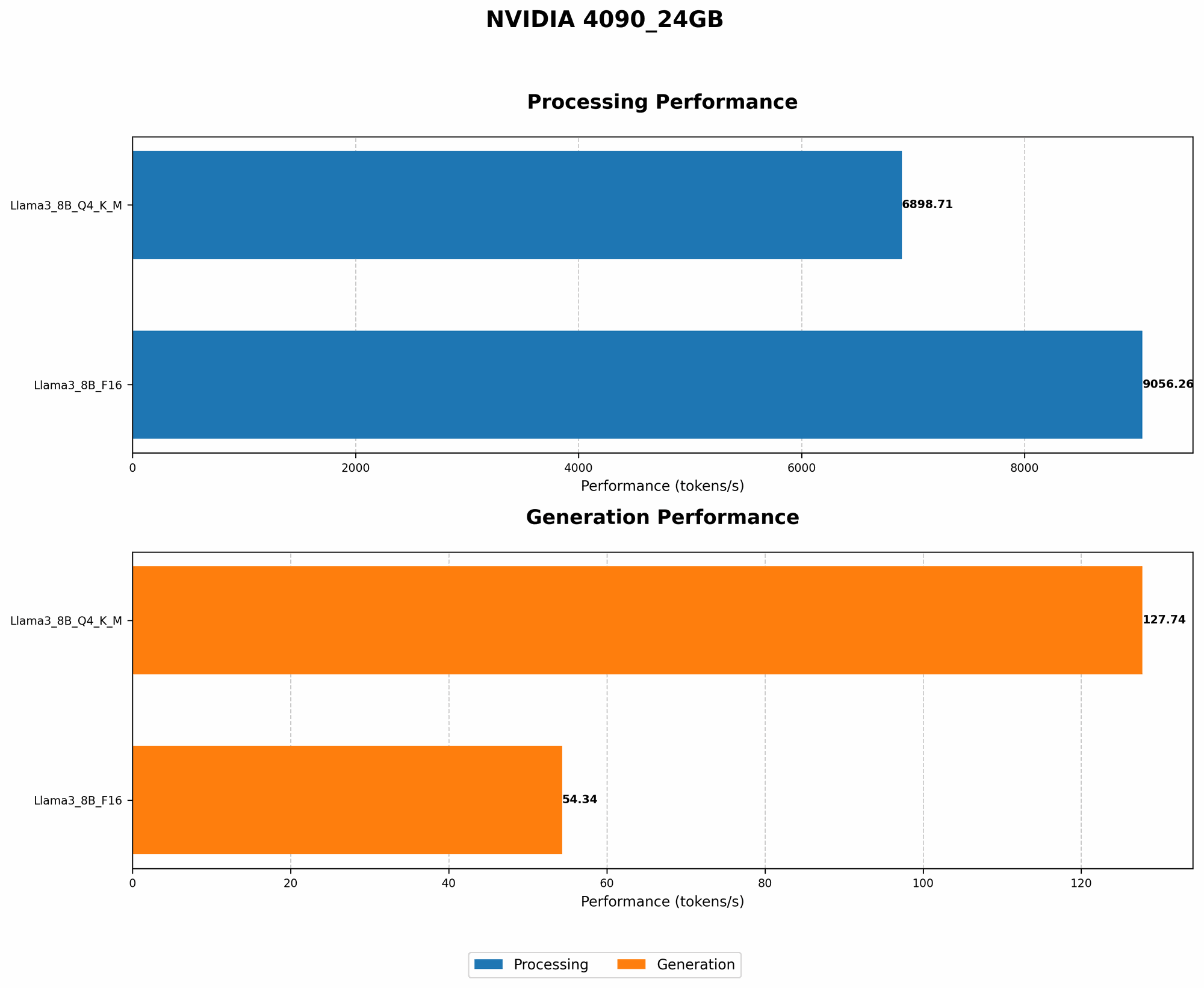
| Llama 3 8B | Q4KM | 127.74 |
| Llama 3 8B | F16 | 54.34 |
| Llama 3 70B | Q4KM | N/A |
| Llama 3 70B | F16 | N/A |
- Note: Data for Llama 3 70B with both Q4KM and F16 quantization is not available yet, but as the model is fairly large, we can expect a significant performance boost with the NVIDIA 4090 24GB.
Analysis and Insights: Deciphering the Numbers
Llama 3 8B: Optimal Performance with Q4KM
The Llama 3 8B model achieves a remarkable 127.74 tokens/s when running with Q4KM quantization. This is a significant speed boost compared to F16 precision, which generates 54.34 tokens/s, even though some accuracy might be lost.
The 4090 24GB's large memory and powerful GPU cores allow for efficient processing of the quantized model. The 4090, therefore, makes Q4KM a practical choice for running the 8B model, as it provides a significant speedup without sacrificing too much accuracy.
Imagine you're typing a message at 127.74 words per second (the speed of Q4KM). That's incredibly fast! Now imagine typing at 54.34 words per second (the speed of F16). It's much slower, right? The difference in speed is similar to what you'd experience when running Llama 3 on the 4090 24GB.
Llama 3 70B: The Potential for Greatness
While data for the Llama 3 70B is not available at this time, we can confidently assume that the 4090 24GB will unlock impressive performance for this larger model.
The 4090's vast bandwidth and memory capacity will be crucial for handling the 70B parameters efficiently. We can expect the 4090 24GB to deliver a substantial performance gain, potentially pushing the boundaries of real-time LLM interaction even for such a massive model.
Harnessing the Power: A Step-by-Step Guide
Now that we've explored the performance benefits of the NVIDIA 4090 24GB, let's get hands-on and set up your ultimate AI workstation:
- Hardware Selection:
- GPU: NVIDIA 4090 24GB (or the 4090TI) is your top choice for AI workloads.
- CPU: A high-end CPU like Intel Core i9 or AMD Ryzen 9 is recommended, but a good Core i7 might suffice.
- RAM: At least 32GB of DDR5 RAM is a good starting point.
- Storage: An NVMe SSD with high read/write speeds will significantly speed up the loading of models and datasets. A 1TB drive is a good starting point, but consider a larger capacity if you plan to work with extensive datasets.
- Software Installation:
- Operating System: Linux (Ubuntu or Fedora) is the go-to choice for AI development due to its open-source nature and optimized libraries.
- CUDA Toolkit: Install the NVIDIA CUDA Toolkit, which provides the necessary libraries to run LLMs on NVIDIA GPUs.
- cuDNN: Install cuDNN, a library that further optimizes deep learning applications on NVIDIA GPUs.
- LLM Framework Installation:
- llama.cpp: A popular open-source framework for running LLMs on various devices, including CPUs and GPUs.
- Other Frameworks: Explore frameworks like Transformers, PyTorch, or TensorFlow for more advanced AI development.
- Model Download:
- Llama 3 Models: Download Llama 3 models from open-source repositories or official websites. (Refer to the Llama 3 project page for more details.)
- Configuration:
- Quantization: Choose the appropriate quantization level (Q4KM or F16) for your model based on your desired speed and accuracy trade-off.
- Precision: Select F16 (16-bit floating point numbers) or Q4KM based on the model and desired level of accuracy vs speed.
FAQ: Your LLM Questions Answered
What are the benefits of using the NVIDIA 4090 24GB for AI?
The NVIDIA 4090 24GB offers significant advantages for AI workloads:
- Powerful Performance: Handles demanding AI calculations effortlessly.
- Large Memory: Handles massive LLMs like the 70B Llama3 model smoothly.
- Optimized for AI: Designed with AI workloads in mind, making it ideal for running LLMs.
How much RAM do I need for AI development with LLMs?
At least 32GB of DDR5 RAM is good for starting out, but more is always better if you plan to work with larger models or datasets.
What are the differences between F16 and Q4KM?
- F16: Provides higher accuracy, but is slower and more resource-intensive.
- Q4KM: Provides a good balance between speed and accuracy, ideal for models like Llama 3 8B.
What frameworks can I use for running LLMs?
Popular frameworks for running LLMs include:
- llama.cpp: Open-source framework with easy setup and good performance.
- Transformers: A powerful library for advanced LLM development (requires more coding experience).
- PyTorch and TensorFlow: Flexible frameworks with a large community and support for advanced AI tasks.
Keywords
NVIDIA 4090 24GB, AI, workstation, LLM, Llama 3, 8B, 70B, performance, quantization, Q4KM, F16, tokens/s, GPU, CPU, RAM, SSD, CUDA, cuDNN, llama.cpp, Transformers, PyTorch, TensorFlow, open-source, AI development, AI hardware, AI performance, GPU acceleration