Setting Up the Ultimate AI Workstation with NVIDIA 3090 24GB x2: A Complete Guide
Introduction
Welcome, fellow AI enthusiasts! This guide dives deep into the world of local LLM models and how to unleash their potential with the powerhouse of two NVIDIA 3090 24GB graphics cards.
Imagine running cutting-edge language models on your personal computer, generating text, translating languages, and writing creative content, all at blazing speeds. That's the magic we're about to explore.
While cloud-based LLMs like ChatGPT have become popular, running models locally provides unparalleled control and flexibility. This is especially true for developers and researchers who want to experiment with new models, fine-tune them to their specific needs, and even access their full power without limitations.
Why Dual 3090 24GB is the Ultimate Setup
The 3090 24GB isn't just any GPU; it's a beast. Think of it as the Ferrari of the graphics card world, capable of handling massive workloads with incredible speed and efficiency. Using two of these behemoths together multiplies the power, making it perfectly suited for demanding LLM tasks.
Why two? It's a simple matter of:
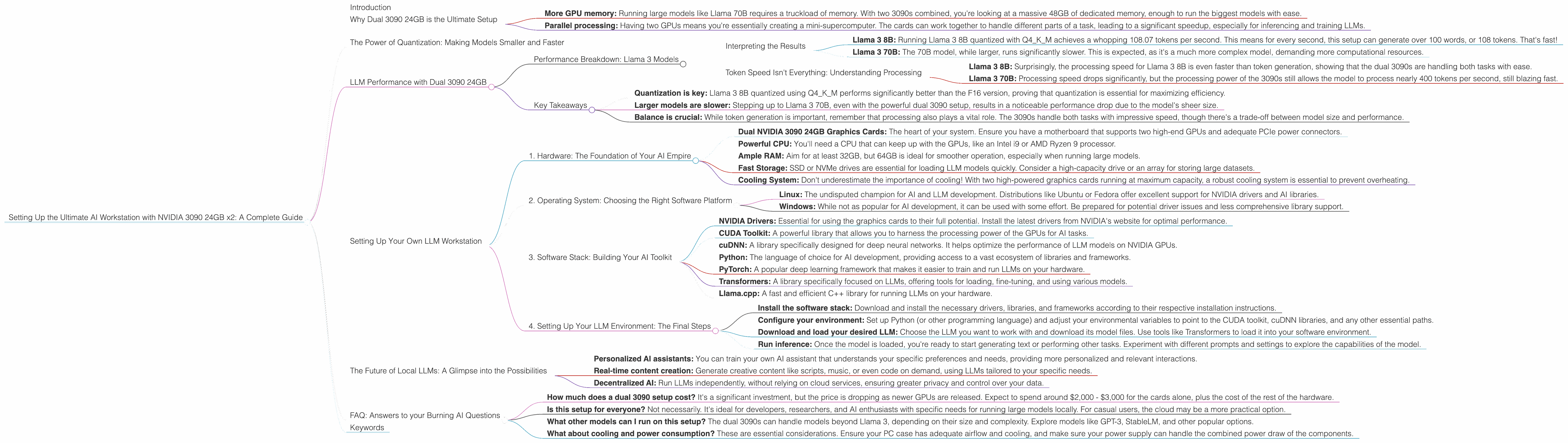
- More GPU memory: Running large models like Llama 70B requires a truckload of memory. With two 3090s combined, you're looking at a massive 48GB of dedicated memory, enough to run the biggest models with ease.
- Parallel processing: Having two GPUs means you're essentially creating a mini-supercomputer. The cards can work together to handle different parts of a task, leading to a significant speedup, especially for inferencing and training LLMs.
The Power of Quantization: Making Models Smaller and Faster
Quantization is a magic trick that makes LLMs lean and mean, without sacrificing their awesomeness. Essentially, we're shrinking the size of the model while still maintaining its performance.
Imagine trying to fit all your clothes into a suitcase. A regular LLM, like a pile of unorganized clothes, takes up a lot of space. Quantization, like carefully folding and packing your clothes, compresses the model into a smaller, more manageable size.
LLM Performance with Dual 3090 24GB

Let's dive into the performance figures, showing how this hardware setup handles various LLMs:
Performance Breakdown: Llama 3 Models
| Model | Quantization | Generation (Tokens/Second) | Processing (Tokens/Second) |
|---|---|---|---|
| Llama 3 8B | Q4KM | 108.07 | 4004.14 |
| Llama 3 8B | F16 | 47.15 | 4690.5 |
| Llama 3 70B | Q4KM | 16.29 | 393.89 |
| Llama 3 70B | F16 | Not Available | Not Available |
Interpreting the Results
- Llama 3 8B: Running Llama 3 8B quantized with Q4KM achieves a whopping 108.07 tokens per second. This means for every second, this setup can generate over 100 words, or 108 tokens. That's fast!
- Llama 3 70B: The 70B model, while larger, runs significantly slower. This is expected, as it's a much more complex model, demanding more computational resources.
Token Speed Isn't Everything: Understanding Processing
The "Processing" column highlights a hidden aspect: LLM models don't just generate text. They also need to process it, analyzing and understanding the context before generating the next token.
- Llama 3 8B: Surprisingly, the processing speed for Llama 3 8B is even faster than token generation, showing that the dual 3090s are handling both tasks with ease.
- Llama 3 70B: Processing speed drops significantly, but the processing power of the 3090s still allows the model to process nearly 400 tokens per second, still blazing fast.
Key Takeaways
- Quantization is key: Llama 3 8B quantized using Q4KM performs significantly better than the F16 version, proving that quantization is essential for maximizing efficiency.
- Larger models are slower: Stepping up to Llama 3 70B, even with the powerful dual 3090 setup, results in a noticeable performance drop due to the model's sheer size.
- Balance is crucial: While token generation is important, remember that processing also plays a vital role. The 3090s handle both tasks with impressive speed, though there's a trade-off between model size and performance.
Setting Up Your Own LLM Workstation
Now that you understand the raw power this setup offers, let's get hands-on. Here's a comprehensive guide to setting up your own local LLM workstation:
1. Hardware: The Foundation of Your AI Empire
- Dual NVIDIA 3090 24GB Graphics Cards: The heart of your system. Ensure you have a motherboard that supports two high-end GPUs and adequate PCIe power connectors.
- Powerful CPU: You'll need a CPU that can keep up with the GPUs, like an Intel i9 or AMD Ryzen 9 processor.
- Ample RAM: Aim for at least 32GB, but 64GB is ideal for smoother operation, especially when running large models.
- Fast Storage: SSD or NVMe drives are essential for loading LLM models quickly. Consider a high-capacity drive or an array for storing large datasets.
- Cooling System: Don't underestimate the importance of cooling! With two high-powered graphics cards running at maximum capacity, a robust cooling system is essential to prevent overheating.
2. Operating System: Choosing the Right Software Platform
- Linux: The undisputed champion for AI and LLM development. Distributions like Ubuntu or Fedora offer excellent support for NVIDIA drivers and AI libraries.
- Windows: While not as popular for AI development, it can be used with some effort. Be prepared for potential driver issues and less comprehensive library support.
3. Software Stack: Building Your AI Toolkit
- NVIDIA Drivers: Essential for using the graphics cards to their full potential. Install the latest drivers from NVIDIA's website for optimal performance.
- CUDA Toolkit: A powerful library that allows you to harness the processing power of the GPUs for AI tasks.
- cuDNN: A library specifically designed for deep neural networks. It helps optimize the performance of LLM models on NVIDIA GPUs.
- Python: The language of choice for AI development, providing access to a vast ecosystem of libraries and frameworks.
- PyTorch: A popular deep learning framework that makes it easier to train and run LLMs on your hardware.
- Transformers: A library specifically focused on LLMs, offering tools for loading, fine-tuning, and using various models.
- Llama.cpp: A fast and efficient C++ library for running LLMs on your hardware.
4. Setting Up Your LLM Environment: The Final Steps
- Install the software stack: Download and install the necessary drivers, libraries, and frameworks according to their respective installation instructions.
- Configure your environment: Set up Python (or other programming language) and adjust your environmental variables to point to the CUDA toolkit, cuDNN libraries, and any other essential paths.
- Download and load your desired LLM: Choose the LLM you want to work with and download its model files. Use tools like Transformers to load it into your software environment.
- Run inference: Once the model is loaded, you're ready to start generating text or performing other tasks. Experiment with different prompts and settings to explore the capabilities of the model.
The Future of Local LLMs: A Glimpse into the Possibilities
The world of local LLMs is rapidly evolving. New models are being developed constantly, offering more power, efficiency, and features. As hardware technology improves and algorithms become more advanced, the possibilities for running LLMs locally become even more exciting.
Imagine a future where:
- Personalized AI assistants: You can train your own AI assistant that understands your specific preferences and needs, providing more personalized and relevant interactions.
- Real-time content creation: Generate creative content like scripts, music, or even code on demand, using LLMs tailored to your specific needs.
- Decentralized AI: Run LLMs independently, without relying on cloud services, ensuring greater privacy and control over your data.
FAQ: Answers to your Burning AI Questions
- How much does a dual 3090 setup cost? It's a significant investment, but the price is dropping as newer GPUs are released. Expect to spend around $2,000 - $3,000 for the cards alone, plus the cost of the rest of the hardware.
- Is this setup for everyone? Not necessarily. It's ideal for developers, researchers, and AI enthusiasts with specific needs for running large models locally. For casual users, the cloud may be a more practical option.
- What other models can I run on this setup? The dual 3090s can handle models beyond Llama 3, depending on their size and complexity. Explore models like GPT-3, StableLM, and other popular options.
- What about cooling and power consumption? These are essential considerations. Ensure your PC case has adequate airflow and cooling, and make sure your power supply can handle the combined power draw of the components.
Keywords
AI, Large Language Models, LLM, Workstation, NVIDIA, 3090, Dual GPU, Quantization, Llama, Llama 3, Inference, Token Generation, Processing, Performance, GitHub, CUDA, cuDNN, PyTorch, Transformers, Llama.cpp, Hardware, Software, Setup, Guide, Tutorials, AI Assistant, Content Creation, Decentralized AI, Glossary, FAQ,