Setting Up the Ultimate AI Workstation with NVIDIA 3090 24GB: A Complete Guide
Introduction
Building your own AI workstation is like crafting a magic wand for the modern wizard. It allows you to unlock the power of Large Language Models (LLMs) locally, enabling you to experiment with these incredible tools, develop custom applications, and explore the fascinating world of generative AI.
The NVIDIA 309024GB GPU is a powerhouse, offering phenomenal performance for AI-intensive tasks. But choosing the right hardware and optimizing your setup to maximize performance is crucial. This guide will walk you through setting up the ultimate AI workstation using the NVIDIA 309024GB, ensuring a smooth and efficient journey into the world of LLMs.
Understanding the Powerhouse: NVIDIA 3090_24GB

Think of the NVIDIA 3090_24GB as the Ferrari of GPUs. It's built for speed, sporting 24GB of GDDR6X memory and a whopping 10,496 CUDA cores. This combination enables a smooth ride when dealing with the massive computation demands inherent in running LLMs.
Choosing the Right LLM Model for Your Workstation
LLMs come in different sizes, architectures, and strengths, just like magical spells. The right LLM, the one that matches your needs, can unleash its power on your workstation:
- Llama 3 8B: A smaller, more manageable LLM, perfect for experimenting and learning the ropes of local AI. It's like a simple spell with powerful effects.
- Llama 3 70B: A gargantuan LLM, full of potential but requiring a robust setup to handle its complexity. Think of it as a grand spell, capable of extraordinary feats.
Comparing Performance: Llama 3 on the NVIDIA 3090_24GB
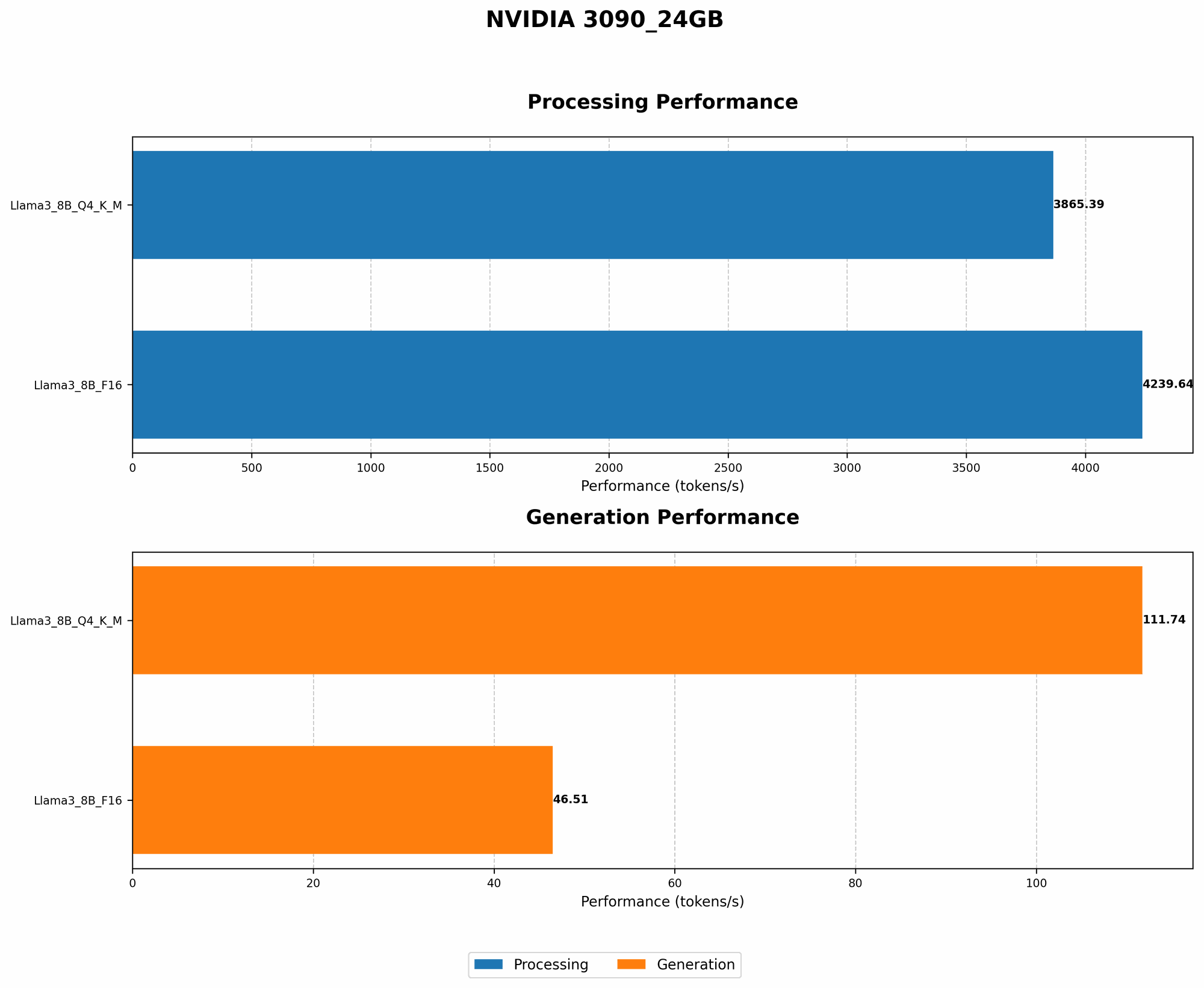
Let's dive into the numbers, showcasing the performance of the NVIDIA 3090_24GB with Llama 3 models, measured in tokens per second, a metric that indicates the speed of processing text:
| Model | Format | Performance | Description |
|---|---|---|---|
| Llama 3 8B | Q4KM | 111.74 | This measures the speed of generating tokens in Q4KM format, which is a compressed form of the model. |
| Llama 3 8B | F16 | 46.51 | This measures the speed of generating tokens in F16 format, which is a more standard floating-point format. |
| Llama 3 70B | Q4KM | N/A | Performance data is not available for this LLM model on the 3090_24GB. |
| Llama 3 70B | F16 | N/A | Performance data is not available for this LLM model on the 3090_24GB. |
Understanding Quantization: A Simplified Explanation
Imagine you have a giant cookbook with detailed recipes. Quantization is like simplifying the cookbook by using shorter, more concise language. It reduces the size of the LLM, which can help both training and inference. The Q4KM format is a highly compressed form, meaning the LLM is much smaller but might have slightly reduced accuracy.
Setting Up Your AI Workstation
Now, let's build that magic wand! Setting up your AI workstation involves several key steps:
1. Choosing Your Hardware:
- CPU: A powerful CPU is important for tasks like text preprocessing and managing the flow of data between the GPU and RAM. Consider Intel i9 or AMD Ryzen 9 CPUs.
- RAM: Generous RAM is crucial for running LLMs, especially larger models. Aim for at least 32GB of RAM, and more is preferable if you're working with advanced LLMs.
- Storage: Choose a high-speed SSD (Solid-State Drive) for your operating system and LLM files. M.2 NVMe SSDs provide the best performance for faster access.
- Power Supply: Make sure your power supply can handle the demands of your GPU. The NVIDIA 3090_24GB has a high power requirement, so a 750W or higher power supply unit (PSU) is recommended.
2. Installation and Configuration
- Operating System: Linux is the preferred choice for AI development, offering excellent command-line tools and a vast ecosystem of AI libraries. Ubuntu or Debian are popular distributions.
- Drivers: Install the latest NVIDIA driver for your GPU. This ensures optimal performance and compatibility.
- CUDA Toolkit: Install the CUDA toolkit, which allows you to use NVIDIA's parallel computing platform to accelerate your AI workload.
- Python and Deep Learning Libraries: Install Python, a popular language for AI development, and packages like PyTorch or TensorFlow, which provide the tools to work with LLMs.
3. Installing and Running LLMs:
- llama.cpp: This is a popular open-source library, designed for running LLMs locally, especially Llama models. It's user-friendly and easy to install. Download and install it from the official repository.
- Running Your LLM: Use the llama.cpp tool with the appropriate settings for your LLM model and hardware.
Optimizing Your Workstation for Performance
Just like a skilled wizard carefully chooses their incantations, you can fine-tune your workstation for peak performance:
1. GPU Memory Management:
- Quantization: As mentioned earlier, quantization significantly reduces the memory footprint of LLMs, improving performance. Experiment with different quantization levels (Q4KM, Q4_K, F16) to find the optimal balance between memory usage and accuracy.
- Batch Size: Adjusting the batch size, the number of tokens processed simultaneously, can impact performance. Experiment with different batch sizes to find the sweet spot for your workstation.
2. Boosting Speed with Multi-GPUs:
For even more power, you can add multiple GPUs to your workstation. While the 3090_24GB is a powerhouse by itself, using multiple GPUs in parallel can dramatically increase performance, especially for larger LLMs.
Exploring the Possibilities with Your AI Workstation
Now you've got the ultimate setup: a powerful NVIDIA 3090_24GB and a well-configured workstation. It's time to put your AI magic to work.
1. Text Generation:
- Creative Writing: Generate stories, poems, scripts, and more. Let your imagination soar with the help of your AI workstation.
- Content Creation: Produce blog posts, articles, marketing copy, and other content. Use your AI workstation to overcome writer's block and boost your content creation process.
- Translation: Translate text between languages. Your AI workstation can break down language barriers and facilitate global communication.
2. Code Generation:
- Generate Code Snippets: Use your AI workstation to assist with coding projects, generating code snippets, and even writing entire functions.
- Debugging and Optimization: Let your AI workstation analyze your code and suggest improvements. It can help you identify bugs, optimize performance, and write cleaner, more efficient code.
3. Chatbots and Conversational AI:
Build intelligent chatbots that can engage in meaningful conversations. Use your AI workstation to power chatbot development, creating personalized and interactive experiences.
FAQ: Common Questions about Your AI Workstation
Q: What are the best LLM models for using with the NVIDIA 309024GB? A: The 309024GB is a powerful GPU, capable of handling a range of LLM models, especially the Llama 3 family. For smaller, more manageable models, try the Llama 3 8B. If you need a more powerful model, consider the larger Llama 3 70B, but keep in mind that it requires more resources.
Q: What are the best tools for managing and running LLMs on my workstation? A: llama.cpp is a popular choice, offering a user-friendly way to run LLMs locally. It's well-documented and has a large community. For more advanced tasks, tools like Hugging Face Transformers provide a comprehensive platform for working with LLMs.
Q: How can I improve the performance of my AI workstation? A: Quantization is a powerful technique for reducing memory usage and boosting performance. Experiment with different quantization levels. Additionally, adjusting the batch size and ensuring you have the latest driver and CUDA toolkit can contribute to a smoother experience.
Keywords
NVIDIA 309024GB, AI Workstation, Large Language Model, LLM, Llama 3, 8B, 70B, GPU, CUDA, Quantization, Q4K_M, F16, Performance, Token Speed, Text Generation, Code Generation, Chatbots, Conversational AI, llama.cpp, Hugging Face Transformers