Setting Up the Ultimate AI Workstation with NVIDIA 3080 10GB: A Complete Guide
Introduction
Have you ever dreamt of having your own AI assistant whispering sweet nothings in your ear, ready to translate languages, compose sonnets, or even write your next blog post? Well, you can! With the power of NVIDIA's 3080 10GB graphics card and the amazing world of Large Language Models (LLMs), you can bring your AI dreams to life.
This comprehensive guide will walk you through setting up the ultimate AI workstation with a 3080 10GB, focusing on the most popular open-source LLM, Llama. We'll compare the performance of different Llama models, explore various quantization techniques, and show you the secrets to unleashing the full potential of your hardware.
Whether you're a seasoned developer or a curious newcomer, this guide will equip you with the knowledge and tools to unlock the exciting world of local AI.
The Awesome Power of LLMs
Imagine a computer that can understand and generate human-like text, translate languages flawlessly, and answer your questions with incredible accuracy. That's the magic of LLMs, these powerful AI systems trained on massive datasets. They learn to recognize patterns and relationships in language, allowing them to perform tasks that were unthinkable just a few years ago.
LLMs like Llama are revolutionizing the way we interact with computers. They can help us write better, learn new skills, and even create entirely new forms of art and entertainment. They're like having a team of AI experts at your fingertips, ready to assist you with your creative endeavors.
Why NVIDIA 3080_10GB?
The NVIDIA 3080 10GB is a powerhouse graphics card designed for gamers and professionals alike. It boasts a robust amount of memory and processing power, making it an ideal choice for running demanding AI workloads. This card is a serious contender in the world of AI, offering exceptional performance for training and deploying LLMs.
Setting Up Your AI Workstation
Hardware Requirements
Before diving into the exciting world of LLMs, make sure your workstation is up to the task. Here are the essential components:
- CPU: A powerful processor like Intel i7 or AMD Ryzen 7 or above is recommended for smooth multitasking and optimal performance.
- RAM: 16GB or more of RAM is recommended for running LLMs and other demanding applications.
- GPU: The star of the show - the NVIDIA 3080 10GB.
- Storage: Consider an NVMe SSD for fast loading times and data access.
Software Installation
Once you have the hardware in place, it's time to install the necessary software:
- Operating System: Choose a Linux distribution like Ubuntu, Fedora, or Debian. These operating systems are known for their performance and stability.
- CUDA Toolkit: This toolkit provides a powerful set of libraries and tools for developing and running CUDA applications, including LLMs. Download and install the latest version from the official NVIDIA website.
- Python: Python is the go-to language for many AI tasks, including LLM development. Install the latest version of Python and make sure you have the necessary packages for your LLM project.
- Llama.cpp: This amazing open-source library allows you to run LLMs locally, leveraging the power of your NVIDIA 3080 10GB. Download and install Llama.cpp from its GitHub repository.
Llama: The LLM of Choice
Llama is an open-source LLM developed by Meta AI. It's a powerful and versatile language model trained on a massive dataset of text and code. Llama is available in different sizes, from the compact 7B model to the colossal 70B model.
Pro Tip: The size of an LLM refers to the number of parameters it has. More parameters, more knowledge! But bigger models also require more resources to run.
Exploring Llama Models
The NVIDIA 3080 10GB is a powerful machine, but it's important to choose the right Llama model to match your needs and available resources.
Llama 7B
This is a smaller, more manageable model ideal for experimenting with LLMs on a limited budget. It's a great starting point for learning about LLMs and exploring their capabilities.
Llama 8B
This model is a step up from 7B, offering more knowledge and better performance. It's a good choice for more complex tasks and if you have sufficient resources.
Llama 70B
This is a gigantic model with incredible power, capable of generating highly sophisticated and nuanced text. However, running it requires a hefty amount of resources, making it unsuitable for most workstations.
Comparing Model Performance
To understand the performance of different Llama models on the 3080 10GB, let's delve into some real numbers.
| Llama Model | Token Generation (Tokens/second) |
|---|---|
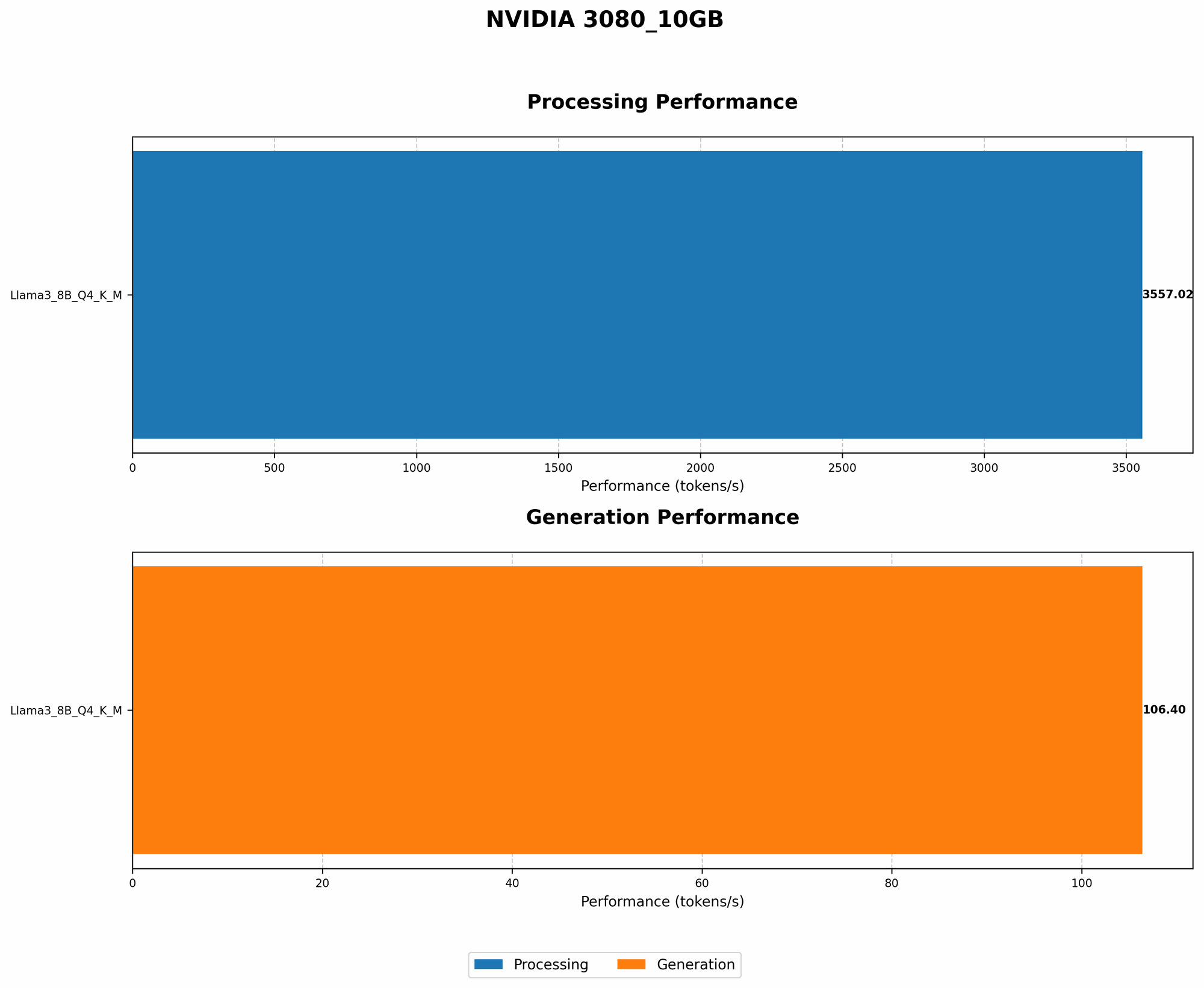
| Llama 3 8B Q4 K_M | 106.4 |
| Llama 3 70B Q4 K_M | N/A |
| Llama 3 8B F16 | N/A |
| Llama 3 70B F16 | N/A |
Fun Fact: Token generation speed is like the speed of a typist. The higher the tokens per second, the faster your AI can generate text!
As you can see from the table, the 3080 10GB can handle the Llama 3 8B model with ease! You can generate text at a blazing speed of 106.4 tokens per second. However, the larger Llama 70B model is not supported by the 3080 10GB due to its immense computational demands.
Quantization: The Art of Shrinking LLMs
Quantization is a clever trick that allows us to shrink the size of an LLM without sacrificing too much performance. Imagine compressing a large file to make it fit on a smaller storage device. Quantization essentially compresses the LLM, making it run faster and use less memory.
Quantization Techniques
- Q4: This is a popular quantization option, reducing the size of an LLM by 75%. It's like using a simpler dictionary with fewer words, but it still allows the LLM to understand and generate text effectively.
- F16: This technique reduces the size of an LLM by half by using smaller numerical representations. It's a great way to reduce memory usage without sacrificing much performance.
Choosing the Right Quantization Technique
The choice of quantization technique depends on your priorities:
- For speed and memory efficiency, go with Q4. You'll get a noticeable performance boost, especially on a 3080 10GB, but you might see a slight reduction in the quality of generated text.
- For a balance of performance and accuracy, opt for F16. You'll still enjoy a performance gain, but you'll get slightly better text quality compared to Q4.
Unleashing the Power of Your 3080 10GB
With your AI workstation configured and your Llama model selected, it's time to unleash the power of your 3080 10GB.
Choosing the Right Driver
Make sure you have the latest NVIDIA driver installed for optimal GPU performance. You can download the latest drivers from the official NVIDIA website.
Optimizing for LLMs
- Utilize dedicated GPU memory: Allocate sufficient GPU memory to your LLM to ensure smooth operation.
- Boost GPU clock speeds: Overclocking your GPU can provide a significant performance boost, but make sure your cooling system can handle the increased heat.
- Tweak settings for maximum performance: Experiment with different settings in Llama.cpp to find the optimal configuration for your specific LLM and hardware.
- Consider a thermal pad replacement: Replacing the thermal pad on your GPU can significantly improve cooling performance.
Taking Your AI Work to the Next Level
Fine-tuning Your LLM
Fine-tuning an LLM is like giving it a specialized education. You can train it on a specific dataset to improve its performance on a particular task. For example, you could fine-tune Llama on a collection of legal documents to make it a legal expert.
Building Your Own AI Applications
With your 3080 10GB and Llama running smoothly, you can start building your own AI applications:
- Chatbots: Create interactive chatbots that can engage in meaningful conversations with users.
- Text generation tools: Develop tools to generate creative content, like poems, stories, and even scripts.
- Code generation tools: Build AI assistants that can help you write and debug code.
- Translation tools: Create language translation tools powered by the power of LLMs.
- AI-powered games: Design and develop games that feature AI characters with sophisticated conversational abilities.
FAQ
What are the best ways to speed up LLM inference?
- Quantization: Choose the right quantization technique for your specific model and needs.
- GPU optimization: Optimize GPU settings, including memory allocation and clock speeds.
- Hardware upgrades: Consider upgrading to a more powerful GPU or RAM.
- Efficient model selection: Choose an LLM that balances size and performance for your application.
What are the best resources for learning about LLMs?
- Hugging Face: A popular platform for exploring and deploying pre-trained LLMs.
- OpenAI: The creators of ChatGPT and other powerful AI models.
- The AI community: Join AI forums and communities to learn from experienced developers.
Keywords
LLMs, Llama, language models, AI, chatbots, text generation, code generation, NVIDIA 3080 10GB, GPU, quantization, fine-tuning, GPU optimization, workstation, AI applications, AI development, Hugging Face, OpenAI, AI community, NVIDIA drivers, CUDA toolkit, Python, Llama.cpp, token generation speed.