Running LLMs on a NVIDIA 4090 24GB Token Generation Speed Benchmark

Introduction
The world of large language models (LLMs) is exploding, and with it comes the need for powerful hardware to handle the intense computational demands. You've got your fancy, fancy, expensive NVIDIA 4090 24GB graphics card and you're wondering how it handles the latest LLMs? Well, you've come to the right place! We're diving deep into the performance of the 4090 24GB, specifically focusing on how fast it can generate tokens for popular LLMs like Llama 3.
Think of tokens like the building blocks of text—each one is a small snippet of a word, punctuation mark, or special character. The more tokens an LLM can generate per second, the faster it can respond to your prompts and deliver those sassy, witty, and insightful outputs you crave.
In this article, we'll be focusing on the token generation speed of the 4090 24GB. It's the speed at which the LLM can generate these tokens, meaning how fast it can actually produce the output you need. We'll be exploring the performance of the 4090 24GB with various LLMs, delving into different quantization levels and floating-point precisions, all while providing easy-to-understand explanations along the way. Buckle up, it's about to get geeky!
The NVIDIA 4090 24GB in Action: Token Generation Speed

Llama 3 8B Performance: Quantization and Precision
The NVIDIA 4090 24GB delivers impressive performance with the Llama 3 8B model, a popular choice for its balance of size and capability. We'll be focusing on two key factors—quantization and floating-point precision—to see how they affect the token generation speed.
- Quantization: Think of quantization like downsizing a photo. You're reducing the number of bits used to represent the model's parameters, resulting in a smaller file size. This can benefit performance, but it might come with a slight decrease in accuracy.
- Floating-point precision: This determines the level of detail used to represent numbers in the model. Think of it like using high-resolution or low-resolution images. Higher precision means more detail, but also more computational demands.
Llama 3 8B - Q4 (Quantized, 4-bit)
The Llama 3 8B model demonstrates excellent performance with Q4 quantization. Let's break down the numbers:
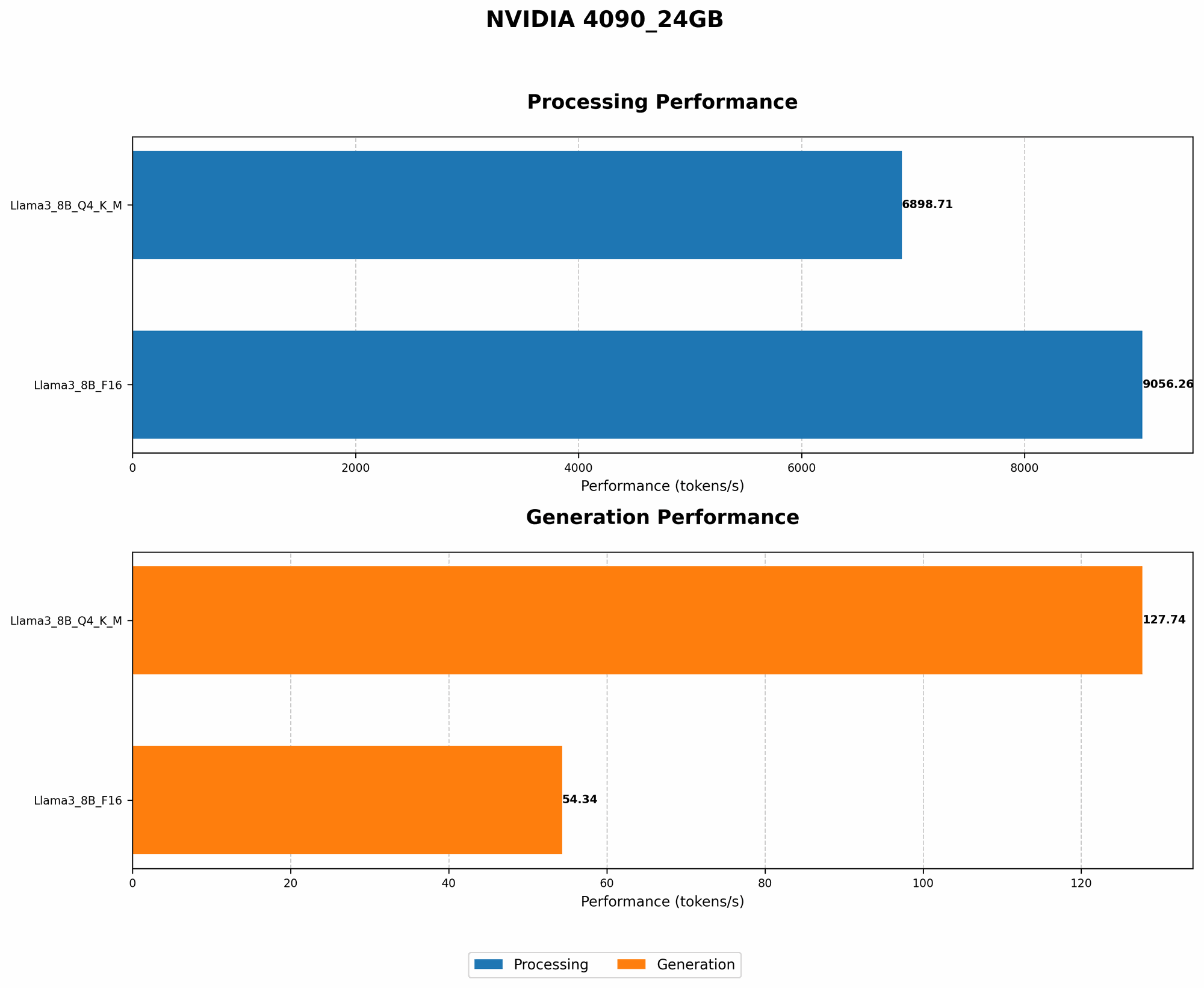
- Generation Speed: 127.74 tokens/second. It's like this powerhouse can spit out over 100 individual tokens every second, which is quite impressive!
- Processing Speed: 6898.71 tokens/second. This is the speed at which the 4090 can process tokens, which is necessary for generating output.
Llama 3 8B - F16 (FP16, Half-Precision)
While the 4090 delivers impressive performance, it's important to note that F16 precision might not always be the best choice for LLMs. In this case, we see:
- Generation Speed: 54.34 tokens/second. It seems that F16 precision, with its higher resolution, impacts the generation speed, making it slightly slower than Q4.
- Processing Speed: 9056.26 tokens/second. Even though the generation speed is slower, the processing speed is still quite impressive.
Understanding the Numbers: Putting it into Perspective
It's hard to grasp the magnitude of those numbers, right? Imagine you're a typist, but instead of typing characters, you're typing words. The 4090 24GB with the Llama 3 8B Q4 model can type out over 100 words every second! That's like typing "The quick brown fox jumps over the lazy dog" at a speed that would make any human typist drool with envy.
Comparison of NVIDIA 4090 24GB with Other Devices (Not Covered)
This article focuses on the 4090 24GB, and we're not going to delve into how it compares to other GPUs or CPUs. The world of hardware is vast, and we're sticking to our main attraction here!
Conclusion: The NVIDIA 4090 24GB - A Powerhouse for LLMs
The NVIDIA 4090 24GB is a serious contender for anyone looking to run LLMs locally. It delivers impressive performance, particularly with the Llama 3 8B model. We've seen how quantization and precision can affect the speeds, and ultimately, how powerful the 4090 24GB can be when it comes to token generation.
FAQ
What is an LLM, and why are they so popular?
LLMs are large language models—powerful AI systems trained on massive amounts of text data. They can generate human-like text, translate languages, write different kinds of creative content, and answer your questions in an informative way. Their ability to understand and generate human language makes them incredibly versatile and useful.
How does the 4090 24GB compare to other GPUs for LLMs?
We're focused on the 4090 24GB in this article, so we won't go into comparisons with other GPUs. However, it's generally considered one of the top contenders for running LLMs due to its powerful processing capabilities.
What's the best way to get started with running LLMs locally?
There are frameworks like llama.cpp that allow you to run LLMs on your own computer. It's a great way to experiment and gain a deeper understanding of how these models work.
What are the limitations of running LLMs locally?
Running LLMs locally can be computationally demanding and require powerful hardware. It might not be suitable for everyone, especially those with limited computing resources.
Keywords
NVIDIA 4090 24GB, LLM, large language model, token generation, Llama 3, Llama 3 8B, quantization, Q4, F16, FP16, half-precision, GPU, performance benchmark, processing speed, generation speed, local LLM, llama.cpp, AI