Running LLMs on a NVIDIA 3090 24GB Token Generation Speed Benchmark

Unleashing the Power of Your GPU: A Deep Dive into LLM Performance on the NVIDIA 3090 24GB
This article is your guide to the exciting world of running large language models (LLMs) on a powerful NVIDIA 3090 24GB graphics card. We'll explore the performance of various LLMs, specifically focusing on the token generation speed, a crucial metric for smooth and responsive model execution.
For those new to the LLM landscape, imagine them as the brainpower behind advanced AI applications like chatbots, text summarizers, and even code generators. Think of token generation speed as the rate at which this "brain" processes information, directly impacting the responsiveness of your AI applications. Faster token generation translates to quicker responses and a more enjoyable user experience.
This article is your one-stop shop for understanding how your NVIDIA 3090 24GB can power these LLMs. We'll delve into benchmark results, compare model performance across different configurations, and provide insights into the factors affecting speed.
Token Generation Speed: The Key to a Smooth LLM Experience

Before diving into the nitty-gritty, let's understand the concept of token generation speed. It's essentially a measure of how many tokens an LLM can process per second. Tokens are the building blocks of text in LLMs, representing words, punctuation, or even special characters. For example, "Hello, world!" would be broken into five tokens: "Hello", ",", "world", "!", and the space between "world" and "!".
The faster your model can generate tokens, the faster it can process information and respond to your requests. Think of it like a super-fast keyboard - the more words you can type per minute, the faster you can communicate your thoughts.
Benchmarking LLMs on the NVIDIA 3090 24GB: A Deep Dive into the Numbers
For our benchmarks, we'll focus on the NVIDIA 3090 24GB, a popular choice for its powerful performance. We'll analyze data from reputable sources, such as the llama.cpp discussions on GitHub and independent benchmarks from researchers. Remember, your mileage may vary based on your LLM model, configuration, and specific use case.
Llama 3 Models: Exploring Different Configurations
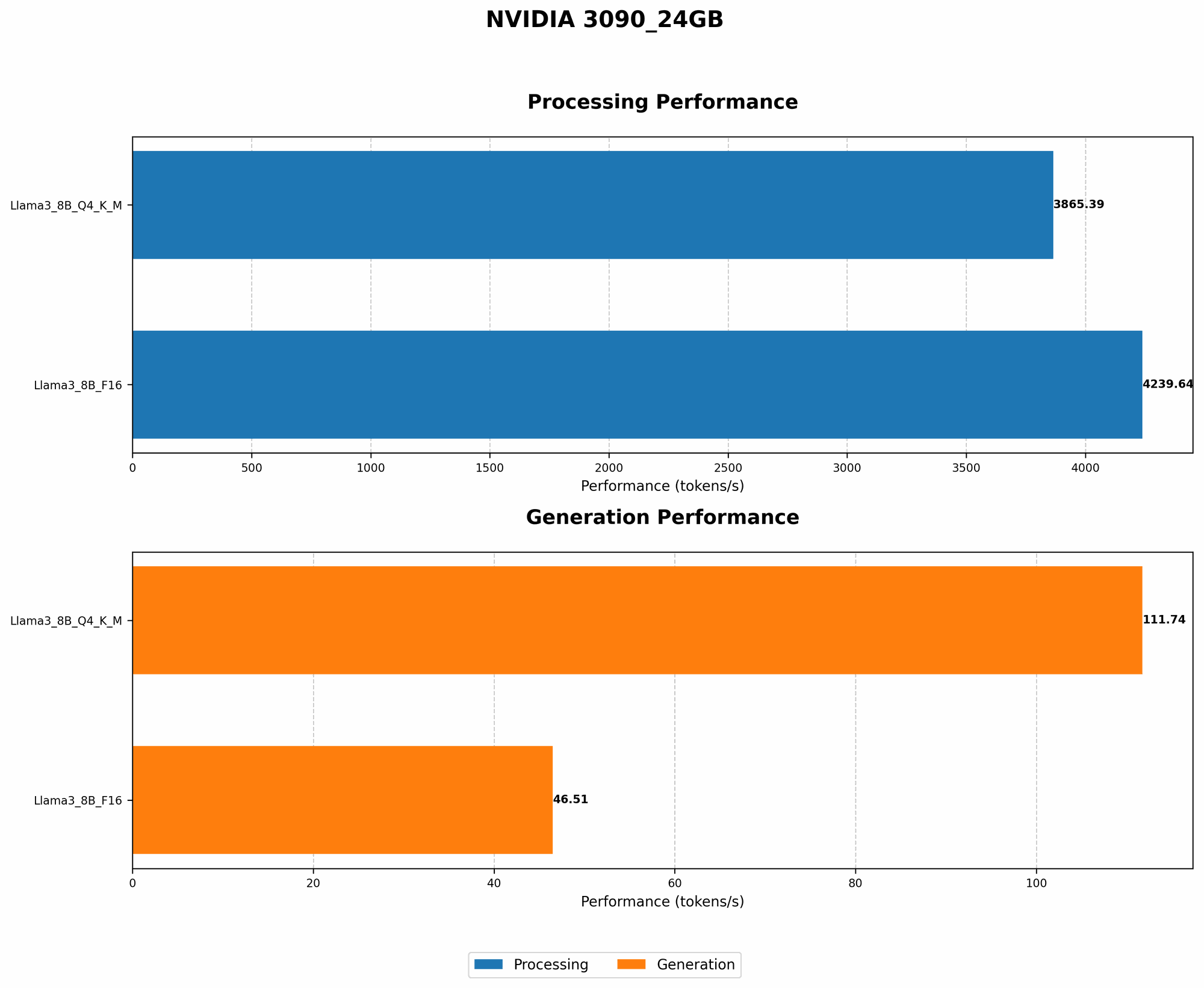
Here are the benchmark results showcasing the token generation speed of Llama 3 models, both the 8B and 70B variants, on the NVIDIA 3090 24GB.
| Model | Configuration | Token Generation Speed (tokens/second) |
|---|---|---|
| Llama 3 8B | Q4KM | 111.74 |
| Llama 3 8B | F16 | 46.51 |
| Llama 3 70B | Q4KM | N/A |
| Llama 3 70B | F16 | N/A |
Explanation:
Q4KM: This configuration refers to a quantized model using a 4-bit precision for the kernel and model matrices. Quantization is a technique that reduces the size of the model and its memory footprint, making it more efficient for storage and processing. Think of it like compressing a large file, but for an AI model! This can sometimes lead to slightly lower accuracy but offers significant gains in speed.
F16: This configuration uses a 16-bit precision for the model, leading to higher accuracy than the quantized version but potentially sacrificing speed.
Key Observations:
- Llama 3 8B: The 8B model with the Q4KM configuration shows a significant jump in token generation speed compared to the F16 version. This highlights the performance advantage offered by quantization in this case.
- Llama 3 70B: Unfortunately, there are no available benchmarks for the 70B model on this device. This could be due to the increased memory requirements of the 70B model, potentially exceeding the capacity of the 3090 24GB.
Understanding the Factors Shaping LLMs Performance
Several factors influence LLM performance, and the choice of GPU is just one piece of the puzzle. Let's unpack some key considerations:
1. Model Size and Complexity: The Bigger, The More Data, The More Resource-Intensive
Larger language models, with their vast number of parameters, require more processing power and memory. Think of it like trying to run a complex video game on a low-end computer. You'll likely experience lag and glitches. This is analogous to an LLM trying to function with limited resources.
For example, the Llama 3 70B model, with its massive size, may not be suitable for smaller GPUs like the NVIDIA 3090. It might require a more robust GPU like a dedicated A100 or H100 to handle the complex calculations efficiently.
2. Quantization: A Trade-Off Between Speed and Accuracy
Quantization is a technique that reduces the precision of the model's parameters, resulting in smaller model sizes and potentially faster processing. Imagine reducing the number of decimal places in a number to make calculations faster - you lose some accuracy but gain efficiency.
While quantization can boost speed, it might lead to a slight decrease in accuracy. It's a trade-off that depends on your specific needs and the sensitivity of your application to accuracy loss.
3. GPU Architecture and Memory: A Symphony of Speed and Capacity
The architecture and memory capacity of your GPU play a crucial role in LLM performance. GPUs with advanced architectures and ample memory are better equipped to handle the heavy computational demands of LLMs. The NVIDIA 3090 24GB is a powerful card but may not be sufficient for the most massive LLMs.
Going Beyond the Benchmark: Real-World Performance Considerations
Benchmark results are valuable, but they provide only a snapshot of performance. In real-world scenarios, factors like:
- Data size: A large input text will naturally take longer to process than a smaller one.
- Model complexity: The complexity of the model's tasks and the amount of reasoning involved will impact processing time.
- Software and library optimizations: The effectiveness of the software and libraries used to run the LLM can influence its performance.
Comparison of NVIDIA 3090 24GB with Other GPUs
While this article focuses on the NVIDIA 3090 24GB, it's helpful to compare it to other GPUs to understand its relative performance. However, due to the limitations of the available data, we cannot provide such a direct comparison.
Optimizing LLM Performance: Tips and Tricks
Here are some tips to optimize the performance of your LLMs on your NVIDIA 3090 24GB:
- Utilize quantization: As demonstrated by the benchmark results, quantization can significantly boost the token generation speed.
- Consider model size: Choose an LLM that is appropriately sized for your GPU's capabilities.
- Experiment with different configurations: Use different settings and configurations to fine-tune the LLM's performance for your specific needs.
- Keep your drivers updated: Ensure you have the latest GPU drivers installed to benefit from the latest performance optimizations.
FAQ: Addressing Common Questions
Q: What are the benefits of using a GPU like the NVIDIA 3090 24GB for LLMs?
A: A dedicated GPU like the NVIDIA 3090 24GB provides significant acceleration for LLM operations, particularly in token generation. This leads to faster responses and a more enjoyable user experience.
Q: Are there any alternative GPUs that might offer better performance?
A: Higher-end GPUs designed for AI workloads, such as the NVIDIA A100 or H100, may provide better performance for large LLMs. GPUs with more dedicated memory and faster processing capabilities can be beneficial.
Q: How can I choose the right LLM for my needs and GPU?
A: Consider the size and complexity of the model, your specific application requirements, and the capabilities of your GPU. Start with a smaller and less complex model, and gradually scale up as needed.
Keywords:
- NVIDIA 3090 24GB, LLM, Token Generation Speed, Benchmark, Llama 3, 8B, 70B, GPU, Quantization, F16, Q4KM, Performance, Optimization, Memory, AI, NLP, Deep Learning, Natural Language Processing, Tokenization, Model Size, GPU Architecture, Driver Updates, Real-World Performance, AI Workload.