Running LLMs on a MacBook Apple M2 Ultra Performance Analysis
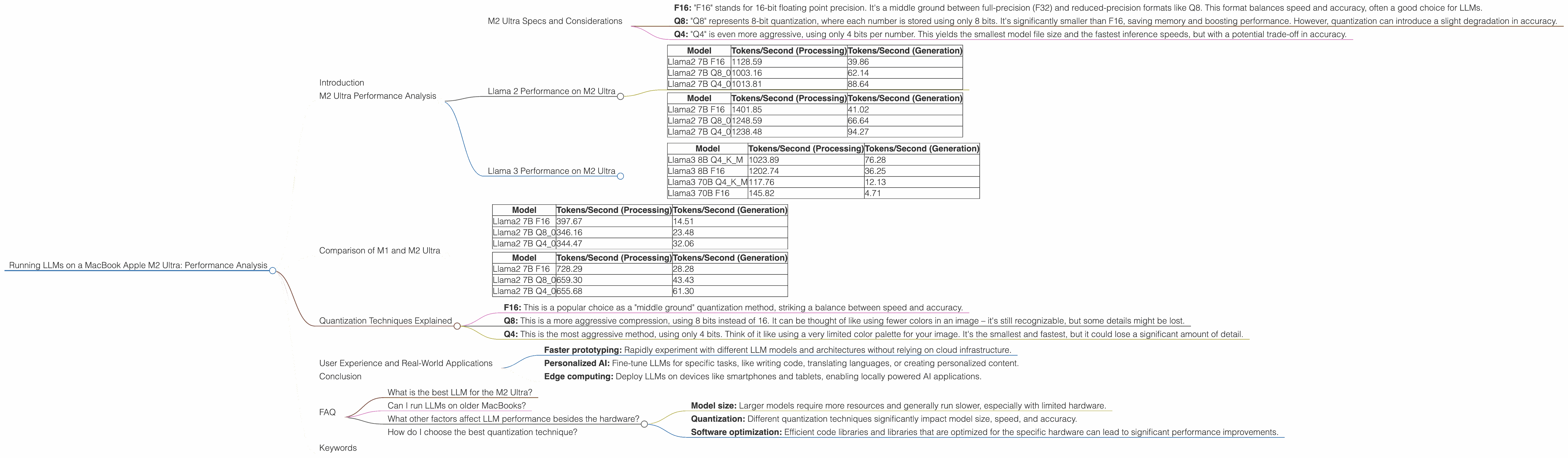
Introduction
The world of large language models (LLMs) is exploding, and with it, the need for powerful hardware to run them locally. While cloud-based solutions offer convenience, running LLMs on your own machine offers greater control, privacy, and sometimes even better performance. Today, we'll dive into the performance of Apple's latest silicon, the M2 Ultra, when running popular open-source LLMs, like Llama 2 and Llama 3.
Imagine you're a developer, data scientist, or just someone who enjoys playing around with AI. You want to experiment with these powerful models, fine-tune them for specific tasks, and maybe even run them on your personal computer. The M2 Ultra offers a tempting option, but how does it actually perform? We'll get our hands dirty with some real numbers and see how this powerful chip handles the demands of modern LLMs.
M2 Ultra Performance Analysis
M2 Ultra Specs and Considerations
The Apple M2 Ultra boasts impressive performance, especially when it comes to AI workloads. Equipped with 60 or 76 GPU cores, depending on the configuration, it's a potent contender in the world of LLM inference. Let's break down the performance of different LLM models and explore the impact of different quantization techniques:
- F16: "F16" stands for 16-bit floating point precision. It's a middle ground between full-precision (F32) and reduced-precision formats like Q8. This format balances speed and accuracy, often a good choice for LLMs.
- Q8: "Q8" represents 8-bit quantization, where each number is stored using only 8 bits. It's significantly smaller than F16, saving memory and boosting performance. However, quantization can introduce a slight degradation in accuracy.
- Q4: "Q4" is even more aggressive, using only 4 bits per number. This yields the smallest model file size and the fastest inference speeds, but with a potential trade-off in accuracy.
Llama 2 Performance on M2 Ultra
Let's start with Llama 2, a popular open-source LLM. We'll analyze the 7B model, which is a good balance between size and capabilities.
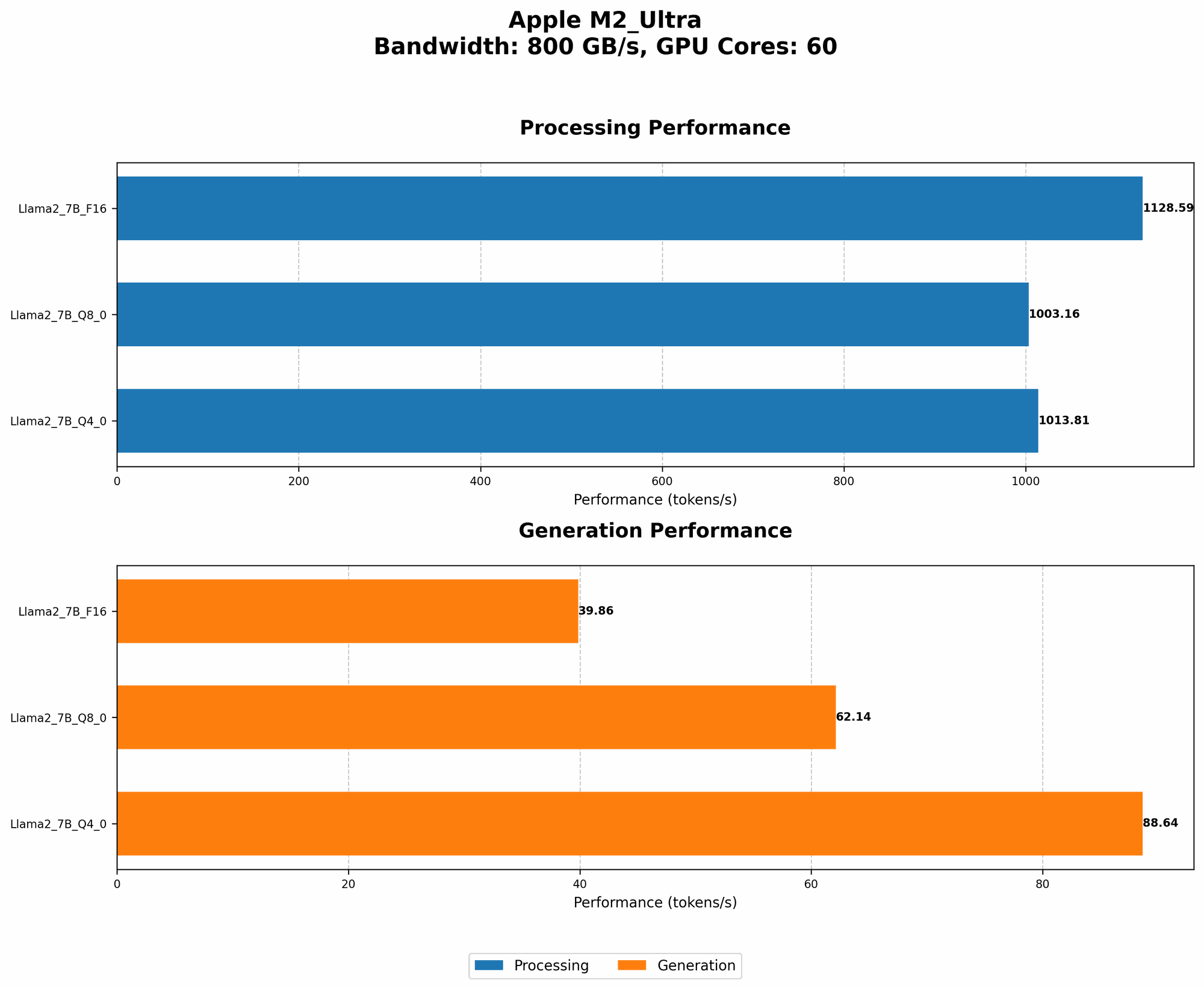
M2 Ultra with 60 GPU Cores
| Model | Tokens/Second (Processing) | Tokens/Second (Generation) |
|---|---|---|
| Llama2 7B F16 | 1128.59 | 39.86 |
| Llama2 7B Q8_0 | 1003.16 | 62.14 |
| Llama2 7B Q4_0 | 1013.81 | 88.64 |
Observations:
- Q80 outperforms F16 in generation: Surprisingly, the Q80 quantization technique leads to a significantly faster generation speed. This is likely due to the reduced memory footprint of the Q8 model, allowing for faster memory access.
- Q40 further boosts generation speed: Q40 continues the trend, offering the fastest generation speeds but with a potential trade-off in accuracy.
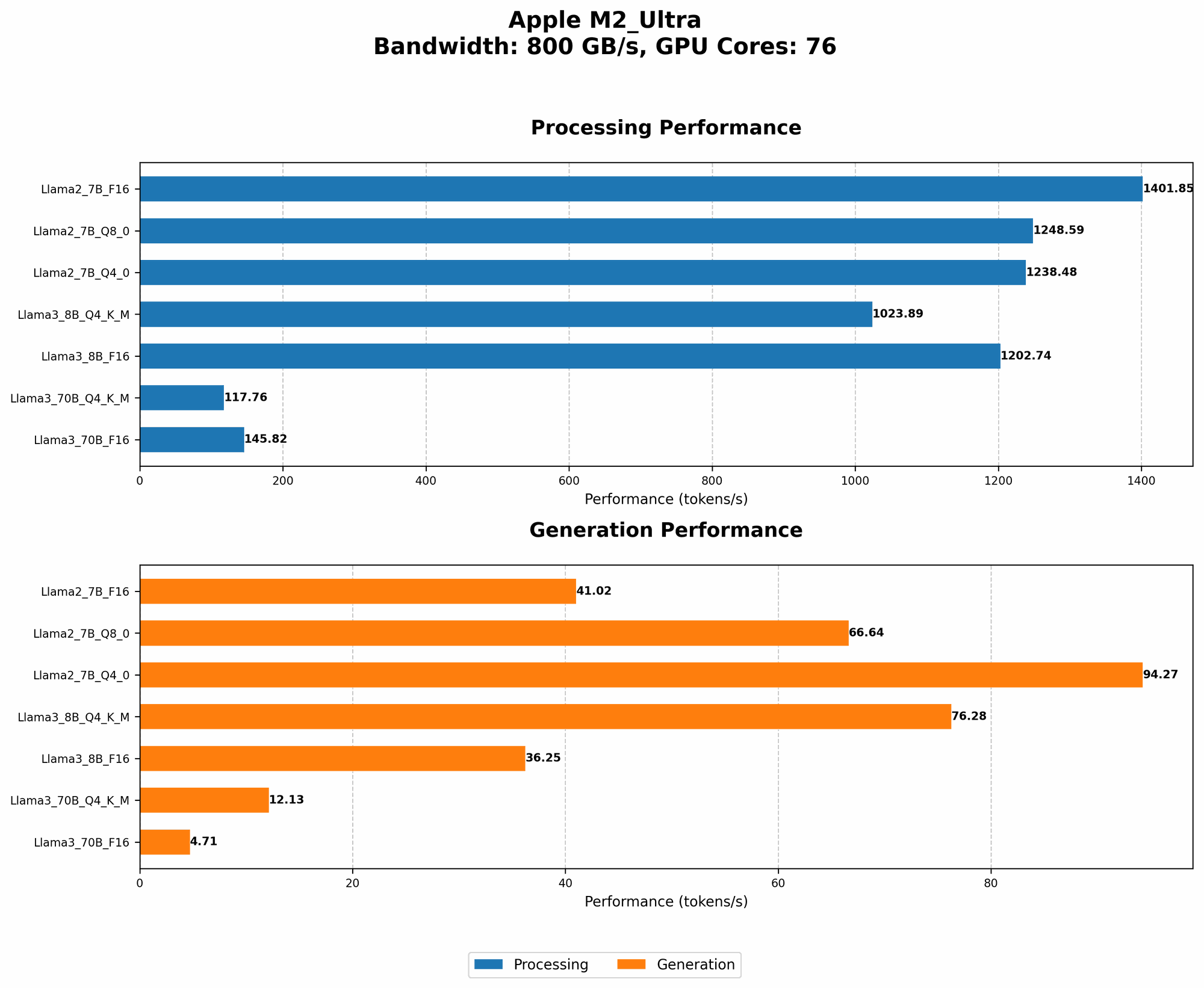
M2 Ultra with 76 GPU Cores
| Model | Tokens/Second (Processing) | Tokens/Second (Generation) |
|---|---|---|
| Llama2 7B F16 | 1401.85 | 41.02 |
| Llama2 7B Q8_0 | 1248.59 | 66.64 |
| Llama2 7B Q4_0 | 1238.48 | 94.27 |
Observations:
- Increased GPU cores lead to faster processing: As expected, the M2 Ultra with 76 cores delivers significantly higher processing speeds compared to the 60-core version.
- Generation speed improvements with more cores: Even though the generation speed was faster with Q80 and Q40 in the 60-core configuration, the 76-core version also demonstrates improvements in these quantization techniques.
Llama 3 Performance on M2 Ultra
Let's move on to Llama 3, a more recent and powerful LLM. We'll be examining the 8B and 70B models.
M2 Ultra with 76 GPU Cores
| Model | Tokens/Second (Processing) | Tokens/Second (Generation) |
|---|---|---|
| Llama3 8B Q4KM | 1023.89 | 76.28 |
| Llama3 8B F16 | 1202.74 | 36.25 |
| Llama3 70B Q4KM | 117.76 | 12.13 |
| Llama3 70B F16 | 145.82 | 4.71 |
Observations:
- Smaller model (8B) faster than 70B: As expected, the smaller 8B model runs significantly faster than the 70B model, both in processing and generation.
- Q4KM faster than F16 in 8B: The Q4KM quantization technique leads to faster generation speeds for Llama 3 8B, a similar trend to Llama 2.
- Significant performance difference between 8B and 70B: There's a large performance gap between Llama 3 8B and 70B, highlighting the impact of model size on inference speed.
Comparison of M1 and M2 Ultra
While the focus of this article is on the M2 Ultra, it's worth comparing its performance to its predecessor, the M1.
Note: Data for the M1 is only available for Llama 2 7B.
M1 Pro (16-core GPU)
| Model | Tokens/Second (Processing) | Tokens/Second (Generation) |
|---|---|---|
| Llama2 7B F16 | 397.67 | 14.51 |
| Llama2 7B Q8_0 | 346.16 | 23.48 |
| Llama2 7B Q4_0 | 344.47 | 32.06 |
M1 Max (32-core GPU)
| Model | Tokens/Second (Processing) | Tokens/Second (Generation) |
|---|---|---|
| Llama2 7B F16 | 728.29 | 28.28 |
| Llama2 7B Q8_0 | 659.30 | 43.43 |
| Llama2 7B Q4_0 | 655.68 | 61.30 |
Observations:
- M2 Ultra significantly faster than M1: The M2 Ultra delivers a substantial performance boost over the M1 Pro and M1 Max, especially in processing and generation speeds.
- M2 Ultra's improvements across quantization: The M2 Ultra shows a clear improvement in all quantization techniques.
Quantization Techniques Explained
Quantization is a technique used to reduce the size of LLM models, making them faster and more efficient. Think of it like compressing an image – you lose some detail, but the overall picture remains recognizable.
- F16: This is a popular choice as a "middle ground" quantization method, striking a balance between speed and accuracy.
- Q8: This is a more aggressive compression, using 8 bits instead of 16. It can be thought of like using fewer colors in an image – it's still recognizable, but some details might be lost.
- Q4: This is the most aggressive method, using only 4 bits. Think of it like using a very limited color palette for your image. It's the smallest and fastest, but it could lose a significant amount of detail.
User Experience and Real-World Applications
The M2 Ultra's performance implications extend beyond mere numbers. Imagine the potential for developers and researchers who can now comfortably run these models on their laptops.
- Faster prototyping: Rapidly experiment with different LLM models and architectures without relying on cloud infrastructure.
- Personalized AI: Fine-tune LLMs for specific tasks, like writing code, translating languages, or creating personalized content.
- Edge computing: Deploy LLMs on devices like smartphones and tablets, enabling locally powered AI applications.
Conclusion
The M2 Ultra offers impressive performance for running LLMs locally. The high GPU core count, combined with efficient memory access and the option of different quantization techniques, allows for blazing-fast processing and generation speeds. Whether you're a developer, researcher, or simply an AI enthusiast, the M2 Ultra provides a compelling platform for exploring the exciting world of large language models.
FAQ
What is the best LLM for the M2 Ultra?
The best LLM for the M2 Ultra depends on your specific needs and the trade-off you're willing to make between model size, speed, and accuracy. For smaller models like Llama 2 7B, you can get excellent performance regardless of the quantization technique. However, for larger models like Llama 3 70B, you might benefit from using more aggressive quantization techniques like Q4 to optimize for speed.
Can I run LLMs on older MacBooks?
Yes, you can run LLMs on older MacBooks, but performance will be significantly slower, especially with larger models. The M1 and M2 chips offer far better performance for LLM inference.
What other factors affect LLM performance besides the hardware?
Several factors can influence LLM performance besides hardware:
- Model size: Larger models require more resources and generally run slower, especially with limited hardware.
- Quantization: Different quantization techniques significantly impact model size, speed, and accuracy.
- Software optimization: Efficient code libraries and libraries that are optimized for the specific hardware can lead to significant performance improvements.
How do I choose the best quantization technique?
The best quantization technique depends on your specific requirements. If you prioritize absolute speed, Q4 is the best choice. However, if you need higher accuracy, F16 or Q8 might be better.
Keywords
LLM, Large Language Model, Apple M2 Ultra, MacBook, GPU, Llama 2, Llama 3, Inference, Performance, Quantization, F16, Q8, Q4, Token Per Second, Processing, Generation, Speed, Accuracy, User Experience, Real-World Applications, Edge Computing, Deep Learning, AI, Software Optimization.