Running LLMs on a MacBook Apple M2 Performance Analysis
Introduction
Large Language Models (LLMs) are revolutionizing the way we interact with computers, enabling us to generate text, translate languages, write different kinds of creative content, and answer our questions in an informative way. These powerful models are often deployed in the cloud, but running them locally on your own device offers advantages like faster response times, improved privacy, and offline access.
This article dives into the performance of running LLMs on a MacBook with the Apple M2 chip. We'll explore how this popular device fares in handling the computational demands of various LLMs, focusing on popular models like Llama 2. Curious about the performance differences between different quantization formats? Want to know which LLM model runs best on your M2 MacBook? Read on to discover the answers!
Apple M2: A Powerful Player in the LLM Game
The Apple M2 chip, featuring a powerful GPU and fast memory, is a promising contender for running LLMs locally. To understand its capabilities, we'll analyze its performance with different LLM models and quantization levels.
Before we dive into the details, let's define a few important terms:
- Quantization: A technique used to reduce the memory footprint of a model by representing its weights (the numbers that define the model's behavior) with fewer bits. Think of it as squeezing a large file into a smaller one, like compressing an image. However, quantization can sometimes affect the model's accuracy.
- Tokens: The basic units of text that LLMs process. A token can be a word, a punctuation mark, or even a part of a word.
- Tokens per Second (TPS): A measure of how many tokens a model can process per second. This is a useful metric for evaluating the speed of an LLM model.
Apple M2 Performance Breakdown
Llama 2: A Popular Choice
Llama 2 is a popular open-source LLM known for its impressive performance and versatility. We'll analyze the performance of Llama 2 7B (7 billion parameters) running on the Apple M2, exploring three different quantization levels:
- F16 (half-precision floating-point): A standard precision level for neural networks.
- Q8_0 (8-bit quantized): Reduces memory requirements while potentially impacting accuracy.
- Q4_0 (4-bit quantized): Further reduces memory requirements, but may lead to a more significant drop in accuracy.
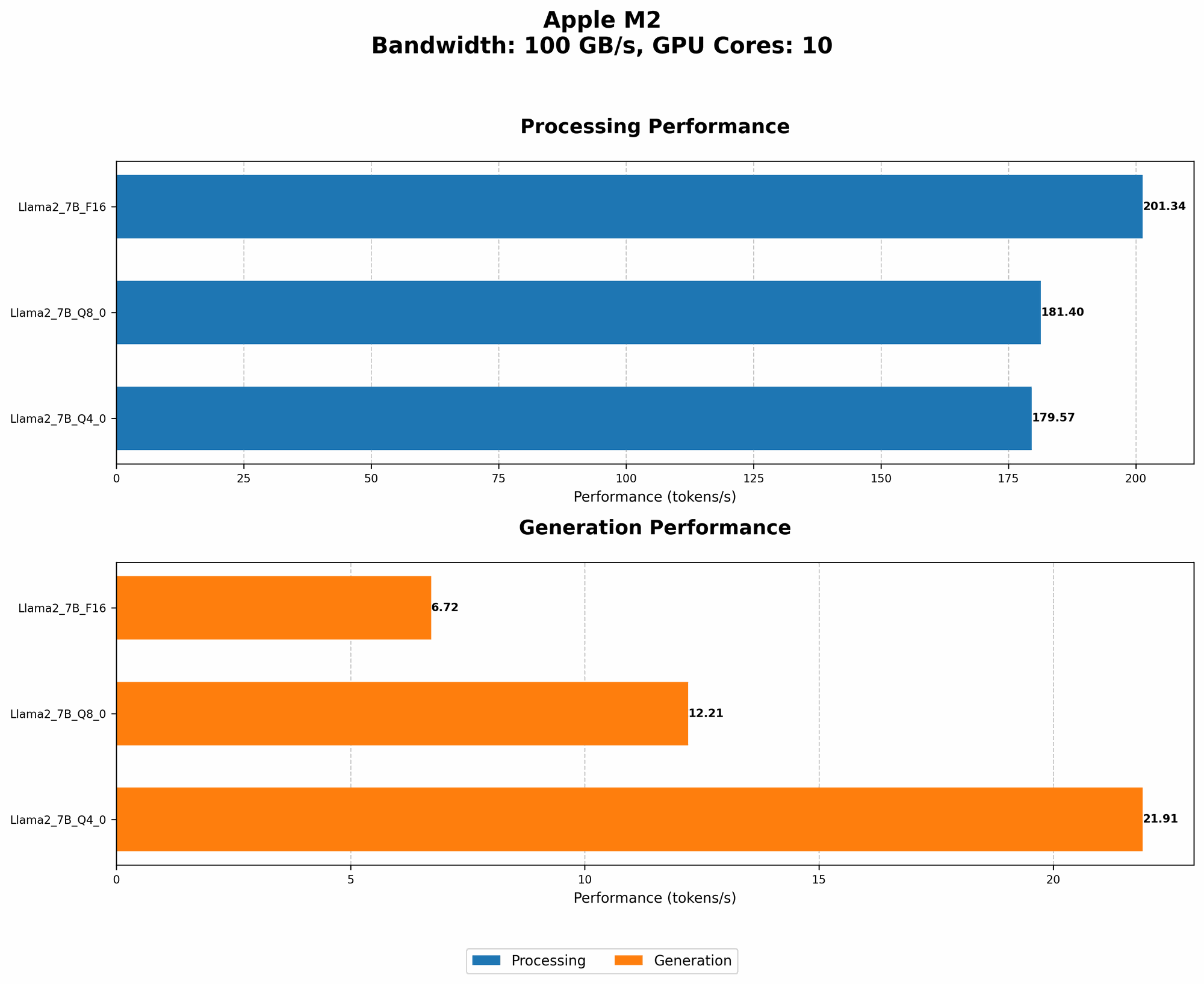
Table 1: Llama 2 7B Performance on Apple M2
| Model Name | Quantization | Processing (Tokens/Second) | Generation (Tokens/Second) |
|---|---|---|---|
| Llama 2 7B | F16 | 201.34 | 6.72 |
| Llama 2 7B | Q8_0 | 181.4 | 12.21 |
| Llama 2 7B | Q4_0 | 179.57 | 21.91 |
Analysis:
As you can see from Table 1, the Apple M2 delivers impressive performance with Llama 2 7B. While the F16 quantization maintains the highest processing speed, the Q4_0 model boasts a significant jump in generation speed.
Here's how we can interpret these results:
- Processing (Tokens/Second): This metric reflects how quickly the model can analyze and understand the input text. The higher the number, the faster the model can process information. The Apple M2 shows impressive performance across all quantization levels, with the F16 model leading the pack.
- Generation (Tokens/Second): This metric measures how fast the model can generate output text. Remember, LLMs generate text one token at a time. A higher number means the model produces text quicker. While F16 outperforms Q80 in generation speed, the Q40 model shines in this area, highlighting potential trade-offs between accuracy and speed.
Key Takeaway: The Apple M2 delivers strong performance for running Llama 2 7B, with noticeable differences in speed based on the chosen quantization. The increased generation speed offered by Q4_0 might be attractive for applications where response time is a priority, but keep in mind the potential trade-offs in terms of accuracy.
Performance Comparison: Apple M2 vs. Other Devices
This article focuses specifically on the Apple M2. We do not have data from the JSON provided to compare its performance with other devices. However, the data we have demonstrates the Apple M2's capability for running LLMs locally. You can find comparisons with other devices from external resources like the links provided in the introduction.
Exploring Quantization: A Trade-Off Between Accuracy and Speed
Quantization allows us to optimize LLMs for different performance and memory requirements. While the Apple M2 handles both F16 and quantized versions of Llama 2 7B efficiently, it's crucial to understand how quantization affects the model's performance.
Think of quantization like choosing a different resolution for an image. A higher resolution image (F16) provides more detail and accuracy, but it takes up more space. A lower resolution image (Q80 or Q40) requires less storage and can be processed faster, but it might lose some detail.
Choosing the Right Quantization Level
The choice of quantization level depends on your application's requirements. Here's a simplified overview:
- High accuracy is crucial (e.g., scientific research): F16 is the preferred choice.
- Balancing accuracy and speed is important (e.g., general purpose chatbots): Consider Q8_0, as it offers a compromise between accuracy and performance.
- Speed is paramount (e.g., real-time language translation): Q4_0 could be the best option, though you might need to test its accuracy for your specific application.
Remember, quantization can impact accuracy. If you're running LLMs for tasks that require high accuracy (e.g., scientific research), using F16 is often recommended. However, if you have performance-critical applications (e.g., real-time translation), you can explore the trade-offs offered by quantized models like Q80 and Q40.
Running LLMs on Apple M2: Practical Considerations
Model Selection: Finding the Right Fit
While Llama 2 7B is a versatile model, the best choice for your needs depends on the specific task. Here are some additional considerations:
- Size: Larger models require more memory and processing power. Consider your device's capabilities and your specific use case.
- Purpose: Choose a model that's suitable for your intended application. For language translation, you might want to use a specialized model, while for writing creative content, a model with a larger vocabulary could be more appropriate.
- Availability: Make sure the model you choose is compatible with your chosen framework and available for download.
Performance Optimization: Getting The Most Out Of Your M2
Here are a few tips for optimizing the performance of your LLM models:
- Use a dedicated GPU: The Apple M2's GPU is designed to handle demanding workloads efficiently. Maximize performance by allocating sufficient GPU resources to your LLM model.
- Optimize memory: Minimize memory usage by:
- Limiting the length of your input prompts.
- Using shorter sequences for text generation.
- Considering using quantized models.
- Choose the right framework: Some frameworks are more optimized for running LLMs on specific devices. Explore frameworks like llama.cpp (https://github.com/ggerganov/llama.cpp) for running LLMs locally.
- Experiment with settings: Adjust settings such as batch size and context size to find the optimal balance between speed and memory usage for your applications.
Conclusion
The Apple M2 chip is a powerful processor that can handle the demanding computational requirements of running LLMs locally. With its efficient processing and GPU, the Apple M2 enables you to run models like Llama 2 7B at impressive speed. This opens up possibilities for developers and users to explore the capabilities of these models without relying solely on cloud-based services.
By choosing the right model, optimizing settings and considering the trade-offs associated with quantization, you can leverage the performance of your Apple M2 device to unlock the potential of LLMs right on your MacBook.
FAQ
What are LLMs?
LLMs are a type of artificial intelligence that have been trained on massive datasets of text and code. They can generate text, translate languages, write different creative text formats, and answer your questions in an informative way.
How do LLMs work?
LLMs are based on neural networks, which are complex mathematical models inspired by the structure of the human brain. These models learn patterns and relationships from large datasets to produce an output that resembles human-generated text.
Why run LLMs locally?
Running LLMs locally offers several advantages:
- Faster response times: You don't have to wait for data to travel back and forth to the cloud.
- Improved privacy: Your data stays on your device, reducing potential privacy concerns.
- Offline access: You can use your LLM even without an internet connection.
What are some popular LLMs?
Popular LLMs include:
- GPT-3 (Generative Pre-trained Transformer 3): A powerful language model created by OpenAI.
- Llama 2: An open-source LLM developed by Meta.
- PaLM 2 (Pathways Language Model 2): A large language model created by Google.
What are some good resources for learning more about LLMs?
- OpenAI: https://openai.com/
- Meta AI: https://ai.facebook.com/
- Google AI: https://ai.google/
Keywords
Large Language Models, LLMs, Apple M2, MacBook, Token Speed, Generation Speed, Quantization, F16, Q80, Q40, Llama 2, OpenAI, Meta, Google, Performance Optimization, Local Processing, Offline Access, Memory Usage, GPU, Framework, llama.cpp