Running LLMs on a MacBook Apple M2 Max Performance Analysis

Introduction
The world of large language models (LLMs) is rapidly evolving, offering exciting new possibilities for language processing, code generation, and creative tasks. But running these computationally intensive models can be a challenge, especially on personal computers. Enter the Apple M2 Max chip, a powerful beast designed to tackle demanding workloads with remarkable efficiency. In this article, we'll delve into the performance of the M2 Max when running popular LLMs, specifically Llama 2 7B, and explore how this chip stacks up for local LLM development and experimentation.
Imagine a device that can generate creative text, translate languages, and even write code, all within the comfort of your own home. That's the power of LLMs, and the Apple M2 Max is starting to unlock this potential.
Performance Analysis: Apple M2 Max vs Llama 2 7B
Understanding the Metrics
Before we dive into the numbers, let's quickly clarify the key performance indicators for LLMs:
- Tokens per Second (Tokens/s): This metric represents the speed at which the LLM processes text. Think of it like the number of words per minute for a human reader. A higher number means faster processing and quicker responses.
- Quantization: This technique reduces the size of the LLM's model, allowing it to run more efficiently. Imagine shrinking a large book down to a compact paperback – you can carry it around easier, but the content is still there! In LLMs, quantization helps reduce memory usage and speeds up processing.
Apple M2 Max: Processing Speed
Llama 2 7B - F16 Precision
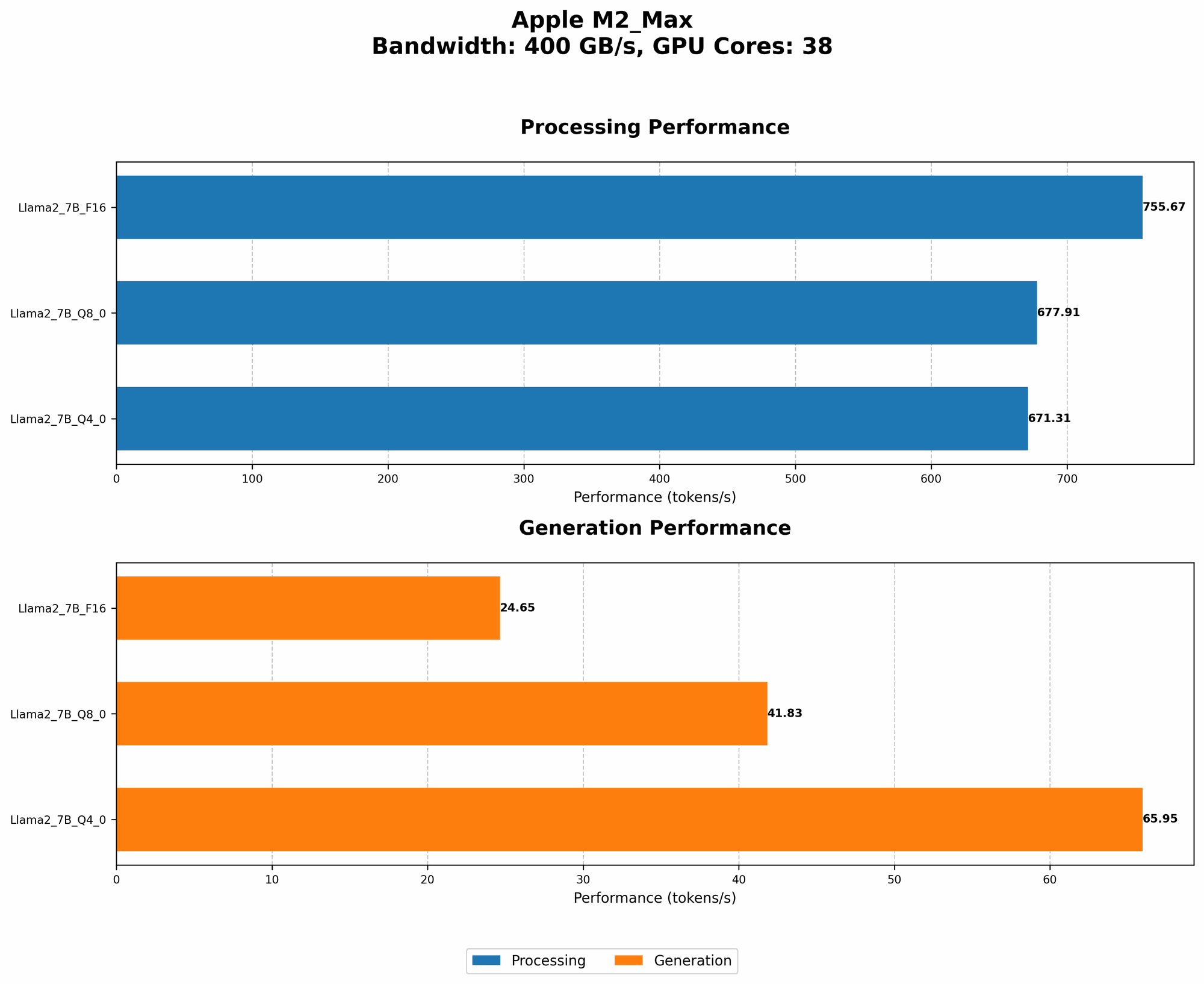
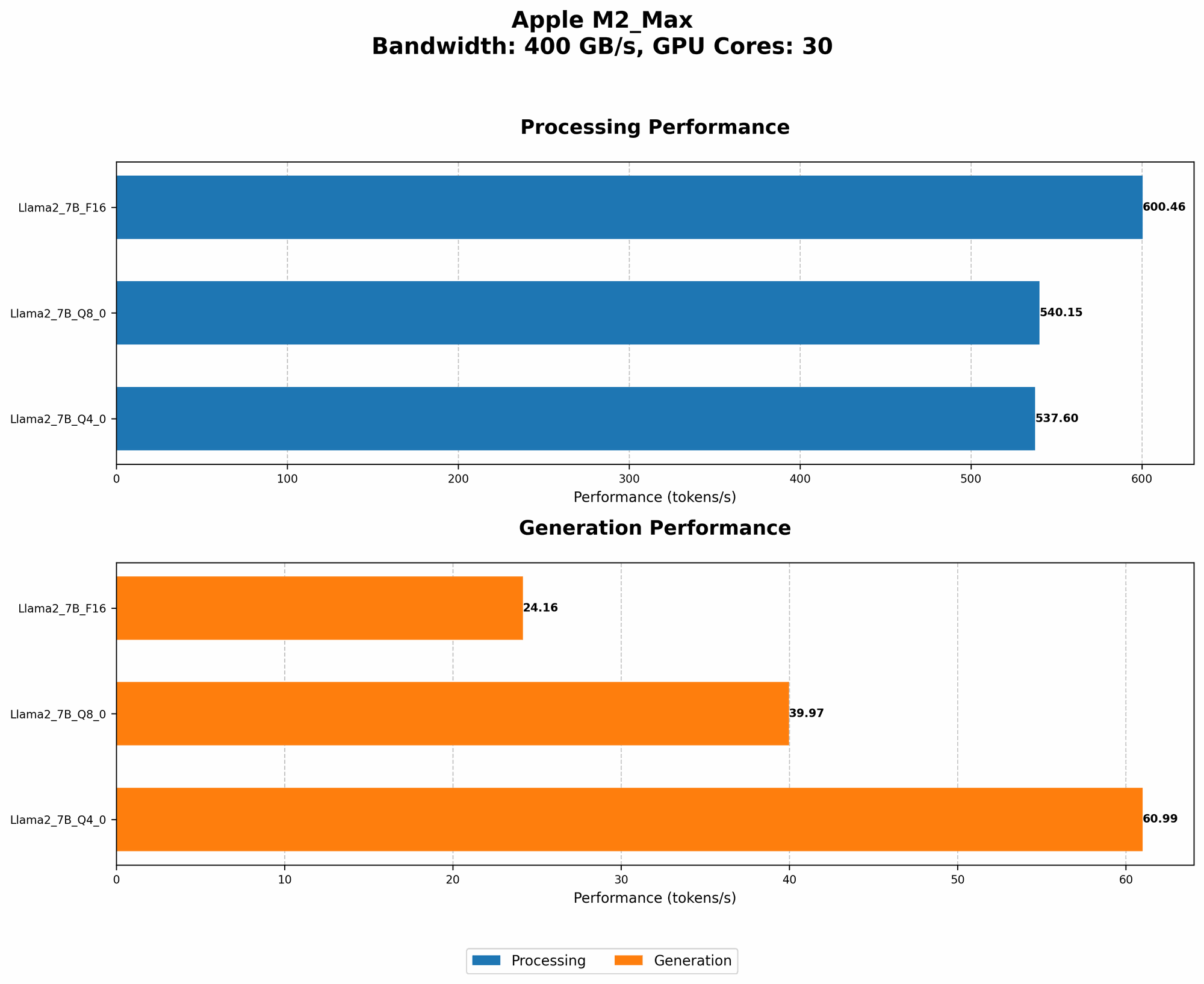
- Processing Speed (Tokens/s): 600.46 (lowest) and 755.67 (highest)
Llama 2 7B - Q8_0 Quantization
- Processing Speed (Tokens/s): 540.15 (lowest) and 677.91 (highest)
Llama 2 7B - Q4_0 Quantization
- Processing Speed (Tokens/s): 537.6 (lowest) and 671.31 (highest)
Apple M2 Max: Generation Speed
Llama 2 7B - F16 Precision
- Generation Speed (Tokens/s): 24.16 (lowest) and 24.65 (highest)
Llama 2 7B - Q8_0 Quantization
- Generation Speed (Tokens/s): 39.97 (lowest) and 41.83 (highest)
Llama 2 7B - Q4_0 Quantization
- Generation Speed (Tokens/s): 60.99 (lowest) and 65.95 (highest)
Understanding the Data
We can observe a few key insights:
- Processing vs. Generation: The M2 Max exhibits significant differences between processing and generation speeds. Processing involves understanding and analyzing text, while generation involves producing new text. This suggests that the M2 Max is well-suited for the calculations involved in understanding text but may need further optimization for generating lengthy outputs.
- Quantization Impact: Quantization, a technique to shrink the model size, has a noticeable effect on processing speed. For example, using Q4_0 quantization increases processing speed compared to F16 precision. However, generation speed is also affected; the higher the quantization level, the slower the generation.
- M2 Max Variation: We see two sets of performance results for the M2 Max. This likely reflects differences in the specific configurations of the M2 Max chip, such as the number of GPU cores, which can vary depending on the MacBook model.
Comparison of M2 Max with Other Devices
Unfortunately, we don't have performance data for other devices in this specific dataset. However, you can find extensive comparisons on the Llama.cpp and GPU-Benchmarks-on-LLM-Inference repositories. These benchmarks often compare performance across various GPUs and even CPUs.
Key Takeaways
The Apple M2 Max chip demonstrates its potential for local LLM development and experimentation. While it excels at processing text, generation speed needs further optimization.
- For developers and enthusiasts: The Apple M2 Max offers a powerful platform for running smaller LLMs like Llama 2 7B. Experimentation with different quantization levels can help optimize performance for specific tasks.
- For casual users: While running a full-scale LLM on a MacBook might still be a challenge, the M2 Max opens the door to engaging with smaller, lighter models for tasks like summarization, translation, or casual conversation.
FAQ
What are LLMs and why are they important?
LLMs are powerful artificial intelligence models trained on massive datasets of text and code. They're revolutionizing fields like language translation, text generation, and even code development. They're like highly skilled language experts, capable of understanding and generating human-like text in various forms.
What is quantization?
Quantization is a technique for reducing the size of a large model. It's like compressing a video file to make it smaller. By reducing the model's complexity, you can make it run faster and use less memory. Think of it as turning a large, detailed map into a simplified version with less detail, but still useful for navigating.
Can I run LLMs on my Mac?
Yes, you can! The Apple M2 Max, in particular, is quite capable of running smaller LLMs. You can explore tools like Llama.cpp, which allows you to run these models locally.
What are the benefits of running LLMs locally?
Running LLMs locally provides several benefits:
- Privacy: Your data remains on your computer, reducing concerns about data privacy.
- Speed: Local processing can be much faster, especially for smaller models.
- Offline Usage: You can use the model even when you're not connected to the internet.
Keywords
Large Language Models, LLMs, Llama 2, Llama 2 7B, Apple M2 Max, MacBook, Performance, Processing Speed, Generation Speed, Quantization, F16, Q80, Q40, Local Inference, GPU, Developers, AI, Machine Learning, NLP, Natural Language Processing, Tokens per Second, Token Speed, Tokenization