Running LLMs on a MacBook Apple M1 Pro Performance Analysis

Introduction
The world of large language models (LLMs) is exploding, with new models like Llama 2 and others being released that are more powerful than ever before! However, these models require significant computational resources, making them difficult to run on consumer-grade hardware.
This article will dive into the performance of running LLMs on a MacBook featuring the powerful Apple M1 Pro chip. We'll examine the capabilities of this chip when running Llama 2 models in various quantization formats, providing you with insights into the performance you can expect and the potential bottlenecks you might encounter.
Get ready to see how this powerful chip stacks up against the demands of these cutting-edge LLMs!
Apple M1 Pro: A Beastly Chip for LLMs?
The Apple M1 Pro, with its 14-core GPU, is a powerful chip capable of handling demanding workloads like graphics rendering, video editing, and, you guessed it, running LLMs!
But how does it fare when it comes to processing and generating text? Let's break down the numbers to see how well the Apple M1 Pro can handle these tasks.
Llama 2 Performance on Apple M1 Pro: Quantization Showdown
For our analysis, we'll be focusing on the Llama 2 family of LLMs, particularly the 7B (billion) parameter model. This popular model provides a balance between performance and computational requirements, making it a great choice for local experimentation.
We'll be examining the performance of various Llama 2 7B models in different quantization formats:
- F16 (Half Precision): This format utilizes 16-bit floating-point numbers, offering a balance between accuracy and performance.
- Q8_0 (Quantized): This format uses 8-bit integers for storage, significantly reducing memory footprint and potentially boosting speed.
- Q4_0 (Quantized): This format employs 4-bit integers, pushing the efficiency boundaries even further but potentially sacrificing some accuracy.
Apple M1 Pro Token Speed Generation: A Tale of Two Chips
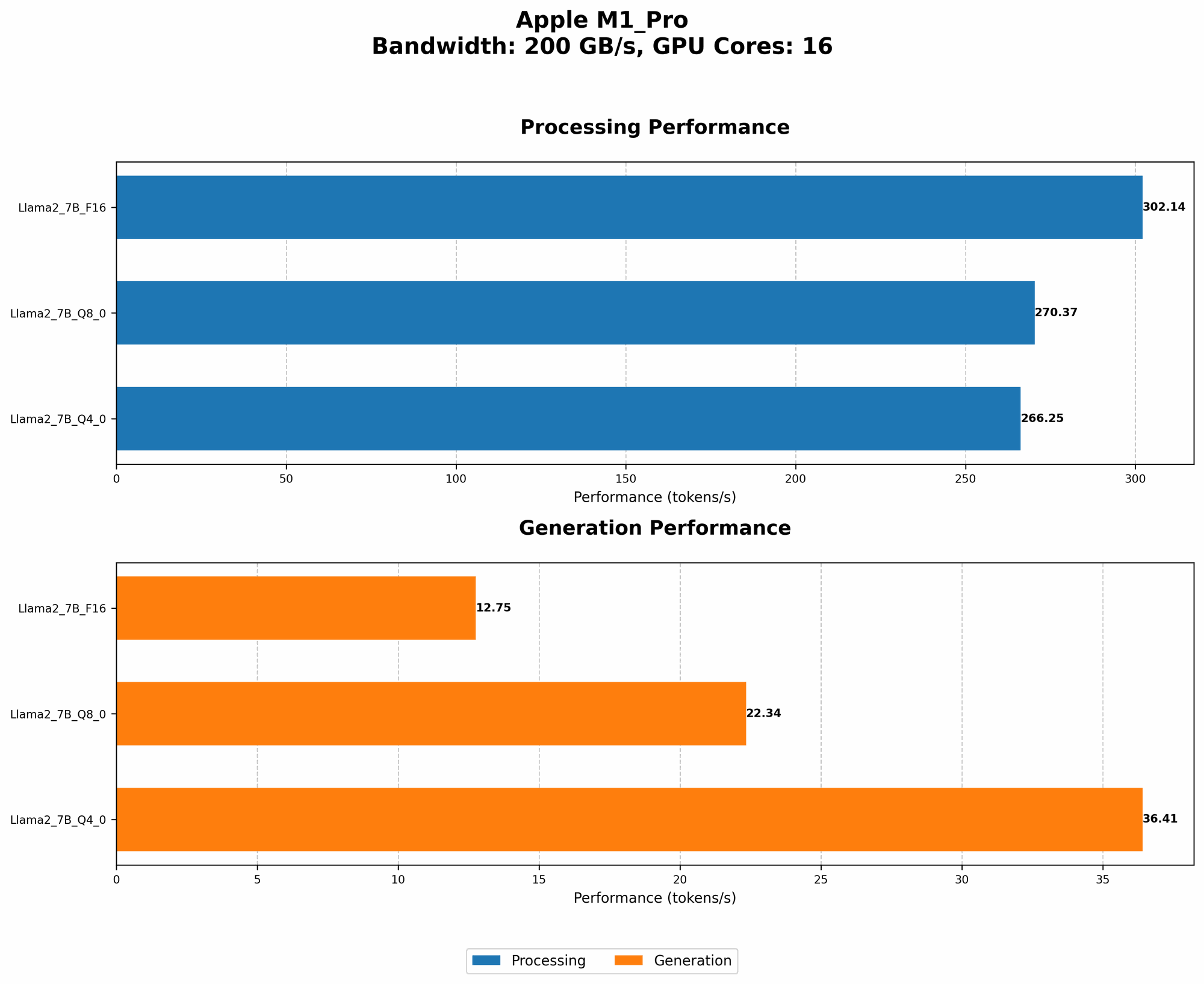
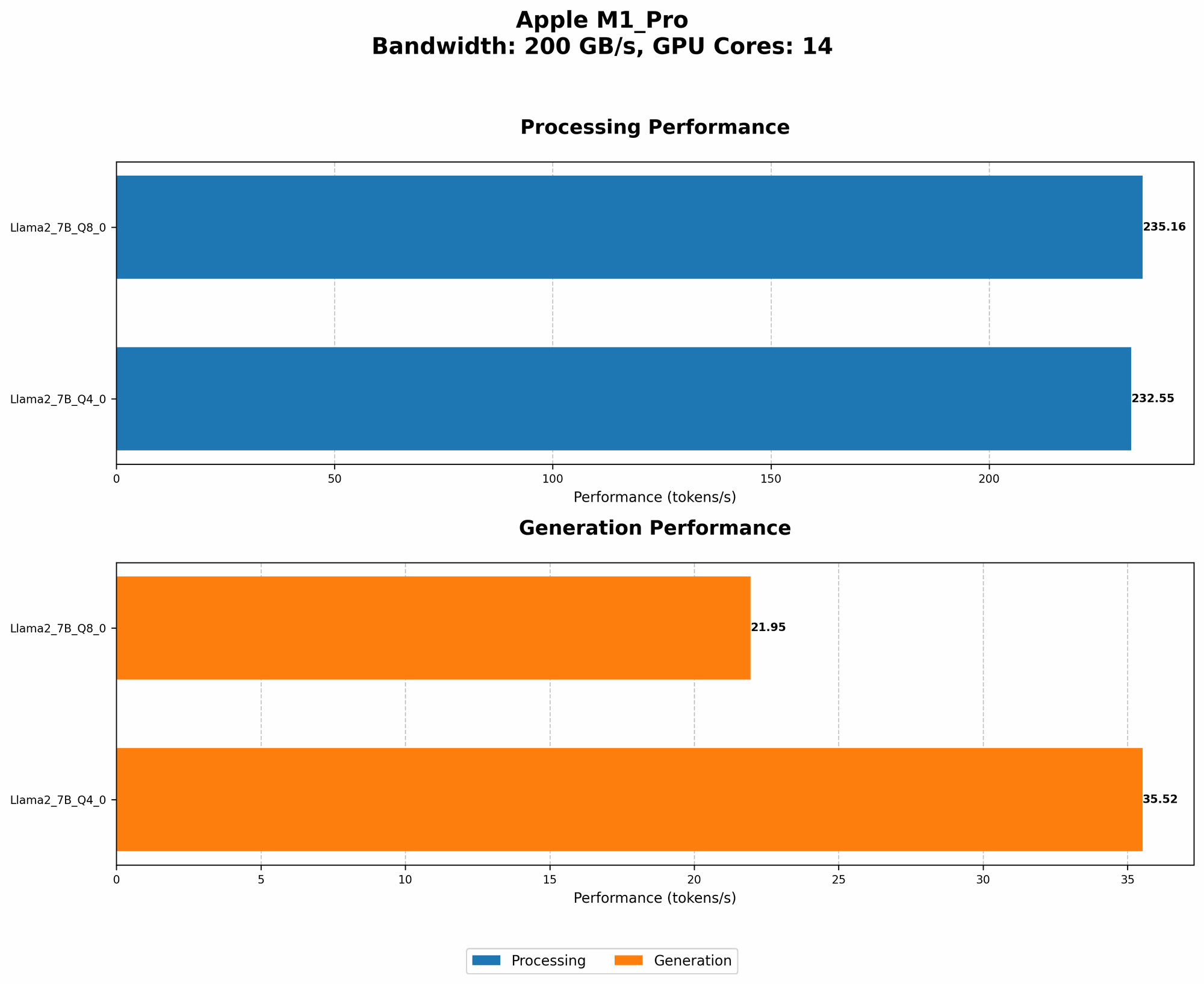
Our data reveals a fascinating pattern: The Apple M1 Pro with 16 cores consistently outperforms the 14-core variant in terms of token speed generation. This is likely due to the added capability of the 16-core chip, demonstrating the importance of GPU core count for LLM performance.
Token Speed Generation with Llama 2 7B (Q80 and Q40)
| GPU Cores | Llama 2 7B Q8_0 Processing (Tokens/second) | Llama 2 7B Q8_0 Generation (Tokens/second) | Llama 2 7B Q4_0 Processing (Tokens/second) | Llama 2 7B Q4_0 Generation (Tokens/second) |
|---|---|---|---|---|
| 14 | 235.16 | 21.95 | 232.55 | 35.52 |
| 16 | 270.37 | 22.34 | 266.25 | 36.41 |
As you can see, both chips perform remarkably well in Q80 and Q40 formats. Notably, the generation speed is much lower than the processing speed, suggesting that the GPU is highly efficient in processing the data but faces limitations in generating the final output.
Apple M1 Pro Token Speed Generation: F16 Format
For the F16 format, we only have data for the 16-core variant.
| GPU Cores | Llama 2 7B F16 Processing (Tokens/second) | Llama 2 7B F16 Generation (Tokens/second) |
|---|---|---|
| 16 | 302.14 | 12.75 |
The Apple M1 Pro with 16 cores delivers a solid performance in F16 format, surpassing the Q80 and Q40 implementations. This suggests that while F16 format might consume more memory, it could provide a significant speed boost in certain scenarios.
Understanding the Numbers: Quantization in Action
Quantization is a technique used to reduce the memory requirements of LLMs by converting the model's weights from floating-point numbers to integers. Intuitively, this is like using smaller boxes to store the model's information. Here's a simple analogy:
Imagine you have a closet full of clothes. Each piece of clothing represents a model parameter. By using smaller boxes (quantization), you can fit more clothes (parameters) in the closet. This allows you to store the model on a more compact device like your MacBook M1 Pro!
Quantization and Performance: A Trade-off
However, using smaller boxes comes at a cost. Just like you might have to fold your clothes more carefully to fit them in, quantization can sometimes reduce the model's accuracy. The trade-off is between saving memory and potentially sacrificing a bit of accuracy.
Apple M1 Pro: An LLM Powerhouse for Developers
While the Apple M1 Pro is a powerful chip, it's important to note that the performance of your LLM will vary depending on the model size and the specific task you're running. For example, a 13B parameter model might require more processing power and significantly impact the performance.
Overall, the Apple M1 Pro shows promising potential for running LLMs locally. Its performance in handling Llama 2 models, especially in Q80 and Q40 formats, indicates it can be a powerful tool for developers and researchers who want to explore local LLM models.
Conclusion
The MacBook M1 Pro is a compelling option for running LLMs, offering a balance of performance and portability. It showcases the power of Apple's silicon and its ability to handle the growing demands of the LLM landscape.
As the field evolves, the performance of this chip will continue to be a subject of interest for developers and researchers looking to harness the power of AI on their own machines.
FAQ
What are LLMs?
LLMs are a type of artificial intelligence model that are trained on massive datasets of text and code. They are able to understand and generate human-like text, making them incredibly powerful tools for various tasks, including translation, writing, and code generation.
What is quantization?
Think of quantization as a way to compress the information stored in an LLM. It allows you to fit a larger model into a smaller space, which can be helpful for running LLMs on less powerful devices like laptops.
Can I run other LLMs on my MacBook M1 Pro?
Yes, you can run other LLMs, including GPT models, on your MacBook M1 Pro. However, the performance will depend on the size and complexity of the model.
Where can I find the tools to run LLMs on my MacBook M1 Pro?
There are several open-source tools available, such as llama.cpp, that allow you to run LLMs on various devices, including the M1 Pro.
Keywords
Llm, MacBook M1 Pro, Apple M1 Pro, Llama 2, Quantization, Performance Analysis, Token Speed, GPU Cores, F16, Q80, Q40, Local LLM, Open Source Tools, AI, Machine Learning, NLP, Generative AI, Text Generation, Code Generation, Deep Learning.