Running Large LLMs on NVIDIA RTX 6000 Ada 48GB: Avoiding Out of Memory Errors
Introduction
The world of large language models (LLMs) is booming, offering exciting possibilities in fields like natural language processing, creative writing, and code generation. However, running these powerful models locally can be a challenge, especially when you're dealing with massive models like Llama 70B. One common concern is hitting the dreaded "out-of-memory" error, which can leave you feeling like you're stuck in a coding purgatory.
This article will explore the nuances of running large LLMs on the NVIDIA RTX 6000 Ada 48GB, a beast of a graphics card designed to tackle demanding workloads. We'll dive deep into the performance of different model sizes and quantization levels, providing you with the knowledge to choose the right configuration for your needs and avoid those frustrating memory errors.
So, buckle up, dear reader, as we embark on a journey to tame the giants of AI, one token at a time!
Understanding LLMs, Memory, and the RTX 6000 Ada 48GB
Let's start by breaking down the key players in this game:
- LLMs: These are complex neural networks trained on massive datasets of text and code. They can generate text, translate languages, write different kinds of creative content, and even answer your questions in an informative way. They're basically the AI superheroes of the language world.
- Memory: The amount of RAM available to your device. LLMs need a lot of memory to store their parameters and process data. Think of it like a massive library for your AI, but instead of books, it's filled with intricate knowledge about language and the world.
- RTX 6000 Ada 48GB: This powerhouse of a GPU comes equipped with 48GB of dedicated GDDR6 memory. It's designed for demanding tasks like machine learning and is a popular choice for running LLMs locally.
The RTX 6000 Ada 48GB's generous memory allows you to run larger models without hitting the dreaded "out-of-memory" error. However, it's crucial to select the right configuration for your specific needs to optimize performance and avoid bottlenecks.
Llama 3 - A Popular Choice for Local Inference
The Llama 3 series of models is becoming increasingly popular among developers and researchers due to their impressive performance both in terms of accuracy and speed. These models are available in various sizes, ranging from the more manageable 7B to the gargantuan 70B.
Llama 3 Model Sizes and Quantization Levels
Before we dive into performance metrics, let's understand the concept of quantization.
Quantization: It's a technique to reduce the size of a model by representing numbers with fewer bits. Think of it like reducing the number of pixels in an image to make it smaller. This technique allows you to fit larger LLM models into your GPU's memory, but it can sometimes affect the accuracy and speed of the model.
Q4KM: In the context of LLM models, Q4KM refers to a specific quantization technique. It uses only 4 bits to represent each number, which significantly reduces the size of the model.
F16: This stands for "half precision," a common format for representing numbers in machine learning. It uses 16 bits, offering a balance between accuracy and memory efficiency.
By using different quantization levels, you can trade off between model size and performance. Now, let's see how these various combinations perform on the RTX 6000 Ada 48GB!
Performance Analysis: Token Speed Generation and Processing
Let's look at the performance of the RTX 6000 Ada 48GB using the Llama 3 models. We'll focus on two critical metrics:
- Token Speed Generation: This metric tells us how many tokens (individual units of text) the model can generate per second. A higher number means faster text output.
- Token Speed Processing: This metric measures how many tokens the model can process per second during inference, which basically involves understanding the input text and providing an output. A higher number means faster processing and response times.
RTX 6000 Ada 48GB: Token Speed Generation and Processing
| Model | Quantization Level | Token Speed Generation (Tokens/second) | Token Speed Processing (Tokens/second) |
|---|---|---|---|
| Llama 3 8B | Q4KM | 130.99 | 5560.94 |
| Llama 3 8B | F16 | 51.97 | 6205.44 |
| Llama 3 70B | Q4KM | 18.36 | 547.03 |
| Llama 3 70B | F16 | Null | Null |
Analysis:
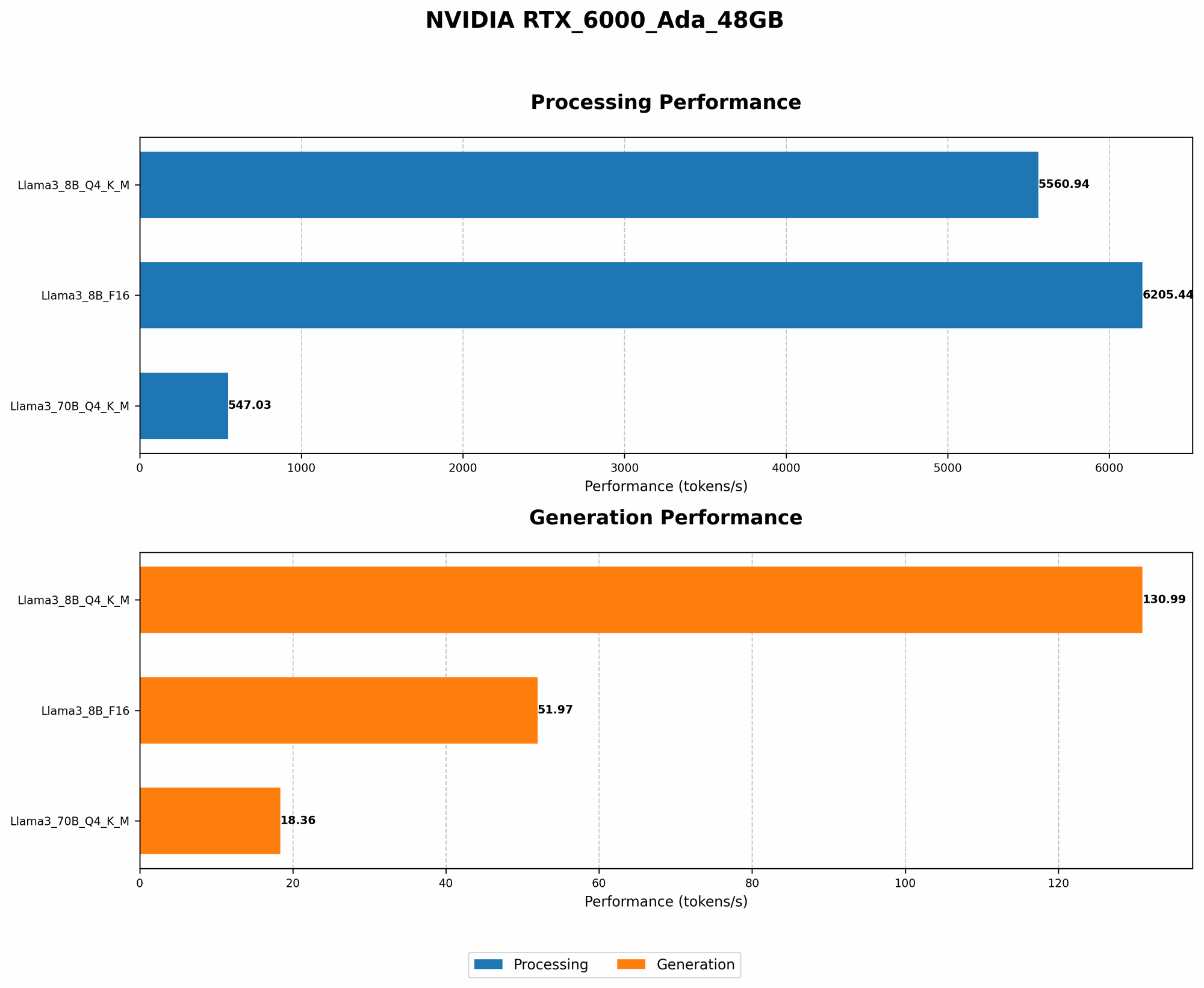
Llama 3 8B: The 8B model, quantized using Q4KM, achieves an impressive speed of 130.99 tokens per second during generation. This means that it can generate about 130 words per second. In comparison, the F16 version generates tokens at a slightly slower speed of 51.97 tokens per second. The Q4KM version is significantly faster in processing (5560.94 tokens/second) compared to the F16 version (6205.44 tokens/second), indicating that it handles the input text more efficiently.
Llama 3 70B: The 70B model, quantized using Q4KM, achieves a token speed generation of 18.36 tokens/second and a processing speed of 547.03 tokens/second. This model is significantly slower than the 8B models, especially during generation, as it has many more parameters to process. The F16 version of the 70B model cannot be loaded onto the RTX 6000 Ada 48GB, as its memory requirements exceed the GPU's capacity.
Comparison of Llama 3 8B and 70B: The smaller Llama 3 8B model, even when quantized using Q4KM, is significantly faster than the 70B model, demonstrating the trade-off between model size and speed. If you need the highest performance for tasks like chatbots or generative text, the 8B model might be a better choice.
Avoiding Out-of-Memory Errors: Choosing the Right Configuration
Based on the performance analysis, we can offer some recommendations to help you select the ideal configuration for your RTX 6000 Ada 48GB, ensuring a smooth LLM experience:
Prioritize Q4KM Quantization: This quantization level significantly reduces the memory footprint without significantly sacrificing performance, making it ideal for fitting larger models onto the GPU.
Focus on Llama 3 8B: If you prioritize speed and want to avoid memory issues, the 8B model is a great starting point. It offers an excellent balance of performance and memory efficiency.
Explore Smaller LLMs: If you're running into memory constraints even with the 8B model, consider exploring other LLMs, such as the smaller versions of Llama 3. You might also try the popular GPT-2 model, which is available in various sizes.
Monitor Memory Usage: It's always a good idea to monitor your GPU's memory usage while running LLMs, especially if you're pushing the limits. This helps you catch potential issues early on and make adjustments if necessary.
Optimizing Your LLM Experience: Tips and Tricks
Now that you've learned about the RTX 6000 Ada 48GB's capabilities and how different LLM configurations perform, here are some tips to optimize your LLM experience:
Use the Right Software: The "llama.cpp" library is a popular choice for running LLMs locally on GPUs like the RTX 6000 Ada 48GB. It's known for its performance and ease of use and allows you to choose between different quantization levels and model sizes.
Reduce Batch Size: If you're running into memory issues, consider reducing the batch size. It's a parameter that controls how many tokens are processed at once. Smaller batch sizes require less memory but can slow down the overall process. You'll need to find a balance between speed and memory usage.
Utilize Tools for Quantization: There are various tools available to help you quantize models automatically, further reducing their memory footprint. The "quantize.py" script from the "llama.cpp" repository is a good starting point.
Explore Cloud Resources: If you're constantly hitting memory limitations, consider exploring cloud-based options for running your LLMs. Cloud services provide access to powerful GPUs and CPUs, allowing you to handle massive models with ease. However, this comes at a cost, as you'll need to pay for the cloud resources you use.
Conclusion
Running large LLMs on the NVIDIA RTX 6000 Ada 48GB can be an incredibly rewarding experience, opening up exciting possibilities for AI exploration. However, it's crucial to choose the right model, quantization level, and software to avoid memory issues and maximize performance. By utilizing the tips and tricks we've shared, you can optimize your LLM setup and unlock the full potential of these powerful AI models. Remember, with a little attention and a dash of technical savvy, you can tame the giants of AI and embark on incredible journeys of discovery!
FAQ
Q: What are some other powerful GPUs that can handle large LLMs?
A: The RTX 6000 Ada 48GB is a top contender, but other excellent options include the NVIDIA A100 and A40 GPUs. These are designed specifically for high-performance computing and machine learning and boast even more memory than the RTX 6000 Ada 48GB.
Q: Can I use my RTX 6000 Ada 48GB for other tasks besides running LLMs?
A: Absolutely! The RTX 6000 Ada 48GB is a versatile GPU that can handle a wide range of demanding tasks, including:
- Game development: Create stunning graphics and immersive experiences.
- Video editing: Render complex scenes and apply intricate effects.
- Scientific simulations: Run complex simulations and data analysis.
- Deep learning: Train and deploy machine learning models.
Q: Is there a chance that the 70B F16 model will be able to run on the RTX 6000 Ada 48GB in the future?
A: It's possible, but unlikely. The 70B F16 model requires a significant amount of memory, even with half precision. However, advances in quantization techniques and GPU memory technologies could potentially make it a viable option in the future.
Q: Can LLMs be used for tasks other than generating text?
A: Yes! LLMs have a wide range of applications, including:
- Machine translation: Translate text between different languages.
- Code generation: Write code in various programming languages.
- Summarization: Create concise summaries of long pieces of text.
- Question answering: Answer questions based on a given context.
- Image generation: (with appropriate adaptations) Create images based on text descriptions.
Keywords
LLMs, NVIDIA RTX 6000 Ada 48GB, Out-of-Memory Errors, Token Speed Generation, Token Speed Processing, Quantization, Q4KM, F16, Llama 3, Llama 3 8B, Llama 3 70B, Performance Analysis, Memory Management, GPU Memory, Local Inference, AI, Deep Learning, Software, llama.cpp, Cloud Resources, Batch Size, Optimizing Performance, Resources, Tech, Data Science, Machine Learning.