Running Large LLMs on NVIDIA RTX 5000 Ada 32GB: Avoiding Out of Memory Errors
Introduction
The world of Large Language Models (LLMs) is blooming, with amazing models like Llama 2, StableLM, and others pushing the boundaries of what's possible with AI. But running these models locally can be a challenge, especially when you're dealing with behemoths like Llama 70B. That's where your trusty NVIDIA RTX 5000 Ada 32GB comes in. But even with a powerful graphics card, you might encounter the dreaded "out-of-memory" error, especially when working with larger models.
This article dives into the key concerns users face when running LLMs on the RTX 5000 Ada 32GB, and how to avoid those pesky "out-of-memory" errors. We'll explore how model size, quantization, and even the specific task (text generation vs. processing) can influence your experience. We'll use real-world performance data for Llama 3 models, highlighting the key factors to consider when tackling this exciting world of local LLM deployment.
Choosing the Right Model: Size Matters for Your RTX 5000 Ada 32GB
Let's face it: Bigger is not always better, especially in the world of LLMs. While larger models often boast higher accuracy, they also demand more memory, turning your RTX 5000 Ada 32GB into a memory-crunching machine.
Here's the deal: The NVIDIA RTX 5000 Ada 32GB offers a generous 32GB of VRAM, which can handle several smaller models with ease. However, for larger models, like Llama 70B, you might have to get creative to avoid memory errors. We'll explore some strategies to make this work smoothly later on.
The Real MVP: Quantization for Memory Savings
Imagine trying to fit a giant jigsaw puzzle into a tiny box. That's kind of what happens with LLMs and your GPU's memory – you're trying to stuff a massive model into a limited space. That's where quantization, a technique that reduces the size of the model (think of it as a puzzle with fewer pieces), comes to your rescue!
Quantization basically involves representing the numbers within the model with fewer bits. Think of it like converting a high-resolution image into a lower-resolution one – it takes up less space but still conveys the same information, just with less detail.
Here's how it works:
- Full precision (FP16): The model uses 16 bits to represent each number. This gives you the most accurate results but requires the most memory.
- Quantization (Q4KM): This involves using 4 bits to represent each number. This significantly reduces memory requirements but may slightly impact accuracy.
Here's a table showcasing the performance difference between FP16 and Q4KM quantization for a 32GB RTX 5000 Ada GPU:
| Model | Quantization | Tokens/second (Generation) | Tokens/second (Processing) |
|---|---|---|---|
| Llama 3 8B | Q4KM | 89.87 | 4467.46 |
| Llama 3 8B | F16 | 32.67 | 5835.41 |
| Llama 3 70B | Q4KM | Not available | Not available |
| Llama 3 70B | F16 | Not available | Not available |
Observations:
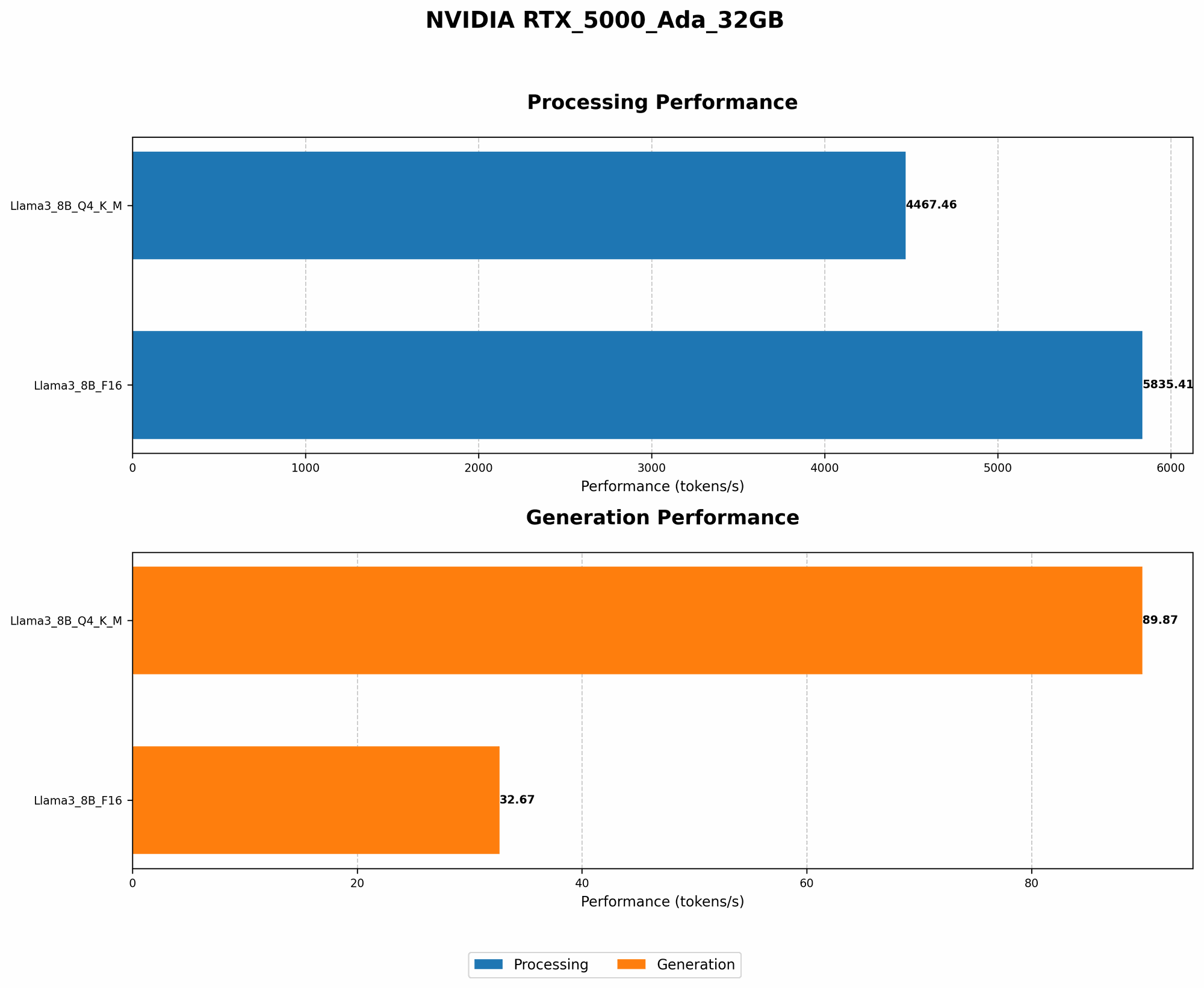
- Significant Speed-up with Q4KM: Q4KM quantization delivers a substantial performance boost compared to FP16. For Llama 3 8B, Q4KM achieves almost 3 times the tokens per second for generation and over 1.3 times for processing compared to FP16.
- Memory Efficiency: Q4KM quantization significantly reduces the model's size, making it much more manageable for your RTX 5000 Ada 32GB.
- Potential for Accuracy Tradeoff: While quantization is excellent for memory efficiency, it can sometimes lead to a slight reduction in accuracy.
Task-Specific Optimization: Generation vs. Processing
Let's get specific. The tasks your LLM performs significantly influence its memory usage. Here's a breakdown of two common tasks:
- Text Generation: This involves the LLM generating text, like writing a story or completing a sentence. It's a memory-intensive task, requiring the model to keep track of the context and generate new text.
- Text Processing: This includes tasks like summarizing text, answering questions, or analyzing sentiment. It's generally less demanding on memory than text generation.
Here's a breakdown of the performance for text generation and processing on a 32GB RTX 5000 Ada:
| Model | Quantization | Tokens/second (Generation) | Tokens/second (Processing) |
|---|---|---|---|
| Llama 3 8B | Q4KM | 89.87 | 4467.46 |
| Llama 3 8B | F16 | 32.67 | 5835.41 |
| Llama 3 70B | Q4KM | Not available | Not available |
| Llama 3 70B | F16 | Not available | Not available |
Observations:
- Faster Processing: The RTX 5000 Ada shines in text processing, achieving a significantly higher token-per-second rate compared to text generation.
- Memory Intensive Generation: Text generation is more demanding on GPU memory, requiring more resources.
Beyond Memory: Optimizing for Performance
Memory isn't the only factor to consider. Here are additional tips for squeezing the most out of your RTX 5000 Ada:
- Software Stack Selection: The software you use to run your LLM can significantly impact performance. Consider using optimized libraries like
llama.cpp(https://github.com/ggerganov/llama.cpp) andGPTQ(https://github.com/IST-DASLab/GPTQ) for maximum efficiency. - Hardware Acceleration: Certain hardware components besides your GPU contribute to accelerated LLM performance. Consider upgrading your RAM and CPU for maximum performance.
Practical Strategies for Local LLM Deployment
Let's shift gears and talk about how to make your RTX 5000 Ada 32GB a true LLM powerhouse.
1. Model Size & Quantization:
- Think Small: Start with smaller models, like Llama 2 7B, and work your way up.
- Embrace Quantization: Q4KM quantization is your best friend for memory constraints.
- Experiment with Different Libraries: Explore libraries like llama.cpp with GPU support, and GPTQ for quantization.
2. Memory Management:
- Efficient Inference: Use techniques like batching to process multiple inputs simultaneously.
- Resource Monitoring: Keep an eye on your GPU memory usage to identify potential bottlenecks.
3. Fine-tuning for Your Task:
- Domain Adaptation: Fine-tune your model on data relevant to your specific task for better performance.
- Prompt Engineering: Crafting effective prompts can significantly reduce the memory footprint and improve results.
FAQ
What is the best way to run large LLMs on the RTX 5000 Ada 32GB?
The best approach is to use a combination of quantization, efficient inference techniques, and possibly model fine-tuning. Start with smaller models and move towards larger ones as you gain experience.
Can I run Llama 70B on the RTX 5000 Ada 32GB?
It's possible, but it requires careful planning and resource optimization. Quantization and efficient inference techniques will be crucial for success.
Will a more powerful GPU help me with out-of-memory errors?
Yes, a GPU with more VRAM, like the NVIDIA RTX 6000, can handle larger LLMs without encountering memory issues. However, even powerful GPUs benefit from quantization and memory optimization.
What are the alternatives to running LLMs locally?
You can use cloud services like Google Colab, AWS SageMaker, and Azure Machine Learning to run LLMs without needing to worry about local resource limitations.
Keywords
LLM, large language models, RTX 5000 Ada 32GB, NVIDIA, GPU, memory, out-of-memory, quantization, Q4KM, FP16, text generation, text processing, llama.cpp, GPTQ, performance, optimization, fine-tuning, prompt engineering, local deployment, cloud services, Google Colab, AWS SageMaker, Azure Machine Learning, memory management, batching, monitoring.