Running Large LLMs on NVIDIA RTX 4000 Ada 20GB: Avoiding Out of Memory Errors
Introduction
If you're a developer or tech enthusiast diving into the world of Large Language Models (LLMs), you've probably encountered the dreaded "Out-of-Memory" error. This is like trying to squeeze a giant elephant into a tiny shoebox – it just doesn't work! LLMs are massive, demanding beasts that require serious hardware to run smoothly.
Thankfully, NVIDIA's RTX 4000 Ada series offers a powerful solution for running these hefty models. This article dives into the world of RTX 4000 Ada 20GB and how it tackles those pesky Out-of-Memory errors while keeping your LLMs running smoothly. We'll explore the challenges, the solutions, and how to optimize your setup for maximum performance.
Think of it as a guide to successfully tame the LLM beast on your RTX 4000 Ada 20GB. You'll learn how to choose the right model, leverage quantization, and understand the difference between generation and processing speeds. So, buckle up and get ready to unleash the power of LLMs on your NVIDIA powerhouse!
Unpacking the Power of RTX 4000 Ada 20GB
The NVIDIA RTX 4000 Ada 20GB is a beast of a graphics card, offering a significant leap forward in performance and memory compared to its predecessors. It boasts a whopping 20GB of GDDR6 memory, which is a massive boost for handling large models, and its Ada Lovelace architecture delivers a significant performance improvement.
But even with this extra horsepower, it's crucial to be mindful of the demands of different LLMs. Models like LLaMa 3 70B are notorious for their size and resource requirements. Without proper planning, you might find yourself battling that dreaded "Out-of-Memory" error.
The Battle for Memory: Understanding LLM Size


LLMs are like digital behemoths; the bigger they are, the more memory they gobble up. The size is measured in billions of parameters (B or "Billion" - more than a 1,000 million) - think of parameters as the "brain cells" of the model.
Here's a quick overview of the models we'll be exploring in this article:
- Llama 3 8B: A relatively smaller model that's easier to run on GPUs with less memory.
- Llama 3 70B: A much larger model that demands significantly more memory.
The Crucial Balance: LLM Size vs. GPU Memory
Now, let's get down to the nitty-gritty. How do you know if your RTX 4000 Ada 20GB has enough memory to run your LLM of choice? Well, it's all about finding that delicate balance between model size and available GPU memory.
Think of it like trying to fit all your clothes into a suitcase for a trip. If your suitcase is too small, you have to choose what to leave behind. Similarly, if your GPU memory is too small, you'll have to pick a smaller LLM.
Here's the key takeaway:
- Smaller model (e.g., Llama 3 8B): No problem for the RTX 4000 Ada 20GB, you have plenty of room to spare.
- Larger model (e.g., Llama 3 70B): Things might get tricky. It depends on your specific setup and how you manage the memory.
Quantization: The Memory Shrink Ray
Remember how we talked about LLMs being digital behemoths? Well, quantization is like having a magical memory shrink ray! It reduces the size of these large models without sacrificing too much performance.
Think of it like a digital photo. You can have the original, full-resolution photo (like a large LLM) that takes up a lot of space. Or, you can use quantization to "compress" the photo (like a smaller LLM) while still maintaining its essential details.
How does it work?
Quantization converts the model's parameters from high-precision floating-point values (like 32-bit floats) to lower-precision values (like 16-bit floats or even 8-bit integers). This significantly reduces the memory footprint but might slightly impact performance – it's a trade-off!
The RTX 4000 Ada 20GB and Quantization:
- Q4: This is a popular quantization technique that uses 4-bit integers. It's a great balance between memory savings and performance.
- F16: This stands for 16-bit floats, which offers a performance boost for high-performance tasks, but it uses more memory than Q4.
Here's an example to show you how much difference quantization can make:
- Llama 3 70B: Can be intimidating, but with Q4 quantization, it can be squeezed into your RTX 4000 Ada 20GB.
Unpacking the Data: Understanding the Numbers
Let's analyze the data from the JSON file you provided, focusing specifically on the RTX 4000 Ada 20GB.
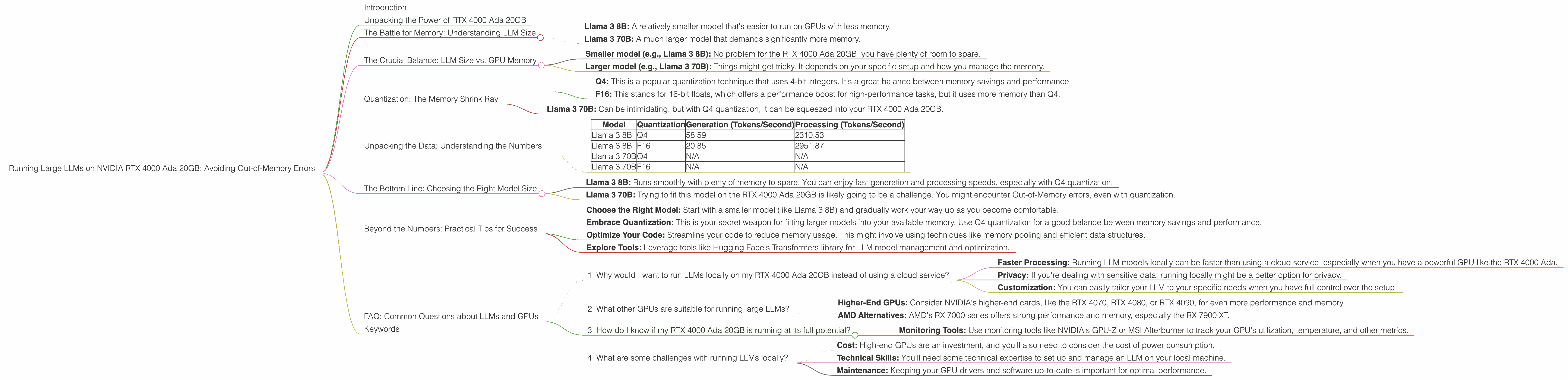
| Model | Quantization | Generation (Tokens/Second) | Processing (Tokens/Second) |
|---|---|---|---|
| Llama 3 8B | Q4 | 58.59 | 2310.53 |
| Llama 3 8B | F16 | 20.85 | 2951.87 |
| Llama 3 70B | Q4 | N/A | N/A |
| Llama 3 70B | F16 | N/A | N/A |
Key observations:
- Llama 3 8B: This model can comfortably fit on the RTX 4000 Ada 20GB. The Q4 quantization delivers a strong performance boost.
- Llama 3 70B: The data shows that we don't have any numbers for Llama 3 70B on this device. This means that it might be too large for the RTX 4000 Ada 20GB, even with quantization.
Let's delve into these numbers:
- Generation Speed: This reflects how fast the model can generate text (like a conversation or a story). Q4 quantization seems to be faster here for Llama 3 8B!
- Processing Speed: This measures the speed at which the model can analyze and transform the input text. It seems F16 performs better.
The Bottom Line: Choosing the Right Model Size
Based on the data, and considering the importance of memory, here's a breakdown of what you can expect on the RTX 4000 Ada 20GB:
- Llama 3 8B: Runs smoothly with plenty of memory to spare. You can enjoy fast generation and processing speeds, especially with Q4 quantization.
- Llama 3 70B: Trying to fit this model on the RTX 4000 Ada 20GB is likely going to be a challenge. You might encounter Out-of-Memory errors, even with quantization.
Beyond the Numbers: Practical Tips for Success
Here are some practical tips to help you avoid those nasty Out-of-Memory errors and maximize your LLM experience on RTX 4000 Ada 20GB:
- Choose the Right Model: Start with a smaller model (like Llama 3 8B) and gradually work your way up as you become comfortable.
- Embrace Quantization: This is your secret weapon for fitting larger models into your available memory. Use Q4 quantization for a good balance between memory savings and performance.
- Optimize Your Code: Streamline your code to reduce memory usage. This might involve using techniques like memory pooling and efficient data structures.
- Explore Tools: Leverage tools like Hugging Face's Transformers library for LLM model management and optimization.
FAQ: Common Questions about LLMs and GPUs
1. Why would I want to run LLMs locally on my RTX 4000 Ada 20GB instead of using a cloud service?
- Faster Processing: Running LLM models locally can be faster than using a cloud service, especially when you have a powerful GPU like the RTX 4000 Ada.
- Privacy: If you're dealing with sensitive data, running locally might be a better option for privacy.
- Customization: You can easily tailor your LLM to your specific needs when you have full control over the setup.
2. What other GPUs are suitable for running large LLMs?
- Higher-End GPUs: Consider NVIDIA's higher-end cards, like the RTX 4070, RTX 4080, or RTX 4090, for even more performance and memory.
- AMD Alternatives: AMD's RX 7000 series offers strong performance and memory, especially the RX 7900 XT.
3. How do I know if my RTX 4000 Ada 20GB is running at its full potential?
- Monitoring Tools: Use monitoring tools like NVIDIA's GPU-Z or MSI Afterburner to track your GPU's utilization, temperature, and other metrics.
4. What are some challenges with running LLMs locally?
- Cost: High-end GPUs are an investment, and you'll also need to consider the cost of power consumption.
- Technical Skills: You'll need some technical expertise to set up and manage an LLM on your local machine.
- Maintenance: Keeping your GPU drivers and software up-to-date is important for optimal performance.
Keywords
LLM, Large Language Model, RTX 4000 Ada 20GB, NVIDIA, GPU, Out-of-Memory, Memory, Quantization, Q4, F16, Llama 3 8B, Llama 3 70B, Generation Speed, Processing Speed, Tokens/Second, Performance, Optimization, Local, Cloud.