Running Large LLMs on NVIDIA L40S 48GB: Avoiding Out of Memory Errors
Introduction
So you're ready to unleash the power of large language models (LLMs) and dive into the fascinating world of generative AI. You've got your hands on an NVIDIA L40S48GB, a powerful GPU designed for high-performance computing. But then, reality hits: "Out-of-memory" errors! Fear not, intrepid AI explorer! We’re here to navigate the intricate dance between model size, memory, and performance with a focus on the L40S48GB.
This guide will explore common concerns faced by users running LLMs on NVIDIA L40S_48GB, including the all-too-familiar "out-of-memory" errors. We'll break down essential concepts, delve into practical strategies, and equip you with the knowledge to run your LLM smoothly.
Understanding the Memory Constraints
Let's start with the basics. Running an LLM involves loading its parameters (the model's "brain") and the input data into the GPU's memory. Think of it like this: your GPU is a spacious apartment for storing the LLM's knowledge and the current conversation. The size of your apartment (GPU memory) determines how big an LLM you can accommodate.
The Size Matters: Model Parameters and Memory Usage
Bigger isn't always better. LLMs come in various sizes, ranging from a few gigabytes to hundreds of gigabytes. The larger the model, the more parameters it has, and the more memory it consumes. An LLM that requires 10GB of memory simply won't fit in a GPU with 8GB of memory — hence the dreaded "out-of-memory" errors.
Quantization: A Memory Diet for LLMs
Imagine a massive library with millions of books, each representing a parameter. Quantization is like a "knowledge compression" strategy! By using fewer bits to represent each parameter (think of it as using smaller "booklets"), we can shrink the memory footprint of the LLM.
Understanding the Types of LLMs and their Memory Footprint
Let's talk about some popular LLM families and their memory usage:
- Llama 2: These models are known for their performance and are often used for various tasks like text generation, translation, and summarization.
- Llama 3: These LLMs are a recent iteration, providing even better performance and capabilities.
Falcon: This model family is renowned for being efficient, boasting remarkable capabilities with a relatively smaller memory footprint.
Optimizing Your LLM on NVIDIA L40S_48GB
Now, let's dive into strategies to keep your LLM running smoothly on your L40S_48GB.
Token Speed Generation and Processing
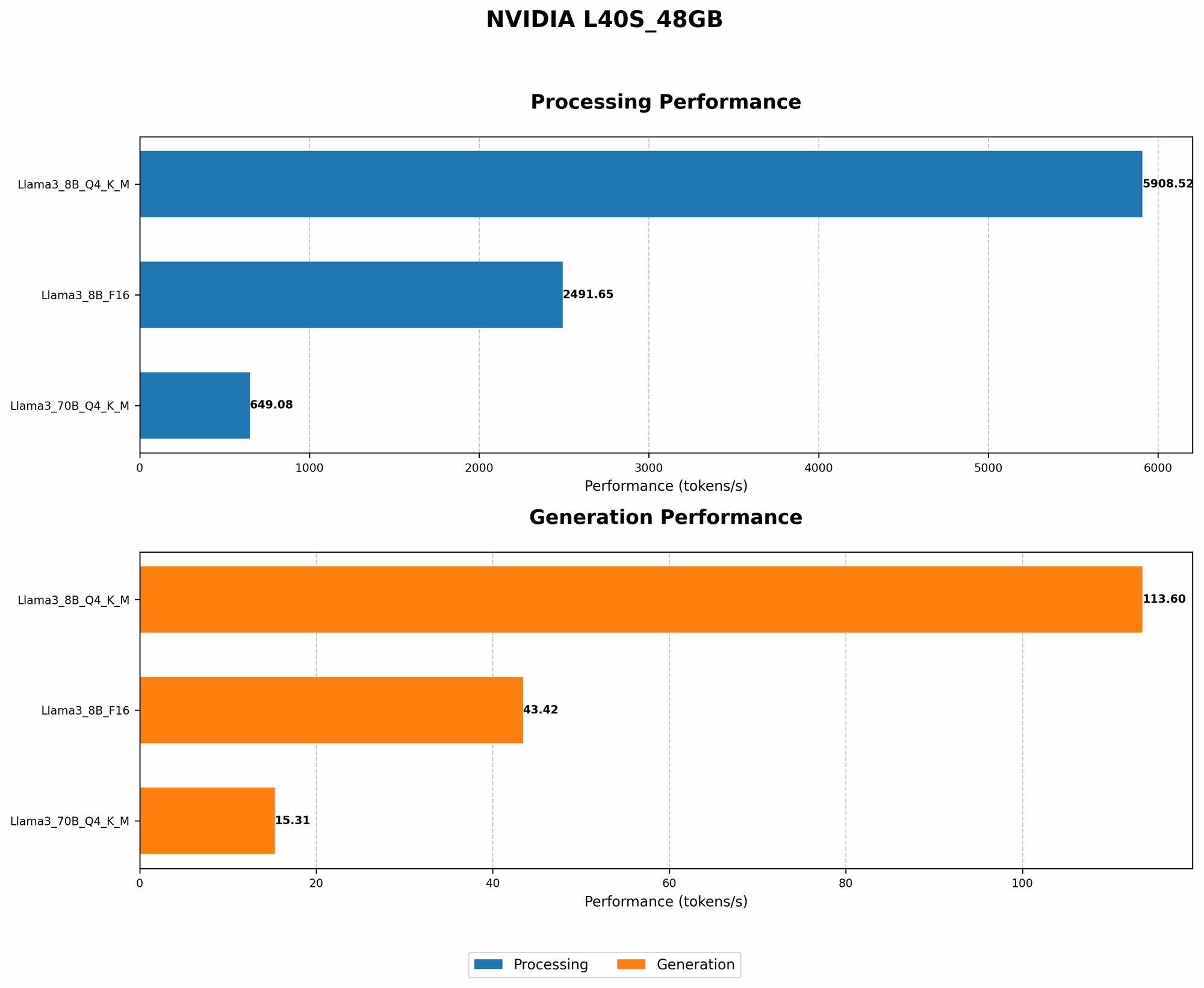
The L40S_48GB offers impressive performance for LLMs. The table below shows token speed for different LLM models and configurations on this GPU:
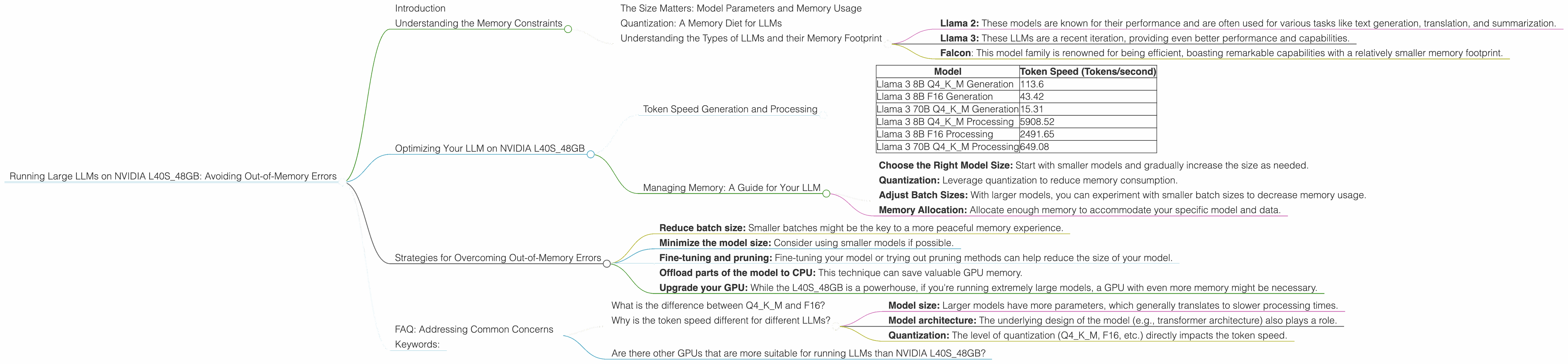
| Model | Token Speed (Tokens/second) |
|---|---|
| Llama 3 8B Q4KM Generation | 113.6 |
| Llama 3 8B F16 Generation | 43.42 |
| Llama 3 70B Q4KM Generation | 15.31 |
| Llama 3 8B Q4KM Processing | 5908.52 |
| Llama 3 8B F16 Processing | 2491.65 |
| Llama 3 70B Q4KM Processing | 649.08 |
- Q4KM: This refers to quantized model, a more memory-efficient format.
- F16: This indicates a model using half-precision floats, striking a balance between speed and accuracy.
Key Insights:
- Quantization: The table highlights the remarkable boost in performance with quantization. For example, Llama 3 8B with Q4KM generates tokens at a rate of 113.6 tokens/second, while the F16 version achieves 43.42 tokens/second.
- Model Size: Larger models, such as Llama 3 70B, exhibit slower speeds compared to smaller models like Llama 3 8B. This is due to their increased memory requirements.
Managing Memory: A Guide for Your LLM
Here's a checklist to help you optimize memory usage for your LLM on the L40S_48GB:
- Choose the Right Model Size: Start with smaller models and gradually increase the size as needed.
- Quantization: Leverage quantization to reduce memory consumption.
- Adjust Batch Sizes: With larger models, you can experiment with smaller batch sizes to decrease memory usage.
- Memory Allocation: Allocate enough memory to accommodate your specific model and data.
Strategies for Overcoming Out-of-Memory Errors
Sometimes, even with these optimizations, encountering out-of-memory errors is inevitable. Here’s a handy toolkit for tackling these challenges:
- Reduce batch size: Smaller batches might be the key to a more peaceful memory experience.
- Minimize the model size: Consider using smaller models if possible.
- Fine-tuning and pruning: Fine-tuning your model or trying out pruning methods can help reduce the size of your model.
- Offload parts of the model to CPU: This technique can save valuable GPU memory.
- Upgrade your GPU: While the L40S_48GB is a powerhouse, if you're running extremely large models, a GPU with even more memory might be necessary.
FAQ: Addressing Common Concerns
What is the difference between Q4KM and F16?
These are methods used for quantizing LLMs, which aims to reduce model size. Q4KM stands for "quantized 4-bit with Kernel and Matrix multiplication". It reduces each parameter to 4 bits resulting in significant memory savings, but with some performance tradeoffs. F16 is a half-precision floating-point format, using 16 bits instead of 32 bits, which is still less precise than full precision but provides a more efficient way to store parameters than full-precision.
Why is the token speed different for different LLMs?
The token speed is influenced by several factors, including:
- Model size: Larger models have more parameters, which generally translates to slower processing times.
- Model architecture: The underlying design of the model (e.g., transformer architecture) also plays a role.
- Quantization: The level of quantization (Q4KM, F16, etc.) directly impacts the token speed.
Are there other GPUs that are more suitable for running LLMs than NVIDIA L40S_48GB?
Yes, there are other powerful GPUs suitable for LLMs. However, the NVIDIA L40S_48GB is a great starting point, especially for models that don't require an excessive amount of memory. If you're running extremely large models, you might consider exploring GPUs such as the NVIDIA A100 or H100.
Keywords:
LLMs, NVIDIA, L40S48GB, out-of-memory, GPU, memory, token speed, llama, quantization, Q4K_M, F16, fine-tuning, pruning, inference, performance, processing, AI, machine learning, deep learning, model size, batch size, memory allocation, optimization, strategies, solutions, guide, tips, troubleshooting, FAQs, common issues.