Running Large LLMs on NVIDIA A40 48GB: Avoiding Out of Memory Errors

Introduction
Imagine you're building a cutting-edge AI application powered by a large language model (LLM) like Llama 3, and you want to run it locally on your powerful NVIDIA A40_48GB GPU. You’ve got a lot of RAM, but LLMs are memory hogs, and you're worried about running into dreaded "out-of-memory" errors. Fear not, fellow AI enthusiast! This article is your guide to avoiding those memory-related headaches and getting your LLM model running smoothly on your A40.
We'll dive into the complexities of LLM inference and how to optimize it for the A40, focusing on key techniques like quantization and understanding how the choice of precision can impact your results. We'll also compare different configurations, showing you the trade-off between speed and memory usage.
So, let's get our hands dirty and unleash the power of your A40_48GB to run these massive LLMs!
Understanding the A40_48GB and LLMs
The NVIDIA A40_48GB is a powerful GPU designed for high-performance computing and AI workloads, boasting a massive 48GB of HBM2e memory. LLMs, on the other hand, are complex neural networks with billions of parameters, requiring a substantial amount of memory for inference. Think of it like this: an LLM is like a giant map filled with intricate details, and your A40 tries to keep track of it all.
How to Avoid Out-of-Memory Errors with your A40_48GB
1. Quantization: Shrinking the Map for a Better Fit
Quantization is a technique that reduces the size of an LLM by representing its weights (those intricate details of the map) using smaller data types. It's like summarizing a long story with a few key sentences – you lose some detail, but you can fit the whole story in your head more easily.
For example, instead of using 32-bit floating-point numbers (F32) to represent the weights, you can use 16-bit floating-point numbers (F16), reducing the memory footprint by half. This is called half-precision quantization. And we can go even further with quantization to 4-bit integers (Q4), resulting in even smaller weights, but sometimes at the cost of accuracy.
2. Precision Trade-off: Speed vs. Accuracy
Quantization is an excellent way to save memory, but it comes with a potential trade-off: your LLM might run faster, but you might lose some accuracy. Imagine your map is a complex city map. A high-resolution map (F32) provides detailed information about every street and building, which is great for planning a detailed journey, but it takes up a lot of space. A lower-resolution map (F16 or Q4) might be simpler, but you can still get to your destination, even if details like the names of smaller roads are missing.
3. Model Size Matters: Choosing the Right LLM
One of the simplest ways to avoid out-of-memory errors is to choose an LLM that is appropriately sized for your A40_48GB. A smaller model like Llama 3 8B will be more manageable than a massive model like Llama 3 70B, even with quantization.
4. Using Efficient Inference Frameworks
There are libraries and frameworks specifically designed to optimize LLM inference, making the most of your A40's capabilities. These frameworks manage memory efficiently and handle acceleration strategies like using the GPU's tensor cores for faster computation.
Comparing Different LLMs and Configurations on A40_48GB
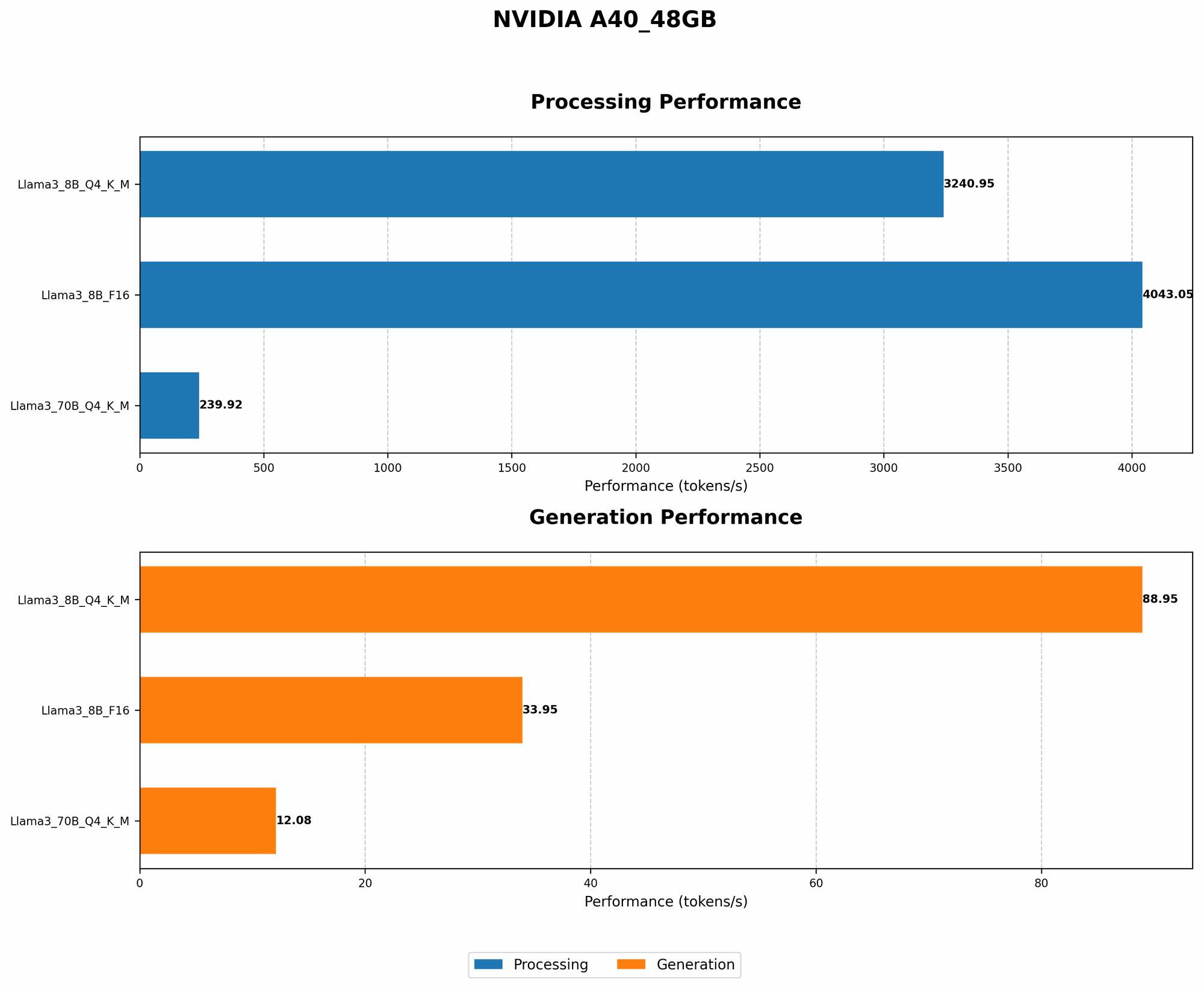
Here's a glimpse into how different Llama 3 models perform on your A40_48GB, using Q4 quantization and F16 precision. We'll look at both token generation speed (how quickly your LLM generates text) and processing speed (how fast your LLM can process a batch of input).
A40_48GB Performance
| Model | Precision | Token Generation Speed (tokens/second) | Processing Speed (tokens/second) |
|---|---|---|---|
| Llama 3 8B | Q4KM | 88.95 | 3240.95 |
| Llama 3 8B | F16 | 33.95 | 4043.05 |
| Llama 3 70B | Q4KM | 12.08 | 239.92 |
| Llama 3 70B | F16 | No Data Available | No Data Available |
Analysis:
- Llama 3 8B Q4KM is significantly faster than Llama 3 8B F16 in terms of token generation. This shows the trade-off between precision and speed - while F16 might offer slightly better accuracy, Q4 provides a significant boost in performance.
- Llama 3 8B F16 is faster in terms of processing speed, indicating that using F16 can be beneficial for batch processing.
- Llama 3 70B Q4KM, noticeably slower than the 8B model, showcases the challenges of running larger models. Even with Q4, it requires more memory and computational resources.
- It's important to note that no data was available for Llama 3 70B F16 on the A40_48GB, likely due to its massive size and complexity.
Optimizing your A40 for LLM Inference: Tips and Tricks
- Choose the Right Tools: Experiment with popular LLM inference frameworks like llama.cpp or transformers, selecting the one that offers the best performance for your use case.
- Explore Model Pruning: Model pruning removes irrelevant connections, further reducing your model's size and potentially improving inference time.
- Leverage Multi-GPU Configurations: If you have the luxury of multiple A40s, you can distribute your LLM across them for even faster inference.
- Tune Memory Allocation: Experiment with different memory allocation strategies within your inference framework.
- Consider Quantization for Different Layers: Instead of applying quantization uniformly, you can selectively quantize specific layers of your model, potentially maintaining accuracy while still realizing memory savings.
Conclusion: Unleashing the Power of your A40_48GB for LLMs
Running LLMs on your A40_48GB can be a rewarding experience, allowing you to bring the power of AI to your local machine. By understanding quantization, precision trade-offs, choosing the right model size, and leveraging efficient inference frameworks, you can avoid out-of-memory errors and unlock the full potential of your A40.
FAQ:
Q1: What are the main challenges of running LLMs on a GPU?
A1: LLMs are memory intensive, and GPUs have limited memory capacity. This can lead to out-of-memory errors. Another challenge is optimizing the computation and memory management for these complex models.
Q2: What are some common strategies for reducing memory consumption in LLM inference?
A2: Quantization, model pruning, and using efficient inference frameworks are key strategies for reducing the memory footprint of LLMs.
Q3: How does quantization impact the accuracy of an LLM?
A3: Quantization can potentially reduce accuracy, especially with more aggressive quantization levels. However, advancements in quantization methods are mitigating these accuracy losses.
Q4: Is it possible to run even larger LLMs like Llama 3 13B or 34B on the A40_48GB?
A4: It might be possible, but it would require careful optimization and potentially using techniques like model parallelism to distribute the model's computation across multiple GPUs.
Keywords:
LLM, large language model, NVIDIA A40_48GB, GPU, out-of-memory error, quantization, precision, half-precision, Q4, token generation speed, processing speed, Llama 3, inference, framework, llama.cpp, transformers, model pruning, multi-GPU, memory allocation, model parallelism, AI, machine learning