Running Large LLMs on NVIDIA A100 SXM 80GB: Avoiding Out of Memory Errors

Introduction
Large Language Models (LLMs) are all the rage these days, capable of generating human-like text, translating languages, and even writing code. But running these massive models locally can be a challenge, especially if you're working with a limited amount of memory. The NVIDIA A100SXM80GB is a powerful GPU designed for demanding tasks like deep learning, but even with its impressive 80GB of HBM2e memory, you might encounter “out-of-memory” errors when running large LLMs.
This article will be your guide to smoothly navigate the world of LLMs on the A100SXM80GB, helping you avoid those dreaded "out-of-memory" errors. We'll delve into the world of model quantization, the impact of memory usage, and explore some strategies to optimize your LLM inference process.
Understanding the Memory Challenge
Imagine trying to fit a giant elephant into a small car. That's kind of what happens when you try to load a huge LLM into a GPU with limited memory. LLMs are massive, with billions of parameters, and require a considerable amount of memory to run.
The NVIDIA A100SXM80GB is a beast of a GPU, boasting 80GB of HBM2e memory, but even that can feel insufficient when dealing with models like Llama 70B. Running these larger models on the A100SXM80GB without meticulous optimization will lead to those infamous "out-of-memory" errors.
Quantization: Shrinking the Elephant
Quantization is a technique used to reduce the size of a model by representing its parameters with a smaller number of bits. It’s like shrinking the elephant by using less material.
Think of it like using a smaller number of colors in a painting – you might lose some detail, but the overall image is still recognizable.
Here's how quantization helps with memory:
- Smaller Footprint: Quantized models take up less memory, allowing you to fit larger models on the A100SXM80GB.
- Faster Inference: Sometimes, quantization even speeds up the inference process.
Quantization Levels: What's Q4KM?
The level of quantization determines the size of the model and its potential performance impact. A higher level of quantization (like Q4KM) uses 4 bits to represent the model's parameters, resulting in a smaller size but potentially a slight drop in accuracy.
Analyzing Performance: Llama3 on the A100SXM80GB
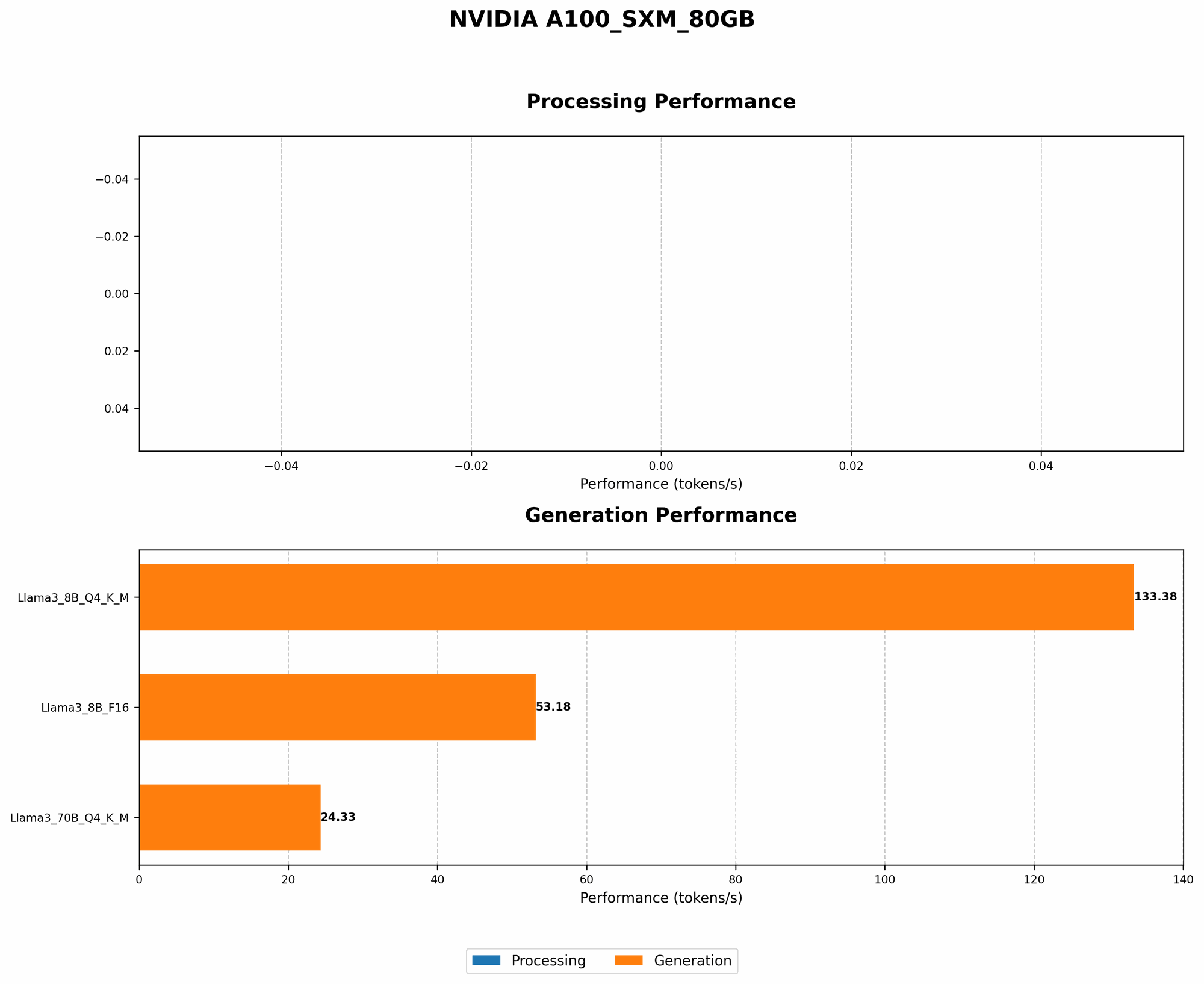
To demonstrate the impact of quantization and model size, let's analyze the performance of Llama3 on the A100SXM80GB. We'll use the numbers provided in the JSON data.
| Model | A100SXM80GB (Tokens/second) |
|---|---|
| Llama3 8B Q4KM Generation | 133.38 |
| Llama3 8B F16 Generation | 53.18 |
| Llama3 70B Q4KM Generation | 24.33 |
Key Observations:
- The Power of Quantization: Comparing the Llama3 8B models, we see a significant difference in performance:
- Q4KM (133.38 tokens/second) significantly outperforms F16 (53.18 tokens/second) in terms of speed.
- The Memory-Speed Trade-off: The larger Llama3 70B model, even with quantization, generates tokens at a much slower rate (24.33 tokens/second) compared to the Llama3 8B Q4KM model. This highlights the trade-off between model size and speed.
Strategies for Avoiding Out-of-Memory Errors
Now that we understand the challenges of running LLMs on the A100SXM80GB, let's look at some strategies to avoid those frustrating "out-of-memory" errors:
1. Quantization: The First Line of Defense
We've already discussed the benefits of quantization, but it's worth emphasizing its role as a vital tool for fitting larger models on the A100SXM80GB. If you're working with a model like Llama 70B, quantization is your best bet.
2. Optimize Your Code: It's Not Just About the Hardware
Even with a powerful GPU like the A100SXM80GB, efficient code is crucial for smooth operation.
- Embrace Libraries: Use optimized libraries specifically designed for LLM inference, such as:
llama.cpp: A popular open-source C++ library for running LLMs, known for its performance and efficient memory management.transformers: A powerful library for working with various transformer-based models, including LLMs.
- Reduce Memory Usage: Pay close attention to memory usage within your code. Look for opportunities to:
- Minimize Intermediate Data: Reduce the amount of intermediate data stored in memory during the inference process.
- Reuse Memory: Recycle memory blocks instead of constantly allocating new ones.
3. Leverage Off-the-Shelf Resources: Embrace the Ecosystem
Don't reinvent the wheel! There are amazing resources available to help you work with LLMs on the A100SXM80GB.
- Pre-trained Models: Many pre-trained LLMs are available with optimized configurations for various hardware setups, including the NVIDIA A100. These models are often quantized to reduce memory usage and speed up inference.
- Cloud Services: For larger models or when you need a lot of computing power, consider using cloud services like Google Colab or Amazon SageMaker, which provide pre-configured environments with A100 GPUs and optimized library support.
Making LLMs Accessible: A100SXM80GB and Beyond
The A100SXM80GB is a game-changer for running LLMs locally. By following the strategies outlined in this article, you can effectively manage memory and efficiently run larger models on this powerful GPU.
However, the quest for better performance continues. Future advancements in hardware, software, and novel techniques will undoubtedly play a role in further expanding the accessibility of these fascinating models.
Frequently Asked Questions (FAQ)
1. What are some popular LLM models?
Popular LLM models include GPT-3 (Generative Pre-trained Transformer 3), LaMDA (Language Model for Dialogue Applications), and Llama (Large Language Model for Dialogue Applications). These models have different strengths and applications, and are continuously being improved.
2. What are the typical memory requirements for different-sized LLMs?
This is where the magic of quantization comes into play:
- Smaller Models: Models like Llama 7B can be run effectively on GPUs with less than 80GB of memory, especially with quantization.
- Larger Models: Models like Llama 70B require more memory. The A100SXM80GB is a good choice for these models, but quantization is generally recommended to avoid memory issues.
3. How does quantization affect the accuracy of a model?
Quantization usually has a small impact on the accuracy of a model. This is because it's like using a smaller number of colors in a painting - you might lose some detail, but the overall image is still recognizable. However, the trade-off between performance and memory can be significant.
4. Are there any other optimizations to improve LLM inference performance?
Besides quantization and the strategies mentioned previously, other techniques can further enhance performance. These include:
- Model Parallelism: Distributing the computation across multiple GPUs to handle larger models.
- Gradient Accumulation: Accumulating gradients over multiple batches to reduce memory consumption during training.
Keywords
Large Language Models, LLMs, NVIDIA A100SXM80GB, GPU, Out-of-Memory, Quantization, Q4KM, F16, Llama 8B, Llama 70B, Memory Optimization, Model Parallelism, Gradient Accumulation, transformers, llama.cpp, Cloud Services, Google Colab, Amazon SageMaker