Running Large LLMs on NVIDIA A100 PCIe 80GB: Avoiding Out of Memory Errors

Introduction
The world of Large Language Models (LLMs) is exploding, with new models popping up faster than you can say "Transformer"! But with this excitement comes a new challenge: how do you actually run these behemoths on your own hardware? One of the most common concerns is running out of memory (RAM), especially when dealing with models like the colossal Llama 70B.
This article focuses on the NVIDIA A100PCIe80GB GPU, a powerful workhorse commonly used for AI tasks. We'll explore the possibilities of running popular LLMs on this GPU and provide practical tips to avoid those dreaded out-of-memory errors. Think of it as a guide to "tame the beast" and unleash the full potential of your LLM, without hitting the memory wall.
Understanding the Challenge: LLMs and Memory
LLMs are known for their massive size, and this size directly impacts memory requirements. Imagine trying to fit a whole library of books into a tiny bookshelf – that's kind of what happens when you attempt to load a giant LLM onto a GPU with limited memory.
To understand the challenge, let's visualize it. Imagine a 70B parameter LLM as a massive city with 70 billion buildings (each representing a parameter). Now, imagine each building needing a specific amount of "memory space" to store its data. If your GPU is like a small village, you can only accommodate a few buildings – hence the memory issue.
Quantization: Making LLMs Leaner and Meaner
Enter quantization – a technique like using a smaller, more efficient building material. In this analogy, it means shrinking the size of buildings (parameters) while keeping the essential information. This allows us to store more buildings (parameters) in the same space.
There are different levels of quantization, like using a smaller brick (Q4, K, M) with 4 bits to represent each parameter value, or a more detailed brick (F16) with 16 bits. The smaller the representation, the less memory is required, but there might be a slight drop in accuracy.
A100PCIe80GB: A Beastly GPU for LLMs
The NVIDIA A100PCIe80GB is a true monster of a GPU. With its massive 80GB of HBM2e memory, it can handle a significant portion of the LLM's parameters, making it a powerful tool for both training and inference.
Key Features of A100PCIe80GB:
- 80GB of HBM2e memory: This allows for storing large models with less frequent data transfers from slower memory.
- Tensor Core technology: Accelerates matrix operations, fundamental to LLM computations.
- High bandwidth memory: Fast access to the data, crucial for efficient processing.
Benchmarking LLMs on A100PCIe80GB
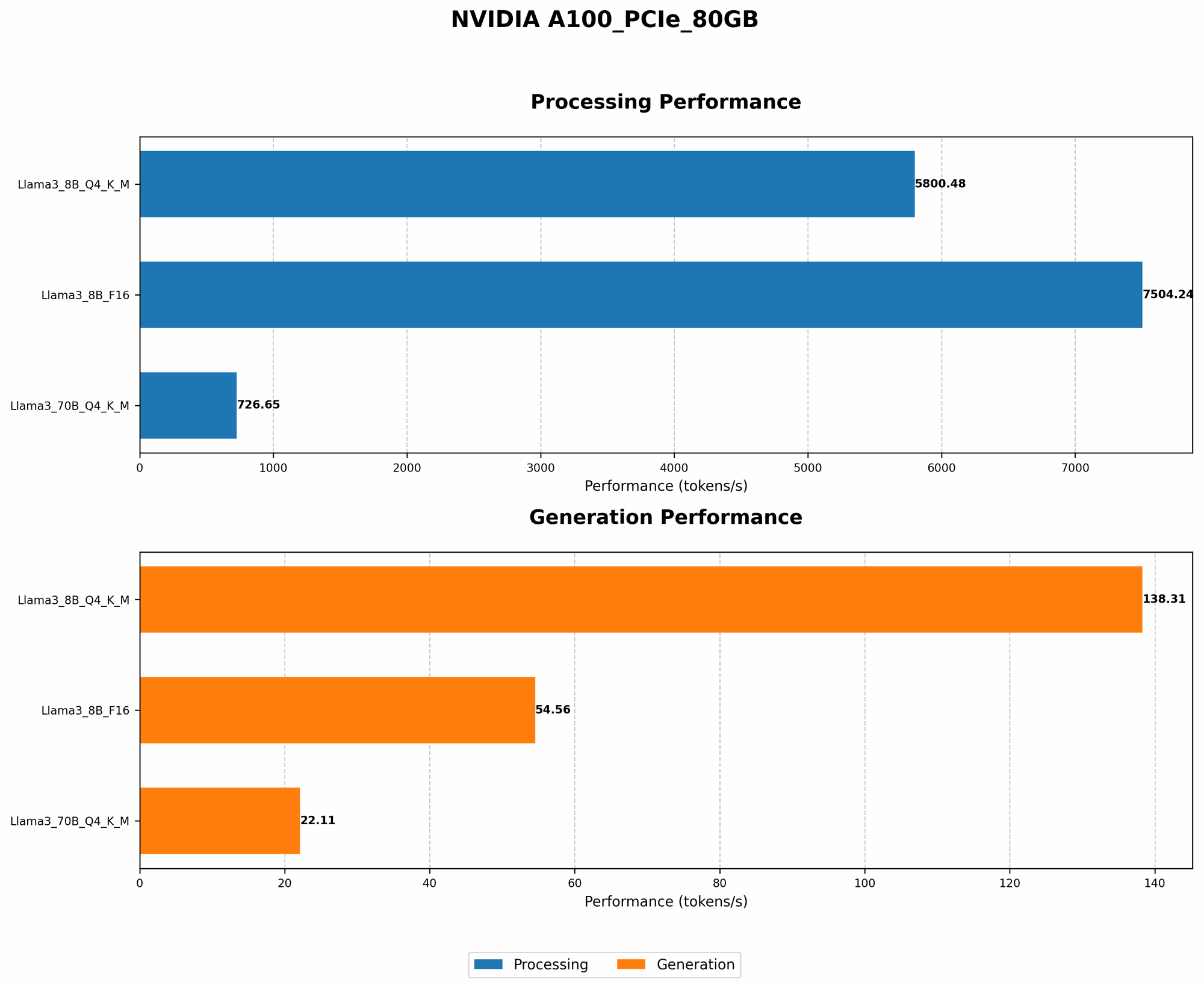
Let's dive into the numbers and see how various LLMs perform on the A100PCIe80GB. We will focus on Llama 3 models, showcasing their token generation speed at different levels of quantization:
| Model | Quantization | Tokens/Second |
|---|---|---|
| Llama 3 8B | Q4, K, M | 138.31 |
| Llama 3 8B | F16 | 54.56 |
| Llama 3 70B | Q4, K, M | 22.11 |
| Llama 3 70B | F16 | N/A |
Important Note: Data for F16 quantization of Llama 3 70B is not available at this time.
Observations:
- Smaller Models, Faster Speeds: The Llama 3 8B model shows significantly faster token generation speeds compared to the 70B model, even at Q4, K, M quantization. This is expected, as smaller models require less memory for computations.
- Quantization Impacts Performance: The Llama 3 8B model runs faster with Q4, K, M quantization, likely due to reduced memory transfers and optimized computations.
- Memory Constraints: The 70B model, with its massive size, requires significant memory even with quantization. This highlights the importance of efficient memory management and using suitable hardware.
Exploring Memory Optimization Techniques
Here are some strategies to maximize your A100PCIe80GB's memory usage and avoid those dreaded "out-of-memory" errors:
1. Leverage Quantization: Shrinking the Footprint
As we've seen, quantization is key to fitting larger models on the A100PCIe80GB.
- Q4, K, M quantization: A great choice for memory-constrained environments. Remember, there might be a tradeoff between accuracy and memory footprint.
- F16 quantization: Offers a balance between memory efficiency and accuracy.
- Experiment: Play around with different levels of quantization to find the sweet spot for your specific LLM and task.
2. Memory Management: Making the Most of Your Resources
Efficient memory management is essential for smooth LLM operation.
- CPU Offloading: Move tasks requiring less GPU power to the CPU. This frees up valuable GPU memory for LLM processing.
- Batch Size Optimization: Carefully choose the batch size for training or inference. A large batch size might lead to memory issues, so experiment to find the optimal balance.
- Data Loading: Streamline Data Intake: Stream data into the model instead of loading everything at once. This helps reduce memory pressure during training.
3. Strategies Beyond the Basics: Advanced Techniques
For those looking to push the boundaries of memory optimization:
- Gradient Accumulation: Break down training into smaller steps, accumulating gradients in memory before applying them to the model. This effectively allows training with larger batch sizes, but it comes with an accuracy tradeoff.
- Model Parallelism: Divide the model into smaller parts and distribute them across multiple GPUs. This allows working with larger models that wouldn't fit on a single GPU.
- Memory Optimization Libraries: Tools like NVIDIA's cuDNN and TensorRT help optimize memory usage and improve performance.
FAQ: Answering Your Questions
Q1: What are other devices suitable for running LLMs?
A1: While the A100PCIe80GB is a great choice for large models, other devices like the NVIDIA A100SXM440GB, A40, and H100 offer varying memory capacities and performance characteristics.
Q2: How important is GPU memory bandwidth for LLM processing?
A2: A high bandwidth GPU memory is crucial for LLM performance. It allows for faster data transfer between the GPU and memory, increasing the overall speed of computation.
Q3: Can I run smaller LLMs like Llama 7B on a consumer GPU?
A3: Depending on the specific model, you might be able to run smaller LLMs on consumer GPUs like the NVIDIA RTX 3090 or RTX 4090. However, their memory capacity might limit the size of the models you can run.
Q4: Are there any cloud solutions for running LLMs?
A4: Yes, companies like Google Cloud Platform, AWS, and Azure offer cloud-based services for running LLMs, providing the necessary infrastructure and resources.
Keywords
LLM, Large Language Model, NVIDIA A100PCIe80GB, GPU, Memory, Out-of-Memory, Quantization, Q4, K, M, F16, Token Generation, Benchmark, Memory Optimization, Batch Size, Gradient Accumulation, Model Parallelism, Memory Optimization Libraries, CUDA, cuDNN, TensorRT, Cloud Solutions, AWS, Google Cloud Platform, Azure.