Running Large LLMs on NVIDIA 4090 24GB: Avoiding Out of Memory Errors

Introduction
The world of Large Language Models (LLMs) is booming! These powerful AI models can generate compelling text, translate languages, write different kinds of creative content, and answer your questions in an informative way. But running LLMs locally on your own machine can be challenging, especially when you’re dealing with models like Llama 70B or the behemoth that is Llama 3!
This article is your guide to navigating the exciting but sometimes tricky world of running LLMs on a powerful NVIDIA 4090 24GB GPU. We'll focus on minimizing those dreaded "Out-of-Memory" errors that can bring your LLM adventures to a screeching halt. We'll also dive into some performance tips to ensure your models run smoothly and efficiently.
Understanding the Out-of-Memory Challenge
Imagine you're trying to fit a massive elephant into a tiny closet. That's kind of what happens when you try to run a large LLM on a GPU with limited memory. These models are enormous, sometimes containing billions of parameters, which are essentially the "knowledge" and "skills" that the model has learned. Loading all that information into your GPU's memory is like cramming the elephant into the closet!
That's where the "out-of-memory" error pops up – the GPU simply can't handle it all. The good news is, we have a few strategies to help you squeeze those elephants into your closet, or in our case, fit those LLMs onto your 4090!
The NVIDIA 4090 24GB GPU - A Powerful Ally

The NVIDIA 4090 24GB GPU is a powerhouse, offering both impressive speed and a hefty chunk of memory. This makes it a great choice for running LLMs, but even with 24GB, you'll need to be strategic about how you manage your memory.
Techniques to Minimize Out-of-Memory Errors
Here are some strategies to help you run your LLMs on a 4090 without running into memory issues:
1. Leverage Quantization
Quantization is like a "diet" for your LLM. It involves compressing the model's parameters, often by reducing the number of bits used to represent them. Think of it as simplifying the elephant's diet to make it fit in the closet!
Here's how quantization works:
- Normal (Full Precision): In the original model, each parameter is stored using 32 bits, like a long, detailed recipe.
- Quantized: We condense the information, perhaps using 8 bits or even 4 bits, like a simplified recipe with fewer ingredients.
This compression drastically reduces the memory footprint of the LLM, making it significantly easier to fit into your GPU's memory.
2. Choose the Right Model Size
Not all LLMs are created equal. There's a wide range of models, from the small and nimble to the enormous and powerful. It pays to choose a model that fits your needs and your GPU's memory capacity.
For example, while the Llama 3 70B model is incredibly capable, it's also a memory hog. If you're working with the NVIDIA 4090 24GB, you might face memory issues. But with the Llama 3 8B model, you have a better chance of successfully fitting it into your GPU.
3. Optimize Your Batch Size
Batch size refers to the number of input examples your model processes at once. Smaller batch sizes use less memory but may be slower. Large batch sizes can be faster but also more memory-intensive. Experiment with different batch sizes to strike the right balance between speed and memory usage.
Understanding the Performance of Llama 3 on NVIDIA 4090 24GB
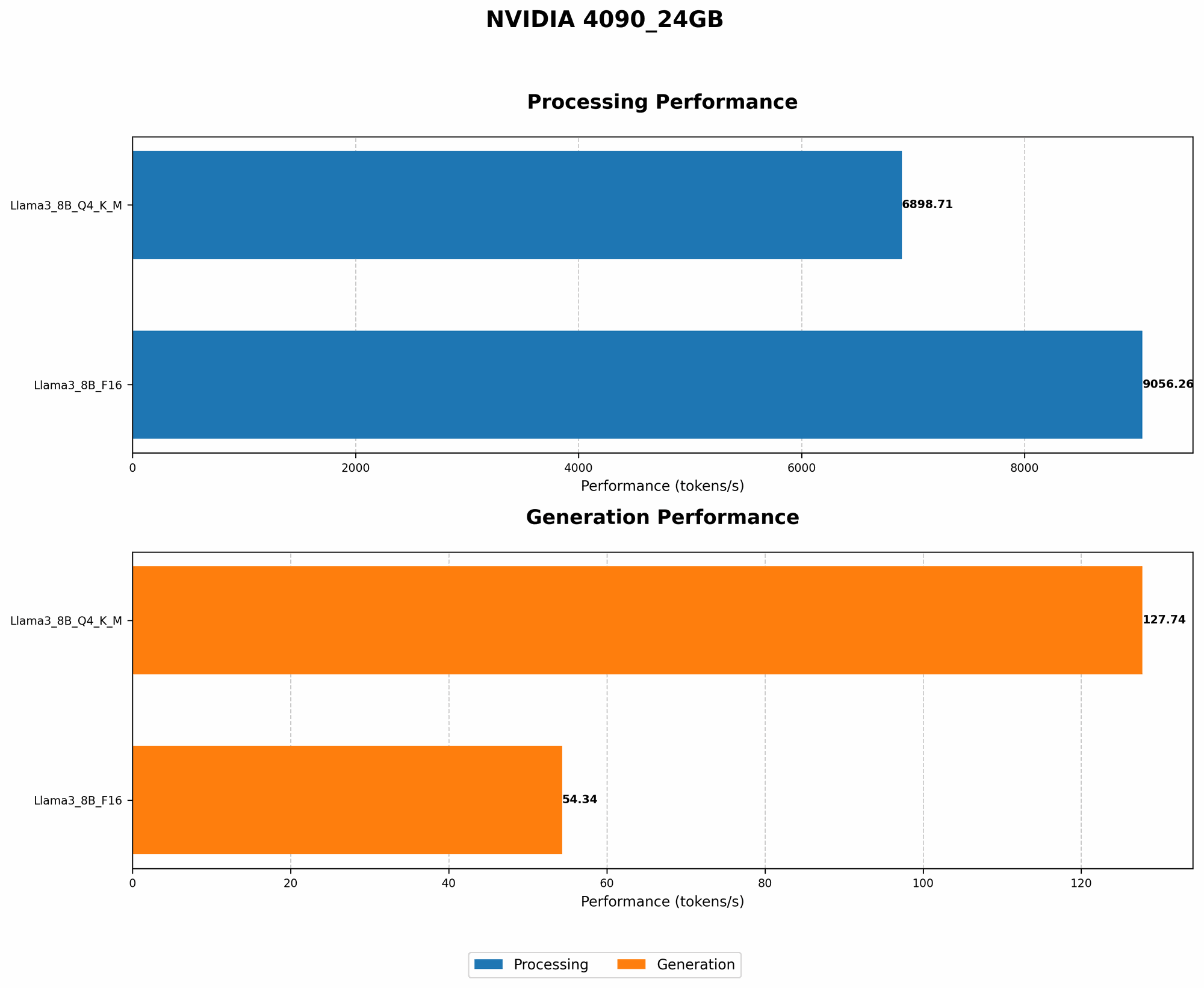
Let's take a look at how various Llama 3 models perform on an NVIDIA 4090 24GB using Llama.cpp, a popular open-source LLM implementation. This data gives us a glimpse into the memory demands and processing speed of these models.
| Model Name | Quantization | Tokens/Second (Generation) | Tokens/Second (Processing) |
|---|---|---|---|
| Llama 3 8B | Q4KM | 127.74 | 6898.71 |
| Llama 3 8B | F16 | 54.34 | 9056.26 |
| Llama 3 70B | Q4KM | - | - |
| Llama 3 70B | F16 | - | - |
Note: The data for Llama 3 70B models is currently unavailable on the specified devices.
Key Observations:
- Quantization Matters: Comparing the Llama 3 8B models, we see that the Q4KM quantized version significantly outperforms the F16 version in terms of token speed generation. This suggests that even though Q4KM sacrifices some precision, it offers a significant boost in efficiency.
- Llama 3 8B is a Good Fit: Both the Q4KM and F16 variants of Llama 3 8B can be successfully run on the 4090 24GB GPU.
- Larger Models Require More Memory: The data for the Llama 3 70B models is not available for this device likely because it exceeds memory requirements.
How to Choose the Right Configuration for Your Needs
Determining the best configuration for your machine and project is a matter of weighing the trade-offs between speed, memory usage, and model accuracy.
- For maximum speed and memory efficiency: Select a quantized model (Q4KM), like the Llama 3 8B, which offers a substantial performance advantage on the 4090 24GB without sacrificing too much accuracy.
- For higher accuracy: If you prioritize accuracy over speed, consider using the F16 version of the Llama 3 8B, although you might make some compromises on memory usage.
Remember: Always test and benchmark your models to find the settings that work best for your specific use case.
Beyond Out-of-Memory: Optimizing for Performance
Now that you're running your LLM smoothly, let's fine-tune it for peak performance! Here are some additional tips:
- Use a Dedicated GPU: Running other applications or games concurrently with your LLM training or inference will slow things down. Try to dedicate the 4090 for your LLM.
- Utilize the Right Libraries: Libraries like llama.cpp are optimized for specific GPUs, so choose the one that's best suited for your 4090.
- Optimize Your Code: Look for performance bottlenecks in your code and optimize them for maximum efficiency, especially in areas where your LLM spends a lot of time.
FAQ (Frequently Asked Questions)
What are the best Open Source tools for running LLMs locally?
Several great open-source tools can help you run LLMs on your own machine. Llama.cpp is a popular choice, known for its speed and flexibility. GPTQ is another excellent option for quantizing models to reduce memory usage.
What is quantization and how does it benefit me?
As mentioned earlier, quantization is like a "diet" for your LLM. It compresses the model's parameters, reducing its memory footprint. Think of it as simplifying the elephant's diet to make it fit in the closet!
How do I decide which model to use?
It depends on your needs! If you're working with a large dataset or require high accuracy, you might want to consider a larger model, even if it's more demanding on your GPU's memory. For less demanding tasks, a smaller model might be sufficient. Experiment with different models to find the best fit for your project.
Keywords
Large Language Models, LLMs, NVIDIA 4090, GPU, Out-of-Memory, Memory Management, Quantization, Llama 3, Llama 8B, Llama 70B, Tokens/Second, Generation, Processing, Performance, Efficiency, Open Source, Llama.cpp, GPTQ, Batch Size, GPU Memory, Machine Learning, AI, Deep Learning, Natural Language Processing.