Running Large LLMs on NVIDIA 4080 16GB: Avoiding Out of Memory Errors

Introduction
Have you ever dreamt of running a massive language model (LLM) like Llama 70B on your own computer? Well, the dream might be closer than you think! With the right hardware, you can unleash the power of these AI giants and explore their incredible capabilities. But, there's a catch: memory! These models are huge, demanding a significant amount of RAM. We'll dive into the world of LLMs and how to avoid those dreaded "Out-of-Memory" (OOM) errors on the popular NVIDIA 4080_16GB GPU.
The Memory Challenge: Why LLMs Need a Lot of RAM?
Imagine trying to fit all the knowledge of a library into a single book - impossible, right? Likewise, LLMs are vast pools of knowledge, trained on massive datasets. This knowledge is stored in the model's weights, which are numbers representing the connections between neurons in the artificial neural network. These weights are huge!
Take the Llama 70B model, for example. It boasts 70 billion parameters, each requiring memory to store. This massive amount of data demands a powerful GPU with ample memory.
How to Avoid OOM Errors on NVIDIA 4080_16GB?
The NVIDIA 4080_16GB GPU is a powerhouse for running LLMs. However, even 16 GB of memory can feel like a drop in the ocean when dealing with models like Llama 70B. Here are the key strategies for keeping your LLM running smoothly on this GPU:
1. Quantization: Shrinking the LLM Footprint
Imagine compressing a high-resolution image into a smaller file size. Quantization does something similar for LLMs. It reduces the precision of the model's weights, effectively shrinking the model's size and memory footprint.
Think of it as using a smaller version of the model, like a low-resolution image. The quality might be slightly less, but you save a significant amount of memory.
2. Choosing a Smaller LLM: Sometimes Smaller is Smarter
Just like you wouldn't use a bulldozer to dig a small hole, you don't always need the largest LLM for every task. For basic tasks like text generation or translation, a smaller model like Llama 7B or 8B might be more than enough!
3. Optimizing Inference: Efficient Model Execution
Running an LLM involves a lot of calculations. Optimizing inference means streamlining these calculations to make the model run faster and more efficiently. This reduces the memory pressure on the GPU.
4. Careful Context Length Management
LLMs have a limited attention span. Just like humans, they can only process so much information at once. The context length determines how much text the model can remember.
By managing the context length correctly, you can avoid excessive memory usage and ensure the model can process information effectively.
Decoding the Data: NVIDIA 4080_16GB Performance
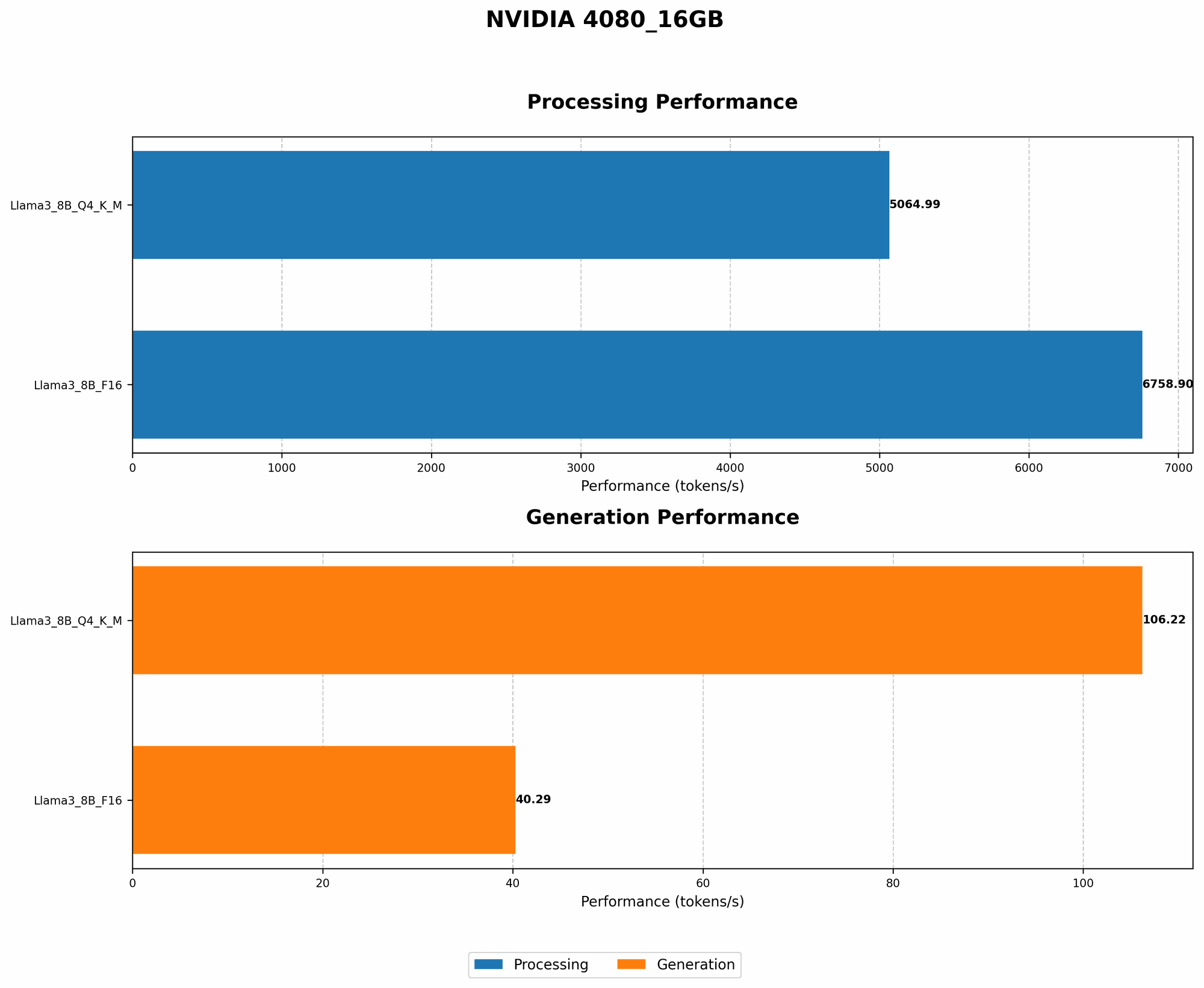
Let's see how the NVIDIA 4080_16GB GPU performs with different LLM models. We'll be focusing on the popular Llama 3 models and will be discussing their performance for both token generation and processing.
Performance Comparison: Llama 3 on NVIDIA 4080_16GB
| Model | Device | Quantization | Tokens/Second (Generation) | Tokens/Second (Processing) |
|---|---|---|---|---|
| Llama 3 8B | NVIDIA 4080_16GB | Q4KM | 106.22 | 5064.99 |
| Llama 3 8B | NVIDIA 4080_16GB | F16 | 40.29 | 6758.9 |
| Llama 3 70B | NVIDIA 4080_16GB | Q4KM | N/A | N/A |
| Llama 3 70B | NVIDIA 4080_16GB | F16 | N/A | N/A |
- Q4KM: Represents the use of 4-bit quantization,, which is a popular method for shrinking the model's size. K_M represents kernels and matrices. This significantly reduces the memory footprint, allowing you to run larger models.
- F16: This represents the use of 16-bit floating-point numbers, which is a standard for LLM calculations. While it consumes more memory compared to Q4KM, it might offer slightly better accuracy in some cases.
- N/A: Unfortunately, we don't have data for performance results of Llama 3 70B on NVIDIA 4080_16GB using our data.
Key Takeaways:
- Quantization Matters: The Llama 3 8B model with Q4KM quantization achieves significantly higher performance than the F16 version. This is because it reduces the memory requirements, allowing the GPU to process more tokens per second.
- Size Does Matter: The performance of Llama 3 8B on NVIDIA 4080_16GB is quite good. However, the model's performance is not available for Llama 3 70B. This suggests that running larger models like Llama 70B might lead to OOM errors on this GPU.
Optimizing Your Workflow: A Guide for Running LLMs
Fine-tuning and Memory Considerations
Fine-tuning an LLM involves training it on a specific task, allowing it to become more specialized. While fine-tuning can enhance performance, it can also increase memory usage.
It's important to consider memory constraints when fine-tuning LLMs on NVIDIA 4080_16GB. You might need to use smaller batch sizes and employ memory optimization techniques to prevent OOM errors.
The Power of Batching: Chunking Your Data
Batching is a technique where you divide your data into smaller chunks and feed them to the model in batches. This allows you to handle large datasets without overwhelming the GPU memory.
The size of your batches plays a crucial role in memory usage. Smaller batch sizes consume less memory but may lead to slower training. Experiment with different batch sizes to find the optimal balance for your specific use case.
Leveraging Offloading: When Memory Gets Tight
What if you're running a large model like Llama 70B? Even with quantization and careful management, it's possible to run into OOM errors. That's where offloading comes in. This technique involves storing some model data on the CPU memory and only loading the required parts onto the GPU when needed. This effectively expands your available memory and allows you to run larger models.
FAQ: Common Questions About LLMs and the NVIDIA 4080_16GB
How Much RAM Do I Need to Run a Llama 3 70B Model?
It's difficult to give a precise answer, as it depends on many factors. For the Llama 3 70B model using F16, most likely you'd require more than 16GB of RAM.
What are the Best Settings for the NVIDIA 4080_16GB to Avoid OOM Errors?
It depends on the model you're using. If you're working with a smaller model like Llama 3 8B, you can get away with F16 precision with a few memory optimizations. However, for larger models like Llama 3 70B, you might need to explore techniques like quantization and offloading.
Can I run Stable Diffusion on this GPU?
Absolutely! Stable Diffusion is a popular image generation model, and the NVIDIA 4080_16GB is a great choice for it. You'll find that it runs smoothly with ample memory to spare.
Keywords:
NVIDIA 408016GB, LLM, Llama 3, Out-of-Memory, OOM, Quantization, F16, Q4K_M, Token Generation, Token Processing, Inference, Context Length, Fine-tuning, Batching, Offloading, Stable Diffusion, GPU memory, RAM.