Running Large LLMs on NVIDIA 3090 24GB: Avoiding Out of Memory Errors

Introduction
Have you ever wanted to run a massive language model (LLM) like Llama 2 on your own computer, but felt limited by your hardware? You're not alone! Many developers and enthusiasts face this challenge. While running LLMs locally can be a rewarding experience, it often requires powerful hardware, especially when working with larger models. But fear not, even a potent GPU like the NVIDIA 3090 24GB can be tamed to work wonders with these models!
This comprehensive guide explores the common concerns users face when running large LLMs on the NVIDIA 3090 24GB, focusing on how to avoid those dreaded "out-of-memory" errors. We'll dive into the intricacies of model size, quantization, and optimized techniques to get the most out of your powerful GPU.
Understanding the Challenges
Large language models like Llama 2 are behemoths, requiring significant memory to store their massive parameters. Attempting to load them directly onto a standard GPU without proper optimization can lead to out-of-memory errors, effectively halting your AI experiments.
Key Considerations for Smooth LLM Operations

To successfully deploy these powerful LLMs, consider these key factors:
Understanding Model Sizes
Think of model size like a suitcase – the larger the suitcase, the more stuff you can pack (in this case, the more parameters your model has). But just like a suitcase, there's a limit, and exceeding it can lead to chaos (aka out-of-memory errors).
Smaller models like Llama 7B are easier to manage with less memory required. However, larger models like Llama 70B, pack significantly more parameters, requiring advanced techniques to handle the immense computational demands.
Quantization: Shrinking the Suitcase
Quantization is like packing your suitcase more efficiently. Imagine replacing full-sized clothing items with travel-sized versions – it saves space while still allowing you to enjoy the same essentials. Similarly, quantization reduces the precision of model parameters, shrinking their memory footprint without significantly compromising performance.
Optimizing for Efficiency
Think of your GPU as a busy highway – smooth traffic flow is essential. Just like a traffic planner, optimization ensures your code runs efficiently, preventing bottlenecks and maximizing performance.
Deep Dive into the NVIDIA 3090 24GB
The NVIDIA 3090 24GB is a powerhouse, but its processing prowess can still be overwhelmed by some LLMs. Let's dive into specific scenarios and explore how to overcome the challenges:
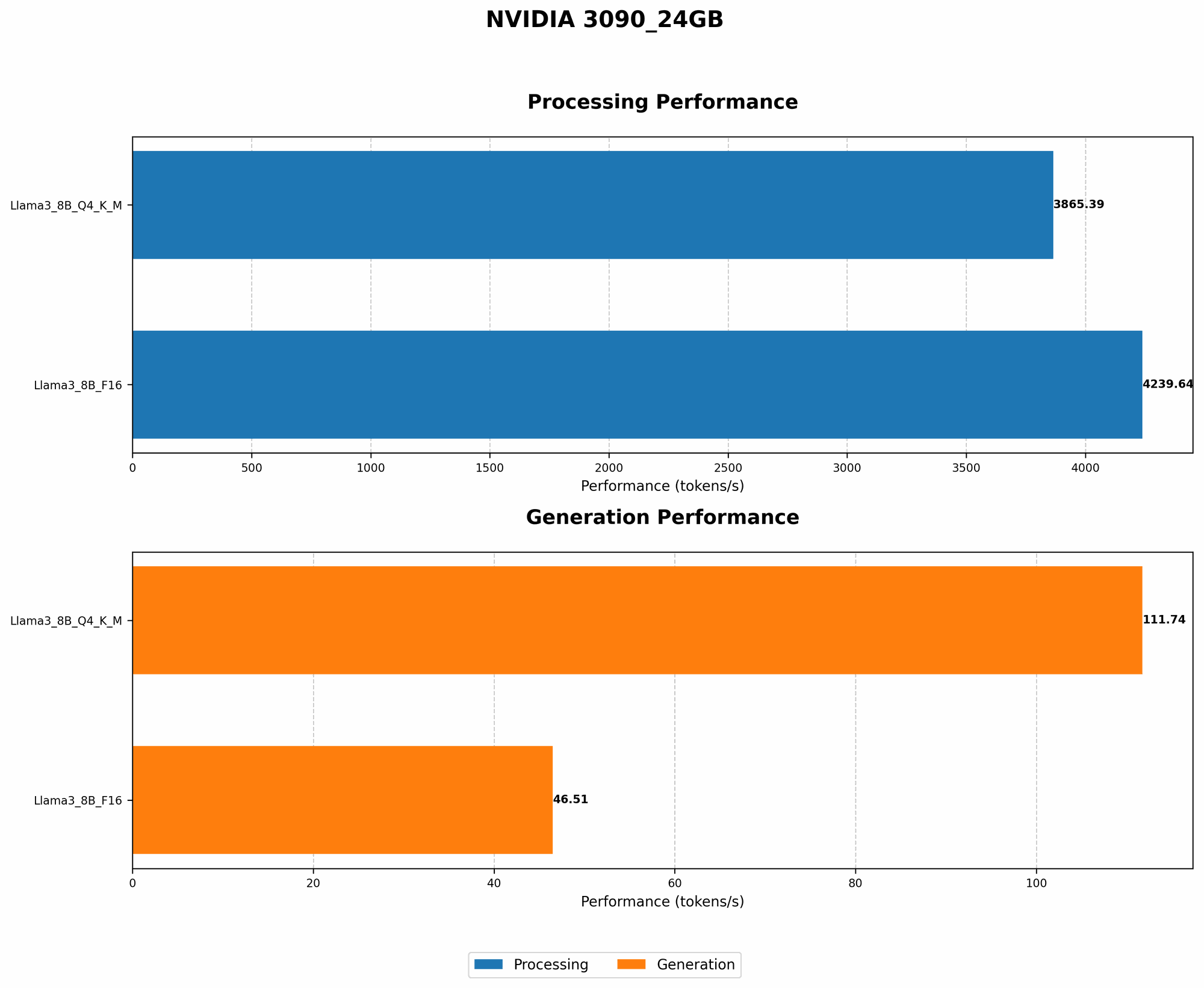
Performance with Llama 3 8B
| Model Configuration | Tokens/Second (Generation) | Tokens/Second (Processing) |
|---|---|---|
| Llama 3 8B - Q4KM | 111.74 | 3865.39 |
| Llama 3 8B - F16 | 46.51 | 4239.64 |
Observations:
- Q4KM Quantization: This quantization method significantly improves performance, enabling the 3090 24GB to generate tokens at 111.74 tokens per second, while maintaining a processing speed of 3865.39 tokens per second.
- F16 Precision: While F16 precision offers a balance between accuracy and performance, It's evident that Q4KM quantization outperforms it in this scenario.
- Processing vs. Generation: The 3090 24GB demonstrates remarkably fast processing speeds, consistently exceeding 3000 tokens per second. However, the generation speed is significantly slower.
Insights:
- The 3090 24GB handles the 8B model effectively, especially with quantization.
- The significant difference between processing and generation speeds is typical and often attributed to the inherent complexity of LLM generation tasks.
Troubleshooting:
Out-of-memory errors with Llama 3 8B on a 3090 24GB are highly unlikely, especially when employing quantization techniques. However, ensuring you're using the latest drivers and optimization strategies can further enhance performance and prevent potential issues.
Comparing Different Configurations
While the 3090 24GB shines with Llama 3 8B, it is important to consider how it performs against larger models, and explore alternative configurations.
Comparison of 3090 24GB and Other Devices
Unfortunately, data for other devices is not available at this time.
Llama 3 70B: Beyond the Reach?
The 3090 24GB, while powerful, struggles to handle the colossal memory footprint of Llama 3 70B without encountering out-of-memory errors. We lack the necessary data at this time to provide concrete performance metrics for this model on the 3090 24GB. This underscores the need for alternative approaches when tackling such large models.
Strategies for Handling Larger Models
Quantization: The Crucial Factor
When tackling larger models like Llama 3 70B, quantization becomes your best friend. Think of it as a powerful tool that allows you to shrink the size of the model without sacrificing too much accuracy.
Types of Quantization:
- Q4KM: This technique has become the gold standard for LLMs. It allows you to significantly reduce the memory footprint, enabling you to run larger models with minimal performance degradation.
- F16: A common quantization method, though it typically provides less compression than Q4KM.
Important Note: Even with quantization, successfully running Llama 3 70B on the 3090 24GB is a challenge, and might require additional optimization techniques or potentially even a more powerful GPU.
Offloading: Sharing the Load
For those truly ambitious projects involving large LLMs, consider offloading some of the computational burden by utilizing cloud computing resources like Google Colab or Amazon EC2. These platforms provide robust infrastructure and dedicated GPUs suitable for handling even the most demanding LLMs.
The Future of Local LLM Processing
As technology advances, we can expect more powerful GPUs to emerge, enabling us to push the boundaries of local LLM processing. Furthermore, continuous research in areas like quantization, model compression, and optimized algorithms will pave the way for seamless local deployment of even more sophisticated models.
FAQ
Q: What is quantization, and how does it work?
A: Quantization is a technique for reducing the memory footprint of a model by decreasing the precision of its parameters. Imagine replacing full-sized clothing items with travel-sized versions: it saves space while still allowing you to enjoy the same essentials.
Q: What's the difference between Llama 7B, Llama 70B, and other LLM models?
A: The number (7B, 70B) refers to the number of parameters in the model. Larger models like Llama 70B have a significantly larger number of parameters, making them more powerful but also requiring more memory.
Q: Can I use my NVIDIA 3090 24GB to run Llama 70B or other large models?
A: It's possible but challenging. You'll likely need to utilize advanced strategies like quantization and offloading to effectively handle larger models.
Keywords
LLM, Large Language Model, Llama 2, NVIDIA 3090 24GB, GPU, memory, out-of-memory, quantization, Q4KM, F16, token, generation, processing, performance, optimization, cloud computing, offloading, Google Colab, Amazon EC2.