Running Large LLMs on NVIDIA 3070 8GB: Avoiding Out of Memory Errors
Introduction
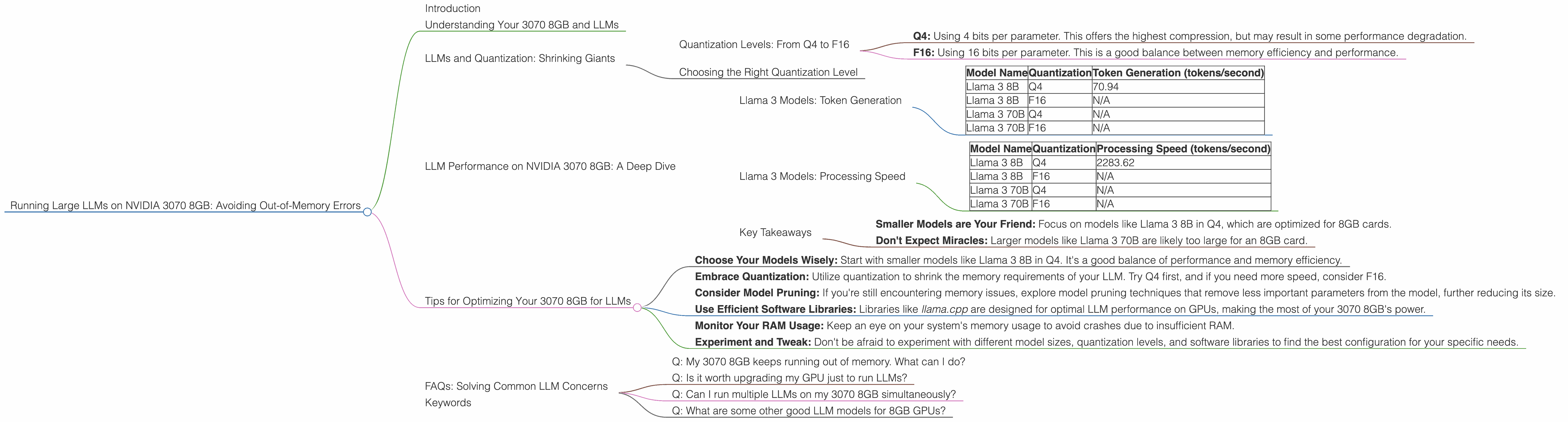
Let's face it, you've got a shiny NVIDIA 3070 8GB graphics card and you're ready to unleash the power of large language models (LLMs). But you've heard whispers about the "out-of-memory" demons that haunt LLM enthusiasts. Fear not, fellow AI adventurer! This guide will equip you with the knowledge to tame those memory monsters and run your LLM dreams smoothly on your 3070 8GB.
Imagine this: You're like a chef trying to cook a grand feast (your LLM) with limited kitchen space (your 8GB RAM). To avoid a kitchen disaster, you need to learn techniques to maximize space and optimize your ingredients (LLM parameters).
This guide will cover the essential techniques for running LLMs on your 3070 8GB, focusing on avoiding dreaded "out-of-memory" errors. We'll discuss key concepts like quantization, model size, and processing speed, diving deep into the specific performance of various LLM models on your beloved 3070 8GB.
Understanding Your 3070 8GB and LLMs
Let's start by understanding the relationship between your GPU and LLMs. Your NVIDIA 3070 8GB is a powerful graphics processing unit that excels at parallel computations – perfect for the heavy lifting involved in running LLMs.
However, the "8GB" in its name refers to its video memory (VRAM), the dedicated RAM for your graphics card. LLMs, especially the larger ones, can be memory hogs!
Here’s an analogy. Think of your 3070 8GB as a high-performance sports car. It's fast and powerful, but it has limited cargo space. You can't fit a full-size truckload of luggage (a massive LLM) in it.
LLMs and Quantization: Shrinking Giants
One way to fit a bulky LLM into your 3070 8GB's memory is to use a technique called quantization.
Imagine you’re trying to pack a suitcase for a trip. Instead of bringing the entire set of bulky full-size toiletries (your LLM), you use travel-size versions (quantized LLM).
Quantization essentially compresses the LLM by reducing the precision of its parameters. This means using fewer bits to represent a parameter, reducing the memory footprint with minimal impact on performance.
Quantization Levels: From Q4 to F16
There are various levels of quantization, and we'll focus on two key types:
- Q4: Using 4 bits per parameter. This offers the highest compression, but may result in some performance degradation.
- F16: Using 16 bits per parameter. This is a good balance between memory efficiency and performance.
Choosing the Right Quantization Level
The best quantization level depends on the specific LLM and your priorities. If you're running a large model and memory is a concern, Q4 might be the way to go. If you prioritize speed and don't mind a slightly larger memory footprint, F16 could be the better option.
LLM Performance on NVIDIA 3070 8GB: A Deep Dive
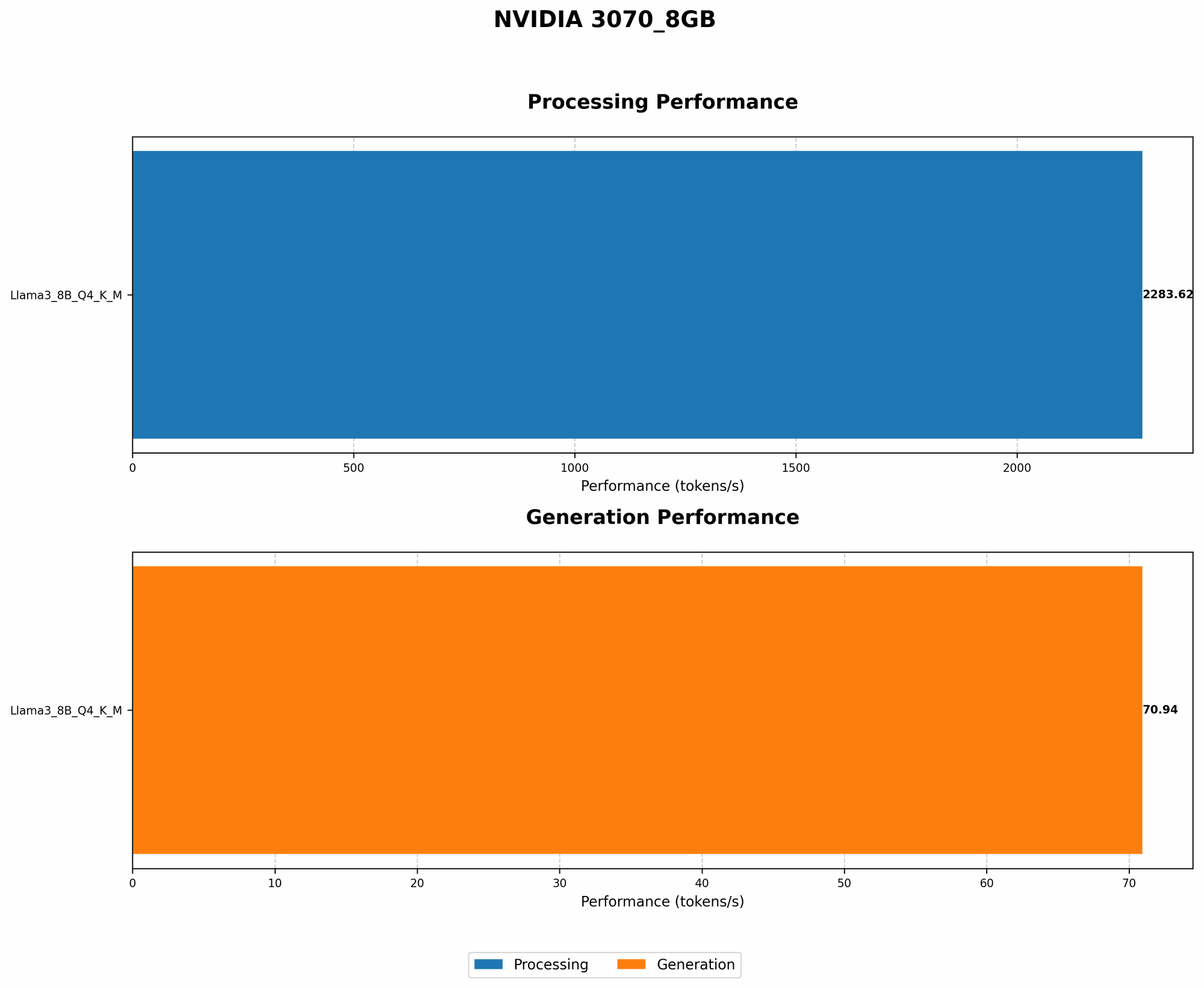
Now, let's examine how different LLMs perform on your 3070 8GB. We'll focus on the popular Llama model family, as it's known for its accessibility and performance.
Llama 3 Models: Token Generation
The table below shows the token generation speeds for Llama 3 models on the 3070 8GB.
| Model Name | Quantization | Token Generation (tokens/second) |
|---|---|---|
| Llama 3 8B | Q4 | 70.94 |
| Llama 3 8B | F16 | N/A |
| Llama 3 70B | Q4 | N/A |
| Llama 3 70B | F16 | N/A |
Key Observations:
- Llama 3 8B Q4: Generates tokens at a decent speed.
- Llama 3 8B F16: Data unavailable. It's highly probable that this model's F16 version won't fit on an 8GB card.
- Llama 3 70B Q4 and F16: Data unavailable. These models are too large for an 8GB card.
- General Pattern: Smaller models like Llama 3 8B in Q4 are more manageable on 8GB cards.
Llama 3 Models: Processing Speed
Let's examine the processing speed of these models for a better understanding of their overall performance.
| Model Name | Quantization | Processing Speed (tokens/second) |
|---|---|---|
| Llama 3 8B | Q4 | 2283.62 |
| Llama 3 8B | F16 | N/A |
| Llama 3 70B | Q4 | N/A |
| Llama 3 70B | F16 | N/A |
Key Observations:
- Llama 3 8B Q4: Shows a significantly higher processing speed than its token generation speed.
- Llama 3 8B F16: Again, data unavailable.
- Llama 3 70B Q4 and F16: Data unavailable.
Key Takeaways
- Smaller Models are Your Friend: Focus on models like Llama 3 8B in Q4, which are optimized for 8GB cards.
- Don't Expect Miracles: Larger models like Llama 3 70B are likely too large for an 8GB card.
Tips for Optimizing Your 3070 8GB for LLMs
Now that you understand the basics, let's dive into some practical optimization tips:
Choose Your Models Wisely: Start with smaller models like Llama 3 8B in Q4. It's a good balance of performance and memory efficiency.
Embrace Quantization: Utilize quantization to shrink the memory requirements of your LLM. Try Q4 first, and if you need more speed, consider F16.
Consider Model Pruning: If you're still encountering memory issues, explore model pruning techniques that remove less important parameters from the model, further reducing its size.
Use Efficient Software Libraries: Libraries like llama.cpp are designed for optimal LLM performance on GPUs, making the most of your 3070 8GB's power.
Monitor Your RAM Usage: Keep an eye on your system's memory usage to avoid crashes due to insufficient RAM.
Experiment and Tweak: Don't be afraid to experiment with different model sizes, quantization levels, and software libraries to find the best configuration for your specific needs.
FAQs: Solving Common LLM Concerns
Q: My 3070 8GB keeps running out of memory. What can I do?
A: First, try quantizing your LLM to Q4. If that doesn't work, consider using a smaller model. LLMs like Llama 3 8B Q4 are often good choices for 8GB GPUs.
Q: Is it worth upgrading my GPU just to run LLMs?
A: It depends on your specific needs. If you're running larger models or require very high speeds, a card with more VRAM (e.g., 12GB or more) might be beneficial. However, for smaller models and reasonable performance, your 3070 8GB can be a good starting point.
Q: Can I run multiple LLMs on my 3070 8GB simultaneously?
A: It's possible, but it's important to consider the memory requirements of each LLM and make sure you're not exceeding your GPU's capacity. This will likely require smaller models or careful resource management.
Q: What are some other good LLM models for 8GB GPUs?
A: Besides Llama 3 8B, models like GPT-Neo 2.7B and GPT-J 6B can also run on 8GB GPUs. Always check the memory requirements of each model before attempting to run it on your hardware.
Keywords
LLM, Large language model, NVIDIA 3070 8GB, Out-of-memory, GPU, VRAM, Quantization, Q4, F16, Token generation performance, Processing speed, Llama 3, Memory efficiency, Llama.cpp, GPU Benchmarks, Model size, Model pruning, RAM, LLM inference.