ROI Analysis: Justifying the Investment in NVIDIA RTX 6000 Ada 48GB for AI Workloads
Introduction
The world of artificial intelligence (AI) is rapidly evolving, with large language models (LLMs) like Llama 3 becoming increasingly popular. These LLMs can perform a wide range of tasks, from generating text and translating languages to writing code and answering questions. However, running these models locally requires significant computing power, especially for larger models like Llama 3 70B. This is where high-performance GPUs like the NVIDIA RTX 6000 Ada 48GB come into play.
This article will analyze the return on investment (ROI) of using the NVIDIA RTX 6000 Ada 48GB for running AI workloads, specifically for Llama 3 models of different sizes. We will dive deep into the performance of this GPU, looking at its token generation and processing speeds and how it stacks up against other available options. We'll also discuss the pros and cons of using this GPU for running these AI workloads, helping you decide if it's the right fit for your needs.
Understanding the Powerhouse: NVIDIA RTX 6000 Ada 48GB
The NVIDIA RTX 6000 Ada 48GB is a powerful GPU designed for professional workflows, including AI and machine learning. It boasts 48GB of GDDR6 memory, allowing it to handle large datasets and models, and boasts impressive processing power thanks to its Ada Lovelace architecture.
This GPU is capable of achieving high performance in AI workloads, particularly for LLMs like Llama 3. However, the real question is: Is the investment in this high-end GPU truly justified for your AI needs?
Performance Benchmarks for Llama 3 Models
To answer the ROI question, let's dive into the actual performance of the RTX 6000 Ada 48GB running Llama 3.
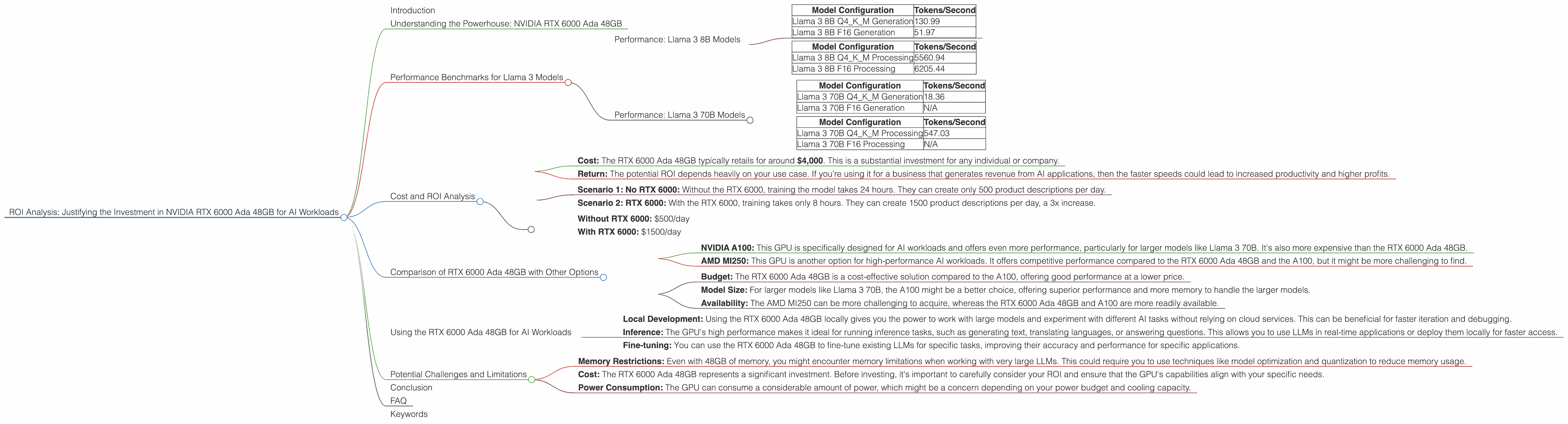
Performance: Llama 3 8B Models
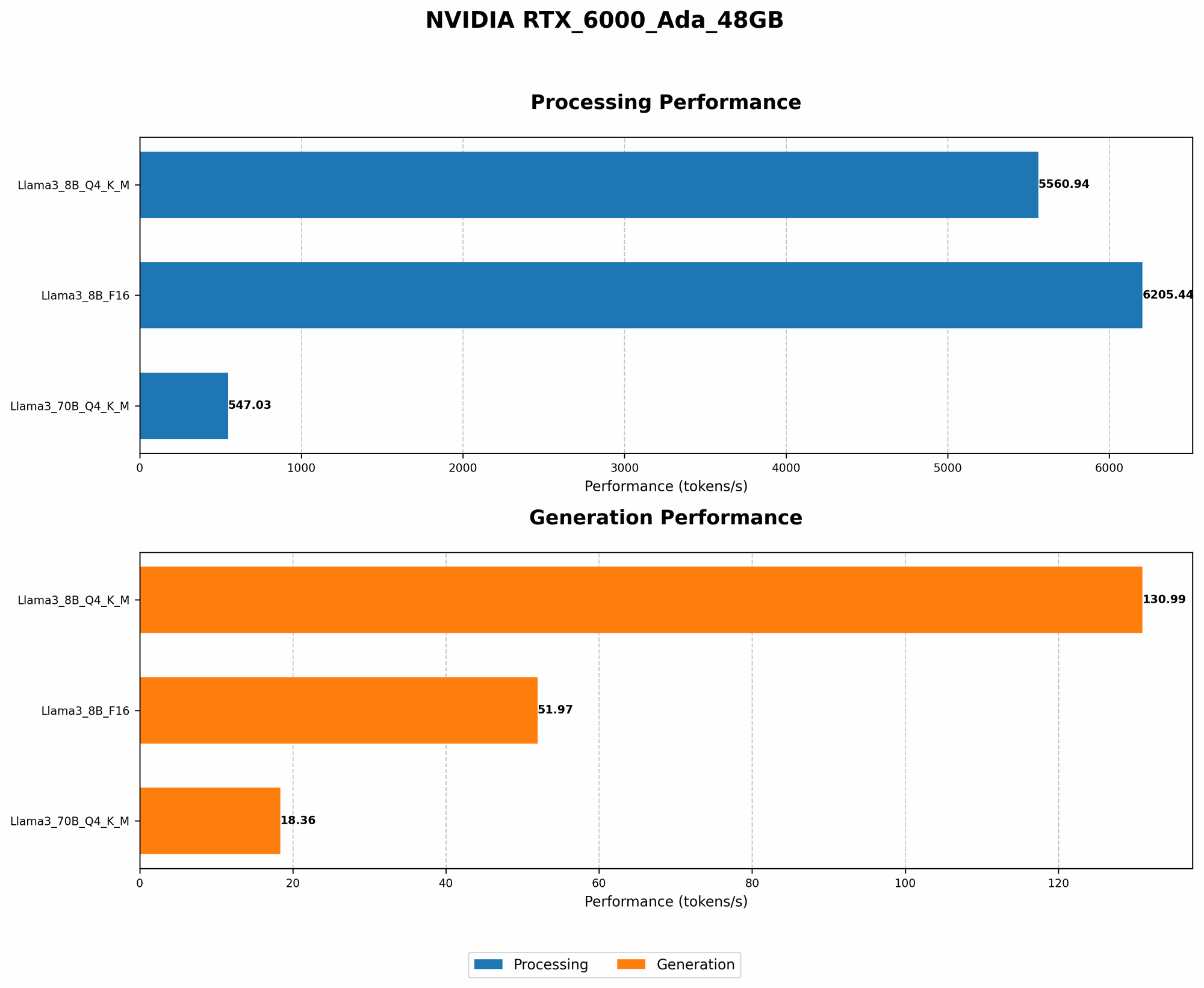
The RTX 6000 Ada 48GB performs notably well with the Llama 3 8B model. We'll look at two different types of performance, token generation and processing speed.
Token Generation Performance:
| Model Configuration | Tokens/Second |
|---|---|
| Llama 3 8B Q4KM Generation | 130.99 |
| Llama 3 8B F16 Generation | 51.97 |
Processing Speed:
| Model Configuration | Tokens/Second |
|---|---|
| Llama 3 8B Q4KM Processing | 5560.94 |
| Llama 3 8B F16 Processing | 6205.44 |
What does this mean?
- Quantisation (Q4KM) vs. Half Precision (F16): You'll notice two different configurations: Q4KM and F16. This relates to how the model is quantized. Think of it like compressing something for faster loading. Q4KM uses less memory but sometimes sacrifices a bit of accuracy. The F16 configuration uses more memory but generally results in more accurate responses.
- Token Generation: This number tells you how many individual "tokens" (words or sub-words) the GPU can process per second. Higher is better. This means your LLM can generate text more quickly.
- Processing Speed: This is the speed at which the GPU can handle the entire language model pipeline, not just the generation of text. This is useful for tasks like question answering and code completion.
Comparing the Q4KM and F16 configurations:
- Token Generation: The RTX 6000 Ada 48GB shows a significant benefit from the Q4KM configuration, generating tokens at over twice the speed compared to the F16 configuration.
- Processing Speed: Notably, the F16 configuration performs better than the Q4KM configuration in terms of overall processing.
Overall Performance: The RTX 6000 Ada 48GB is well-suited for running Llama 3 8B models, achieving impressive speeds for both token generation and processing, particularly with the Q4KM configuration.
Performance: Llama 3 70B Models
The RTX 6000 Ada 48GB can handle the larger Llama 3 70B model, but the performance numbers are less impressive than the 8B model.
Token Generation Performance:
| Model Configuration | Tokens/Second |
|---|---|
| Llama 3 70B Q4KM Generation | 18.36 |
| Llama 3 70B F16 Generation | N/A |
Processing Speed:
| Model Configuration | Tokens/Second |
|---|---|
| Llama 3 70B Q4KM Processing | 547.03 |
| Llama 3 70B F16 Processing | N/A |
Important Note: There is no data available for the F16 configuration for Llama 3 70B. This highlights the memory limitations that larger models face on even powerful GPUs like the RTX 6000 Ada 48GB.
Key Takeaways:
- Performance Degradation: You can see a significant drop in both token generation and processing speeds when running the 70B model compared to the 8B model. This is expected due to the larger model size and increased processing requirements.
- Memory Constraints: The lack of data for the F16 configuration highlights the memory limitations of the RTX 6000 Ada 48GB when running large LLMs. The GPU's memory capacity might not be sufficient to store the entire model in its entirety.
- Trade-offs: While the RTX 6000 Ada 48GB can handle the Llama 3 70B model, you face a noticeable performance decrease. This trade-off between model size and performance is a common challenge in AI workloads, and you might need to explore other solutions like model optimization or distributed training to improve performance further.
Cost and ROI Analysis
While the RTX 6000 Ada 48GB is a powerful GPU, it comes with a significant price tag. So, is it worth the investment?
- Cost: The RTX 6000 Ada 48GB typically retails for around $4,000. This is a substantial investment for any individual or company.
- Return: The potential ROI depends heavily on your use case. If you're using it for a business that generates revenue from AI applications, then the faster speeds could lead to increased productivity and higher profits.
Here's a simplified example to illustrate the potential ROI:
Imagine a developer uses the RTX 6000 Ada 48GB to train an AI model that generates product descriptions for an e-commerce store.
- Scenario 1: No RTX 6000: Without the RTX 6000, training the model takes 24 hours. They can create only 500 product descriptions per day.
- Scenario 2: RTX 6000: With the RTX 6000, training takes only 8 hours. They can create 1500 product descriptions per day, a 3x increase.
The ROI: Let's say each product description generates an extra $1 in revenue.
- Without RTX 6000: $500/day
- With RTX 6000: $1500/day
Net Gain: $1000/day.
This is just a simplified example. The real ROI will vary depending on your specific use case. But it highlights the potential value the RTX 6000 Ada 48GB can unlock.
Comparison of RTX 6000 Ada 48GB with Other Options
While the RTX 6000 Ada 48GB is a great option, it might not be the best fit for everyone. Let's compare it with other powerful GPUs suitable for AI workloads:
- NVIDIA A100: This GPU is specifically designed for AI workloads and offers even more performance, particularly for larger models like Llama 3 70B. It's also more expensive than the RTX 6000 Ada 48GB.
- AMD MI250: This GPU is another option for high-performance AI workloads. It offers competitive performance compared to the RTX 6000 Ada 48GB and the A100, but it might be more challenging to find.
Choosing the right option:
- Budget: The RTX 6000 Ada 48GB is a cost-effective solution compared to the A100, offering good performance at a lower price.
- Model Size: For larger models like Llama 3 70B, the A100 might be a better choice, offering superior performance and more memory to handle the larger models.
- Availability: The AMD MI250 can be more challenging to acquire, whereas the RTX 6000 Ada 48GB and A100 are more readily available.
Ultimately, the best GPU for your needs depends on your budget, the model size you're working with, and your specific use case.
Using the RTX 6000 Ada 48GB for AI Workloads
The RTX 6000 Ada 48GB is a powerful tool for running AI workloads. Here are some practical ways to use it:
- Local Development: Using the RTX 6000 Ada 48GB locally gives you the power to work with large models and experiment with different AI tasks without relying on cloud services. This can be beneficial for faster iteration and debugging.
- Inference: The GPU's high performance makes it ideal for running inference tasks, such as generating text, translating languages, or answering questions. This allows you to use LLMs in real-time applications or deploy them locally for faster access.
- Fine-tuning: You can use the RTX 6000 Ada 48GB to fine-tune existing LLMs for specific tasks, improving their accuracy and performance for specific applications.
Potential Challenges and Limitations
While the RTX 6000 Ada 48GB is a fantastic GPU, it's not without its limitations and potential challenges:
- Memory Restrictions: Even with 48GB of memory, you might encounter memory limitations when working with very large LLMs. This could require you to use techniques like model optimization and quantization to reduce memory usage.
- Cost: The RTX 6000 Ada 48GB represents a significant investment. Before investing, it's important to carefully consider your ROI and ensure that the GPU's capabilities align with your specific needs.
- Power Consumption: The GPU can consume a considerable amount of power, which might be a concern depending on your power budget and cooling capacity.
Conclusion
The NVIDIA RTX 6000 Ada 48GB is a powerful GPU that offers impressive performance for running AI workloads, particularly for Llama 3 models. Its ability to work with both the 8B and 70B models, albeit with varying levels of performance, makes it a versatile tool for AI developers. However, it's important to consider the cost and potential limitations before investing. Carefully assessing your specific needs and comparing it to other available options will help you determine if the RTX 6000 Ada 48GB is the right choice for your AI endeavors.
FAQ
Q: What are large language models (LLMs)?
A: LLMs are a type of AI model trained on massive text datasets. They can understand and generate human-like text, perform various language-based tasks, and even translate languages.
Q: What is quantization?
A: Quantization is a technique used to reduce the memory footprint of AI models by representing their weights and activations with lower precision. This allows for faster inference and deployment on devices with limited memory.
Q: What is token generation?
A: Token generation is the process of converting text into individual tokens, which are the building blocks for LLMs. These tokens can be words, sub-words, or other units of text, depending on the model.
Q: What are the differences between F16 and Q4KM configurations?
A: F16 uses half precision, while Q4KM is a form of quantization. F16 generally results in more precise responses, but Q4KM uses less memory and can be faster.
Q: Is the NVIDIA RTX 6000 Ada 48GB the only option for running LLMs?
A: No. There are other powerful GPUs like the A100 and AMD MI250 that can be used for AI workloads. The best option depends on your budget, model size, and specific needs.
Keywords
Large Language Models, LLM, Llama 3, NVIDIA RTX 6000 Ada 48GB, GPU, AI, Token Generation, Processing Speed, Quantisation, F16, Performance, ROI, Cost, Comparison, Token, AI Workloads, Inference, Fine-tuning, Memory, Power Consumption