ROI Analysis: Justifying the Investment in NVIDIA 4080 16GB for AI Workloads
Introduction
The world of Artificial Intelligence (AI) is booming, and one of the hottest areas is Large Language Models (LLMs). These models are capable of generating human-like text, translating languages, writing different kinds of creative content, and answering your questions in an informative way. Running these models locally on your own computer can be a game-changer, offering faster response times, greater privacy, and the freedom to experiment without relying on cloud services. But, as with any powerful technology, it comes with a price tag.
The NVIDIA 408016GB graphics card is a popular choice for AI workloads, but is it worth the investment? In this article, we’ll analyze the performance of the NVIDIA 408016GB for various AI workloads, specifically LLMs, and help you decide if it's the right choice for your needs.
NVIDIA 4080_16GB Performance for Llama 3 LLMs
The NVIDIA 4080_16GB is a powerful GPU, and it shows its muscle when running LLMs like Llama 3 - the latest version of Meta's open-source LLM. We'll focus on two different versions of Llama 3: the 8B (8 billion parameters) and the 70B (70 billion parameters) models.
Llama 3 8B Performance on NVIDIA 4080_16GB
The 8B model is a great starting point for experimenting with LLMs. It's smaller and faster to run than the 70B model, making it ideal for testing and exploring basic functionalities.
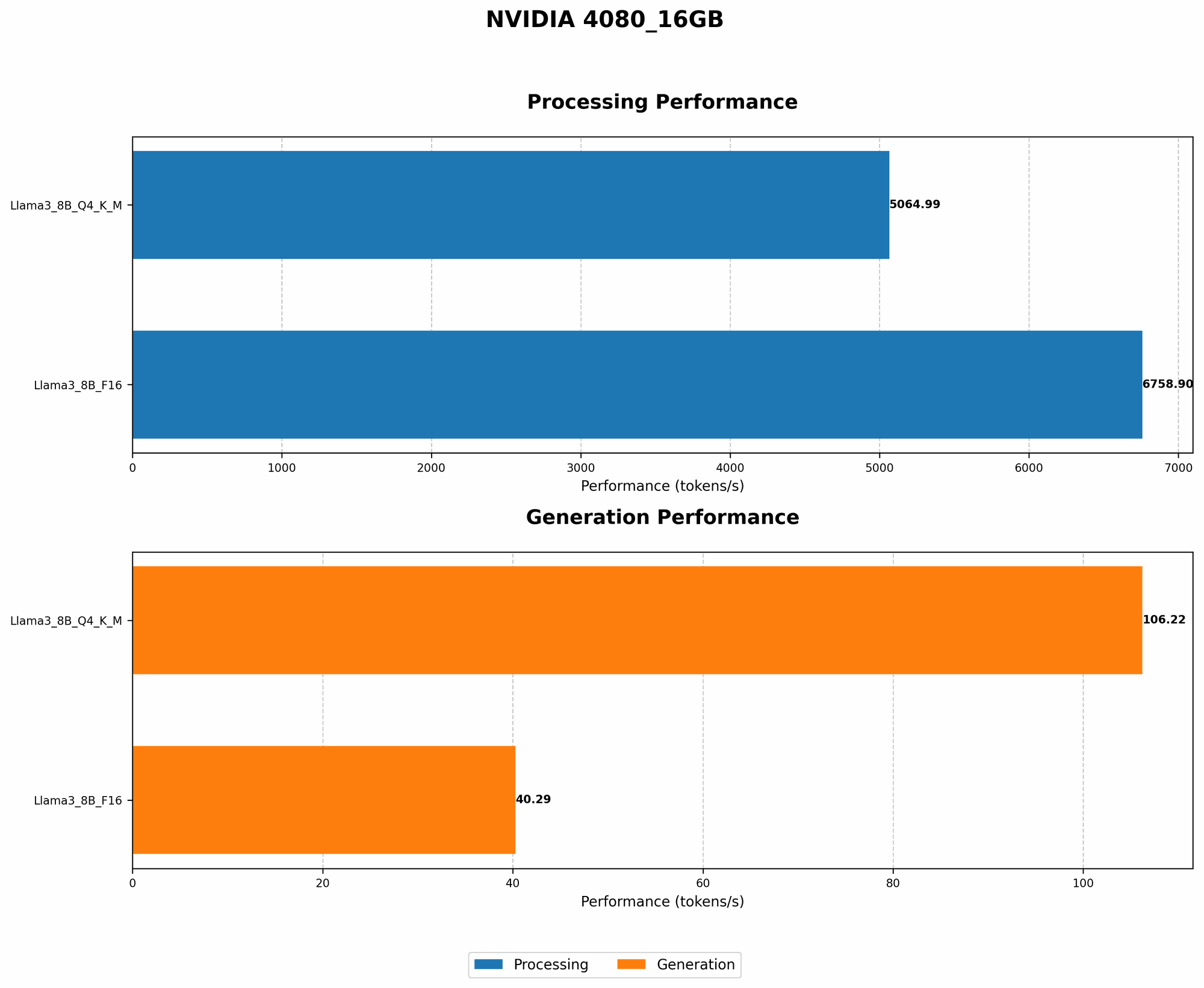
Let's look at the token generation and processing speeds:
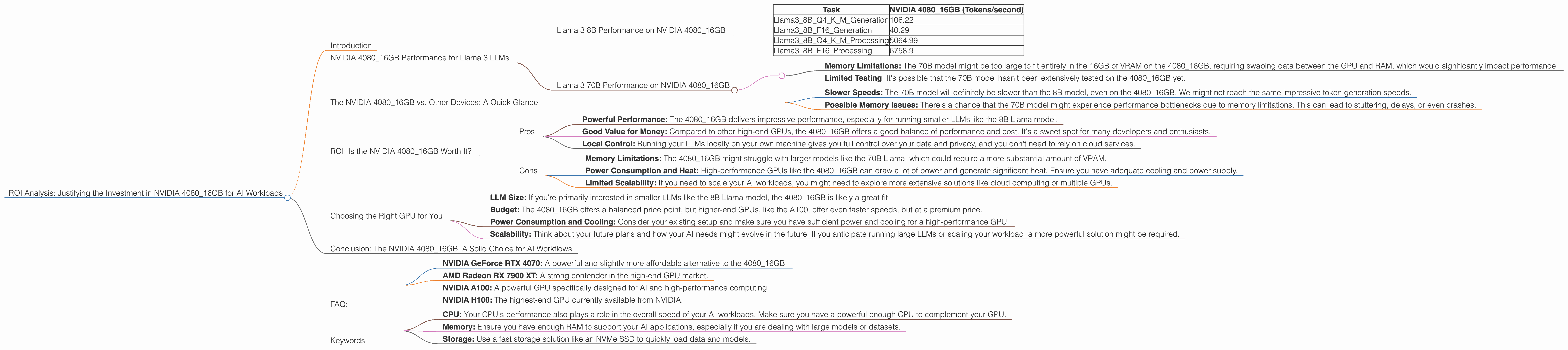
| Task | NVIDIA 4080_16GB (Tokens/second) |
|---|---|
| Llama38BQ4KM_Generation | 106.22 |
| Llama38BF16_Generation | 40.29 |
| Llama38BQ4KM_Processing | 5064.99 |
| Llama38BF16_Processing | 6758.9 |
Here's a breakdown of the terms and what they mean:
- Q4KM_Generation: This represents the token generation speed using quantization. Quantization is like compressing the model to make it smaller and faster to run. In this case, we use Q4, a highly compressed format that reduces the model size significantly.
- F16_Generation: This represents the token generation speed using FP16 (half-precision) floating point numbers. It's a more common format used for training and inference.
- Processing: This refers to the speed at which the model processes the input tokens. It's a crucial metric for evaluating model performance.
What do these numbers tell us?
- Quantization is King: The 408016GB shows significantly faster token generation speeds when using Q4K_M over F16. This highlights the importance of utilizing quantization techniques for boosting performance.
- Speed Demon: The 4080_16GB can process tokens at remarkable speeds, reaching up to 6758.9 tokens per second!
- 8B is a Breeze: The 8B model is a breeze to run on this GPU. You can expect smooth and responsive text generation and processing.
Llama 3 70B Performance on NVIDIA 4080_16GB
The 70B model is the heavyweight champion of Llama 3, offering significantly more complex and nuanced capabilities. However, it also demands more computing power.
Unfortunately, we don't have data on the performance of the 70B model on the 4080_16GB. This could be due to a few factors:
- Memory Limitations: The 70B model might be too large to fit entirely in the 16GB of VRAM on the 4080_16GB, requiring swaping data between the GPU and RAM, which would significantly impact performance.
- Limited Testing: It's possible that the 70B model hasn't been extensively tested on the 4080_16GB yet.
For now, we can only speculate on the performance of the 70B model. Based on other benchmarks and general trends, we can expect the following:
- Slower Speeds: The 70B model will definitely be slower than the 8B model, even on the 4080_16GB. We might not reach the same impressive token generation speeds.
- Possible Memory Issues: There's a chance that the 70B model might experience performance bottlenecks due to memory limitations. This can lead to stuttering, delays, or even crashes.
The NVIDIA 4080_16GB vs. Other Devices: A Quick Glance
While this article focuses on the 4080_16GB, it's useful to compare it to other popular options for running LLMs.
Comparing the NVIDIA 4080_16GB to CPUs:
CPUs are generally less suited for running LLMs compared to GPUs. They offer much lower token speeds and struggle to keep up with the demands of these models. Imagine a marathon runner trying to compete with a Formula 1 race car!
Comparing the NVIDIA 4080_16GB to Other GPUs:
The 4080_16GB sits comfortably in the mid-range to high-end GPU category, which is a great sweet spot for AI workloads. It offers a good balance of performance and cost. For example, higher-end GPUs like the A100 or H100 might offer even faster speeds, but with a significantly higher price tag.
ROI: Is the NVIDIA 4080_16GB Worth It?
Now that we've looked at the performance numbers, the million-dollar question is: Is the NVIDIA 4080_16GB a worthwhile investment for AI workloads? The answer is nuanced and depends on your specific needs and budget.
Here's a breakdown of the pros and cons:
Pros
- Powerful Performance: The 4080_16GB delivers impressive performance, especially for running smaller LLMs like the 8B Llama model.
- Good Value for Money: Compared to other high-end GPUs, the 4080_16GB offers a good balance of performance and cost. It's a sweet spot for many developers and enthusiasts.
- Local Control: Running your LLMs locally on your own machine gives you full control over your data and privacy, and you don't need to rely on cloud services.
Cons
- Memory Limitations: The 4080_16GB might struggle with larger models like the 70B Llama, which could require a more substantial amount of VRAM.
- Power Consumption and Heat: High-performance GPUs like the 4080_16GB can draw a lot of power and generate significant heat. Ensure you have adequate cooling and power supply.
- Limited Scalability: If you need to scale your AI workloads, you might need to explore more extensive solutions like cloud computing or multiple GPUs.
Choosing the Right GPU for You
Deciding on a GPU for AI workloads is a personal decision. Consider the following factors:
- LLM Size: If you're primarily interested in smaller LLMs like the 8B Llama model, the 4080_16GB is likely a great fit.
- Budget: The 4080_16GB offers a balanced price point, but higher-end GPUs, like the A100, offer even faster speeds, but at a premium price.
- Power Consumption and Cooling: Consider your existing setup and make sure you have sufficient power and cooling for a high-performance GPU.
- Scalability: Think about your future plans and how your AI needs might evolve in the future. If you anticipate running large LLMs or scaling your workload, a more powerful solution might be required.
Conclusion: The NVIDIA 4080_16GB: A Solid Choice for AI Workflows
The NVIDIA 4080_16GB is a strong contender for AI workloads, particularly for running smaller LLMs or exploring the capabilities of these models. It offers a good blend of performance and value, making it a worthwhile investment for many developers and enthusiasts. However, it's important to consider your LLM size, budget, and future needs to ensure you choose the right GPU for your specific requirements.
FAQ:
Q: What is quantization? A: Quantization is a technique used to compress LLMs and reduce their size without sacrificing too much accuracy. It's like converting a complex photo into a simpler version with fewer pixels. This compression makes the models faster to run because they take up less memory.
Q: Is the NVIDIA 408016GB good for other AI tasks besides LLMs? A: Absolutely! The 408016GB is well-suited for a wide range of AI tasks, including machine learning, deep learning, computer vision, and image processing.
Q: Should I use the 408016GB for gaming? A: You certainly can! The 408016GB delivers excellent gaming performance. While it might be overkill for most games, it will provide you with stunning visuals and smooth frame rates for the most demanding titles.
Q: What alternatives to the 4080_16GB are available? A: There are several GPUs available, ranging from budget-friendly options to high-end cards. Some popular alternatives include:
- NVIDIA GeForce RTX 4070: A powerful and slightly more affordable alternative to the 4080_16GB.
- AMD Radeon RX 7900 XT: A strong contender in the high-end GPU market.
- NVIDIA A100: A powerful GPU specifically designed for AI and high-performance computing.
- NVIDIA H100: The highest-end GPU currently available from NVIDIA.
Q: What other factors should I consider besides the GPU? A: Other factors that will influence your performance include:
- CPU: Your CPU's performance also plays a role in the overall speed of your AI workloads. Make sure you have a powerful enough CPU to complement your GPU.
- Memory: Ensure you have enough RAM to support your AI applications, especially if you are dealing with large models or datasets.
- Storage: Use a fast storage solution like an NVMe SSD to quickly load data and models.
Keywords:
NVIDIA 408016GB, GPU, AI, LLM, Large Language Model, Llama 3, Llama 8B, Llama 70B, Token Generation, Token Processing, Quantization, Q4K_M, F16, Performance, ROI, Cost, Budget, Power Consumption, Cooling, Gaming, Alternatives, CPU, Memory, Storage, Data Center, Cloud Computing, Local Control.