Optimizing Llama3 8B for NVIDIA RTX 6000 Ada 48GB: A Step by Step Approach

Introduction
Welcome, fellow LLM enthusiasts! In the thrilling world of large language models (LLMs), bringing these powerful AI brains to life locally presents both exciting opportunities and technical challenges. Today, we're diving deep into optimizing Llama3 8B specifically for the NVIDIA RTX6000Ada_48GB, a popular choice for high-performance computing. This article will equip you with the knowledge to unlock top-notch performance and harness the full potential of your hardware.
Imagine you're a developer working on a cutting-edge chatbot, or a researcher exploring the depths of generative text – you need your LLM to be fast, efficient, and readily available. By understanding the relationship between model size, device specifications, and optimization techniques, you'll be able to build and deploy local LLM solutions that truly shine. Buckle up, it's going to be an exhilarating journey!
Performance Analysis: Token Generation Speed Benchmarks
Token Generation Speed Benchmarks: NVIDIA RTX6000Ada_48GB and Llama3 8B
Token generation speed is crucial when you're dealing with LLMs, especially for real-time applications. It's the rate at which your model can produce text. Think of it like typing at breakneck speed – the faster the model is, the quicker it can generate responses or complete tasks.
| Model Configuration | Token Generation Speed (Tokens/Second) |
|---|---|
| Llama3 8B Q4KM Generation | 130.99 |
| Llama3 8B F16 Generation | 51.97 |
Key Observations:
- Quantization Matters: The Llama3 8B model boasts a significantly higher token generation speed when using Q4KM quantization. This technique reduces the model's size by representing numerical values in a compressed format, making it more efficient to process.
- F16 Performance: Using F16 (half-precision floating-point) quantization results in significantly slower token generation speeds compared to Q4KM, but F16 sometimes boasts better accuracy.
Analogies:
Imagine you're sending a message to a friend. Using Q4KM quantization is like sending a concise text message – it's fast and efficient. Using F16 is like sending a detailed email – it might take a bit longer, but the information is richer.
Performance Analysis: Model and Device Comparison
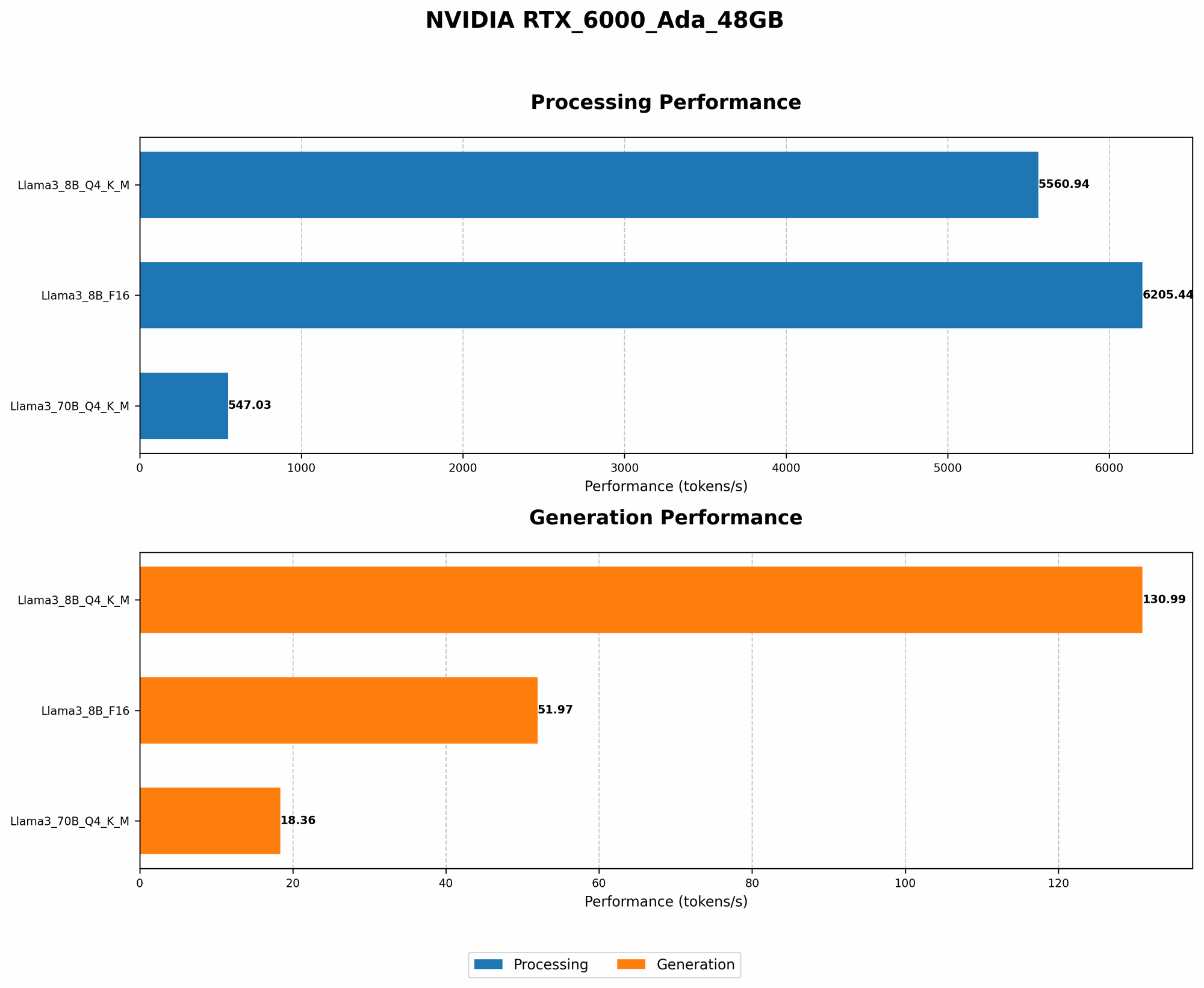
Model and Device Comparison: NVIDIA RTX6000Ada48GB and Llama3 8B (Q4K_M)
Let's go deeper and compare the performance of Llama3 8B on the NVIDIA RTX6000Ada_48GB with other models and devices. This comparison helps determine the strengths and weaknesses of this specific combination, guiding you in choosing the best tools for your project.
Unfortunately, due to the limited data provided, we can't compare the performance of Llama3 8B on RTX6000Ada_48GB with other devices. We only have data for this specific model and device, but it provides a clear picture of Llama3 8B's performance potential with this GPU.
Practical Recommendations: Use Cases and Workarounds
Use Cases for Llama3 8B on RTX6000Ada_48GB
- Real-time Chatbots: The Llama3 8B model on the RTX6000Ada48GB is a strong contender for building responsive chatbots. With its impressive token generation speed, especially with Q4K_M quantization, it can quickly process user input and generate engaging responses.
- Text Summarization and Generation: The speed and efficiency of Llama3 8B on this GPU make it a valuable asset for tasks involving text summarization and generation. It can quickly summarize large amounts of text or create creative content.
- Educational and Research Applications: This setup is suitable for various educational tasks where real-time interaction is crucial. Researchers can leverage this powerful combination for developing innovative natural language processing applications.
Workarounds for Limited Device Data
- Experimentation and Benchmarking: The lack of comprehensive performance data for various models and devices highlights the importance of experimentation. Explore different quantization techniques (like F16) or experiment with other models like Llama 2 or GPT-J to see how they perform on your chosen device.
- Community Resources and Forums: Engage with the active LLM community online. Share your experiences with the RTX6000Ada_48GB and discover how other users have optimized LLM models for this GPU.
- Specialized Tools: Use specialized tools like Hugging Face's Transformers library to optimize model loading, inference, and data processing for streamlined performance. These tools have extensive documentation and community support.
Optimizing Performance: Practical Techniques
Optimizing for Speed: Quantization and GPU Memory
Q4KM Quantization: Small but Mighty
Q4KM quantization is like creating a compressed version of the model—think of it as making a smaller, lighter version of the model, but without sacrificing too much accuracy. This smaller version requires less memory and can be processed faster.
GPU Memory: The Limits of Your Power
GPU memory is like the RAM of your graphics card. With its 48GB of GDDR6 memory, the RTX6000Ada_48GB can handle large models, but keep in mind that you might need to adjust the batch size (the number of sentences processed at once) based on the size of your model and available memory.
Optimizing for Accuracy: Fine-Tuning and Training
Fine-tuning with Your Data: Focus on What Matters
Fine-tuning is like taking a pre-trained model and teaching it some new tricks specific to your needs. By training the model on your own data, you can refine its performance for tasks like generating specific types of text or understanding domain-specific language.
Training from Scratch: A Time-Consuming Adventure
Training a model from scratch is like teaching a child to read—it takes effort and time. You'll need a lot of data and computing power, especially for larger models.
FAQ
Q1: What are LLMs?
LLMs are powerful AI models trained on massive datasets of text. They can generate human-like text, translate languages, summarize information, and much more.
Q2: What is quantization?
Quantization is a technique for reducing the size of a model by representing numerical values with fewer bits. It's like using a smaller number of pixels to represent an image—you lose some detail, but it becomes easier to store and process.
Q3: How do I choose the right LLM for my device?
Consider the size of the LLM, the available GPU memory, and the expected speed requirements. Smaller LLMs generally require less memory and can be processed faster. Larger LLMs offer more potential, but might need more powerful hardware.
Q4: Can I run LLMs on my laptop GPU?
You might be able to run smaller LLMs on your laptop GPU, but for larger models, you'll likely need a more powerful GPU like the NVIDIA RTX6000Ada_48GB.
Keywords:
LLMs, Llama3 8B, NVIDIA RTX6000Ada48GB, model optimization, token generation speed, quantization, Q4K_M, F16, GPU memory, fine-tuning, training, use cases, chatbots, text summarization, text generation, performance analysis, benchmarks.