Optimizing Llama3 8B for NVIDIA A40 48GB: A Step by Step Approach

Introduction: Unleashing the Power of Local LLM Models on NVIDIA A40_48GB
The world of large language models (LLMs) is buzzing with excitement, as these powerful AI systems are revolutionizing how we interact with information and technology. LLMs are becoming increasingly accessible for local deployment, allowing developers to leverage their capabilities without relying on cloud-based services. One of the most popular LLM models is Llama3, and today we're diving deep into optimizing its performance on the NVIDIA A40_48GB, a powerhouse GPU designed for high-performance computing.
This article will guide you through a comprehensive guide to optimizing Llama3 8B on the A40_48GB, covering performance analysis, practical recommendations, and real-world use cases. We'll also address common questions about LLMs and device optimization, ensuring you have all the knowledge you need to get started.
Performance Analysis: Token Generation Speed Benchmarks on A40_48GB
Token Generation Speed Benchmarks: Llama3 8B on A40_48GB
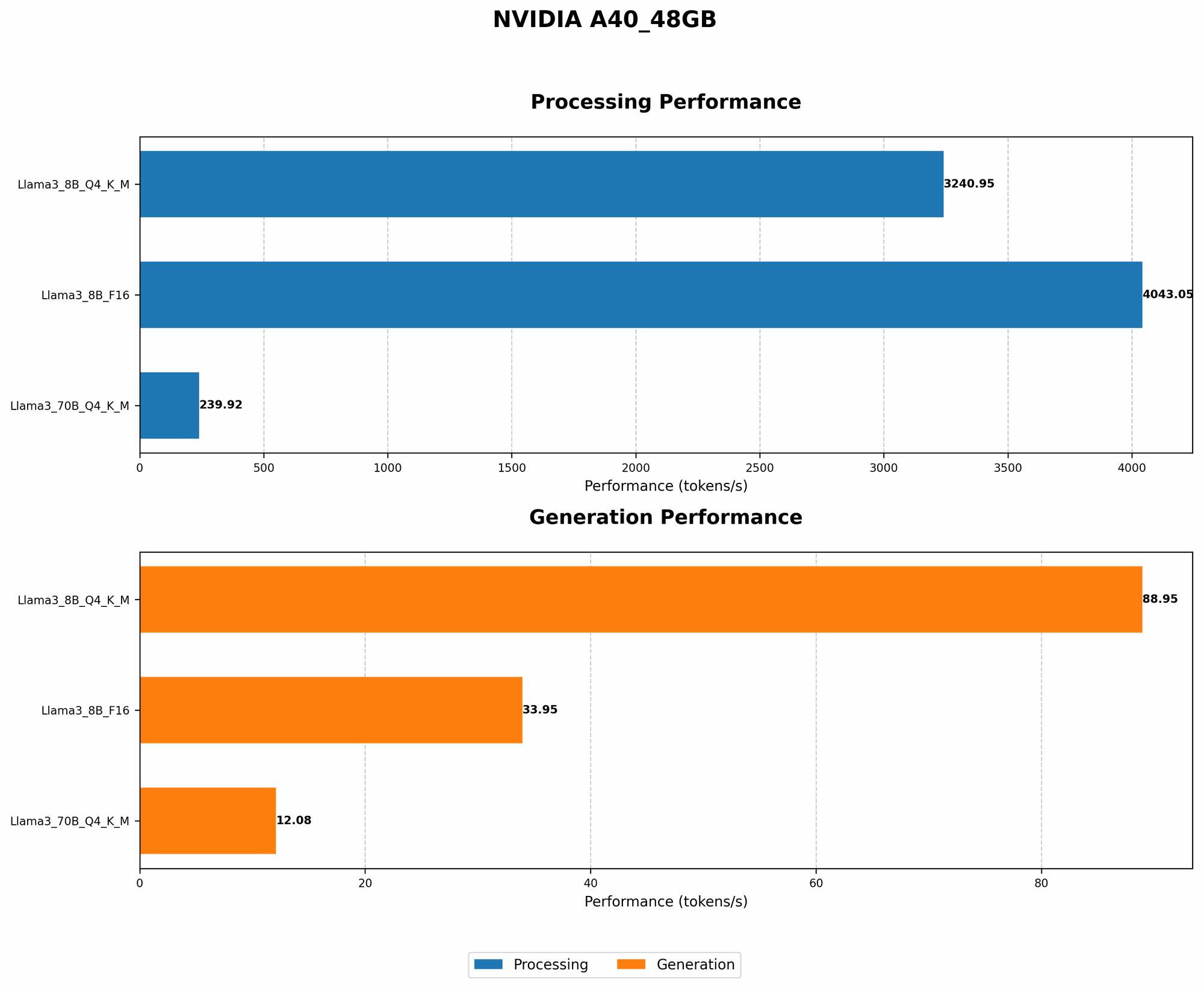
Let's start with the heart of the matter: how fast can Llama3 8B generate tokens on the A40_48GB? The table below shows the token generation speeds for different quantization levels and precision settings.
| Model | Quantization | Precision | Tokens/second |
|---|---|---|---|
| Llama3 8B | Q4KM | F16 | 88.95 |
| Llama3 8B | F16 | F16 | 33.95 |
Key Takeaways:
- Quantization matters: Using Q4KM quantization (4-bit quantization for weights, and 16-bit for activations) significantly improves token generation speed compared to F16 precision. This is because quantization reduces the memory footprint of the model, enabling faster processing.
- F16 precision: While F16 provides higher accuracy, it comes at the cost of slower token generation speeds. For scenarios where speed is paramount, Q4KM might be the better option.
Think of it this way: Quantization is like using a smaller suitcase for your trip: you pack less stuff, but it's easier to carry around. F16 precision is like packing everything you own, giving you more options but requiring a bigger, heavier suitcase.
Model and Device Comparison: Llama3 8B vs. Llama3 70B on A40_48GB
Let's compare the performance of Llama3 8B with its larger sibling, Llama3 70B, on the same A40_48GB.
| Model | Quantization | Precision | Tokens/second |
|---|---|---|---|
| Llama3 8B | Q4KM | F16 | 88.95 |
| Llama3 70B | Q4KM | F16 | 12.08 |
Key Takeaways:
- Size matters: As expected, Llama3 70B is slower than Llama3 8B in token generation due to its larger size. This means that Llama3 8B is a good choice if you need speed and responsiveness.
- Computational cost: The larger model requires more computational resources, slowing down the token generation process.
Analogy: Imagine a car race: a smaller car (Llama3 8B) can navigate corners and accelerate faster than a larger car (Llama3 70B) with the same engine. While the larger car has more potential, it's less agile in this scenario.
Practical Recommendations: Use Cases and Workarounds
Use Cases for Llama3 8B on A40_48GB
Based on the performance analysis, here are some ideal use cases for Llama3 8B on the A40_48GB:
- Real-time chatbots: The high token generation speed makes Llama3 8B a perfect choice for building conversational AI systems with fast response times.
- Interactive question-answering: Need quick answers to complex questions? Llama3 8B can process the information and deliver answers in real-time.
- Text summarization and generation: Generate concise summaries of lengthy documents or craft creative text content with Llama3 8B's impressive speed.
- Code completion and generation: Boost your coding productivity with Llama3 8B's ability to suggest code snippets and even generate entire code blocks.
Workarounds for Performance Bottlenecks
While the A40_48GB is a powerful GPU, some situations might require optimization strategies to achieve optimal performance:
- Memory constraints: If your application requires large amounts of memory, consider using a smaller model or reducing the batch size to reduce the memory footprint.
- CPU bottleneck: If your CPU is not keeping up with the GPU, consider upgrading your CPU or using a multi-threaded inference library to leverage multiple CPU cores.
FAQ: Answering Common Questions
Q: How does quantization work?
A: Quantization is a technique that reduces the precision of a model's weights and activations to decrease its memory footprint and accelerate inference. Imagine shrinking a high-resolution image to a lower resolution. While some details are lost, the image's core information remains, making it faster to process.
Q: What's the best way to choose the right LLM and device for my project?
A: Consider your specific needs. If speed is paramount, a smaller model like Llama3 8B might be ideal. For complex tasks requiring a vast knowledge base, a larger model might be necessary. Choose a device that can handle the computational demands of your chosen model.
Q: How do I optimize my LLM software for maximum performance?
A: Utilize libraries like llama.cpp, which is specifically designed for efficient LLM inference. Explore different quantization techniques and experiment with parameters like batch size to find the optimal settings for your application.
Q: Where can I find more information about LLMs and device optimization?
A: The Hugging Face website is a fantastic resource for LLMs, including pre-trained models, documentation, and community forums. Explore the NVIDIA Developer website for information on optimization techniques for GPUs.
Keywords:
Llama3 8B, NVIDIA A40_48GB, LLM, large language model, token generation speed, quantization, F16 precision, performance benchmarks, use cases, workarounds, chatbots, question-answering, text summarization, code completion, optimization, llama.cpp, Hugging Face, NVIDIA Developer