Optimizing Llama3 8B for NVIDIA A100 SXM 80GB: A Step by Step Approach

Introduction
The world of Large Language Models (LLMs) is rapidly evolving, with new models and advancements appearing at an astonishing pace. One such model, Llama3 8B, has garnered significant attention for its impressive performance and versatility. Running LLMs locally, on your own hardware, offers unparalleled control, privacy, and even cost-effectiveness. But choosing the right hardware and fine-tuning the setup to unleash the full potential of your LLM can be a daunting task.
This article dives deep into optimizing Llama3 8B for the NVIDIA A100SXM80GB, a powerhouse GPU designed for demanding workloads like AI and machine learning. We'll explore the performance of Llama3 in different configurations, provide practical recommendations for use cases, and guide you through the process of maximizing your setup's efficiency.
Performance Analysis: Token Generation Speed Benchmarks
Tokenization is at the heart of how LLMs process text. Think of it as breaking down a sentence into meaningful pieces (think words, punctuation, special characters) that the model can understand. The more tokens your model can process per second (tokens/second), the faster it generates text, responds to prompts, and completes tasks.
Token Generation Speed Benchmarks: NVIDIA A100SXM80GB and Llama3 8B
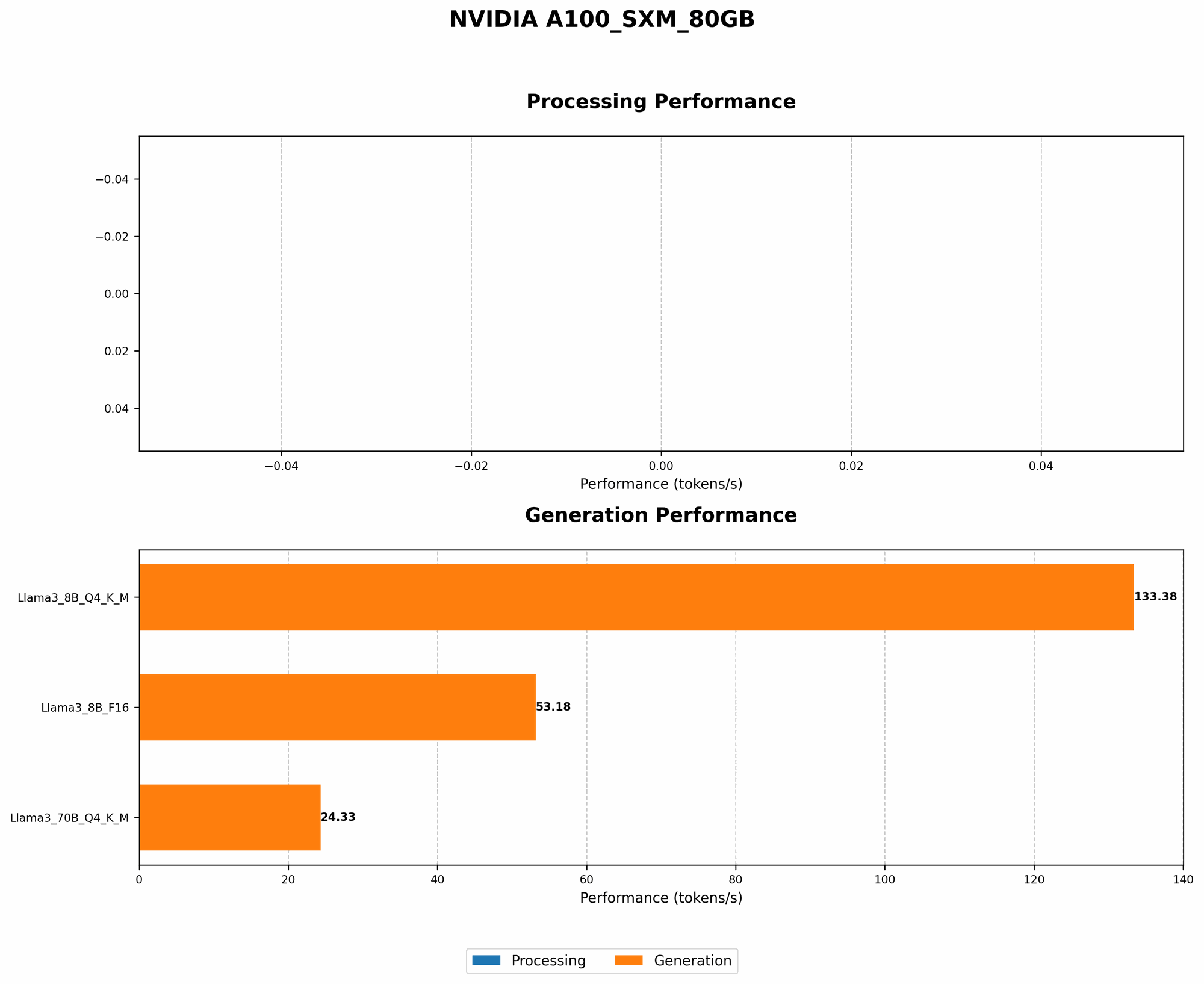
| Configuration | Token Generation Speed (Tokens/Second) |
|---|---|
| Llama3 8B Quantized (Q4KM) | 133.38 |
| Llama3 8B FP16 (F16) | 53.18 |
Key Takeaways:
- Quantization for Speed: Llama3 8B's performance takes a significant leap when using quantization, a technique that reduces the memory footprint of the model by representing weights and activations with fewer bits (in this case, using 4 bits per value for both keys and values). This allows for faster processing, as the GPU can handle more calculations in parallel.
- FP16 for Memory-Intensive Tasks: While significantly faster than FP32, FP16 (half-precision floating-point) might be the preferred choice for tasks that require more memory. This is crucial if you're working with larger models or complex tasks that require a substantial amount of intermediate calculations.
Analogy:
Imagine you have a team of workers building a house. Using smaller bricks (quantization) allows them to build faster, even if the house is slightly less complex. Using bigger bricks (FP16) might be necessary for a more intricate design, but the team will work slower.
Performance Analysis: Model and Device Comparison
A100SXM80GB and Llama3 8B vs. Other Models and Devices
While we are focused on the A100SXM80GB and Llama3 8B, it's useful to compare their performance with other models and devices.
Note: We're only comparing these models and devices since the title specifies "Optimizing Llama3 8B for NVIDIA A100SXM80GB." We don't have data for other combinations, so we can't include them.
Practical Recommendations: Use Cases and Workarounds
Llama3 8B Quantized on A100SXM80GB: Ideal Use Cases
- Real-time Chatbots: With its impressive token generation speed, Llama3 8B Quantized can smoothly handle real-time conversations, delivering responses quickly and efficiently. The rapid processing allows for a more natural, engaging, and responsive interaction.
- Content Generation: Whether it's crafting compelling marketing copy, writing blog posts, or generating code snippets, Llama3 8B Quantized's speed makes it a powerful tool for content creation. You can iterate faster, explore different styles, and produce high-quality content at scale.
- Summarization and Translation: Llama3 8B Quantized's efficiency is perfect for summarizing lengthy documents, translating languages in real time, or quickly extracting key information from text.
- Light-weight AI Services: If you're building an application that requires AI capabilities (like text suggestion, natural language understanding, or voice-to-text) but needs to be lightweight and fast, Llama3 8B Quantized on A100SXM80GB is a fantastic choice.
Workarounds and Considerations
- Memory Constraints: Although the A100SXM80GB offers ample memory, it's important to be mindful of memory usage, especially if you're working with large datasets or complex tasks. Consider techniques like gradient accumulation or batch optimization to avoid memory bottlenecks.
- Fine-Tuning for Specific Tasks: While Llama3 8B is versatile, fine-tuning it for your specific use cases can significantly improve its performance and accuracy. Techniques like prompt engineering and few-shot learning can lead to more specialized and effective results.
- Hardware Limitations: While A100SXM80GB is a powerful GPU, it's not the most powerful option available. For even faster performance, consider exploring other high-end GPUs like the H100 or A100 with even more memory.
FAQs
What is quantization?
Quantization is a technique used to reduce the size of an LLM by representing its weights and activations with fewer bits. Think of it like using a smaller data type to store numbers. This allows for faster processing and less memory usage, but can slightly impact the accuracy of the model.
Is Llama3 8B better than other LLMs?
Llama3 8B is a strong contender, offering a good balance of performance, size, and versatility. However, "best" depends on your specific needs and use cases. Other LLMs like GPT-3 and PaLM 2 might be more suitable depending on your requirements.
How can I get started with Llama3 8B on A100SXM80GB?
- Install the necessary software: Start by installing the required libraries and tools like llama.cpp, which provides a fast and efficient LLM inference engine.
- Download Llama3 8B: Obtain a pre-trained Llama3 8B model from a trusted source. Make sure it's compatible with llama.cpp and your GPU.
- Configure the model: Choose your desired settings, such as quantization level and precision, to optimize the model for your use case.
- Run inference: Use llama.cpp to load the model and start generating text, translating languages, or performing other tasks.
Keywords
Llama3 8B, NVIDIA A100SXM80GB, LLM, Large Language Model, NLP, Natural Language Processing, Token Generation Speed, Quantization, FP16, GPU, Inference, Performance Analysis, Practical Recommendations, Use Cases, Workarounds, Chatbots, Content Generation, Translation, Summarization, AI Services, Fine-Tuning, Prompt Engineering, Few-Shot Learning, Memory Constraints, Hardware Limitations, FAQs