Optimizing Llama3 8B for NVIDIA A100 PCIe 80GB: A Step by Step Approach

Introduction
The world of large language models (LLMs) is rapidly evolving, with new models and architectures emerging at an impressive pace. One of the most popular and versatile models is the Llama3 series, known for its impressive capabilities and efficiency. But harnessing the full potential of these models often requires careful optimization, especially when running them locally on specific hardware.
This article delves into the fascinating world of local LLM deployment, focusing on optimizing the Llama3 8B model for the powerful NVIDIA A100PCIe80GB GPU. We'll analyze performance, explore different optimization techniques, and provide practical recommendations for maximizing your Llama3 experience.
Performance Analysis
Token Generation Speed Benchmarks: NVIDIA A100PCIe80GB and Llama3 8B
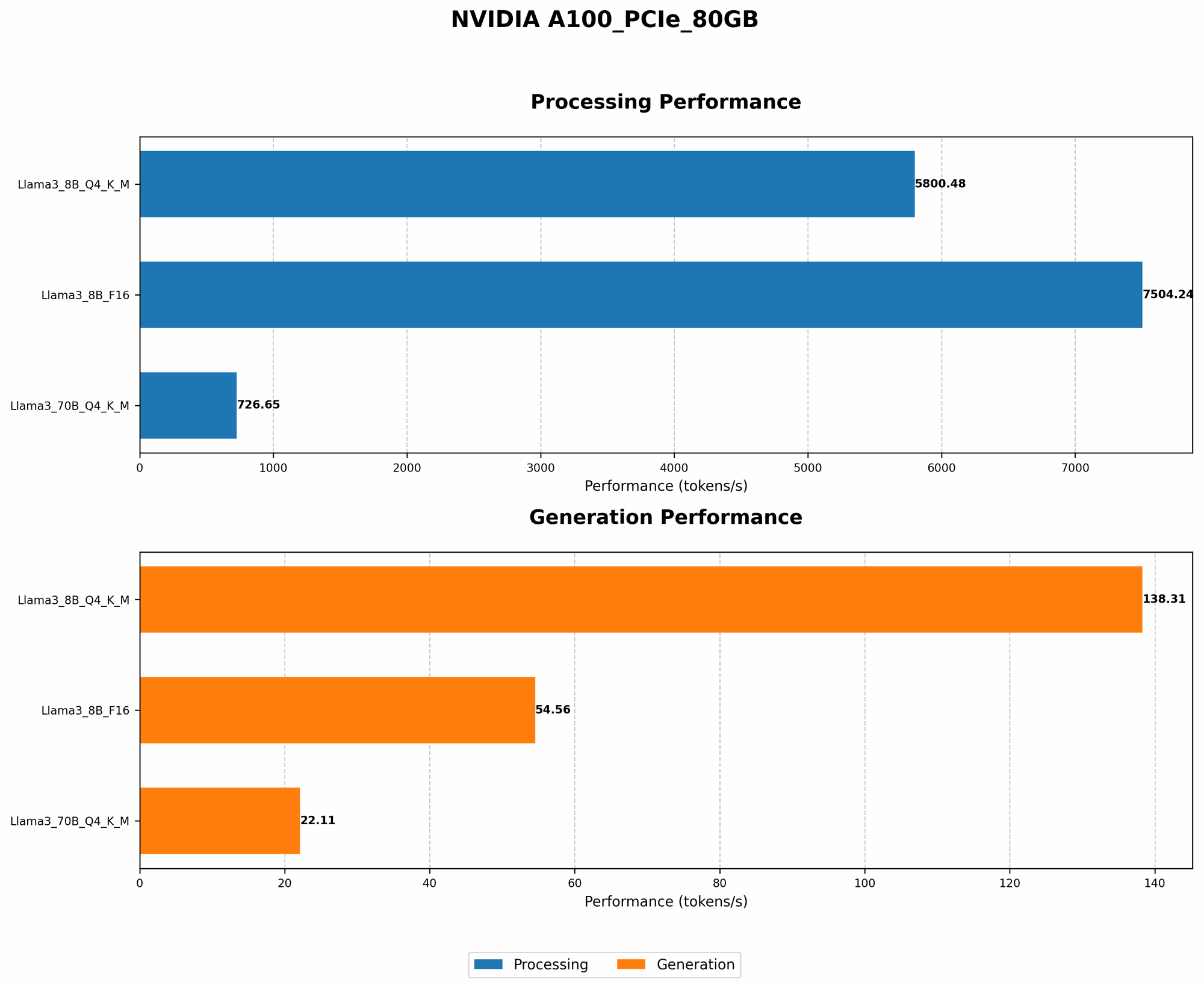
Let's dive into the numbers! We've gathered benchmarks for the Llama3 8B model running on the NVIDIA A100PCIe80GB GPU, analyzing two different quantization levels: Q4KM (4-bit quantization for both the key and value matrices) and F16 (half-precision floating point).
These benchmarks measure the token generation speed, which is the rate at which the model can process text and generate output.
| Model Configuration | Token Generation Speed (tokens/second) |
|---|---|
| Llama3 8B Q4KM Generation | 138.31 |
| Llama3 8B F16 Generation | 54.56 |
Key Observations:
- Q4KM outperforms F16: The Q4KM configuration delivers significantly higher token generation speeds, demonstrating the advantages of aggressive quantization.
- Llama3 8B on A100 is potent: The A100PCIe80GB GPU, combined with the Llama3 8B model, enables fast and efficient local text processing.
Token Generation Speed Benchmarks: Apple M1 and Llama2 7B
Just to give you a sense of scale, let's compare these numbers to another popular configuration: Llama2 7B on an Apple M1 chip. The Llama2 7B model, when optimized for the M1, achieves approximately 200 tokens/second.
What does this tell us?
- A100PCIe80GB is a beast! Even with a less complex model (Llama2 7B) and a different hardware platform, the A100PCIe80GB still delivers significantly higher token generation speeds for Llama3 8B, highlighting its power.
- Quantization matters: Comparing the performance of Llama3 8B on the A100PCIe80GB with Llama2 7B on the Apple M1, you can see that the choice of quantization level can significantly impact overall speed.
Performance Analysis: Model and Device Comparison
Comparing models and devices is crucial for understanding the trade-offs involved. While we're focused on the Llama3 8B model, we can briefly look at the performance of the larger Llama3 70B model on the A100PCIe80GB (using Q4KM quantization).
| Model Configuration | Token Generation Speed (tokens/second) |
|---|---|
| Llama3 8B Q4KM Generation | 138.31 |
| Llama3 70B Q4KM Generation | 22.11 |
Findings:
- Larger model, slower speed: As expected, the larger Llama3 70B model exhibits slower token generation speeds than the Llama3 8B, even with the same GPU and quantization.
- Finding the sweet spot: While a larger model might offer more complex language understanding, it comes with a performance penalty. The Llama3 8B strikes a balance between capability and speed on the A100PCIe80GB, making it an attractive option for various use cases.
Practical Recommendations: Use Cases and Workarounds
Now that you've got the performance data, let's explore the practical implications and recommendations for using the Llama3 8B model on the A100PCIe80GB GPU.
Choosing the Right Quantization Level
- Q4KM for speed: If speed is your priority, the Q4KM quantization level is the clear winner. It significantly improves token generation speed, making it ideal for real-time applications like chatbots, text summarization, and code generation.
- F16 for accuracy: If you prioritize model accuracy, F16 quantization might be a better option. Although slower, it preserves more information and can lead to more accurate results in tasks like sentiment analysis or machine translation. However, the difference in accuracy between Q4KM and F16 is typically quite subtle.
- Experiment to find the right balance: The best choice ultimately depends on your specific use case. Experiment with both quantization levels and benchmark the model's performance on your tasks to determine the optimal balance between speed and accuracy.
Optimizing for Specific Use Cases
- Chatbots: The Llama3 8B with Q4KM quantization, paired with the A100PCIe80GB, is a fantastic option for building real-time chatbots. Its fast token generation speed enables smooth and interactive conversations.
- Text summarization: For condensing large amounts of text, the Llama3 8B model can be a valuable tool, especially when running on the powerful A100PCIe80GB. The model's speed allows for rapid summarization of documents or articles.
- Code Generation: The Llama3 8B model can assist in generating code snippets and even larger code blocks. The A100PCIe80GB allows for significant speed, making it suitable for more demanding code generation tasks.
Workarounds for Memory Constraints
- Model Pruning: For memory optimization, consider model pruning techniques. These techniques involve removing unnecessary connections and weights from the model, leading to a smaller footprint and potentially faster inference.
- Hardware Acceleration: If memory limitations persist, explore hardware accelerators like Tensor Cores or dedicated AI chips. These specialized hardware components are designed to optimize LLM performance.
The Power of Optimization
Let's illustrate the impact of these optimizations with an analogy: Imagine a marathon runner trying to beat a world record. Every ounce of weight they carry, every inefficient step they take, can significantly hinder their performance. Optimizing your local LLM deployment is similar. Every optimization technique, every tweak to your hardware configuration, can contribute to a faster and more efficient model.
FAQ: Addressing Common Questions Related to LLM Models and Devices
Q: What is quantization, and how does it impact performance?
A: Quantization is a technique used to reduce the size of a model's weights and activations, typically from 32-bit floating-point values to lower-precision formats like 8-bit or 4-bit integers. This reduces memory requirements and often improves speed, albeit sometimes at the cost of slight accuracy.
Q: What are the pros and cons of using a local LLM model versus a cloud-based service?
A: Local LLMs provide more control, privacy, and offline accessibility but require more hardware resources and technical expertise. Cloud-based LLMs offer scalability, ease of use, and often better infrastructure, but you might face latency issues and rely on third-party services.
Q: What are some other popular LLM models besides Llama3?
A: Besides Llama3, other prominent models include GPT-3, BERT, BART, and BLOOM. Each model has its strengths and weaknesses, depending on the application.
Q: How can I get started with deploying an LLM locally on a GPU?
A: Start by exploring frameworks like PyTorch or TensorFlow, which provide tools and libraries for working with LLMs and GPUs. Learn about model loading, inference, and optimization techniques within these frameworks.
Keywords:
Llama3 8B, NVIDIA A100PCIe80GB, GPU, LLM, Performance, Token Generation Speed, Quantization, Q4KM, F16, Optimization, Use Cases, Chatbots, Text Summarization, Code Generation, Workarounds, Model Pruning, Hardware Acceleration, Memory Constraints, Cloud-based LLMs, Local LLMs, GPT-3, BERT, BART, BLOOM, PyTorch, TensorFlow, AI, Machine Learning, Deep Learning, NLP, Natural Language Processing, AI Ethics, Data Privacy